Creating Switchable Images via Kadence Tabs – Free Snippet Included
Hello Block Bditor Lovers, this is the first post I am writing on the Kadence Blocks customization Trick,…

Kadence Blocks tutorials that go past the block settings. Every guide here solves a real client problem with the free Kadence Blocks plugin, a little CSS and, where needed, a short snippet you can copy. No extra plugins unless I say so.
Layouts: responsive table with Row Layout, 3 column slider with Swiper, timeline block with CSS only, before and after image comparison.
Forms and popups: block free email domains in Kadence Forms, open a popup after a form is submitted.
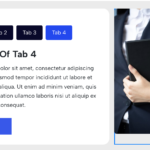
Interactive content: switch images with Kadence Tabs, quick support widget with a Blocksy popup.
Hello Block Bditor Lovers, this is the first post I am writing on the Kadence Blocks customization Trick,…
We use cookies to help you navigate efficiently and perform certain functions. You will find detailed information about all cookies under each consent category below.
The cookies that are categorised as "Necessary" are stored on your browser as they are essential for enabling the basic functionalities of the site.
We also use third-party cookies that help us analyse how you use this website, store your preferences, and provide the content and marketing materials that are relevant to you. These cookies will only be stored in your browser with your prior consent.
You can choose to enable or disable some or all of these cookies but disabling some of them may affect your browsing experience.
Necessary cookies are required to enable the basic features of this site, such as providing secure log-in or adjusting your consent preferences. They are not used for advertising or to track you across other sites. The consent cookie stores a random identifier that lets us keep a record of the choice you made.
Functional cookies help perform certain functionalities like sharing the content of the website on social media platforms, collecting feedback, and other third-party features.
Analytical cookies are used to understand how visitors interact with the website. These cookies help provide information on metrics such as the number of visitors, bounce rate, traffic source, etc.
Performance cookies are used to understand and analyse the key performance indexes of the website which helps in delivering a better user experience for the visitors.
Cookies that have not yet been categorized.
Marketing cookies are used to provide visitors with customised ads based on the pages you visited previously and to analyse the effectiveness of the ad campaigns.