Disclosure: I earn a commission if you buy Unblock through the Unblock links on this page, at no extra cost to you. The GenerateBlocks and GeneratePress links are plain links with nothing attached. Neither company saw this post before it went live.
GenerateBlocks is the better choice for most people building with blocks in November 2026, and Unblock is the better choice for developers who think in HTML and CSS and want an AI agent to do the building. GenerateBlocks shipped about a third of the code on the same page, scored higher on Lighthouse, has a free version with 200,000 installs, and leaves 65% of your text on screen if you ever switch it off. Unblock produced the cleanest markup, let an AI agent finish the build with the fewest tokens and the fewest check runs, and then shows a blank page the moment the plugin goes.
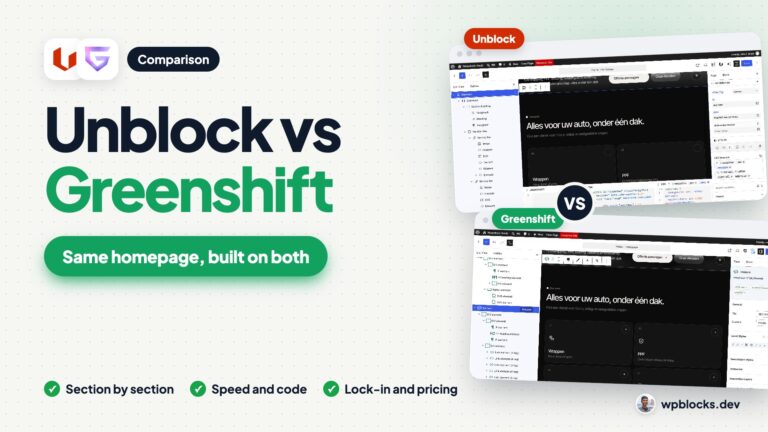
To get there I built the same real client homepage twice, pixel perfect, on identical local WordPress 7.1.4 installs running PHP 8.5: once with Unblock 1.0.0 on the Unblock Theme 1.0.0, and once with GenerateBlocks 2.5.1 and GenerateBlocks Pro 2.8.0 on GeneratePress 3.6.1 with GP Premium 2.5.6, using the v2 blocks, Global Styles, Design Tokens and GP Elements. Both versions match the hand coded original to within 0.1% of pixels at 1440, 768 and 390 pixels wide. Every screenshot below comes from those two builds, and every number comes from my build logs and measurements, all taken in November 2026.
Quick verdict
- Pick Unblock if you write HTML and CSS comfortably, want every block to be one real HTML element with a class you named, want to drive the build with an AI agent over MCP, and can live with a plugin your pages cannot exist without. For WooCommerce it also built the better product page: one template, no layout shift.
- Pick GenerateBlocks if you want the leanest page a visual block builder produced in my test, a proper free version, native header navigation and forms, a mature product from 2020 with 98 out of 100 on WordPress.org, and a site that degrades gracefully if you ever leave. On WooCommerce it keeps Woo’s own product template and the hooks extensions rely on.
- Either is fine if you build brochure sites from a design system of tokens and reusable classes. Both work that way, both keep custom CSS and JavaScript small, and both reached a pixel perfect result on a demanding homepage.
GenerateBlocks vs Unblock at a Glance
| Unblock | GenerateBlocks | |
|---|---|---|
| Owner | Themeone (Loïc Blascos, maker of WP Grid Builder) | EDGE22 Studios (Tom Usborne) |
| Free version | No, and no free trial (live demo only) | Yes, GenerateBlocks on WordPress.org |
| WordPress.org rating and installs | Not on WordPress.org | 98 out of 100 (122 ratings), 200,000+ installs |
| Current version | 1.0.0, released 10 November 2026 | GenerateBlocks 2.5.1 (10 November 2026), Pro 2.8.0 |
| On the market since | Alpha January 2026, 1.0 in November 2026 | May 2020 |
| Cheapest paid plan | $69 a year, 1 site | $99 a year, 1 site (GeneratePress One) |
| Lifetime option | $499 once, 1,000 sites | $596 once, 100 sites |
| Sites on the top yearly plan | 100 ($199) | 100 ($199) |
| Theme used | Unblock Theme (blank block theme) | GeneratePress + GP Premium (classic theme) |
| Editor | Block editor plus docked HTML, CSS and JS editors | Block editor with a per block Styles builder |
| Styling model | Global CSS selectors and variables, edited visually or as code | Global Styles, Design Tokens and per block local styles |
| Header and footer | Block theme template parts in the Site Editor | GP Premium Block Elements |
| Quote form | Native form element, own validation script | GenerateBlocks Pro Forms, validation built in |
| Blocks for this homepage | 364 | 291 |
| Code shipped (HTML, CSS, JS, fonts) | 390 KB (27 KB without fonts) | 120 KB |
| JavaScript transferred | 8.2 KB | 12.9 KB |
| DOM nodes | 477 | 520 |
| Lighthouse mobile / desktop | 70 / 96 | 77 / 98 |
| Text left with the builder off | 0%, blank page | 65%, unstyled |
| WooCommerce product page code | 467 KB (363 KB fonts), 59 KB JS | 249 KB, 102 KB JS |
| WooCommerce mobile Lighthouse / CLS | 76 / 0 | 67 / 0.47 |
| Best for | Developers and AI agent builds | Most block builders, freelancers and agencies |
How Each One Thinks
Unblock has one idea and follows it all the way: one block is one HTML element. Every block on the page is an unblock/element (plus a text block), and you choose its tag, its id, its classes and any attribute you like in an Attributes panel. A section is a section, a tile is an a, the stats are a real dl with dt and dd. Styling lives in global CSS selectors and variables that Unblock stores and serves for you. You edit them with visual Layout, Sizing, Spacing, Borders, Typography, Background and Effects panels, or in a CSS editor docked under the canvas, and the two stay in sync because they write to the same rule. Each block can also carry its own JavaScript, and Twig expressions work inside text.
GenerateBlocks 2 has moved close to the same idea, with more guard rails. Its v2 blocks are few and generic: Element (a container you can render as any tag), Text, Media and Shape, plus Pro blocks for the site header, navigation, menus and forms. You style each block in a Styles builder with every CSS property as a control and a CSS Mode that shows the code. Reusable styling goes into Global Styles, which are real classes, and Design Tokens, which are CSS variables. The theme side, header, footer, layout and hooks, comes from GeneratePress and its Elements module.
So the gap is smaller than it looks. Both builds ended up as a design system of tokens and reusable classes on clean semantic HTML. Unblock gets there by treating the block editor as an HTML and CSS editor. GenerateBlocks gets there by giving you visual controls for everything and generating the CSS.
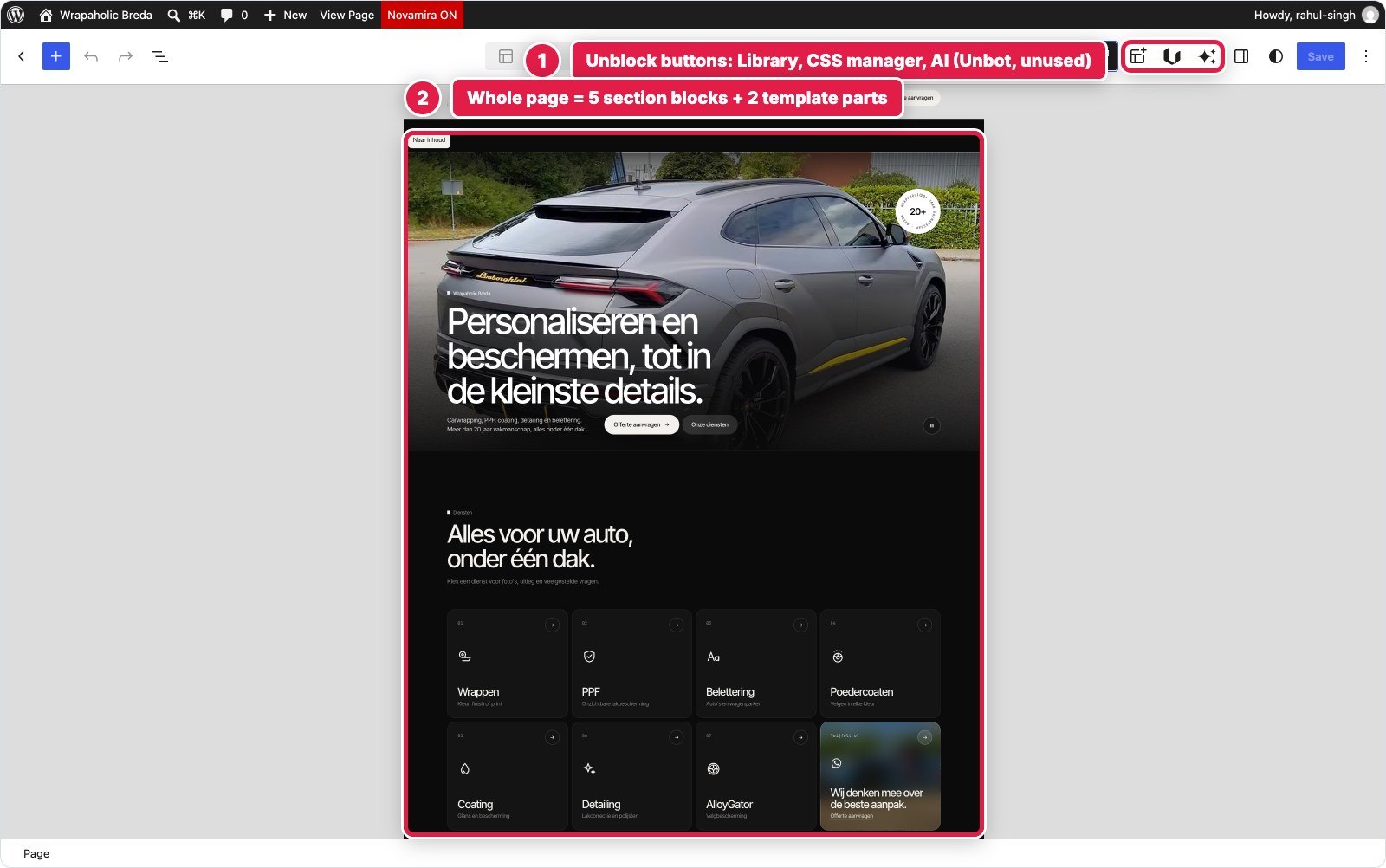

One thing you notice straight away in the List View. Unblock shows the names you gave each block (Hero, Service tile, Offerte form) and otherwise the tag. GenerateBlocks labels nearly every block Container or Text, so a 193 block page reads as a wall of nested Containers unless you rename them. On a page this size that matters more than any feature list.
| Unblock | GenerateBlocks | |
|---|---|---|
| Blocks on the page body | 243 | 193 |
| Blocks in header, footer and form | 121 | 98 (18 header, 54 footer, 26 form) |
| Total blocks for the homepage | 364 | 291 |
| Block types used | 2 (element, text) | 11 (element, text, media, shape, core video, 6 Pro blocks) |
Header and Full Screen Mobile Menu
The header needed a logo, a pill shaped desktop menu, WhatsApp and quote buttons, a background that turns solid after 12 pixels of scrolling and hides when you scroll down, and below 1080 pixels a full screen menu with a numbered service list.
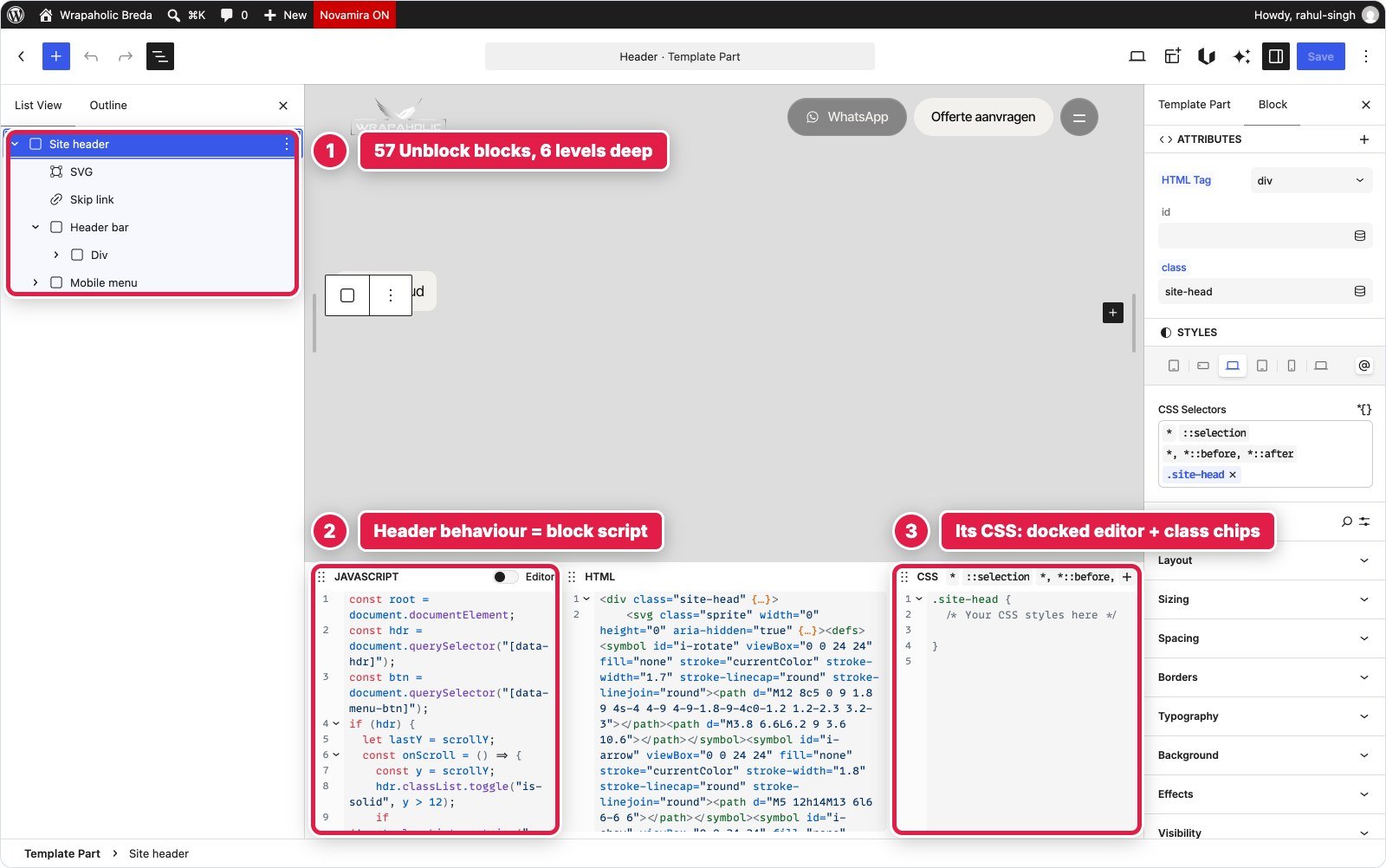
In Unblock the header is the theme’s header template part, edited in the Site Editor. It is one Site header element with 57 blocks inside: an inline SVG sprite of 16 icons, the skip link, the header bar and a Mobile menu element that is the full screen overlay. There is no header, menu or off canvas component. Every node is a plain element, styled by 23 selectors in a Header collection (5,205 bytes of CSS), and one 1,355 byte block script handles the scroll behaviour, the menu toggle, Escape to close, the scroll lock and aria-current. Two small annoyances: the template part wraps everything in its own header tag that you cannot add a class to, and WordPress injects its own hidden skip link next to the design’s Dutch one.
In GenerateBlocks the header is a GP Premium Block Element of type Site Header, shown on the entire site. Inside sits the Pro Site Header block, a media logo, the Pro Navigation block with two Classic Menu blocks wired to real WordPress menus, and a Menu Toggle with custom icons. 18 blocks in total. The Navigation block does the hard part natively: a 1080 pixel breakpoint, a partial overlay mobile menu, open and close, Escape, aria-expanded and a focus trap. GenerateBlocks’ helper classes swap the desktop pills for the full screen list when the menu opens. What it cannot do is sticky or hide on scroll behaviour, or swap the toggle’s label, so that took 717 bytes of JavaScript. I also had to switch GeneratePress’s own navigation off so its menu script would not load, and blank its button colours because the theme’s rules beat the GenerateBlocks classes.


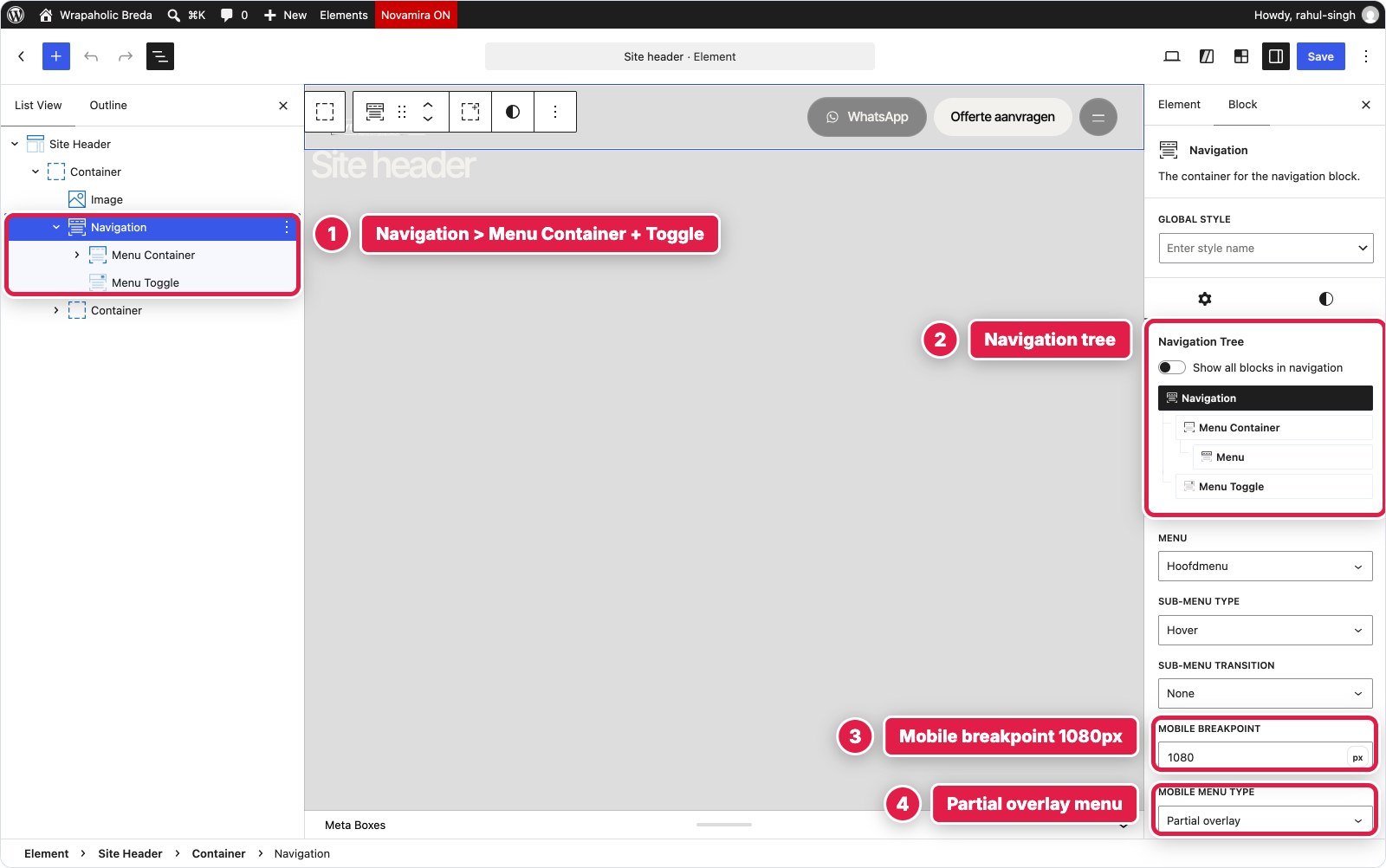
There is one editor gap on the GenerateBlocks side: the open mobile menu cannot be previewed in the block editor. Selecting the menu container in mobile preview still shows the closed bar, so you check it on the front end.
| Header | Unblock | GenerateBlocks |
|---|---|---|
| Blocks | 57 | 18 |
| CSS | 5,205 B in the Header collection | 5,267 B local + 750 B Global Styles |
| JavaScript | 1,355 B (everything) | 717 B (scroll and label only) |
| Accessible menu built in | No, hand built | Yes, Esc, aria-expanded, focus trap |
Winner for this section: GenerateBlocks. A third of the blocks, half the JavaScript, and the accessible mobile menu comes ready made.
Video Hero with the Rotating Badge
The hero is a full screen looping video with a gradient overlay, a circular badge with text running around it, a large headline, two buttons and a pause button for the video.
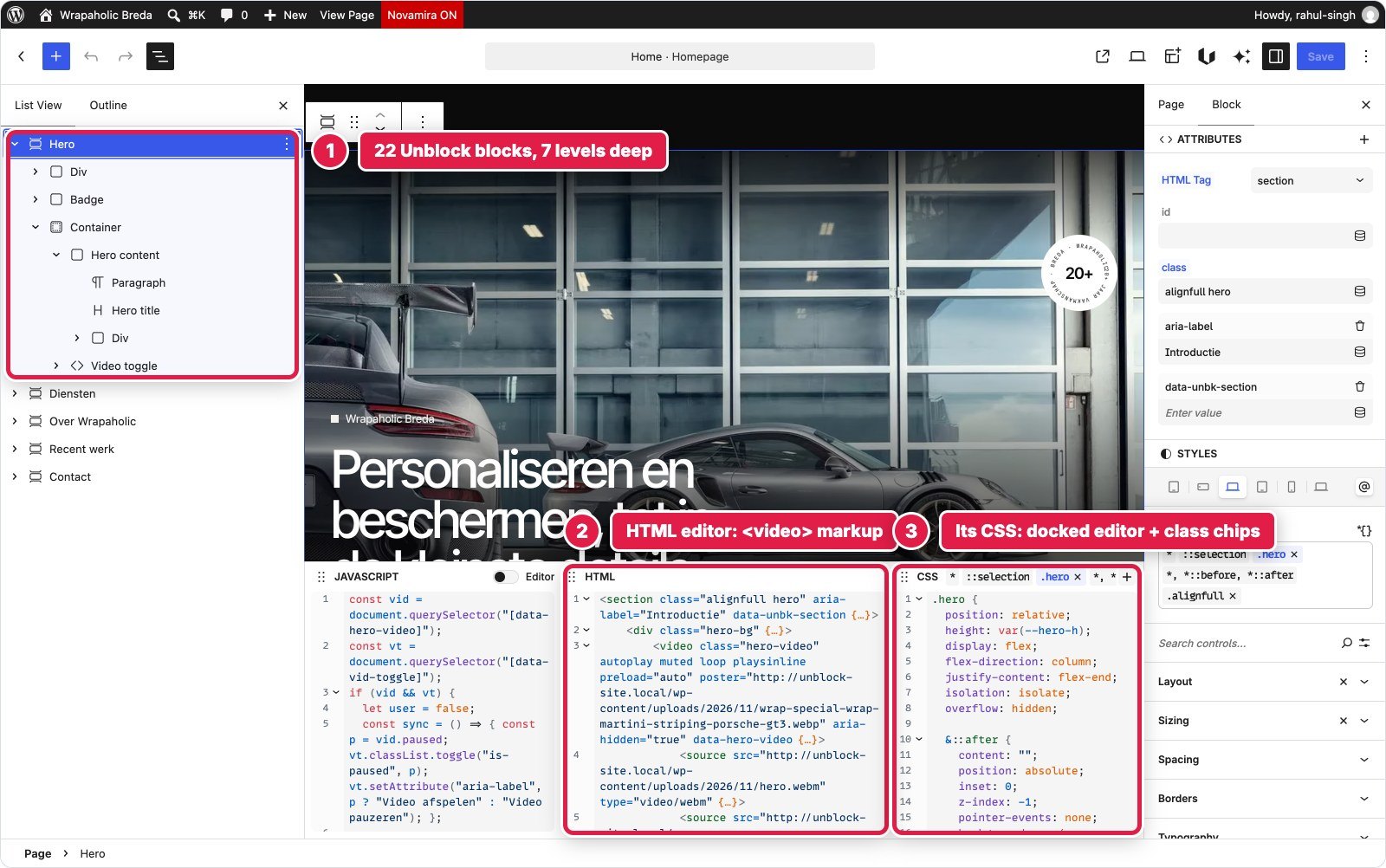
In Unblock the hero is one section with 22 blocks, seven levels deep. The video is an ordinary video element with two source children, webm and mp4, and autoplay muted loop playsinline typed in as attributes. The badge is an inline SVG with a text path. Layout and overlay are the .hero rule plus 7 more selectors (2,136 bytes), and a 756 byte script handles pause and play, reduced motion and pausing the video when it scrolls out of view.
In GenerateBlocks the hero is a GB Element section with 16 blocks. The video is the core Video block, which WordPress presents as its GIF variation once autoplay, muted and loop are on, and hides the playback toggles. It accepts one source only, so the build uses just the webm file, and it has no setting for aria-hidden, so the script sets that. The badge is a GB Shape with circular text, and the overlay gradients are &::after rules in the local styles. The Styles builder cannot write @keyframes, so the badge rotation lives in 45 bytes of Customizer CSS. The video script is 695 bytes.


The editor also behaves differently here. GeneratePress paints the dark page background on the body, and the GenerateBlocks editor canvas does not apply it, so light text over transparent parts of the hero looks washed out while you edit. Unblock’s canvas looks like the front end.
Winner for this section: Unblock. Two video sources and every attribute you need, without fighting a core block that was built for something else.
Service Tiles
Eight link tiles in a grid, each with a photo, a number, an icon, a title, a subtitle and an arrow, plus a hover zoom. The last tile is an image card with a call to action.
In Unblock the Diensten section is 71 blocks. Each tile is an a element with an image, a number span, an SVG icon, a b title, a small subtitle and the arrow. The grid, hover zoom and overlays are 13 selectors in a Services collection, 3,744 bytes, all reading design tokens. No JavaScript. WordPress curled the apostrophe in “foto’s”, and the only fix inside Unblock was a Twig expression that prints a straight one.
In GenerateBlocks the section is 63 blocks: a GB Element grid with eight GB Element tiles rendered as links, each holding a Media image, a Text number, a Shape icon, title, subtitle and an icon text block. The styling sits almost entirely in Global Styles: tile, tile-nr, tile-ico, tile-t, tile-s, tile-go and tile-cta add up to 4,325 bytes, and the whole section has only 319 bytes of local CSS. No JavaScript.


This is the section where the two feel most alike. In both you style the tile class once and the other seven follow. The difference is in how you get to the rule: in Unblock you click the class chip and the rule opens in the CSS dock, in GenerateBlocks you click the Global Style chip and edit it with the same visual controls you use for a single block.
Winner for this section: a draw. Same result, same approach, no JavaScript in either. GenerateBlocks needed 8 fewer blocks, Unblock gives you the cleaner List View.
About, Stats and Pillars
A two column block with an eyebrow, heading, intro, three stats, a photo with a caption, and a row of four pillars below.
In Unblock it is 33 blocks: a stats dl with three dt and dd pairs, a figure with an image and figcaption, and a ul of four pillars. 12 selectors in the About collection, 1,966 bytes. The original design restyled the eyebrow with a descendant selector, and because Unblock prints each selector’s media variants right after the selector itself, that trick had to become an explicit modifier class.
In GenerateBlocks it is 39 blocks with the same semantics: GB Elements set to dl, dt and dd, a figure element with a Media image and a Text caption, and a ul with four li elements. The grid layouts are local styles, 2,342 bytes, plus 384 bytes of Global Styles.

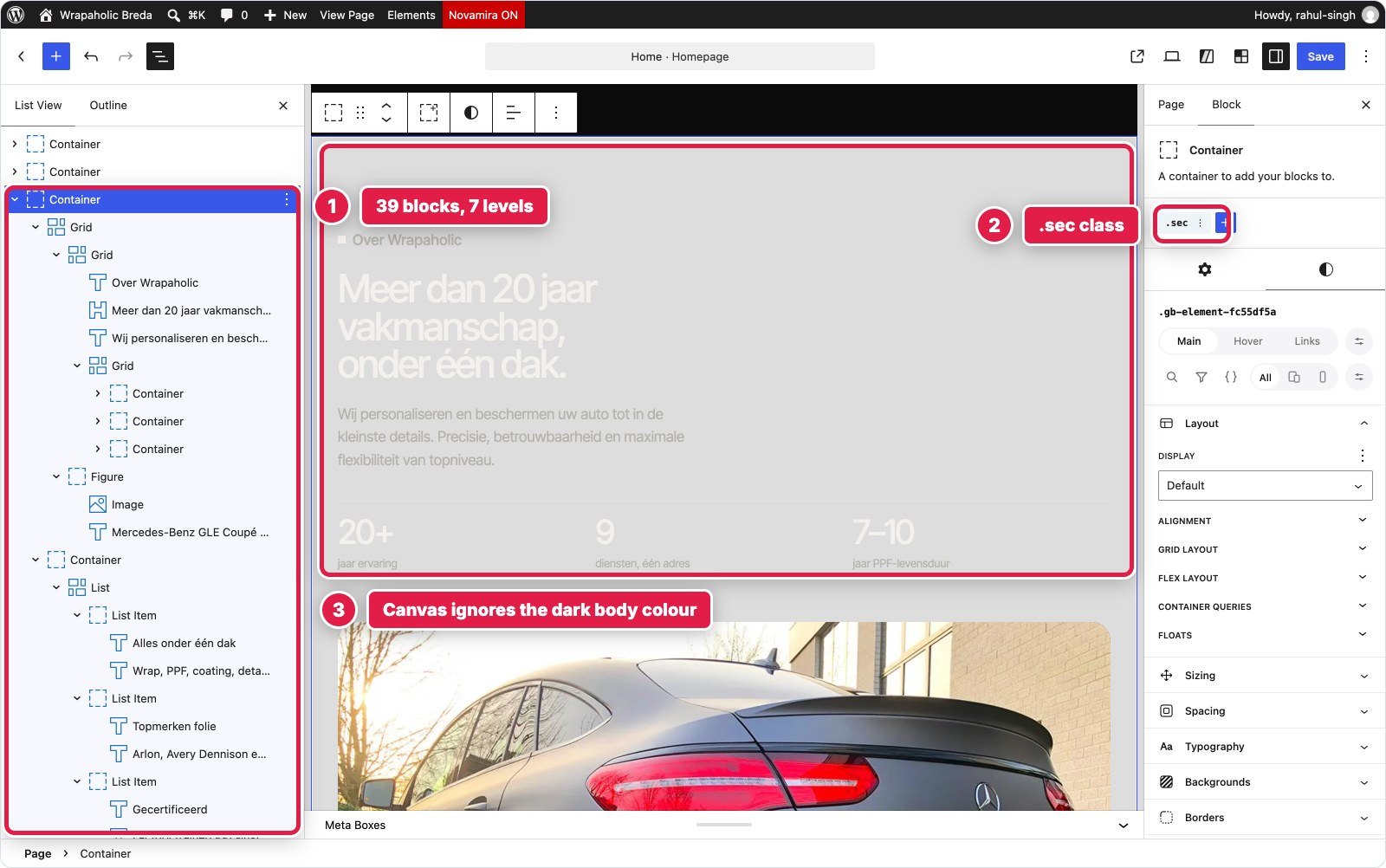
Look at the right screenshot. This section has a transparent background, and because the GenerateBlocks editor does not paint GeneratePress’s dark body colour, you edit light grey text on a light grey canvas. It is fixable with an editor stylesheet, but out of the box it is the worst editing experience in either build.
Winner for this section: Unblock. Same semantic HTML in both, but only Unblock lets you see what you are editing.
Draggable Project Strip
A horizontal strip of seven project cards that snaps card by card, with round previous and next buttons and mouse drag on desktop.
In Unblock the Recent werk section is 41 blocks. The strip is a flex row with overflow-x and scroll snap in the .strip rule, 1,633 bytes of CSS in total, and a 1,048 byte script moves it by one card width and adds mouse drag. Unblock has no slider or carousel component.
In GenerateBlocks the section is 38 blocks. GenerateBlocks Pro does have a Carousel block, but it ships the Swiper library, about 131 KB, so the build uses a plain GB Element with overflow, scroll snap and a hidden scrollbar in its local styles, and 1,057 bytes of JavaScript for the buttons and drag. The cards are GB Elements rendered as links, styled by the card Global Styles.


| Project strip | Unblock | GenerateBlocks |
|---|---|---|
| Blocks | 41 | 38 |
| CSS | 1,633 B | 870 B local + 2,093 B Global Styles |
| JavaScript | 1,048 B | 1,057 B |
| Native carousel available | No | Yes, but it loads Swiper (131 KB) |
Winner for this section: a draw. Both ended at the same place with the same kilobyte of script. GenerateBlocks gives you a carousel if you need one in a hurry, at a weight cost I would not pay here.
Contact and Quote Form
Contact details with an open or closed indicator based on Dutch time, today’s opening hours highlighted, and a quote form with service chips, name, contact, car model and a message, required field validation and a personal thank you after sending.
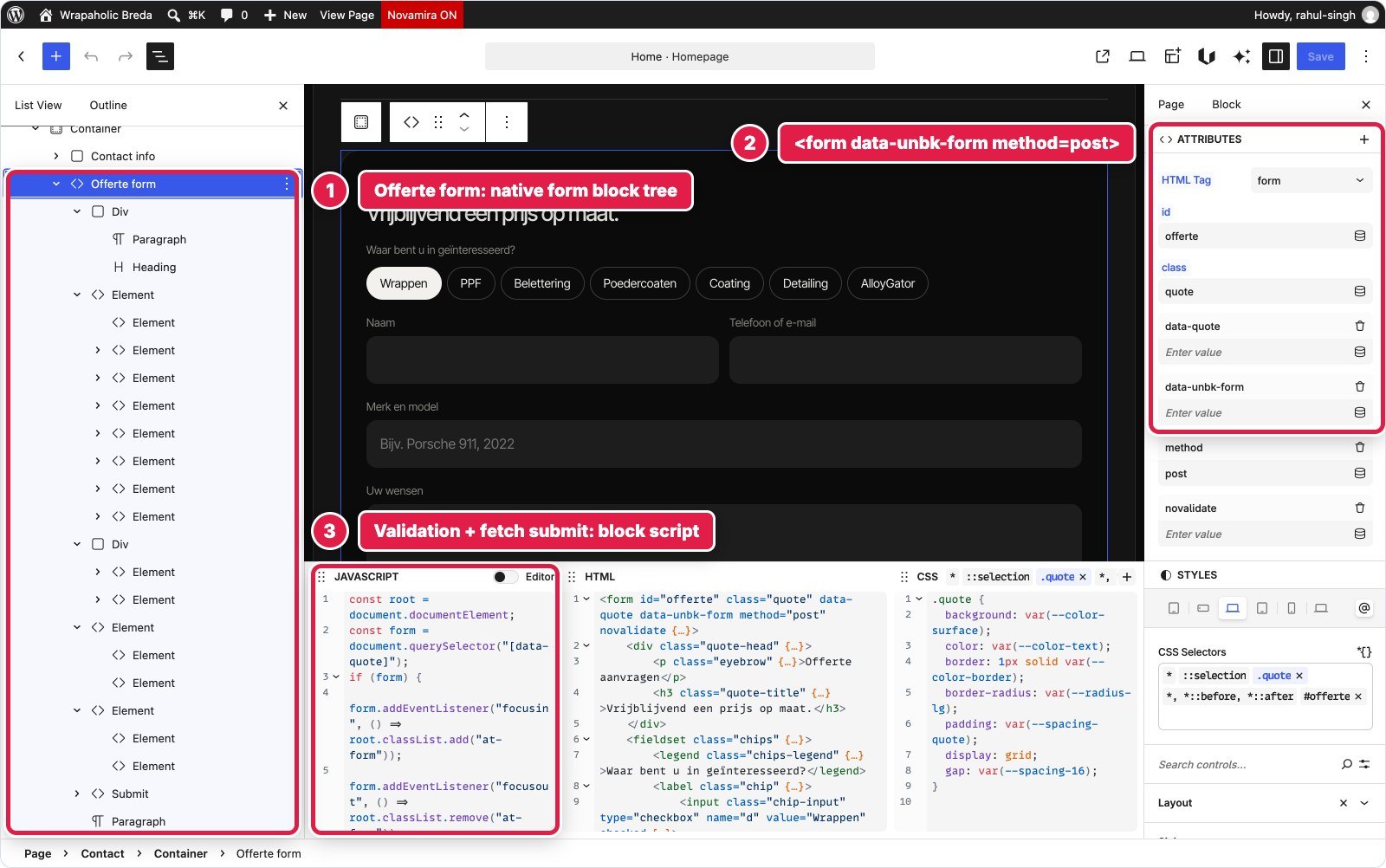
In Unblock this is the largest section, 76 blocks seven levels deep. The form is Unblock’s own form mechanism: a plain form element with a data-unbk-form attribute, and Unblock adds the action, a honeypot and a timestamp on the server and handles delivery. Every input, label, fieldset and legend is a real element you place yourself. Unblock’s native form only posts, so validation and the inline success message are a 1,819 byte script, and the open or closed status is another 774 bytes. CSS for the section is 6,607 bytes. This is also where you can see Unblock’s visual controls at work: the Borders, Typography and Background panels in the sidebar edit the same .contact rule that sits in the CSS dock.
In GenerateBlocks the section is 37 blocks plus a GenerateBlocks Pro Form, which lives in its own post type with its own editor screen and 26 blocks: a checkbox group for the chips, text fields, a textarea, a submit button and a success container. Validation, REST submission, an email action and stored submissions are all native. The gaps: Forms are switched off by default in the settings, required labels get an automatic asterisk the design did not want, the checkbox group has no default checked option, and the success message is static, so the first name is added from the gb-form:success event. The section’s JavaScript, status included, is 1,253 bytes.



| Contact and form | Unblock | GenerateBlocks |
|---|---|---|
| Blocks | 76 | 37 + 26 in the form |
| CSS | 6,607 B | 1,849 B + 1,942 B form + 340 B Global + 67 B Customizer |
| JavaScript | 2,593 B | 1,253 B |
| Client side validation | Script | Native |
| Stored submissions | Delivery handled by Unblock | Yes, plus an email action |
Winner for this section: GenerateBlocks. A real form builder with validation and stored entries beats writing your own validation script, even with the small workarounds.
Footer with the Giant Word
A four column footer with logo, services, links and workshop details, a giant outlined “Wrapaholic” across the full width, and a bottom bar with the current year.
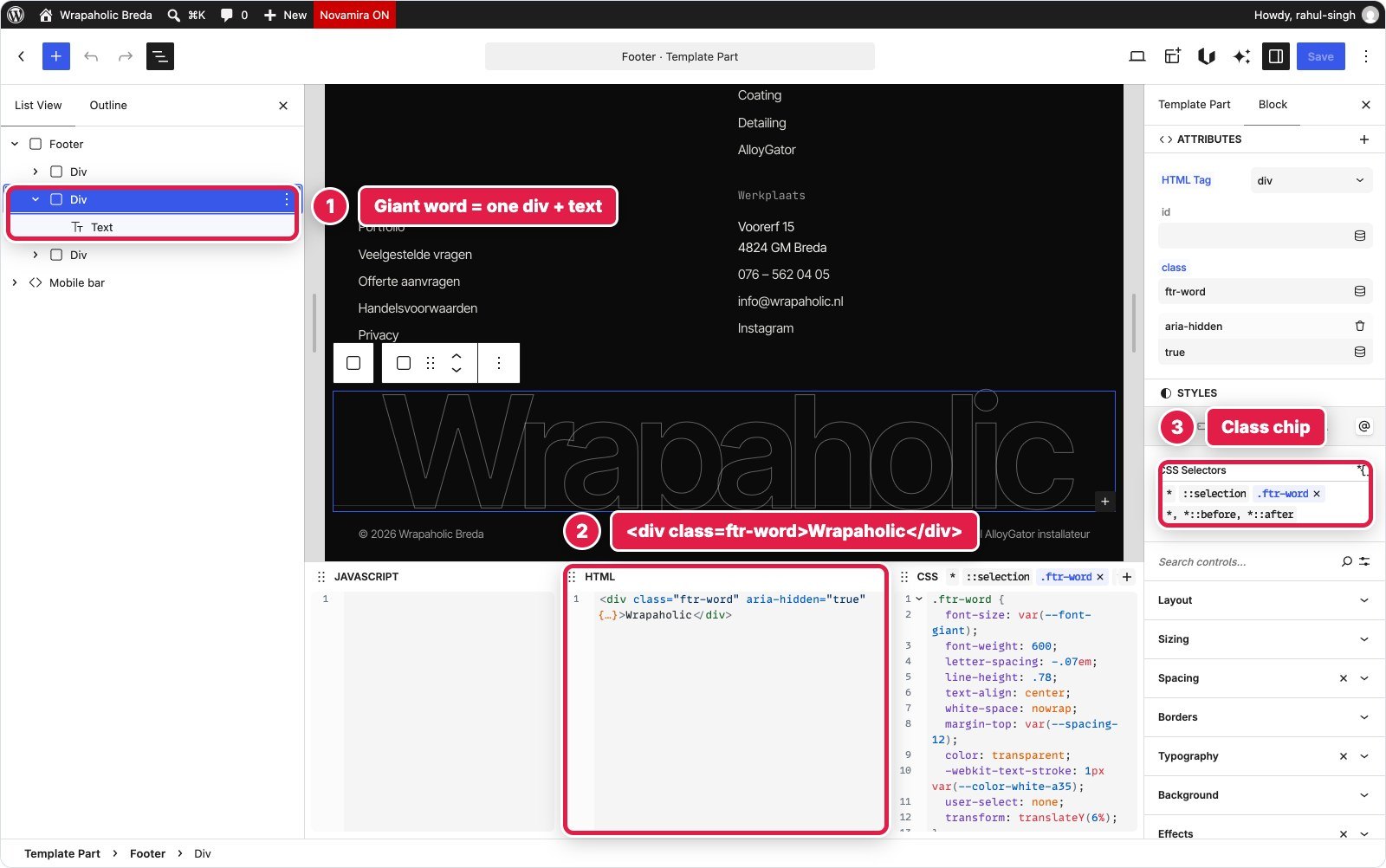
In Unblock it is the footer template part with 54 blocks: real ul, li and h4 elements for the columns, the giant word as one element with CSS text stroke, 2,198 bytes of CSS, and a 100 byte script that writes the year.
In GenerateBlocks it is a second GP Block Element of type Site Footer with 50 blocks. The giant word is a Text block with outline styling in its local CSS, and the year is the Pro dynamic tag {{current_year}}, so no script. One catch: that Element replaces only the copyright area, so the footer widgets had to be set to zero in the Customizer.

Winner for this section: GenerateBlocks, narrowly. A dynamic year tag and site wide display rules are small things, and they mean zero JavaScript.
Mobile Contact Bar
On phones a fixed bar at the bottom with call, WhatsApp and quote buttons, which slides away when the menu is open or while you type in the form.
In Unblock it is a 10 block nav in the footer template part, hidden on desktop and turned into a fixed pill bar in the 680 pixel at rule, 974 bytes of CSS. It hides itself through classes the header and form scripts set on the page. The design’s breakpoints (1080, 680 and 380) differ from Unblock’s presets (780 and 360), so I created new site at rules for them.
In GenerateBlocks it is a 4 block GB Element nav as a second root block inside the footer Element, 1,002 bytes of local styles. It reacts to GenerateBlocks’ own body[data-gb-menu-open] attribute and to the form script’s class.
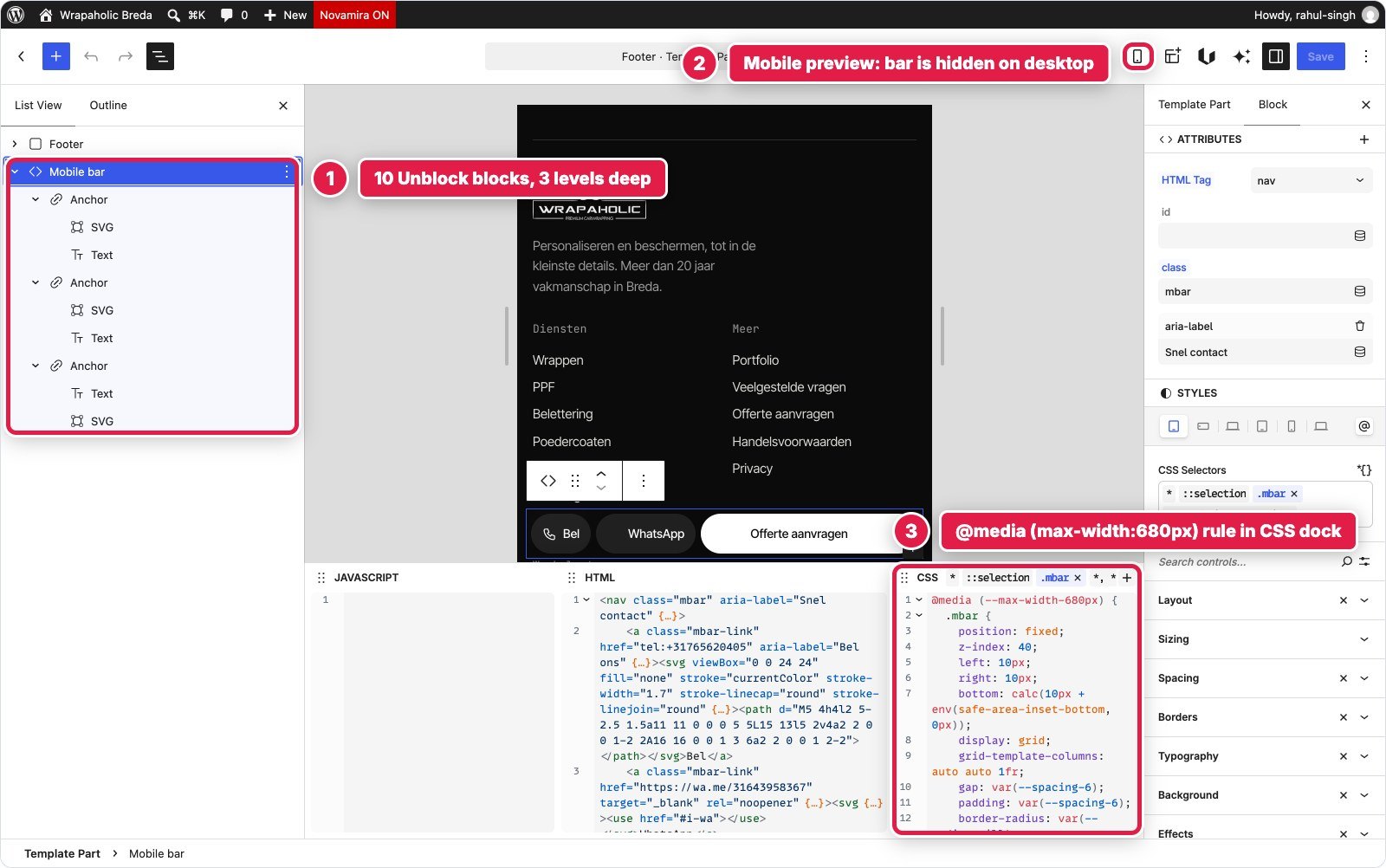

Winner for this section: a draw. The same idea in about a kilobyte of CSS each. You have to switch to mobile preview to even see it in either editor.
Design System, Fonts and Global Styles
This is where both builders are strongest, and they are surprisingly close.
Unblock keeps 120 CSS custom properties in its Variables manager, filed in collections: Colors (34, in HSL), Spacing (36), Typography (25, including fluid clamp sizes), Effects (20 radii, shadows and easing curves) and Layout, plus a 680 pixel override. Next to them sit 156 selectors in 11 collections (Base, Utilities, Buttons, Header, Hero and one per section) and 11 at rules for breakpoints, hover, reduced motion and keyframes. Every colour, size and radius in a component rule reads a token. Fonts come from the Fonts tab, which uses the WordPress Font Library and serves the files locally.
GenerateBlocks Pro has a Design workspace with a live Style Book. In my build it holds 23 Design Tokens (colours, type scale, radius, container width, gutter, header height, easing) and 35 Global Styles: 7 element styles for html, body, links, buttons, images, SVG and headings, and 28 component classes. They compile into one cached file of 9,252 bytes. One off layout goes into each block’s local styles, 18,391 bytes in total, printed inline. Fonts come from GP Premium’s Font Library, also served locally, with a small Hook Element for the preload because the Font Library has no preload option.


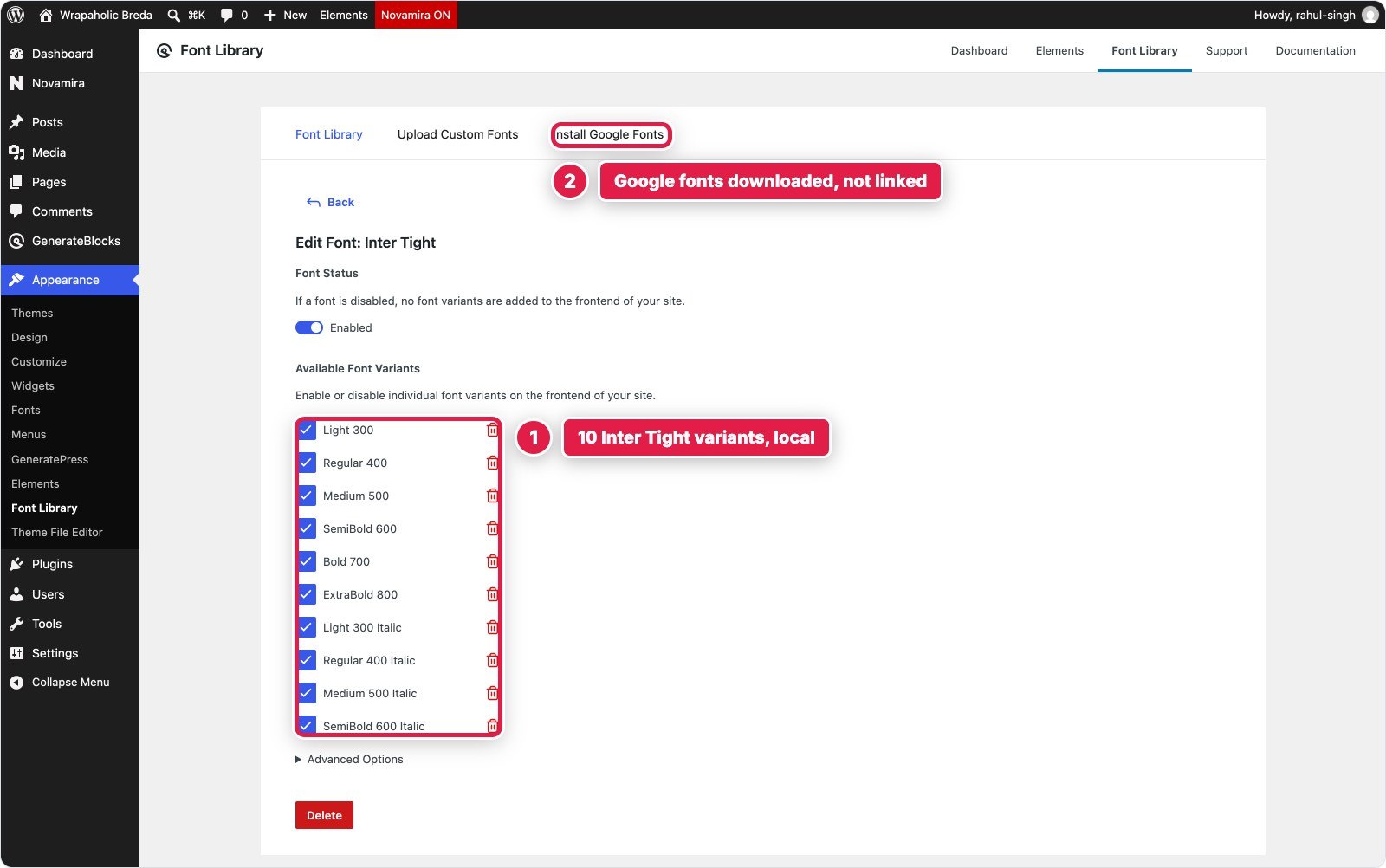
Both approaches work. Unblock is the more complete design system for someone who thinks in CSS, with collections, at rules and a history tab. GenerateBlocks is the friendlier one, with a Style Book that shows your tokens on real elements. The one thing I would change on the GenerateBlocks side is the split between GeneratePress settings and GenerateBlocks styles: theme rules for buttons and inputs had a higher specificity than the Global Style classes, so I had to blank several GeneratePress colours and scope input styles under a class.
Custom CSS and JavaScript: How Much Each Needed and Where It Lives
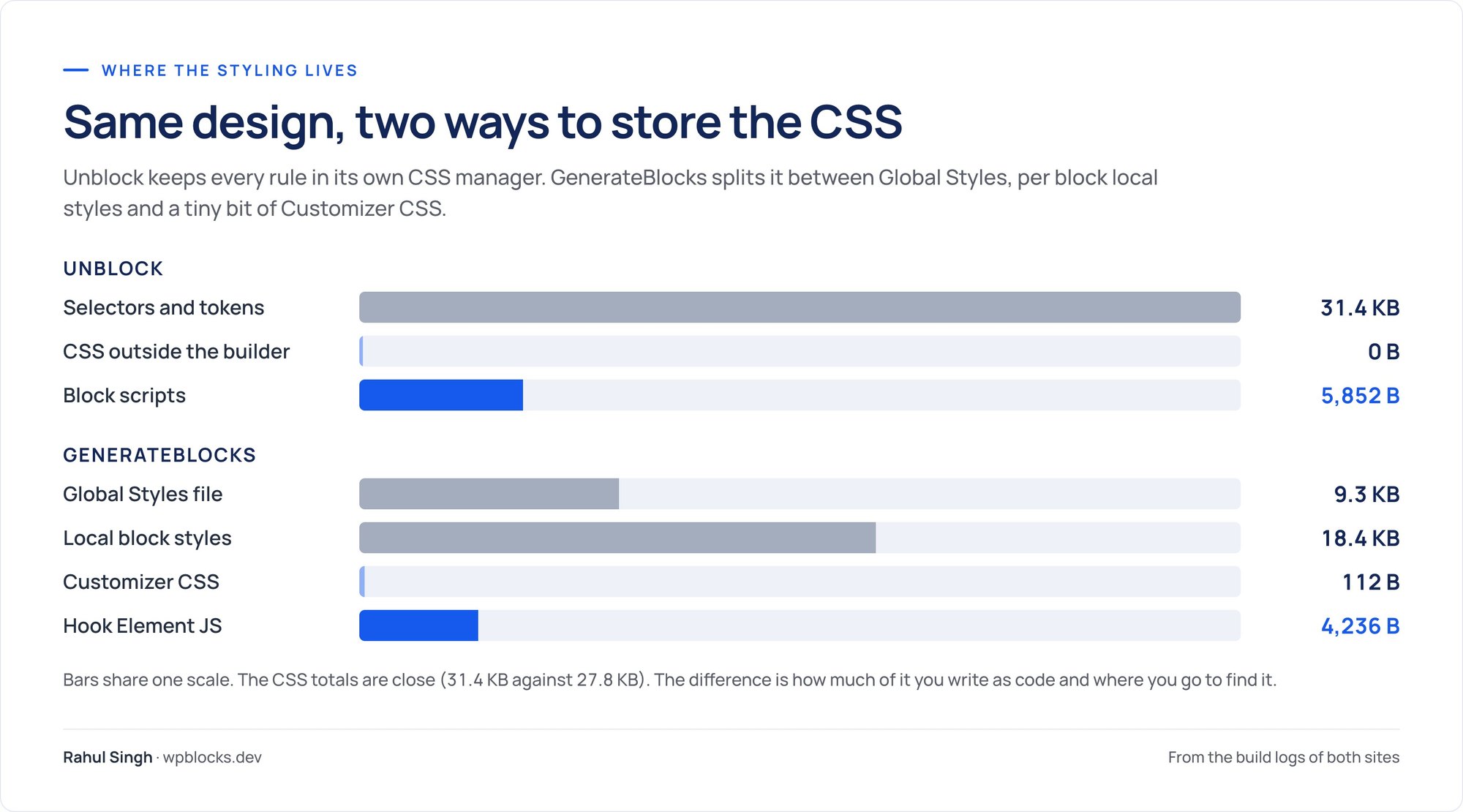
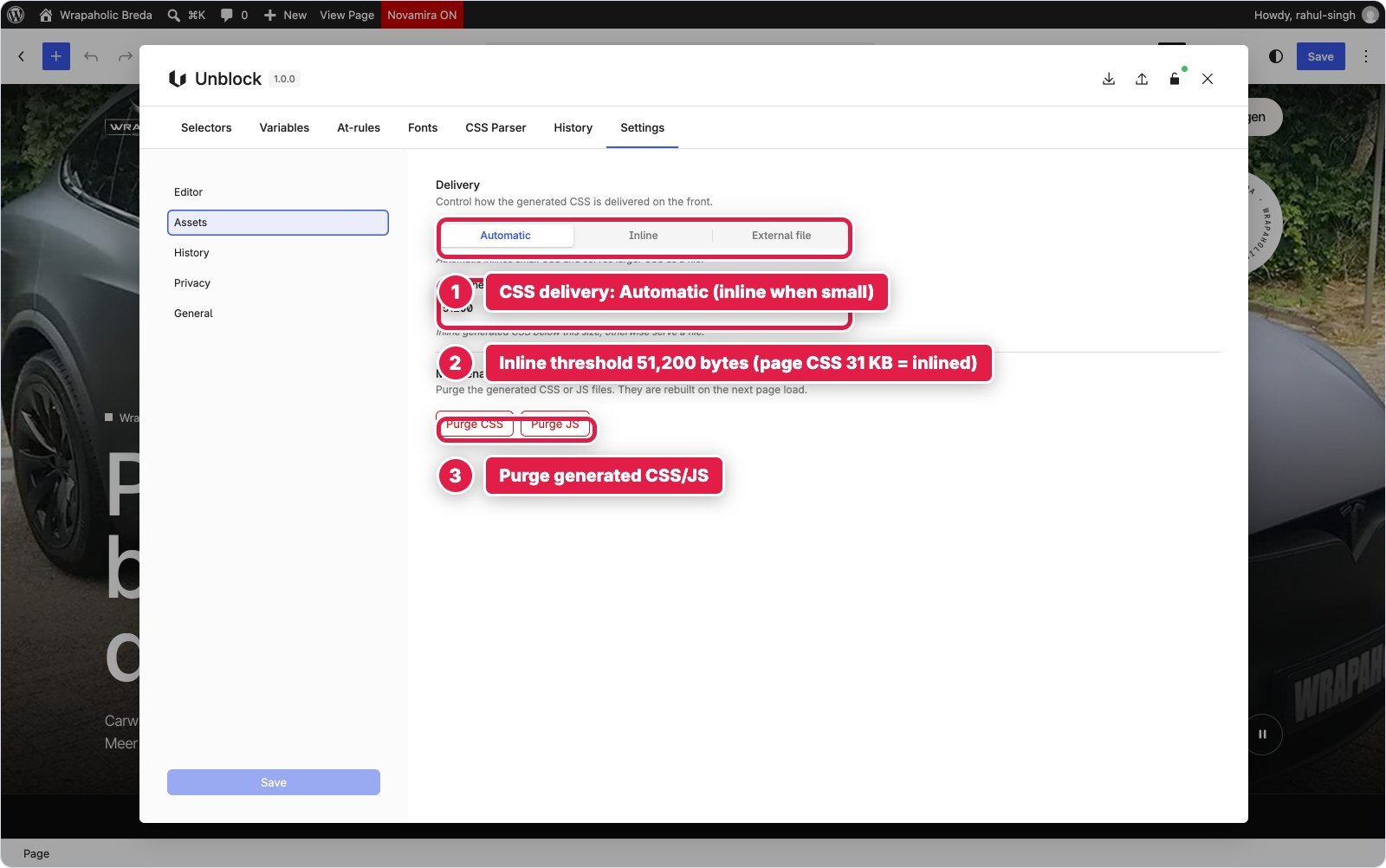
Counting “custom CSS” is not fair to Unblock if you count it naively, because in Unblock the CSS manager is the builder. Its 31.4 KB of served CSS (33.7 KB of source) is the equivalent of GenerateBlocks’ Global Styles plus local styles, which add up to about 27.8 KB. The honest comparison is how much had to go outside the builder’s own system, and how much JavaScript the design needed.
| Unblock | GenerateBlocks | |
|---|---|---|
| Builder styling | 31.4 KB selectors and variables | 9.3 KB Global Styles + 18.4 KB local styles |
| CSS outside the builder | 0 B | 112 B Customizer CSS (two @keyframes) |
| JavaScript total | 5,852 B in 6 block scripts | 4,236 B in one Hook Element |
| Where the JS lives | On the block it belongs to, bundled into one deferred file | One GP Hook Element on wp_footer |
| Biggest JS item | Form validation and submit, 1,819 B | Form chip, success name and mobile bar, inside 4,236 B |


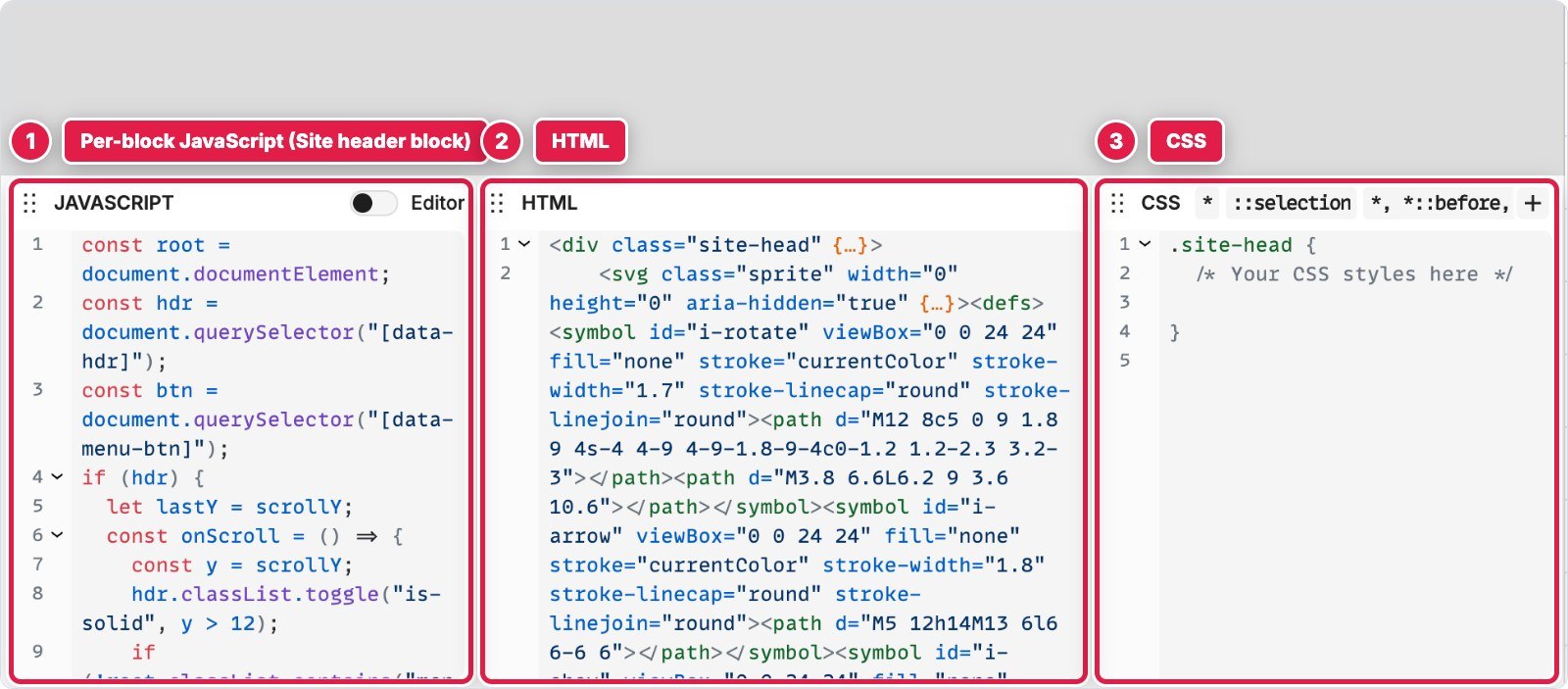

I prefer Unblock’s way of storing JavaScript. The header script is on the header, the form script is on the form, and Unblock bundles them into one deferred file. In GenerateBlocks the same behaviour lives in a single Hook Element that you have to remember exists. GenerateBlocks still needed 1.6 KB less JavaScript, mostly because its navigation and form do more on their own.
Performance: What Each One Ships
I measured both homepages logged out, with no page cache, on the same machine. The hand coded original is the baseline. All numbers are compressed transfer sizes unless noted.
| Unblock | GenerateBlocks | Hand coded | |
|---|---|---|---|
| Code shipped (HTML, CSS, JS, fonts) | 390 KB | 120 KB | 96 KB |
| Of which fonts | 363 KB | 75 KB | 75 KB |
| JavaScript transferred | 8.2 KB | 12.9 KB | 2.9 KB |
| HTML document (uncompressed) | 89 KB | 88 KB | 22 KB |
| CSS inline in the head (uncompressed) | 51.8 KB | 36.2 KB | 0 |
| Unused CSS on load | 44% | 69% | 71% |
| Requests (without the video) | 18 | 24 | 17 |
| DOM nodes | 477 | 520 | 449 |
| Lighthouse mobile / desktop | 70 / 96 | 77 / 98 | 76 / 97 |
| Mobile first paint | 3.0 s | 1.5 s | 1.6 s |
| Mobile largest paint (the video) | 8.0 s | 6.3 s | 7.0 s |
| Lighthouse accessibility | 96 | 96 | 96 |

Strip out the fonts and Unblock is the leanest page builder output I have measured: 27 KB of HTML, CSS and JavaScript, fewer DOM nodes and fewer requests than GenerateBlocks, and the least unused CSS, because it only prints the selectors the page uses. The problem is the fonts. The same three families cost 75 KB on GenerateBlocks and 363 KB on Unblock. Looking at the requests, Unblock’s font install served three full Inter Tight files of about 110 KB each, where GeneratePress’s Font Library served one 45 KB file. Those fonts are also why Unblock has the slowest first paint on mobile, 3.0 seconds against 1.5.
Lighthouse needs a warning label here. On every version of this page, the mobile largest paint is the 2.3 MB hero video, so mobile scores mostly measure video loading. Desktop is 96 against 98, which nobody will feel. The mobile gap, 70 against 77, is real and comes from the fonts. Unblock 1.0 shipped two days before my test, and font subsetting is the kind of thing I expect it to fix. Until it does, GenerateBlocks wins this section clearly.



Building It with AI
Unblock sells itself on AI building, so I also had an AI agent build each version from the same written brief, with the same pixel compare tool to check its work against the original. The agent stopped when the page passed at all three widths.
| Unblock | GenerateBlocks | |
|---|---|---|
| Tokens used | 352,000 | 450,000 |
| Pixel compare runs to pass | 2 | 4 |
| Build time | 19 minutes | 26 minutes |
| How it wrote the page | Unblock’s own abilities, with content hashes | Block markup with styles and compiled CSS |

The reason is the model. For an agent, Unblock is HTML and CSS with a save button: it writes elements with tags and attributes, writes selectors and variables, and Unblock stores and serves them. Every write went through Unblock’s own abilities, the same ones its MCP Bridge exposes to Claude, ChatGPT, Cursor and other clients (16 MCP tools plus 31 more through the WordPress MCP Adapter; the bridge needs WordPress 6.9 or newer and an active licence). There was nothing to translate.
GenerateBlocks stores each block’s styles twice, as structured style data and as compiled CSS, and when you write blocks from outside the editor you have to produce both. The agent’s own little compiler leaked some comma separated nested selectors out of scope on the first run, which cost a compare run to find. The rest of the extra runs went on GeneratePress specifics: menu links flagged as current, theme button rules beating classes, and a Hook Element that reads its code from meta instead of the post content.
Unblock also has its own chat assistant, Unbot, which uses your own API key through the WordPress AI connectors. I did not use it for this build. GeneratePress One includes GeneratePress AI, which I did not test either. If you build with an agent, Unblock is the better platform today, and the gap is in the design of the product, not in a feature list.
Lock In: Switch the Builder Off
Then I deactivated the builder plugin on each site, left the theme on, and measured what was left of the homepage.
| Builder off | Unblock | GenerateBlocks |
|---|---|---|
| Text still visible | 0% | 65% |
| Images | 0 of 4 | 3 of 4 |
| Video | Gone | Still there |
| Links | 0 of 44 | 45 of 44 |
| Form fields | 0 of 4 | 0 of 4 |
| Page height | 900 px, blank | 37,985 px, unstyled |


The reasons are structural. GenerateBlocks’ v2 blocks save their HTML into the post, so with the plugin off WordPress still prints the markup without the styles. The quote form disappears because GenerateBlocks Pro renders it from its own post type, and the header and footer content still prints because GP Premium’s Elements, which hold it, stay active. Unblock’s elements need the plugin to render at all, so the page is empty.
This matters less than it sounds if you plan to stay, and a lot if you build for clients. A GenerateBlocks site can be rescued by someone with a stylesheet. An Unblock site without Unblock is a database full of block comments. If you stop paying for Unblock, the site keeps working, you only lose updates, the AI assistant and support, but the plugin itself has to stay installed forever.
WooCommerce: the Same Product Page on Both
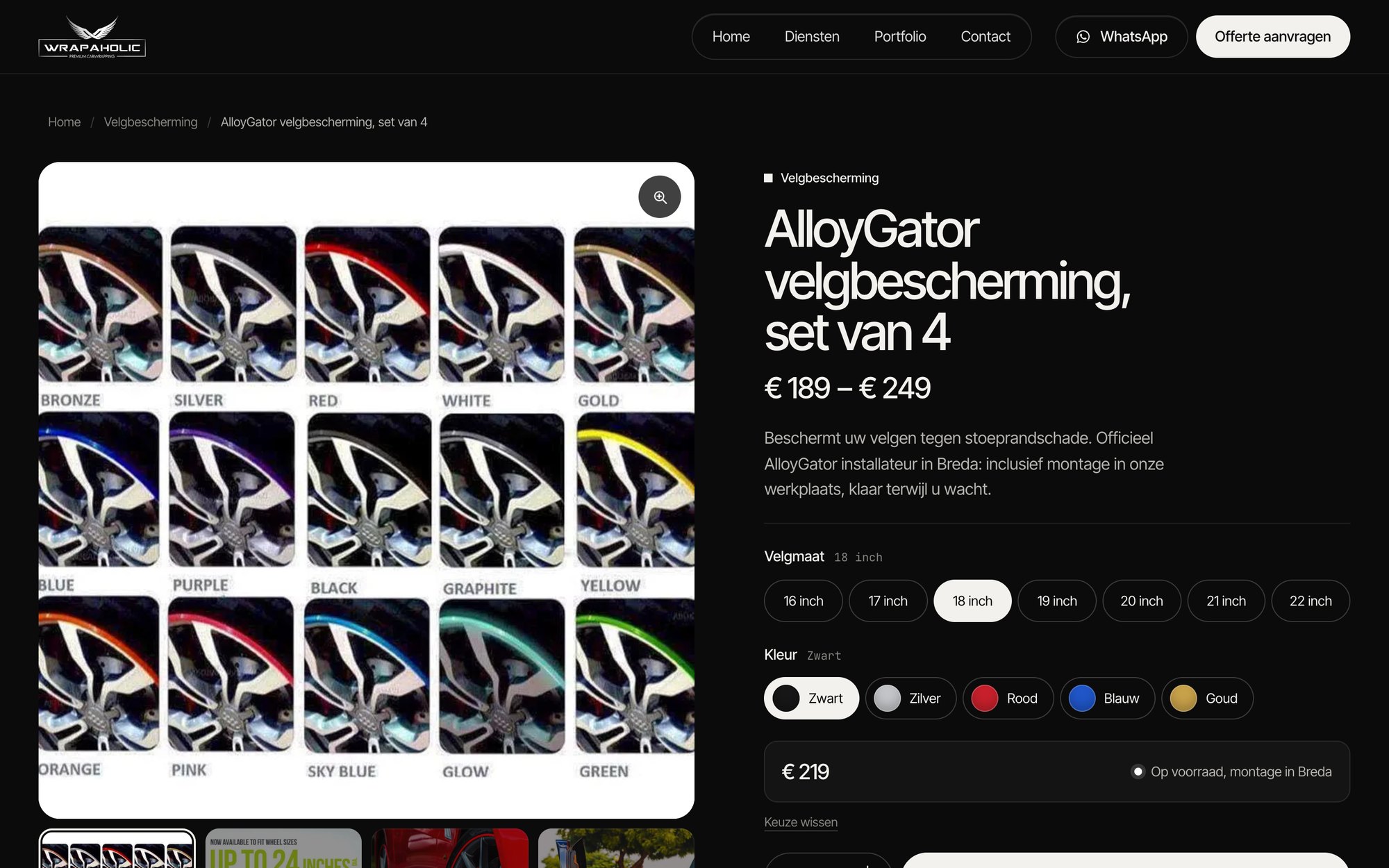
After the homepage I gave both builders a second job for the same client: a WooCommerce single product page. Two real products, AlloyGator rim protection as a variable product with 7 rim sizes and 5 colours (35 variations, € 189 to € 249), and an XPEL PPF package as a simple product on sale. One template had to serve both, every value had to come from WooCommerce, and the result had to match a hand coded reference page at 1440, 768 and 390 pixels: a gallery with thumbnails and a lightbox, size buttons, colour swatches, a price and stock box that follows the selection, a quantity stepper, tabs, a help card, related products and a product bar on phones.

Both builds run WooCommerce 11.3.0 on the same sites as the homepage, and both had to pass the same real cart test at the end: choose 20 inch in Rood, add two, and the cart must show € 498,00 with exactly that variation. Both passed. Unblock matched the reference to 0.16%, 0.22% and 0.34% of pixels at the three widths, GenerateBlocks to 0.21%, 0.44% and 0.62%. The AI agent needed about 21 minutes on each. How they got there could hardly be more different.
Unblock: the whole product page in one template part
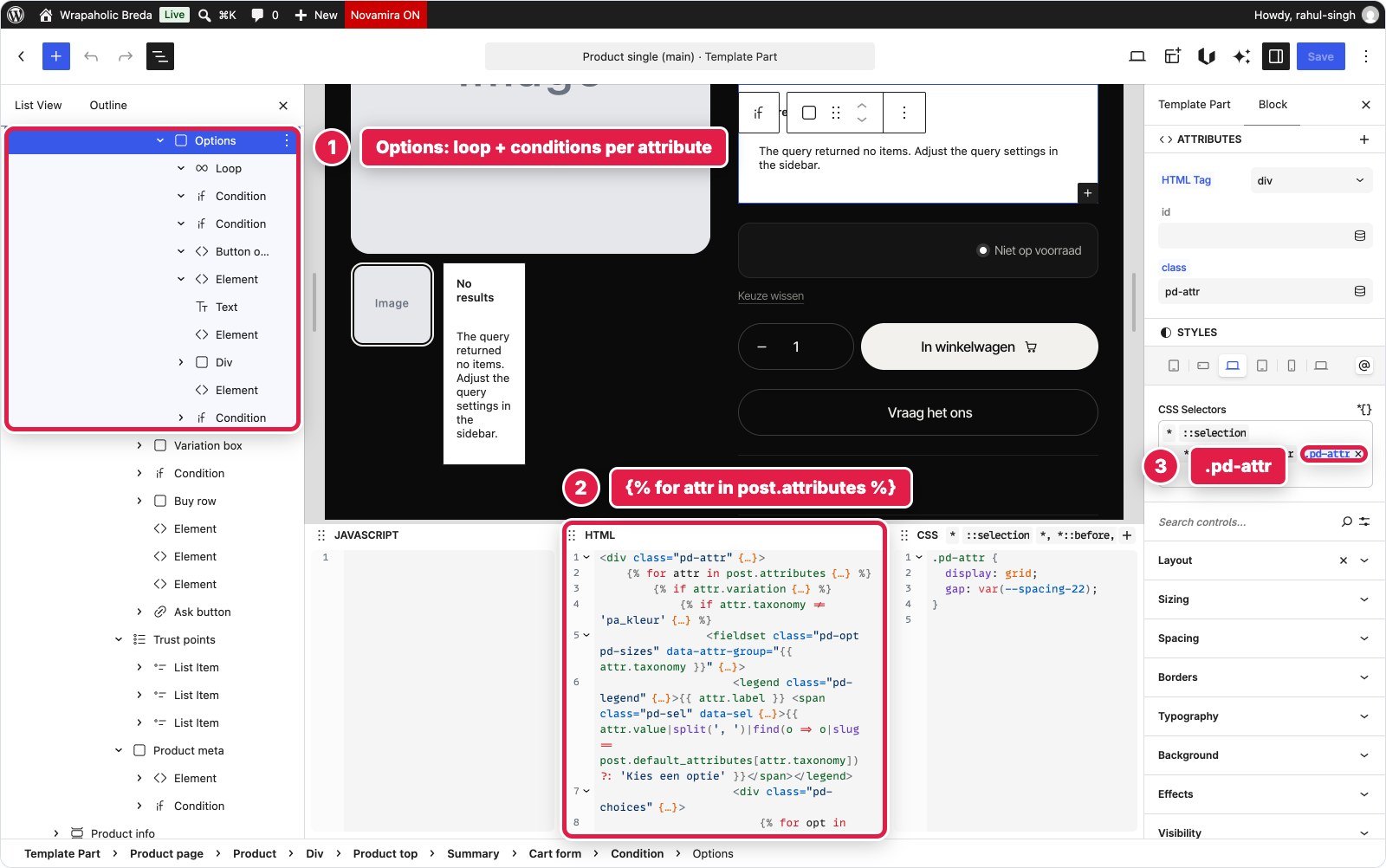
In Unblock the product page is one template part, “Product single (main)”, with 193 blocks: the gallery, the summary, the cart form, the tabs, the help card and the related products. The single product template around it holds just three parts, header, product and footer. Every value comes from Unblock’s built in WooCommerce data in Twig: post.title, post.price_html, post.product_gallery, post.attributes, post.variations. No add-on, no WooCommerce blocks, no PHP. The only store setting I changed was the order of the colour terms.
There are two catches. Unblock cannot write to the single-product template, because WooCommerce registers a template with the same name and every Unblock tool refuses the id, so that template is a small three part shell written once outside Unblock. And Unblock cannot place WooCommerce blocks, so the cart form, the gallery and the added to cart message are all Unblock elements. The template part editor also has no product to preview: titles read “Post Title”, images read “Image” and the loops say “No results”.
The variation picker is generated, not placed by hand. A Loop over post.attributes prints one fieldset per attribute, a Condition sends the colour attribute to swatches and everything else to pill buttons, and each swatch reads its colour from a design token named after the term, so a new colour is one new token. One 6,586 byte script on the root block matches the choice against WooCommerce’s real variations, updates price, stock, SKU and variation_id, and posts the form to WooCommerce’s AJAX add to cart. The same script runs the gallery, lightbox, tabs, stepper and toast. Without JavaScript the form still posts through WooCommerce’s own handler; I tested that too.
GenerateBlocks: WooCommerce’s own template, restyled
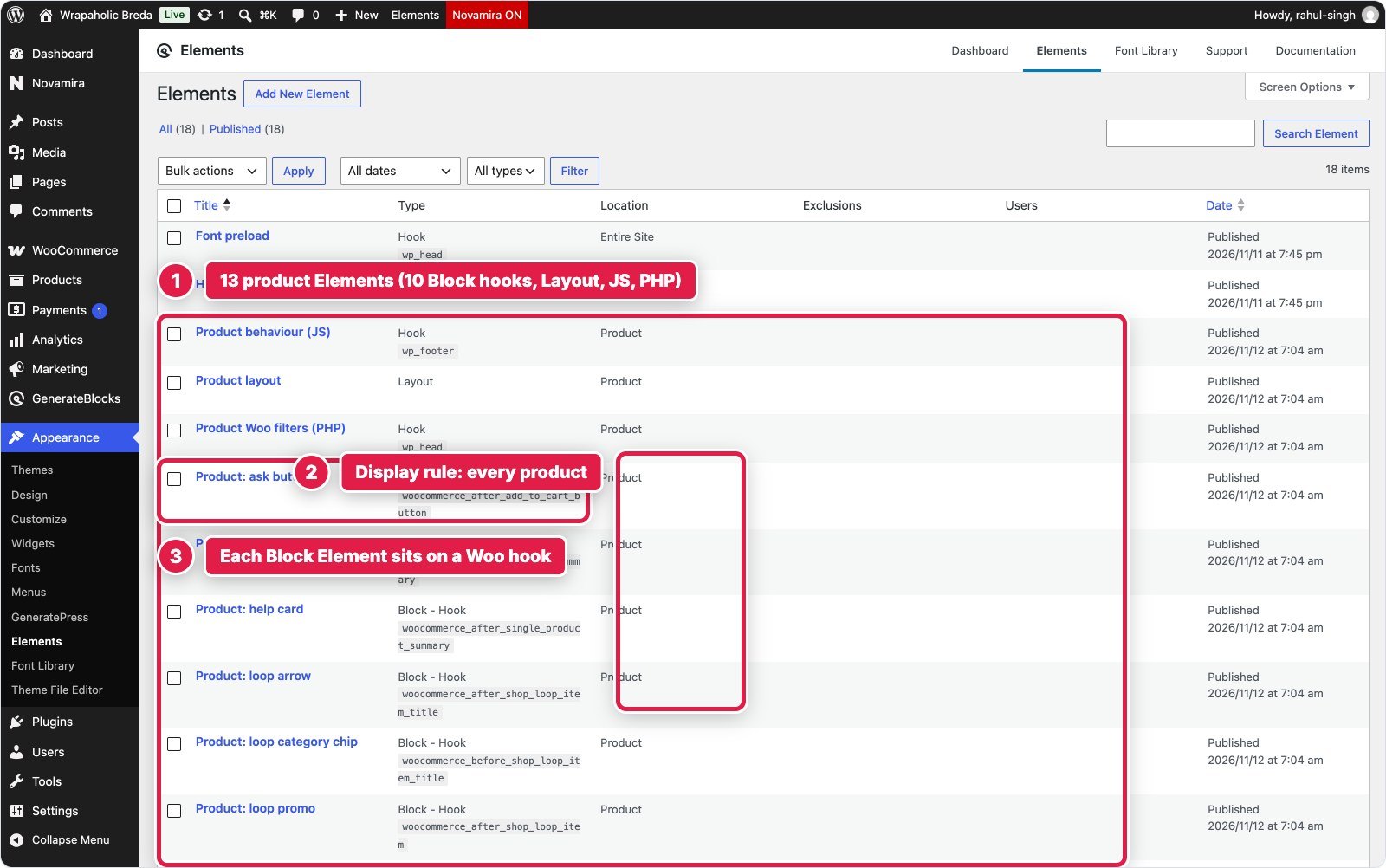
GenerateBlocks 2.5.1 and Pro 2.8.0 contain no WooCommerce code at all: no product blocks and no WooCommerce dynamic tags. So GP Premium’s WooCommerce module lets WooCommerce print its classic product template, a Layout Element switches off the sidebar, the featured image and the footer widgets, and everything the design adds on top (category eyebrow, variation box, trust points, ask button, help card, related heading, card chip, promo banner, mobile bar) is a Block Element of GenerateBlocks blocks hung on a WooCommerce hook. That is 13 Elements on 9 hooks with 51 blocks between them. There is no screen where you see the whole product page, each Element opens in an empty canvas, and you need to know hook names and priorities like woocommerce_before_add_to_cart_quantity at 5.
The styling is 25.2 KB of GenerateBlocks Pro Global Styles written against WooCommerce’s classes, with #page #content prefixes to beat the CSS that WooCommerce and GP Premium already load, plus 8.5 KB of local block styles. Global Styles live in one site wide stylesheet, so the product CSS also loads on the homepage. The Style Book lists these selector based styles but cannot open them. Every text change the design needed, the price without “,00”, the SKU label, the button text, the sale badge and the breadcrumb, is a PHP filter: 2,444 bytes in a Hook Element. The GeneratePress Customizer did handle the quantity buttons, the sidebar and the upsells with plain toggles, and this build also turned reviews off and raised the product image sizes to 800 pixels.
Classic WooCommerce prints the variations as dropdowns, and there is no swatch add-on for GeneratePress or GenerateBlocks. A 3.1 KB script turns each dropdown into buttons or colour swatches and drives the real dropdown underneath, so WooCommerce’s own variation script still owns price, stock and SKU. Swatch colours are CSS keyed on the term slug. The trade-offs: an incomplete selection shows WooCommerce’s browser alert instead of the hint line, and add to cart reloads the page, with WooCommerce’s notice styled as the toast. In return you keep WooCommerce’s gallery with zoom and its lightbox, its tabs, and every hook that WooCommerce extensions print into.


What each product page ships
| Unblock | GenerateBlocks | Hand coded | |
|---|---|---|---|
| How the template is built | 1 template part, 193 blocks | Woo’s classic template plus 13 Elements (51 blocks) | Static HTML |
| Add-ons | None | None (GP Premium Woo module) | n/a |
| Variation picker | Own buttons on a real Woo form, 6.6 KB JS | Custom buttons over Woo dropdowns, 3.1 KB JS | Static |
| Custom CSS | 25.7 KB, served only on the page | 33.7 KB (25.2 KB loads site wide) | n/a |
| PHP filters | None | 2.4 KB | n/a |
| Code shipped (HTML, CSS, JS, fonts) | 467 KB (363 KB fonts) | 249 KB | 104 KB |
| JavaScript transferred | 59 KB | 102 KB | 5 KB |
| Requests | 27 | 42 | 14 |
| DOM nodes | 453 | 509 | 388 |
| Lighthouse mobile / desktop | 76 / 99 | 67 / 100 | 95 / 100 |
| Mobile layout shift (CLS) | 0 | 0.47 | 0 |
| Mobile first paint | 3.5 s | 1.8 s | 1.5 s |
| Pixel difference 1440 / 768 / 390 | 0.16 / 0.22 / 0.34% | 0.21 / 0.44 / 0.62% | n/a |
| Cart test, 2 × 20 inch Rood | € 498,00, passed | € 498,00, passed | n/a |
Most of Unblock’s 59 KB of JavaScript is not Unblock’s. WooCommerce enqueues its classic scripts on every product page, jQuery, its add to cart and general scripts and the order attribution tracker, even though the Unblock template uses none of them, and no setting removes them. GenerateBlocks loads the same set plus the slider, zoom, lightbox and variation scripts its page does use. The code shipped flips the other way for the reason you already know from the homepage: the same 363 KB font install, which also gives Unblock the slower first paint on mobile, 3.5 seconds against 1.8.
And yet Unblock scores 76 on mobile against 67. The difference is one number in the table: layout shift.

Why the GenerateBlocks product page jumps on phones
On a 390 pixel phone the GenerateBlocks page has a layout shift of 0.47 in Lighthouse, far past the 0.1 that Google calls good. I traced it with a layout shift recorder: the gallery is 450 pixels tall before the scripts run, then WooCommerce’s slider sets its track to 800% width and only about 100 milliseconds later gives each slide a width. In between, the slides size themselves off that giant track, the gallery balloons to 3,637 pixels and the whole summary column, title, price and picker, is pushed off screen and back. Two shifts, both on the column a shopper is about to tap.
This is WooCommerce’s gallery script doing what it does on any template that does not reserve the space. The Elementor and Spectra builds in this benchmark use the same slider and jump just as much. Unblock scores 0 because its gallery is its own markup: the main image sits in a box with a fixed 1:1 aspect ratio, the image carries its width and height, and WooCommerce’s gallery script never runs, so the gallery is 444 pixels tall from the first paint to the end.

Why the page jumps on phones
WooCommerce’s gallery slider lays every slide out at full width for a moment before it starts. On a phone that briefly makes the gallery several thousand pixels tall and shoves everything below it down and back up.
The fix is a few lines of CSS in a Global Style: give the gallery’s main image area a fixed aspect ratio and overflow: hidden, so the box is reserved before the script runs. I left both builds exactly as they were finished, so the numbers above are without it. If you build a store on GenerateBlocks, add it on day one.
Winner for this section: Unblock. One template you can see as a whole, no add-on, no PHP, no layout shift, fewer requests and less JavaScript. GenerateBlocks ships less code only because of Unblock’s fonts.
My WooCommerce verdict: for a WooCommerce store, I would build the product pages in Unblock when I build and run the shop myself and it sells simple and variable products. The template is one readable place, the picker is mine, and the page does not jump. I would choose GenerateBlocks when the store depends on WooCommerce extensions that print into the classic product page, like product add-ons or subscriptions, because Unblock replaces that template and its hooks with its own markup (I did not test any extensions in either build). In that case expect hooks, Global Styles written against WooCommerce classes and a PHP snippet for every text change, and add the gallery fix before launch.
Pricing in 2026
Unblock
| Plan | Price | Sites |
|---|---|---|
| Starter | $69 a year | 1 |
| Professional | $129 a year | 10 |
| Agency | $199 a year | 100 |
| Lifetime | $499 once | 1,000 |
Every Unblock plan includes the builder, the Unblock Theme, the AI assistant and the MCP Bridge, and local or staging sites do not count. Starter gets standard support, the other plans priority support. There is no free version and no trial, only a live demo, and no separate renewal price is published.
GenerateBlocks (GeneratePress One)
| Plan | Price | Sites |
|---|---|---|
| GeneratePress One | $99 a year | 1 |
| GeneratePress One | $149 a year | 10 |
| GeneratePress One | $199 a year | 100 |
| GeneratePress One lifetime | $596 once | 100 |
You cannot buy GenerateBlocks Pro on its own anymore. GeneratePress One bundles GP Premium, GenerateBlocks Pro, GenerateCloud and GeneratePress AI. The free GenerateBlocks plugin and the free GeneratePress theme stay on WordPress.org, but nearly everything this build leaned on, the Site Header and Navigation blocks, Forms, Global Styles, Design Tokens and GP Elements, is in the paid bundle.
What you pay
| What you need | Unblock | GenerateBlocks | Cheaper |
|---|---|---|---|
| Try it for free | Not possible | Free plugin and theme | GenerateBlocks |
| 1 site, a year | $69 | $99 | Unblock |
| 10 sites, a year | $129 | $149 | Unblock |
| 100 sites, a year | $199 | $199 | Tie |
| 10 sites over 3 years | $387 | $447 | Unblock |
| Lifetime | $499 for 1,000 sites | $596 for 100 sites | Unblock |
| Refund window | 14 days | 30 days | GenerateBlocks |
The comparison that should decide it for freelancers
On price alone Unblock wins every paid tier, and its lifetime licence covers ten times the sites for $97 less. But the bill is the smaller part of the decision. A GenerateBlocks site handed to a client can be maintained by any WordPress developer and survives the licence lapsing and even the plugin being removed. An Unblock site needs someone who reads HTML and CSS, and it needs Unblock installed for its whole life.
If you keep your clients on a care plan and build with an agent, Unblock’s lifetime plan is the better deal. If you hand sites over and walk away, pay the extra for GenerateBlocks.
When Unblock Makes Sense, and When It Does Not
Unblock is efficient in the hands of people who already think in markup. In my build the fastest way to work was to read the HTML editor, click a class chip, and change the rule, with the visual panels as a shortcut for spacing and borders. If that describes you, Unblock removes a whole layer of translation that GenerateBlocks still has.
- It suits developers comfortable with HTML, CSS and a little Twig, who want every element and class under their control.
- It suits agencies building with AI agents over MCP. Fewest tokens, fewest check runs, and an API designed for it.
- It suits people who care about clean markup: the HTML was the closest to hand written of any builder I tested, at 27 KB without fonts.
- It does not suit clients who edit their own site. There are no friendly widgets, and the List View is only as clear as the names you give it.
- It does not suit anyone who wants ready made components. There is no navigation block, carousel, video block or form builder; you write them.
- It does not suit anyone who cannot accept a hard dependency. Switch it off and the page is blank.
- It does not suit anyone who wants a long track record. Version 1.0 shipped on 10 November 2026; GenerateBlocks has been on WordPress.org since 2020.
Who Should Pick Which
Pick Unblock if
- You write HTML and CSS and want the editor to stop hiding them from you.
- You build with an AI agent and want the builder with the cleanest API for it.
- You want per block JavaScript that lives on the block it belongs to.
- You maintain the sites you build, and the lifetime plan for 1,000 sites makes sense for you.
- You build WooCommerce product pages and want the whole template in one place, with your own variation picker and no layout shift on phones.
Pick GenerateBlocks if
- You want a visual Styles builder with Global Styles and Design Tokens, and a free version to start on.
- You need a native accessible navigation and a real form builder with validation and stored entries.
- You want the lighter page today: 120 KB against 390 KB, and better mobile Lighthouse.
- You hand sites to clients, or want a site that still shows its content if the plugin ever goes.
- Your store relies on WooCommerce extensions that print into the classic product page, so Woo’s own template and hooks must stay.
Pros and Cons
My verdict on Unblock
Unblock
4.0/5
The cleanest markup and the best AI building model of any builder I tested, plus the better WooCommerce product page of these two, held back by a heavy font install, a brand new 1.0 and total lock in.
What works
What does not
My verdict on GenerateBlocks
GenerateBlocks
4.5/5
The safer and lighter choice for most block builders: visual styling on a real design system, native navigation and forms, and a site that survives without it. On WooCommerce it brings no product tools of its own.
What works
What does not
The Conclusion
GenerateBlocks wins this comparison for most people, and it wins it on the things that last: a lighter page, better mobile scores, native navigation and forms, a free version, six years of track record, and a site that still shows its content if you ever leave. On the same homepage it shipped 120 KB against Unblock’s 390 KB, and it needed only 112 bytes of CSS outside its own style system.
Unblock wins the part of the job it was built for. It is the most honest block builder I have used: the HTML you see is the HTML you get, the CSS is yours, and the scripts sit on the blocks they belong to. Its visual panels and code editor edit the same rules, so you can work either way. An AI agent finished the page with 22% fewer tokens, half the compare runs and seven minutes less than on GenerateBlocks. If you are a developer building with agents, that adds up across every site you make.
The two things that hold Unblock back are fixable and permanent, in that order. The 363 KB font install is a 1.0 problem that I expect to change, and I will retest it. The lock in is the architecture: Unblock pages do not exist without Unblock. Decide whether you can live with that before anything else.
WooCommerce moves the balance a little toward Unblock. On the same product page it produced the better result: one template instead of 13 hooked Elements, no PHP, no layout shift, 27 requests against 42 and 76 against 67 on mobile Lighthouse. GenerateBlocks has no WooCommerce tools of its own and restyles Woo’s classic template instead, which costs effort but keeps every hook your extensions need. It still ships less code, again because of Unblock’s fonts.
My pick: GenerateBlocks for client sites you hand over, Unblock for sites you build and keep running yourself with an agent.
FAQ
Is Unblock better than GenerateBlocks?
For developers who write HTML and CSS and build with AI agents, yes. For most other people, no. In my test GenerateBlocks shipped less code (120 KB against 390 KB), scored 77 against 70 on mobile Lighthouse, and leaves 65% of the page visible if the plugin is switched off, where Unblock leaves a blank page.
Is Unblock a good GenerateBlocks alternative?
It is the closest alternative in philosophy, since both build pages from generic elements styled by reusable classes and tokens. Unblock goes further toward pure HTML and CSS, and it is cheaper on every paid plan. It has no free version, and no ready made navigation, carousel or form builder.
Can I use Unblock with GeneratePress or GenerateBlocks?
Unblock works in the block editor, so it can run next to other block plugins, but it is designed around its own blank block theme and template parts. I built each version on its own recommended theme and did not test mixing the two on one page.
Does Unblock work without the plugin?
No. With Unblock deactivated my homepage showed 0% of its text, no images and no links. If you stop renewing, built sites keep working, but the plugin must stay installed. GenerateBlocks pages keep their HTML when the plugin is off.
Is Unblock code only?
No. The inspector has visual Layout, Sizing, Spacing, Borders, Typography, Background and Effects panels, and they edit the same global CSS rule the docked code editor shows, so the two stay in sync.
How much does Unblock cost compared to GenerateBlocks Pro?
Unblock costs $69 a year for 1 site, $129 for 10, $199 for 100, or $499 once for 1,000 sites. GenerateBlocks Pro comes only in GeneratePress One: $99 a year for 1 site, $149 for 10, $199 for 100, or $596 once for 100 sites. Prices checked 12 November 2026.
Does either one have a lifetime deal?
Both do. Unblock Lifetime is $499 for 1,000 sites, $349.30 with the Black Friday discount until 1 December 2026. GeneratePress One lifetime is $596 for 100 sites.
Which one is faster?
GenerateBlocks, in my test. The Unblock page had less HTML, CSS and JavaScript (27 KB) and fewer DOM nodes, but its font install served 363 KB of fonts against 75 KB, which pushed its total to 390 KB and its mobile Lighthouse score to 70 against 77.
Which one is better for building with AI?
Unblock. An AI agent rebuilt the same page with 352,000 tokens and 2 check runs in Unblock, against 450,000 tokens and 4 runs in GenerateBlocks. Unblock also has an MCP Bridge with 16 tools plus 31 more through the WordPress MCP Adapter.
Is there a free version of Unblock?
No. Unblock has no free plugin and no free trial, only a live demo and a 14 day refund. GenerateBlocks and GeneratePress both have free versions on WordPress.org.
Can you build a WooCommerce product page with Unblock?
Yes. Unblock reads WooCommerce data in Twig (title, price, gallery, attributes, variations), so I built one template part that serves every product, with no add-on and no PHP. It cannot place WooCommerce blocks or write to the single-product template itself, so the template is a small shell around an Unblock part and the variation picker runs on a 6.6 KB script of your own. My build passed a real cart test with the right variation.
Does GenerateBlocks work with WooCommerce?
It works alongside it, but GenerateBlocks 2.5 and Pro 2.8 have no WooCommerce blocks or dynamic tags. With GP Premium’s WooCommerce module you restyle Woo’s classic product template: in my build that took 13 Elements on WooCommerce hooks, 33.7 KB of CSS, 2.4 KB of PHP filters and a 3.1 KB script for the size buttons and colour swatches.
Which one makes the faster WooCommerce product page?
It depends on the device. GenerateBlocks shipped less code (249 KB against 467 KB, because of Unblock’s fonts) and scored 100 against 99 on desktop. On mobile Unblock won 76 against 67, because WooCommerce’s gallery slider made the GenerateBlocks page jump with a layout shift of 0.47, where Unblock had 0. A few lines of CSS that reserve the gallery box fix that jump.