Disclosure: I earn a commission if you buy Unblock through the links on this page, at no extra cost to you. Kadence is linked plainly, with no affiliate link. Neither company saw this post before it went live, and nothing in it was paid for.
Kadence Blocks is the safer pick for most WordPress sites, and Unblock is the better tool if you write HTML and CSS yourself or build with AI agents. I rebuilt the same real client homepage on both, pixel for pixel, and Kadence won the scores you can measure from outside (Lighthouse, accessibility, what survives when you switch the plugin off), while Unblock produced the leaner page, the cleaner markup, the faster AI build and the far cheaper licence for anyone with more than one site.
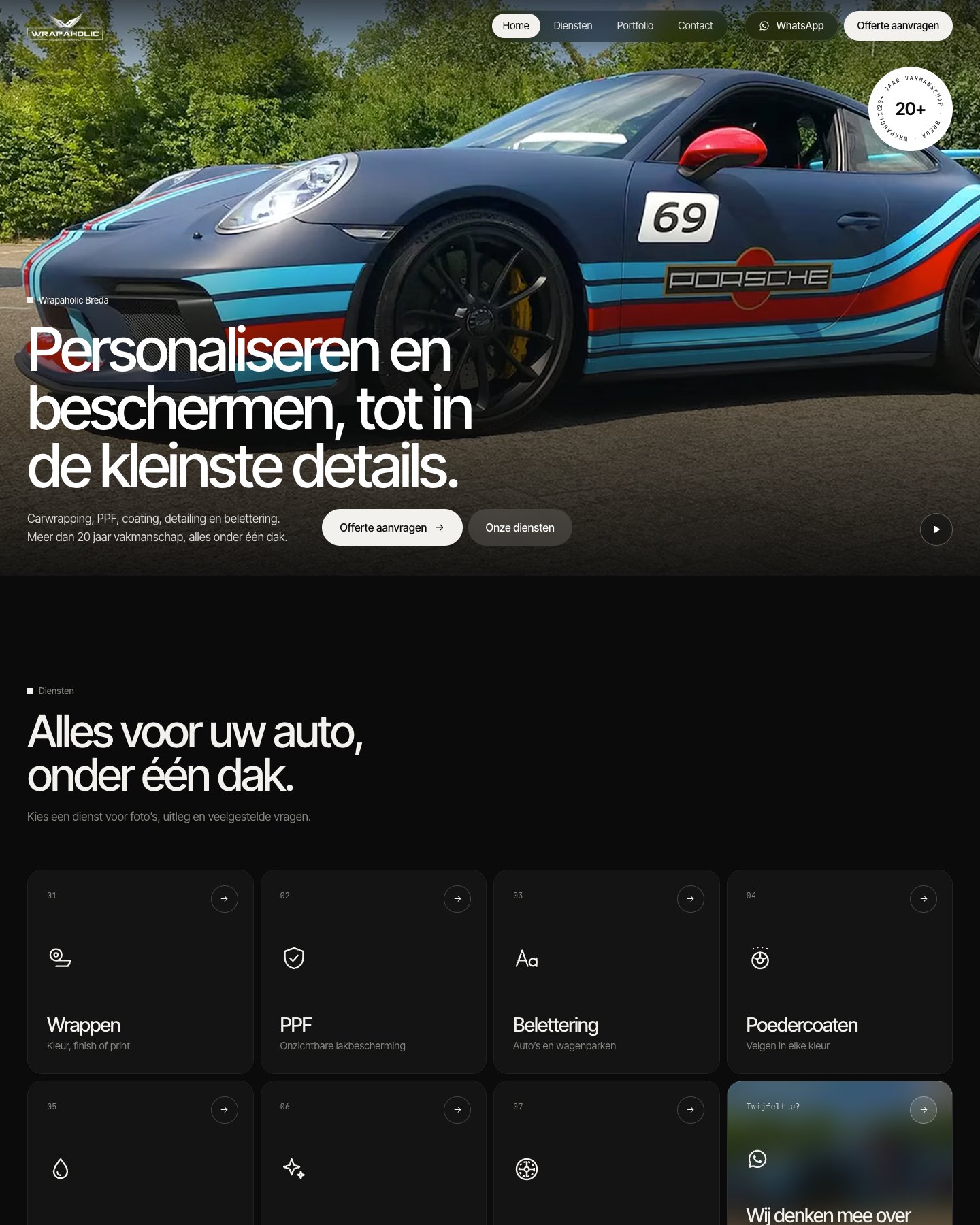
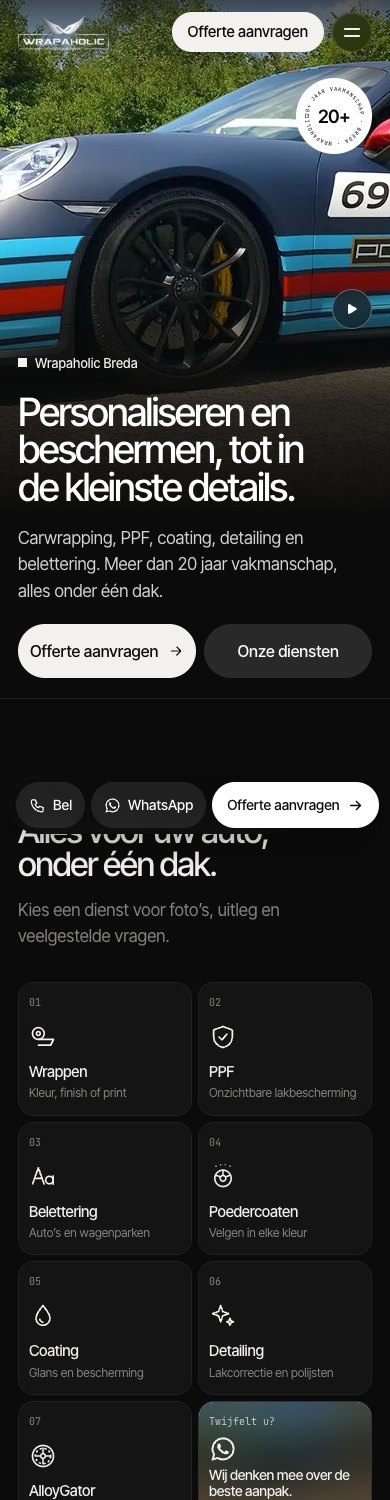
The homepage belongs to Wrapaholic Breda, a Dutch car wrapping studio, so the copy in every screenshot is Dutch. It has a sticky header with a full screen mobile menu, a video hero with a rotating circular badge, 8 service tiles, an about block with stats and pillars, a draggable project strip, a contact section with a quote form, a footer with a giant outlined word, and a fixed contact bar on phones. I built it in November 2026 on identical local installs of WordPress 7.1.4 and PHP 8.5: Unblock 1.0.0 on the free Unblock Theme 1.0.0, and Kadence Blocks 3.9.1 + Blocks Pro 2.9.1 on the Kadence theme 1.6.0 + Kadence Pro 1.3.0. Both versions match the original design with under 0.2% pixel difference at 1440, 768 and 390 pixels wide, so every difference below comes from how each builder gets there.
Quick verdict
- Pick Unblock if you or your team are comfortable with HTML and CSS, you build custom designs for clients, you want an AI agent to do the building, or you run more than a handful of sites. In my build it shipped 477 DOM nodes against 658, needed 2 check runs against 6, and costs $129 a year for 10 sites against $599.
- Pick Kadence if the site owner will edit the pages alone, you want native components (a header builder, a background video, a form with validation and email delivery), you want a free version to start on, or you cannot accept a blank page if the builder plugin is ever removed.
- Either is fine for a developer building one site for themselves. Both reached a pixel perfect result, and both needed about 31 KB of custom CSS to get there.
- For a WooCommerce store, Kadence with its Shop Kit add-on gives you swatches and WooCommerce’s own variation logic without picker code, while Unblock built the lighter, shift free product page (27 requests against 58, CLS 0 against 0.03) with its own 6.6 KB cart script.
Kadence vs Unblock at a Glance
| Unblock | Kadence Blocks | |
|---|---|---|
| Owner | Themeone (Loïc Blascos, maker of WP Grid Builder) | Liquid Web and Nexcess (StellarWP) |
| Free version | None, and no trial (a live demo only) | Kadence Blocks and the Kadence theme are free on WordPress.org |
| WordPress.org | Not listed | Blocks: 600,000+ installs, 96 out of 100 from 334 ratings. Theme: 500,000+ installs, 98 out of 100 |
| Current version | 1.0.0, released 10 November 2026 | Blocks 3.9.1 (11 November 2026), theme 1.6.0 |
| Minimum WordPress and PHP | WP 6.7, PHP 8.1 | WP 6.6, PHP 7.4 |
| Cheapest paid plan | $69 a year, 1 site | $350 a year, 1 site (bundle) |
| Lifetime option | $499 once, 1,000 sites | None |
| Biggest yearly plan | 100 sites, $199 a year | 100 sites, $999 a year |
| Editor | Block editor with docked JavaScript, HTML and CSS panels per block | Block editor, plus the Customizer, Elements and a separate form post |
| Styling model | Reusable CSS selectors and variables, with visual panels that write the same CSS | Per block settings, one value per device, global palette |
| Header and footer | Block theme template parts in the Site Editor | Customizer Header Builder, footer as a Kadence Pro Element |
| Form | Native form element, server handles delivery | Advanced Form block with validation, AJAX and email action |
| Code shipped (HTML, CSS, JS, fonts) | 390 KB (27 KB without fonts) | 151 KB |
| JavaScript shipped | 8.2 KB | 15.8 KB |
| DOM nodes | 477 | 658 |
| Lighthouse mobile / desktop | 70 / 96 | 84 / 99 |
| Lighthouse accessibility | 96 | 100 |
| Plugin switched off | Blank page, 0% of the text left | 91% of the text left, still styled |
| WooCommerce product page code | 467 KB (363 KB fonts), 59 KB JS, 27 requests | 288 KB, 115 KB JS, 58 requests |
| WooCommerce mobile Lighthouse / CLS | 76 / 0 | 81 / 0.03 |
| AI build effort | 352K tokens, 2 check runs, 19 minutes | 479K tokens, 6 check runs, 36 minutes |
| Best for | Developers and agencies building custom designs, often with AI | Sites the owner edits, and anyone who wants native components |
How Each One Thinks
These two plugins live in the same block editor and solve the problem from opposite ends.
Unblock turns every block into one HTML element. There is one block type, unblock/element, and you choose its tag (section, div, a, video, form, dl, svg) and its attributes in an Attributes panel. Styling lives in reusable CSS selectors that Unblock stores globally and prints only on the pages that use them. Select any block and three code editors dock at the bottom of the screen: JavaScript, HTML and CSS for that block. Twig expressions work inside text, which I used once to keep a straight apostrophe in “foto’s” away from WordPress’s texturizer.
That last point matters, because the build log I worked from says Unblock “has no style controls”, and that is wrong. The inspector has visual Layout, Sizing, Spacing, Borders, Typography, Background and Effects panels, and they edit the same selector you see in the CSS editor. Change a border in the panel and the line appears in the code. Edit the code and the panel updates. You are always working on a reusable class, never on a one off block style.
Kadence gives you purpose built blocks: Row Layout, Section, Advanced Text, Advanced Buttons, Icon, Image, Advanced Form. Each one has Layout, Style and Advanced tabs with a value per device (desktop, tablet, mobile). Global colours come from the Kadence Global Palette, typography from the Customizer, and the header from the Customizer Header Builder. Anything the controls cannot express goes into Customizer Additional CSS and, with Kadence Pro, into a footer scripts box.
The page counts show the difference. My Unblock homepage is 243 blocks in the page body and 364 with the header and footer, because every span and svg is a block. The Kadence page is 181 blocks, plus 20 in the footer Element, 5 in the mobile bar and 7 in the form, and the header has no blocks at all because it is Customizer settings.

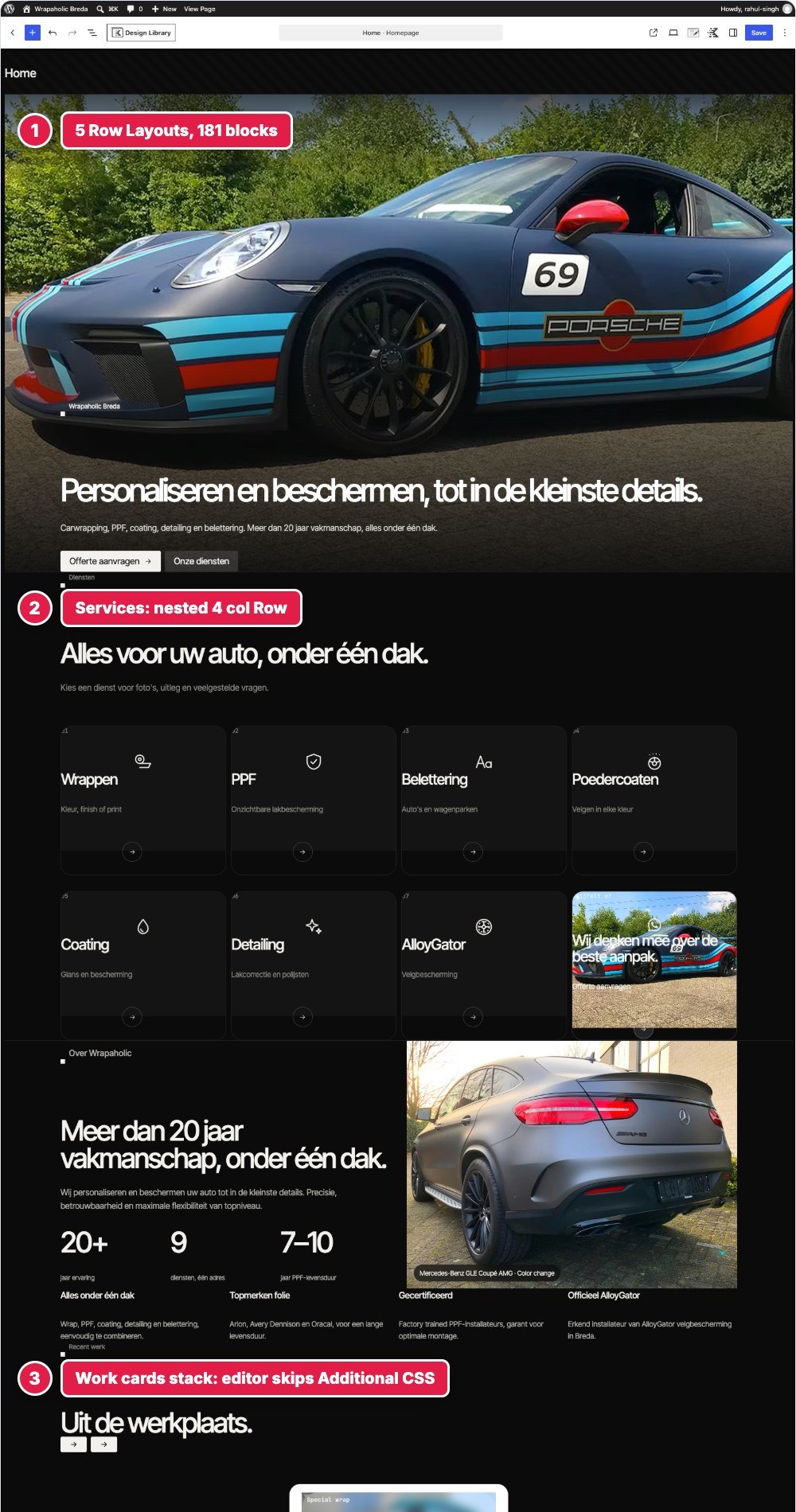
That second caption is the first practical difference you hit. Unblock’s editor canvas shows the finished design. Kadence’s editor does not load the Customizer Additional CSS, so in my build the rotating badge was a plain white disc, the project strip was a tall stack of cards and nothing had its glass effect until I opened the front end. If a client edits the page, they edit a version that does not look like their site.
Header and Mobile Menu
The design needed a transparent header that turns solid after 12 pixels of scrolling, hides when you scroll down past 320 pixels and comes back on scroll up, a pill shaped navigation with a blurred glass background, WhatsApp and quote buttons, and a full screen numbered mobile menu that opens with a clip path reveal.
In Unblock the header is the Unblock Theme’s header template part, edited in the Site Editor. It is one Site header element holding an inline SVG sprite of 16 icons, a skip link, the header bar and the mobile menu overlay: 57 blocks, 6 levels deep. There is no header widget or menu component, so every link is an anchor element, and the scroll behaviour, menu toggle, Escape key, scroll lock and aria-current are a 1,355 byte block script on the Site header block. Styling is 23 selectors in a Header collection, 5,205 bytes.
In Kadence the header is pure Customizer: logo on the left, Primary Navigation and two Kadence Pro buttons on the right, a mobile row with a trigger, and the off canvas drawer switched to the Fullwidth layout. The drawer JavaScript, including Escape, aria-expanded and scroll lock, is Kadence’s own, and the menu comes from a normal WordPress menu with aria-current built in. That is a lot of work you do not have to do.
Kadence still needed 6,602 bytes of Additional CSS here, the most of any section, because the Customizer has colours and typography for header items but no pill container, no blur and no per item gap. Header button labels are escaped text, so the WhatsApp icon went in as a CSS mask. And Kadence’s sticky “reveal on scroll up” hides the header from the first scrolled pixel, which is not what the design does, so I switched it off and replaced it with 688 bytes of JavaScript.


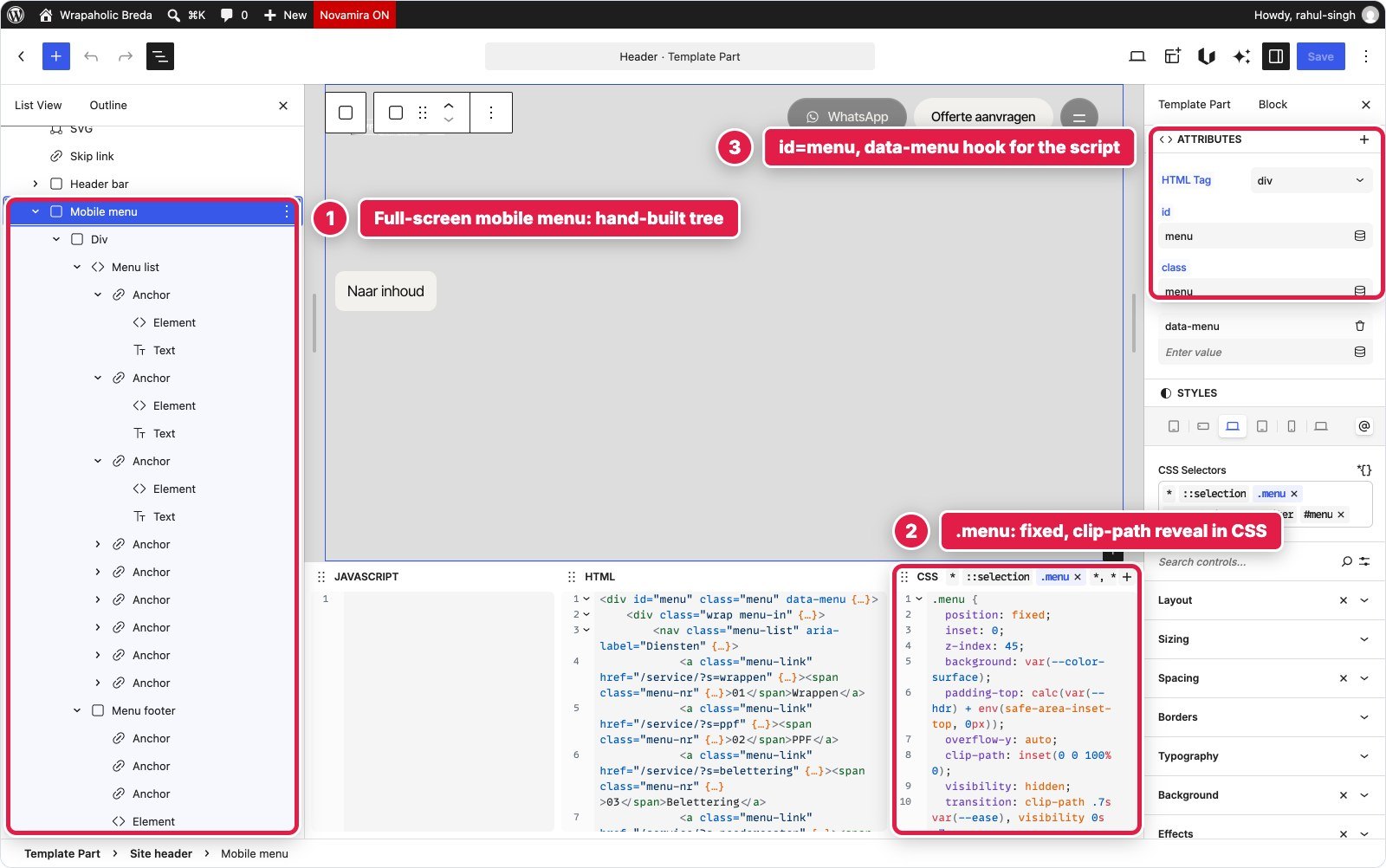

| Header | Unblock | Kadence |
|---|---|---|
| Blocks | 57 (6 levels) | 0, it is Customizer settings |
| Custom CSS | 5,205 bytes | 6,602 bytes |
| Custom JS | 1,355 bytes (everything) | 688 bytes (scroll behaviour only) |
| Native menu and drawer | No | Yes |
Two small things went wrong on both sides. Unblock’s template part wraps the design in its own header tag that cannot take a class, so the real header is a div inside it, and WordPress adds its own hidden “Skip to content” link next to the design’s “Naar inhoud” link. Kadence mangled the relative menu URL “./#diensten” into “http://./#diensten”, and Unblock’s URL sanitising did exactly the same to “./” links, so on both I used root relative links instead.
Winner for this section: Kadence. A native drawer with proper keyboard handling and a real WordPress menu beats hand writing them, even after the extra CSS.
Video Hero
The hero is a full screen autoplaying video with a poster, a dark gradient overlay, an eyebrow, the H1, two glass pill buttons, a round play and pause toggle, and a badge with text running around a circle.
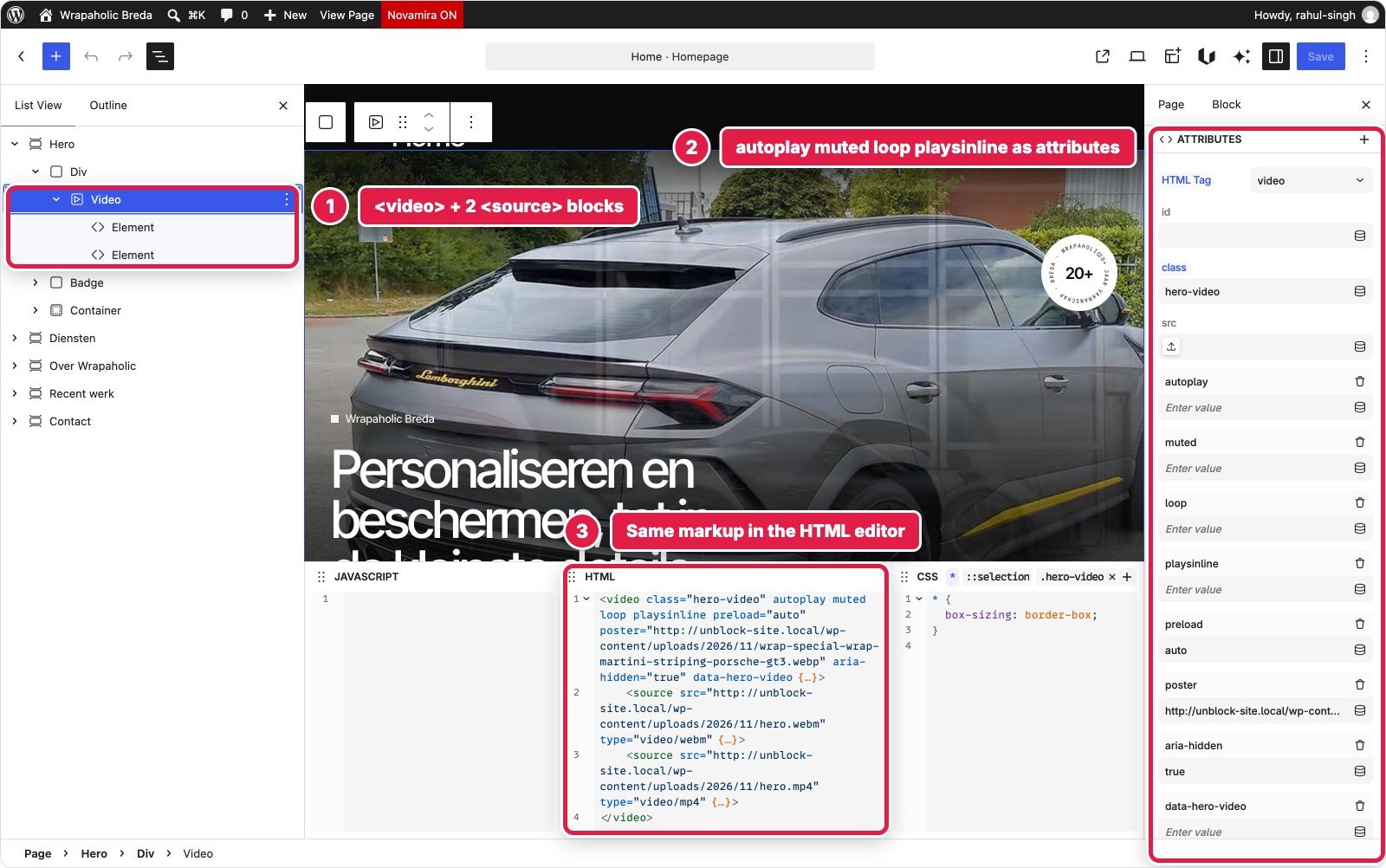
In Unblock the hero is one section element, 22 blocks and 7 levels: a background div with a real video element and two source elements, the rotating badge as an inline SVG with a textPath, and a container with the copy and buttons. Autoplay, muted, loop and playsinline are just attributes you type in the Attributes panel. There is no background video setting. A 756 byte block script handles the toggle, reduced motion and pausing off screen.
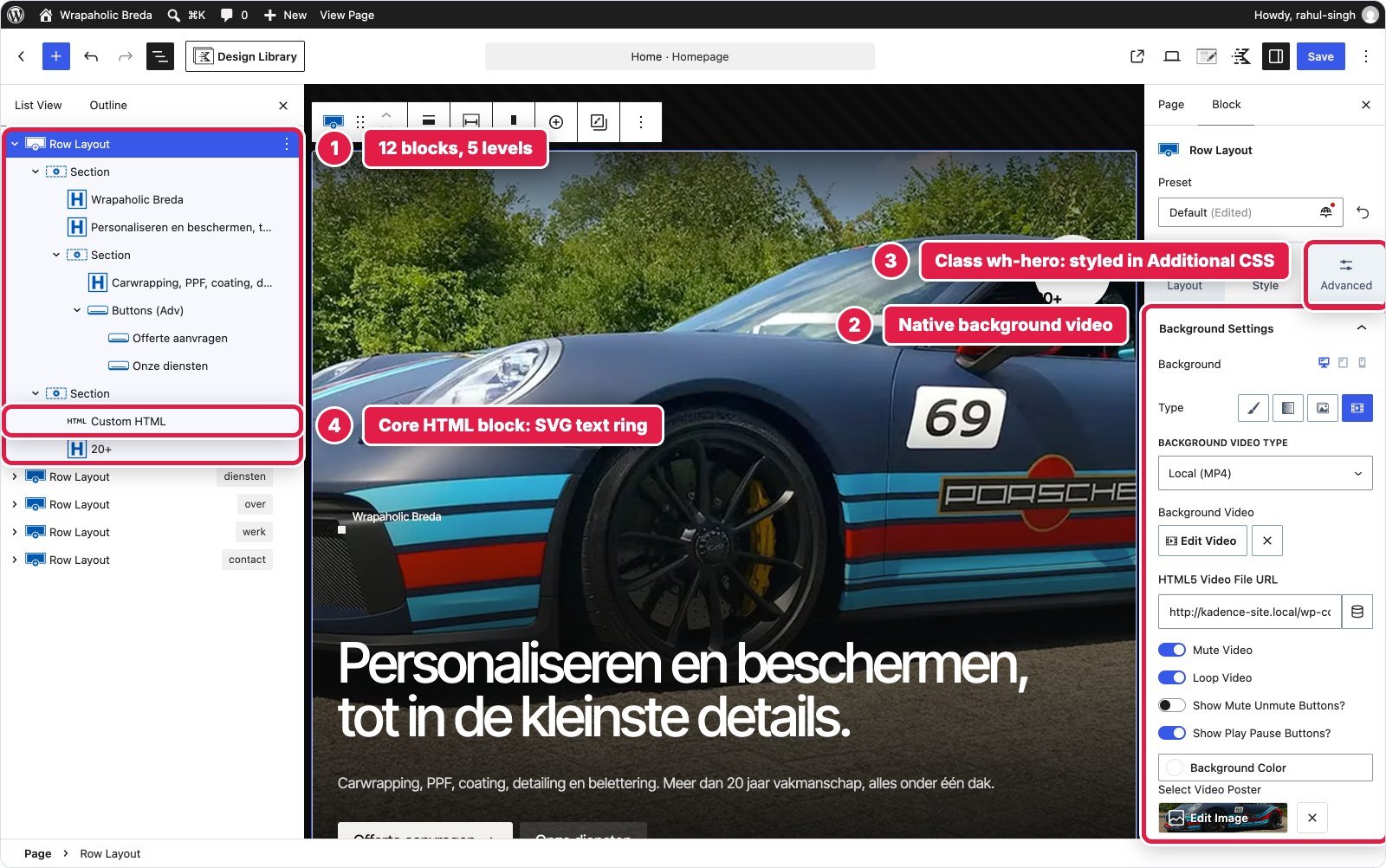
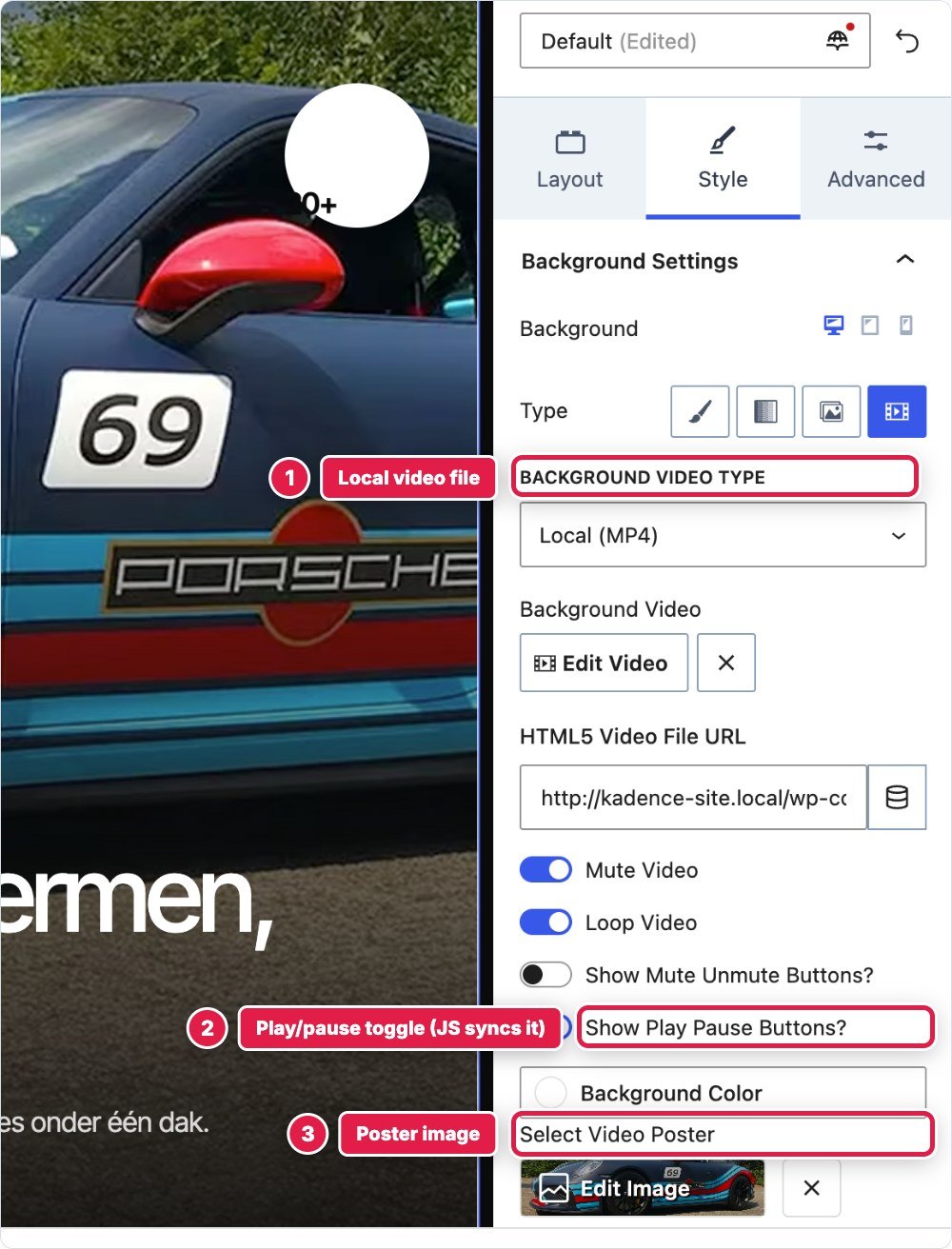
In Kadence the hero is one Row Layout with its background set to video in the Style tab: a local file, muted and looped, with a poster and Kadence’s own play and pause buttons. Inside sit two Sections for the copy and the badge: 12 blocks, 5 levels. That is the native way, and it is quicker to click together. But the text ring around the badge needed a Custom HTML block (324 bytes of SVG), because no Kadence block puts text on a path. The height clamp of 620 pixels to 960 pixels could not be set, because the Row min height takes one unit for all devices and has no maximum, and Kadence also puts a min height on the inner column that overflowed by 2.5 pixels until I reset it.
The native video buttons have hard coded English aria-labels, no reduced motion handling, no off screen pause and no sync with the video state. Fixing that for a Dutch site took 1,121 bytes of JavaScript, more than Unblock’s whole hero script.
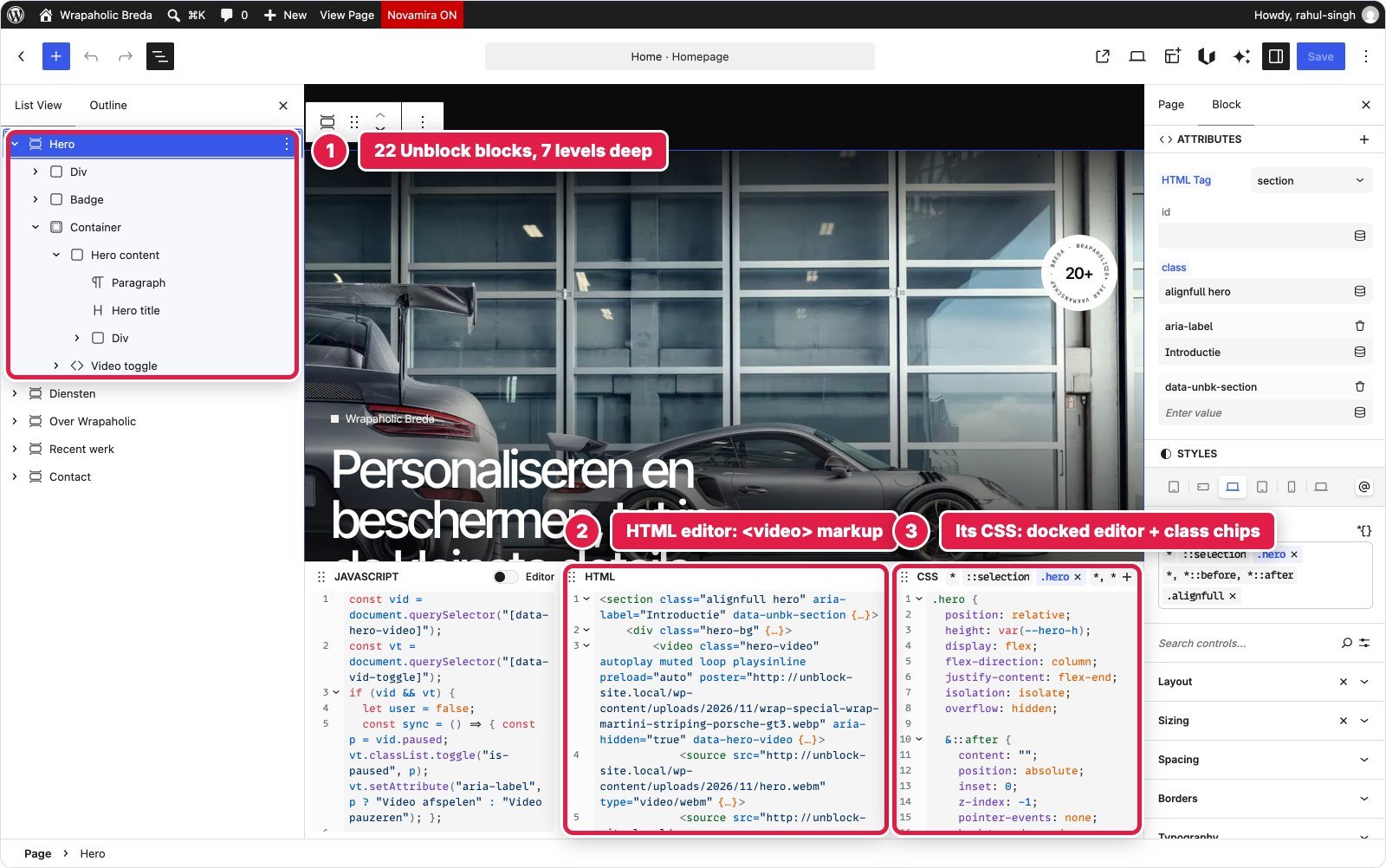
| Hero | Unblock | Kadence |
|---|---|---|
| Blocks | 22 (7 levels) | 12 (5 levels) + 1 Custom HTML |
| Custom CSS | 2,136 bytes | 3,447 bytes |
| Custom JS | 756 bytes | 1,121 bytes |
| Native video control | No, a video element | Yes, background video |
Winner for this section: Unblock. Kadence has the native control, and still ended up with more CSS, more JavaScript and a raw HTML block than Unblock’s hand built hero.
Service Tiles
Eight linked tiles in a 4 column grid (2 on tablet and phone), each with a number, a line icon, a title and a subtitle, a photo that fades in on hover, a gradient overlay, and a frosted glass call to action tile at the end.
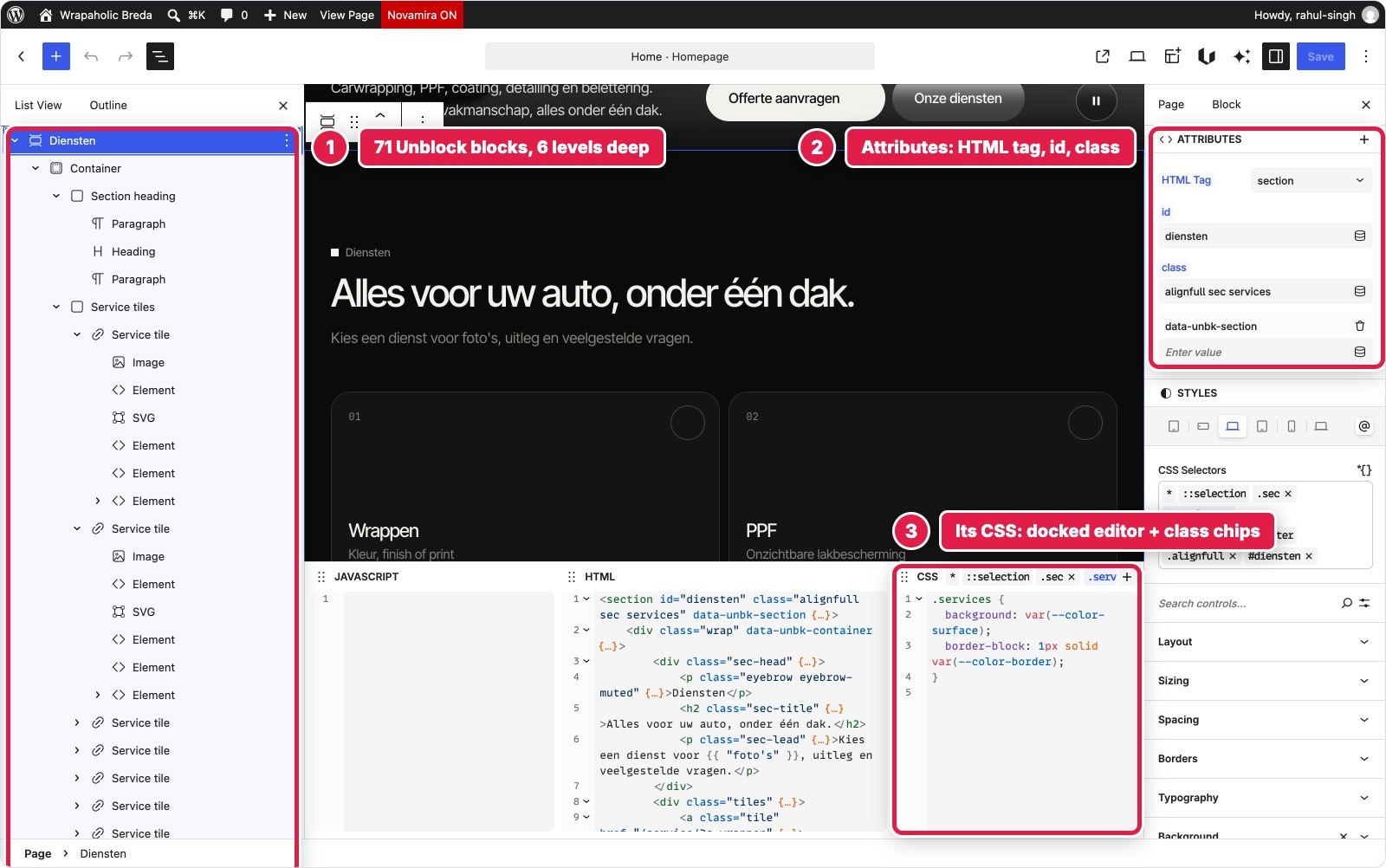
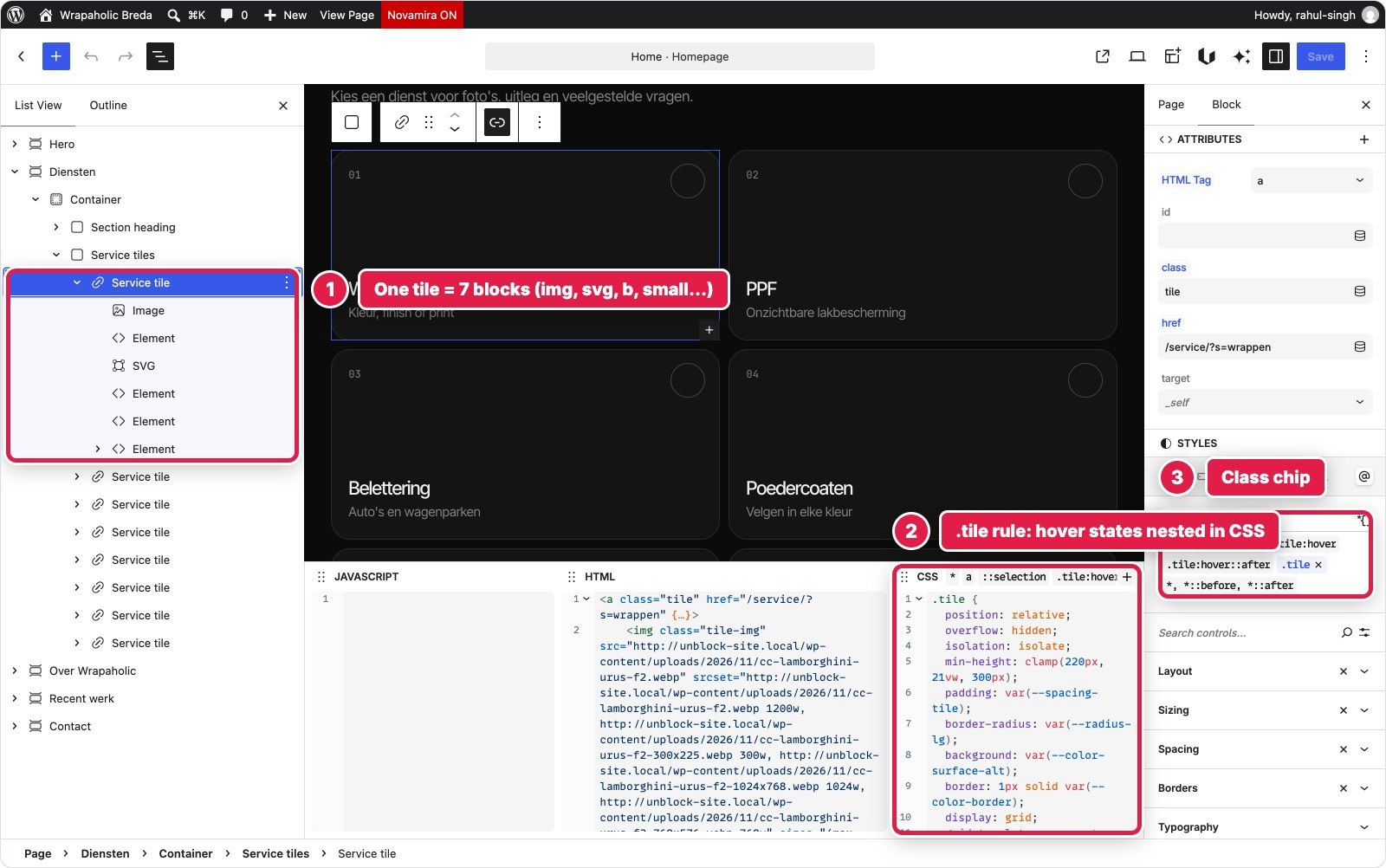
In Unblock the Diensten section is 71 blocks, 6 levels. Each tile is an anchor element containing an image from the media library (with srcset and sizes), a number span, an SVG icon, a title, a subtitle and an arrow badge. The grid, hover zoom and overlays are 13 selectors in a Services collection, 3,744 bytes, and no JavaScript. One quirk: Unblock prints each selector’s media query variants right after that selector, so a couple of descendant specificity tricks from the original stylesheet had to become modifier classes.
In Kadence it is also 71 blocks and 6 levels, built as a Row Layout with a nested 4 column Row of Sections. Each tile is a Section turned into a link with the Overlay Link option, and the hover photo is set natively under Style, Background, Hover. That is a nice feature, and it is visual. The icons are Kadence Icon blocks with Kadence Pro Custom SVG files, which come out filled, so line icons needed a fill:none rule. Kadence also centres Section grids on mobile with justify-content, which I had to reset, and since the theme CSS loads after Additional CSS inside the main element, several resets needed a #wrapper prefix to win. Total: 3,661 bytes of CSS.

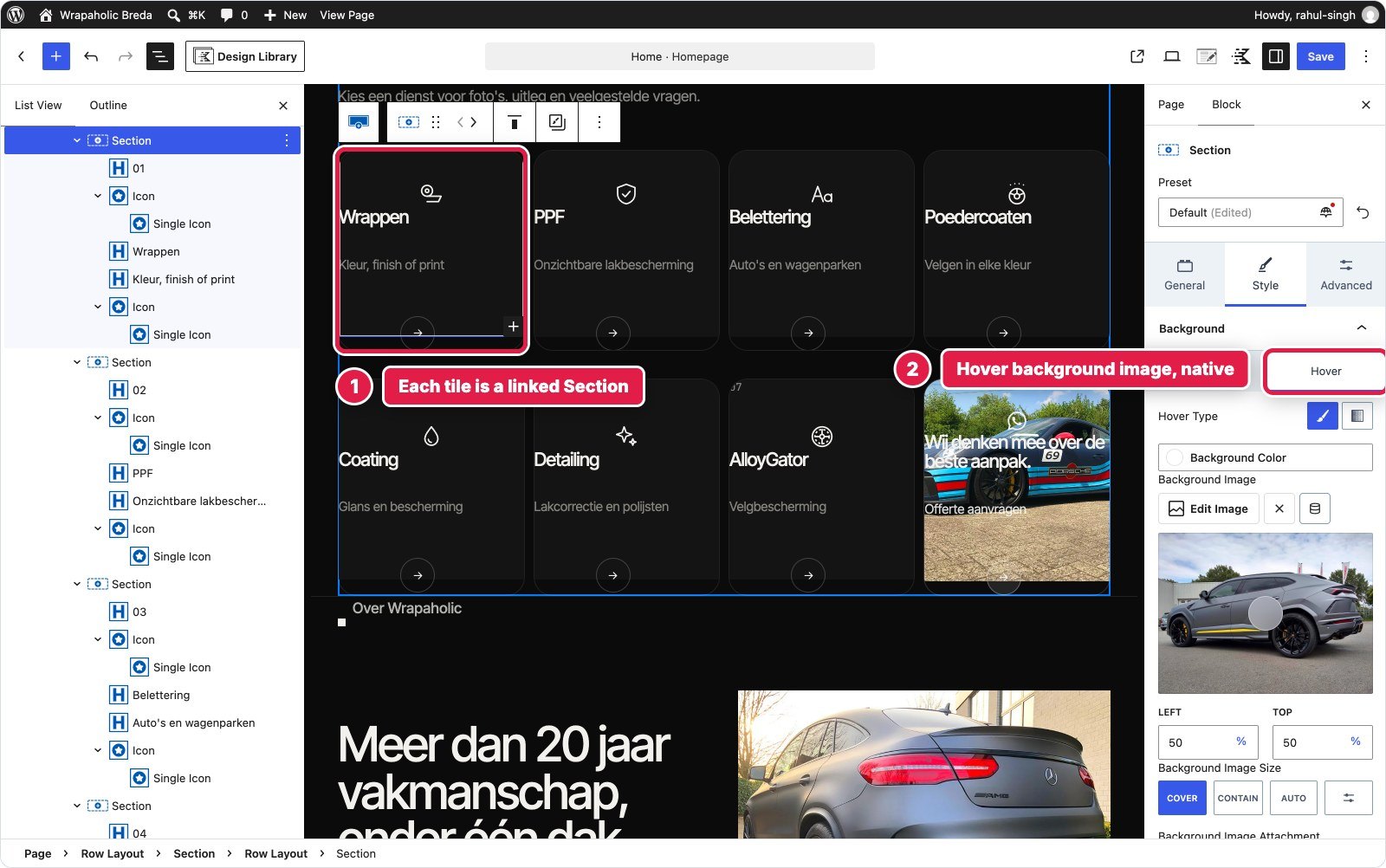
Winner for this section: Kadence, narrowly. Same block count and the same amount of CSS, but the hover image and the linked Section are things a non developer can change without touching code.
About, Stats and Pillars
A two column intro with uneven columns (1fr and 1.1fr), three stats, a photo with a frosted caption, and four pillars with dividers that reflow on tablet and phone.
In Unblock it is 33 blocks, 6 levels. The stats are a real description list (dl, dt, dd), the pillars a real unordered list, and the photo a figure element with a figcaption. Semantics come from picking the HTML tag, not from a widget. The CSS is 12 selectors and 1,966 bytes.
In Kadence it is 32 blocks but 7 levels: a Row with a Section holding nested Row Layouts for the intro, a 3 column stats Row and a 4 column pillars Row, with every text item as Advanced Text and the photo as a Kadence Image with a caption. The 1fr 1.1fr split cannot be set in the Row or Section UI, which only offers preset and percentage widths, and fluid clamp() sizes are not possible because Kadence takes one value per device. That came to 2,224 bytes of CSS.

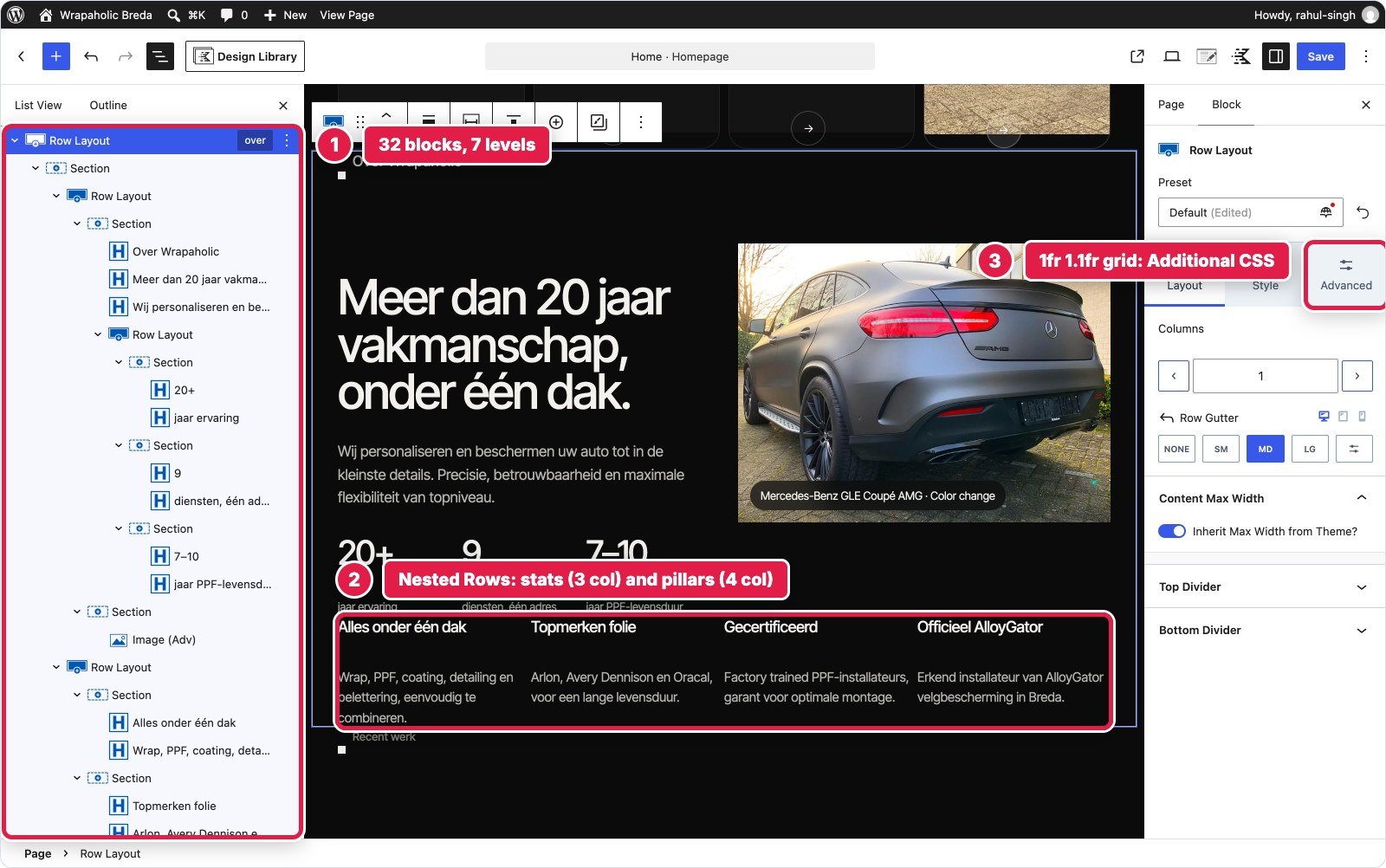
Winner for this section: Unblock. Better HTML, one level shallower, and the uneven grid is one line of CSS in the place you expect it.
Project Strip
A horizontal strip of six project cards and a portfolio card that snaps as you scroll, with round previous and next buttons that move one card, and mouse drag on desktop.
In Unblock it is 41 blocks: a heading row with two buttons and a Project strip div with seven cards. The strip is overflow scrolling with scroll snap in the strip rule (1,633 bytes of CSS for the section), and a 1,048 byte block script moves it by one card and adds drag. There is no carousel block, so this is HTML, CSS and a script. In the editor you see the strip as it looks on the site.
In Kadence it is 38 blocks: a header Section with two icon only Advanced Buttons and a strip Section with seven card Sections, each with a Kadence Image. No Kadence carousel option behaves like a native scroll snap strip with an end card, so the scroll is Additional CSS (2,285 bytes) and the buttons and drag are 1,261 bytes of footer JavaScript. In the editor the cards stack vertically, because the editor does not load Additional CSS, so you are editing seven tall cards that look nothing like the front end.


Winner for this section: Unblock. Both needed custom code, Unblock needed less of it, and its editor shows what the visitor sees.
Contact and Quote Form
Contact details and opening hours with a live open or closed status in Amsterdam time, today’s hours in bold, and a quote form with service chips, three fields, a message box, validation and a success message.
In Unblock this is the biggest section: 76 blocks, 7 levels. The form is Unblock’s own form mechanism, a plain form element with a data-unbk-form attribute. Unblock injects the action URL, a honeypot and a timestamp on the server and handles delivery. Every input, label, fieldset and legend is a real element. What the native form does not do is client side validation or an inline success state, so a 1,819 byte block script validates required fields, posts with fetch and swaps in the thank you message, and a 774 byte script on the contact info computes the open status. This section is also where the visual controls show best: Borders, Typography and Background panels sit next to the CSS editor and write into the same contact rule.
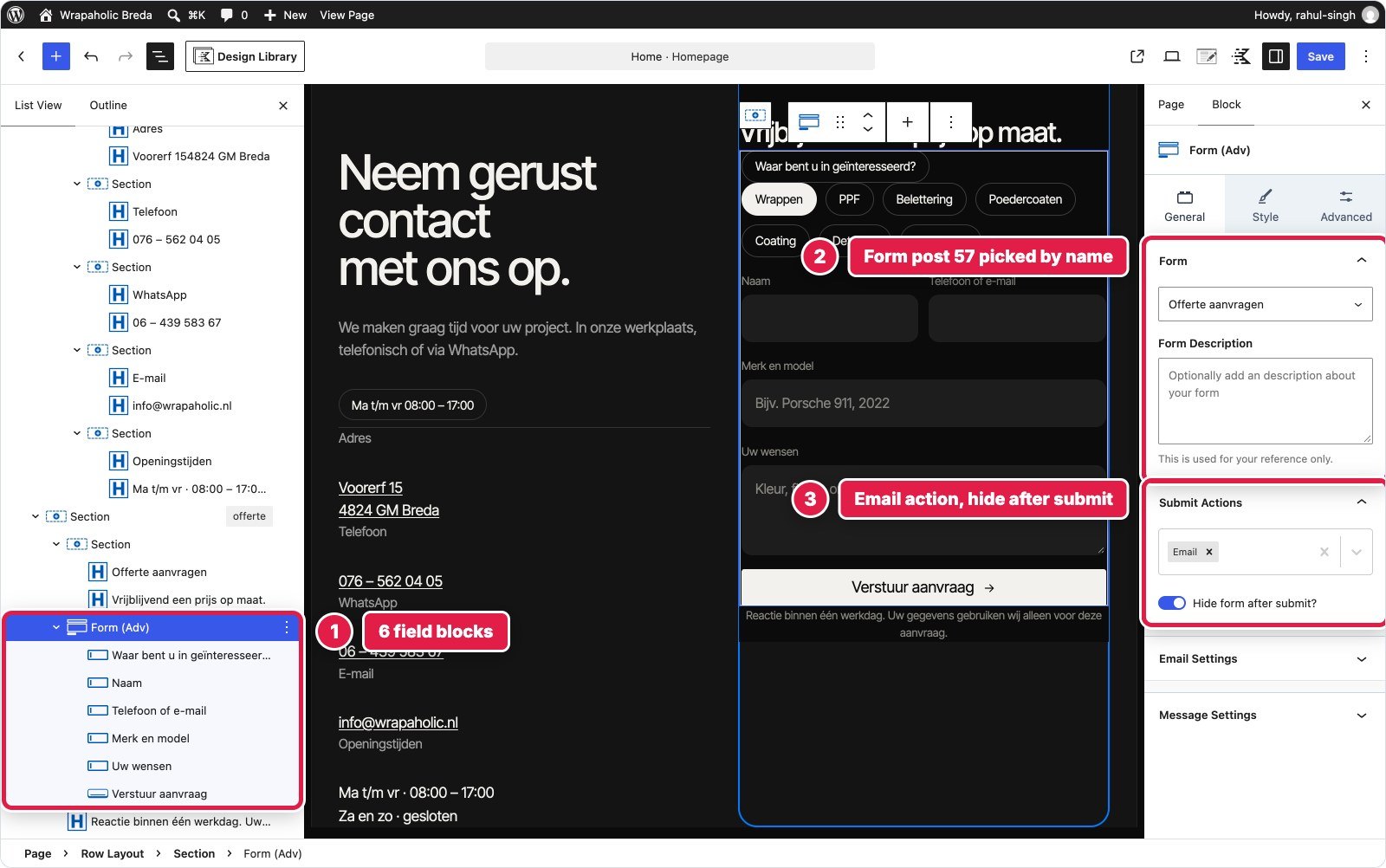
In Kadence the contact section is a 2 column Row with Advanced Text for the details, and the form is a Kadence Advanced Form block pointing at a separate form post: a checkbox group, three text fields, a textarea and a submit button with an SVG icon. Required validation, AJAX submit, an Email action and “hide form after submit” are all native, so no form script was needed. The open status still needed 805 bytes of JavaScript. The friction was in the details: the form wrapper ignores the block className, there is no half width field option (the two up fields are CSS grid), the pill checkboxes are CSS, and the validation strings stay English unless you install the Dutch language pack.


| Contact | Unblock | Kadence |
|---|---|---|
| Blocks | 76 (7 levels) | 28 on the page + 7 in the form post |
| Custom CSS | 6,607 bytes | 5,447 bytes |
| Custom JS | 2,593 bytes | 805 bytes |
| Native validation and success message | No | Yes |
| Delivery handled by the builder | Yes | Yes, Email action |
Winner for this section: Kadence. A proper form block with validation and a success state is worth more than markup purity on the one section that takes leads.
Footer
A 4 column footer (brand, services, more links, workshop address), a giant outlined “Wrapaholic” word across the full width, and a bottom bar with the current year.
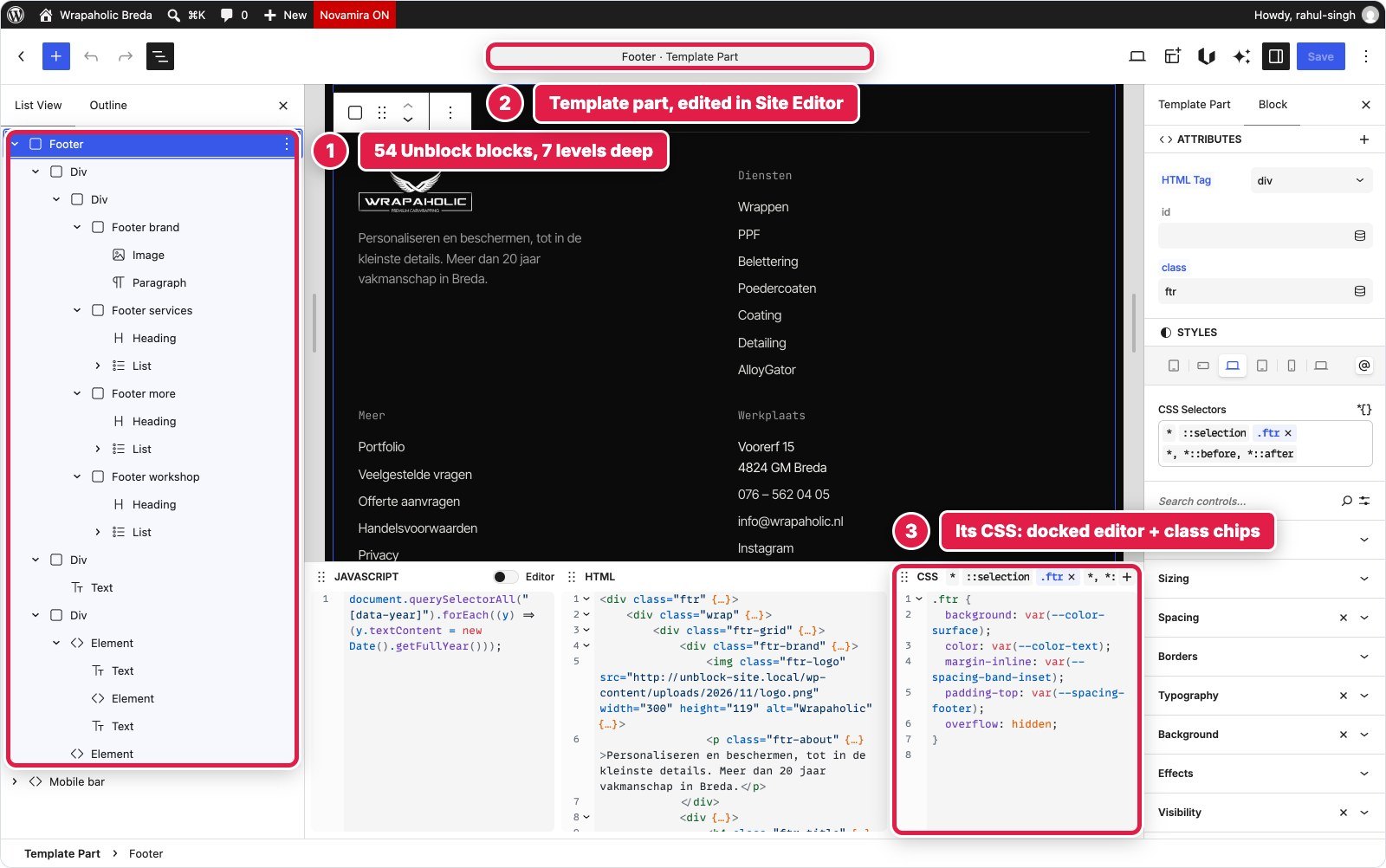
In Unblock it is the Unblock Theme’s footer template part: one Footer element, 54 blocks, 7 levels, with real ul, li and h4 elements for the link columns, the giant word as a single div with CSS text stroke, and a 100 byte script for the year. 2,198 bytes of CSS. Like the header, the template part wraps it in a footer tag you cannot class.
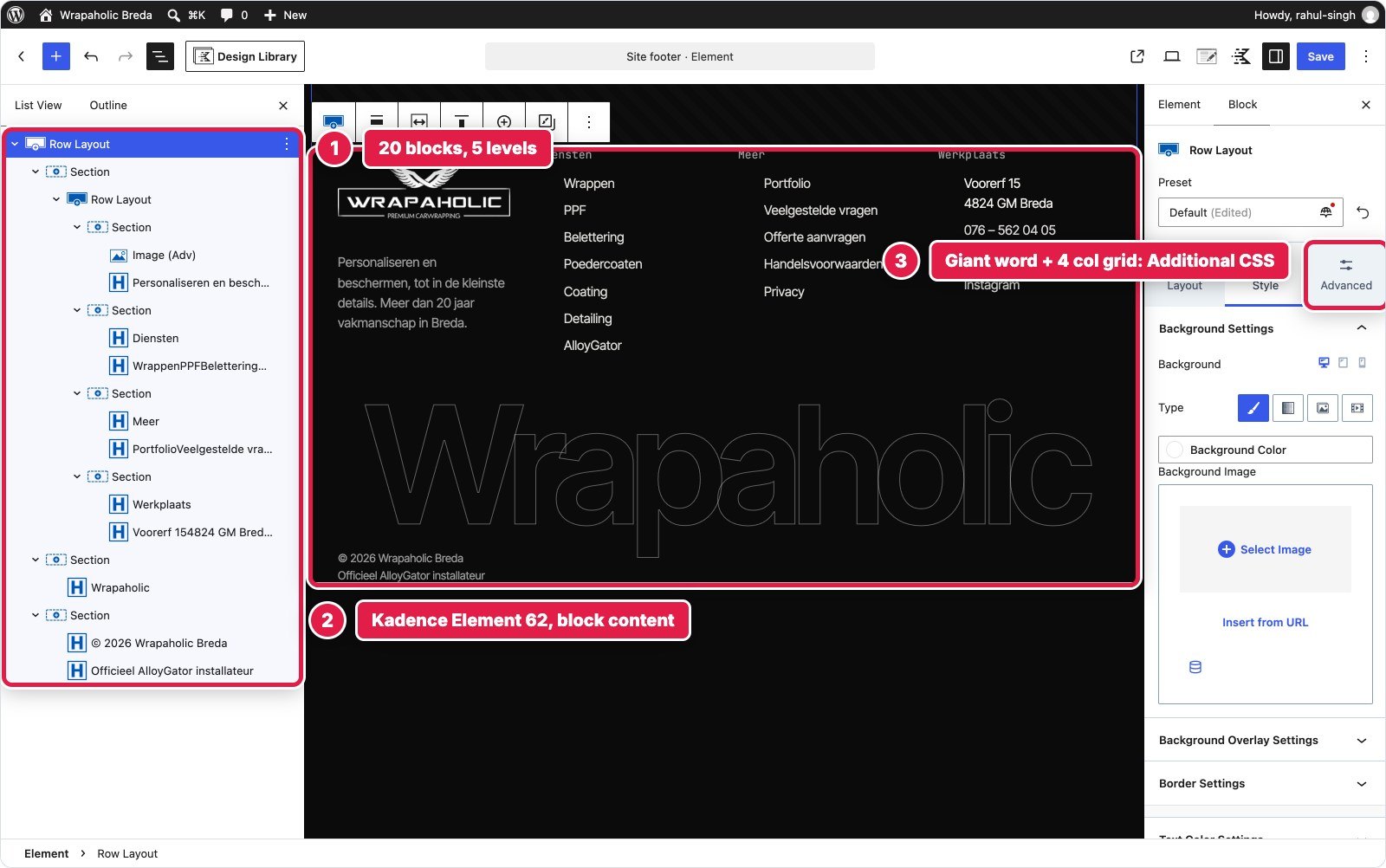
In Kadence I did not use the theme’s Footer Builder, because the design is a full block layout. It is a Kadence Pro Element of the Content Section type, placed on the replace footer hook for the whole site: 20 blocks, a Row Layout rendered as a footer tag with a 4 column grid, the giant word and the bottom bar. The 1.4fr 1fr 1fr 1fr columns and the giant word sizing are Additional CSS (1,839 bytes), plus 89 bytes of JavaScript for the year. Elements print their block CSS after Additional CSS, so my overrides needed higher specificity.
Winner for this section: Unblock, narrowly. Kadence used fewer blocks, but it needed a Pro add on, a hook and a specificity fight. In Unblock the footer sits where a block theme expects it.
Mobile Contact Bar
A fixed pill bar at the bottom of the screen on phones with call, WhatsApp and quote buttons, hidden while the menu is open or the form has focus.
In Unblock the bar is a nav element in the footer template part, 10 blocks, with three anchors. It is hidden on desktop and becomes the fixed bar inside a 680 pixel media rule (974 bytes of CSS). It has no script of its own: it hides through classes the header and form scripts already set on the html element. One friction point: the design’s breakpoints are 1080, 680 and 380 pixels, Unblock’s presets are 780 and 360, so I created new site at rules.
In Kadence it is a second Kadence Pro Element hooked after the footer: one Section rendered as nav with an Advanced Buttons block of three buttons and SVG icons, 5 blocks. Fixing it to the bottom, the glass and hiding it with the drawer open is 1,129 bytes of CSS, and hiding it while the form has focus is 314 bytes of JavaScript. On a desktop width editor canvas the bar renders empty, so you have to switch to the Mobile preview to see it.


Winner for this section: Unblock. Less CSS, no extra script and no second Element to keep track of.
Section tally: Kadence takes the header, the service tiles and the form, Unblock takes the hero, the about block, the project strip, the footer and the mobile bar. Kadence wins where it has a mature native component. Unblock wins wherever the design asks for something no component offers, which on a custom agency design is most of the page.
Design System, Fonts and Global Styles
Unblock has a Variables manager. My build holds 120 CSS custom properties on :root in collections for Colors (34, in HSL), Spacing (36), Typography (25, including fluid clamp() sizes), Effects (20 radii, shadows, gradients and easing values) and Layout. Every colour, size, radius and shadow in every component rule reads a token. Selectors live in 11 collections (156 selectors in total), and there are 11 at rules for breakpoints, hover, reduced motion and keyframes. Fonts are installed through the WordPress Font Library from Unblock’s Fonts tab and served from the uploads folder, with no request to Google.
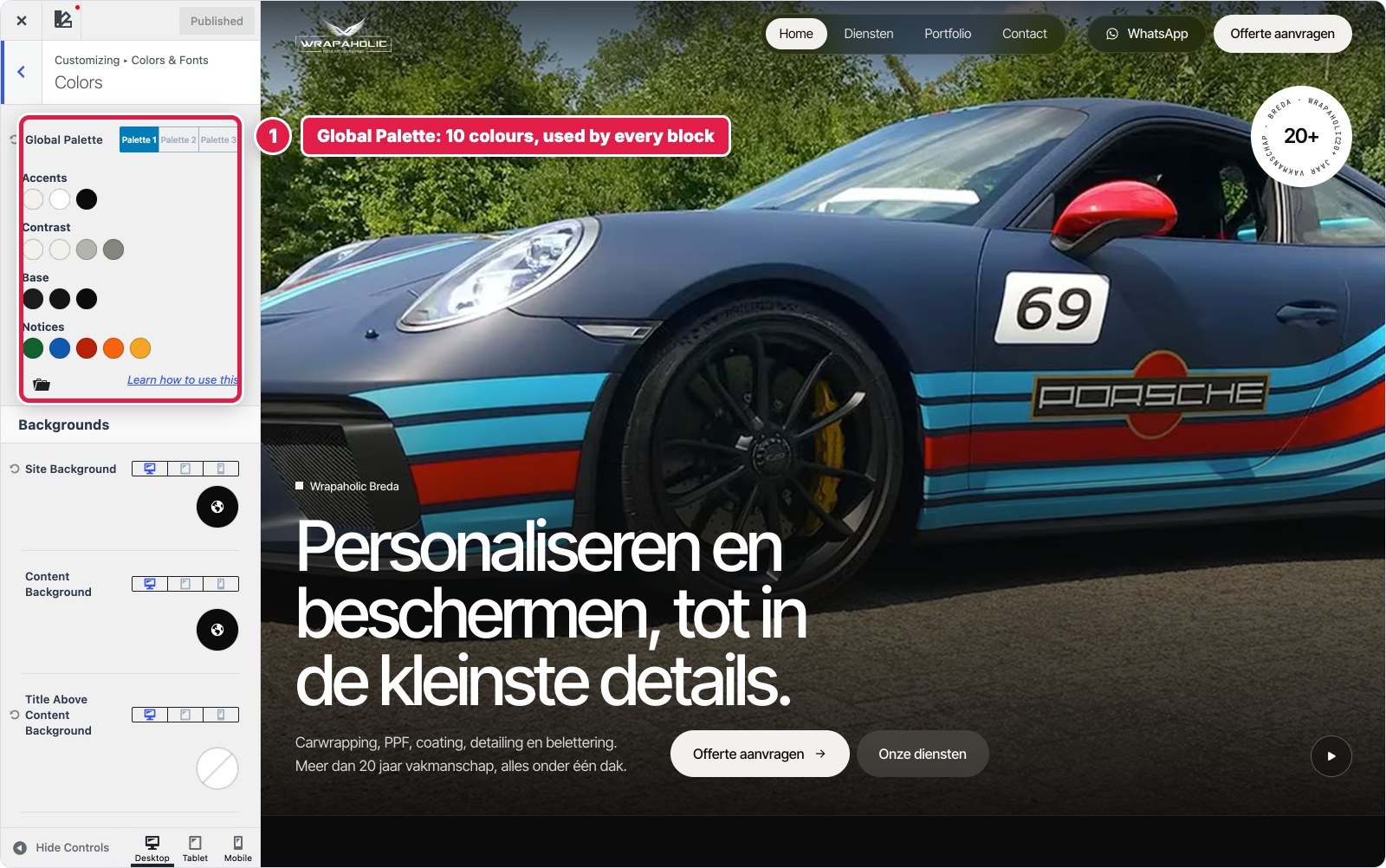
Kadence uses the Global Palette: 10 colour slots that every block references by name, which is excellent when a client wants to change the brand colour in one place. Typography sits in the Customizer (Inter Tight body, headings inheriting it at weight 500), with Kadence Blocks typography for the JetBrains Mono labels. Spacing and fluid sizes are where Kadence stops: there is no clamp() support in the controls, so my Additional CSS maps the palette to its own tokens for the fluid sizes.

My verdict here: Unblock is a real design system in the developer sense, Kadence is a friendlier one for site owners. If you think in tokens, Unblock. If your client needs to recolour the site without help, Kadence.
Custom CSS and JavaScript: How Much Each Needed and Where It Lives
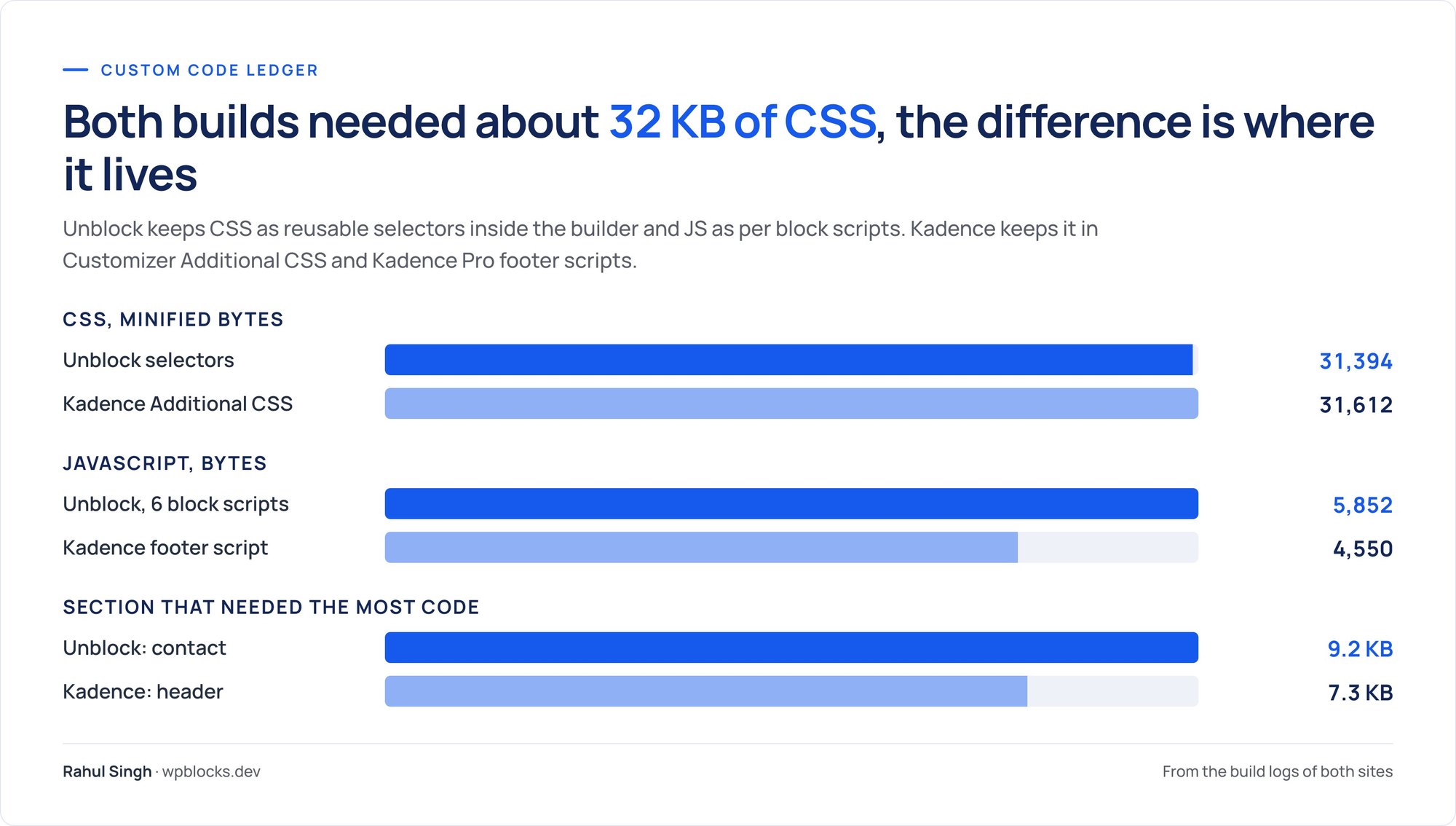
This is the number people ask about first, and the answer surprised me. Both builds needed almost the same amount of CSS. The difference is where it lives and how it is organised.
| Unblock | Kadence | |
|---|---|---|
| Custom CSS | 31,394 bytes as served (33,666 source) | 31,612 bytes of rules (33,560 with comments) |
| Where the CSS lives | 156 named selectors in 11 collections, printed only on pages that use them | One Customizer Additional CSS box, printed on every page |
| Custom JavaScript | 5,852 bytes in 6 block scripts | 4,550 bytes in one footer script |
| Where the JS lives | On the block it belongs to, bundled into one deferred file | Kadence Pro Custom Scripts, footer |
| Raw HTML blocks | None | 1 (the badge ring, 324 bytes) |


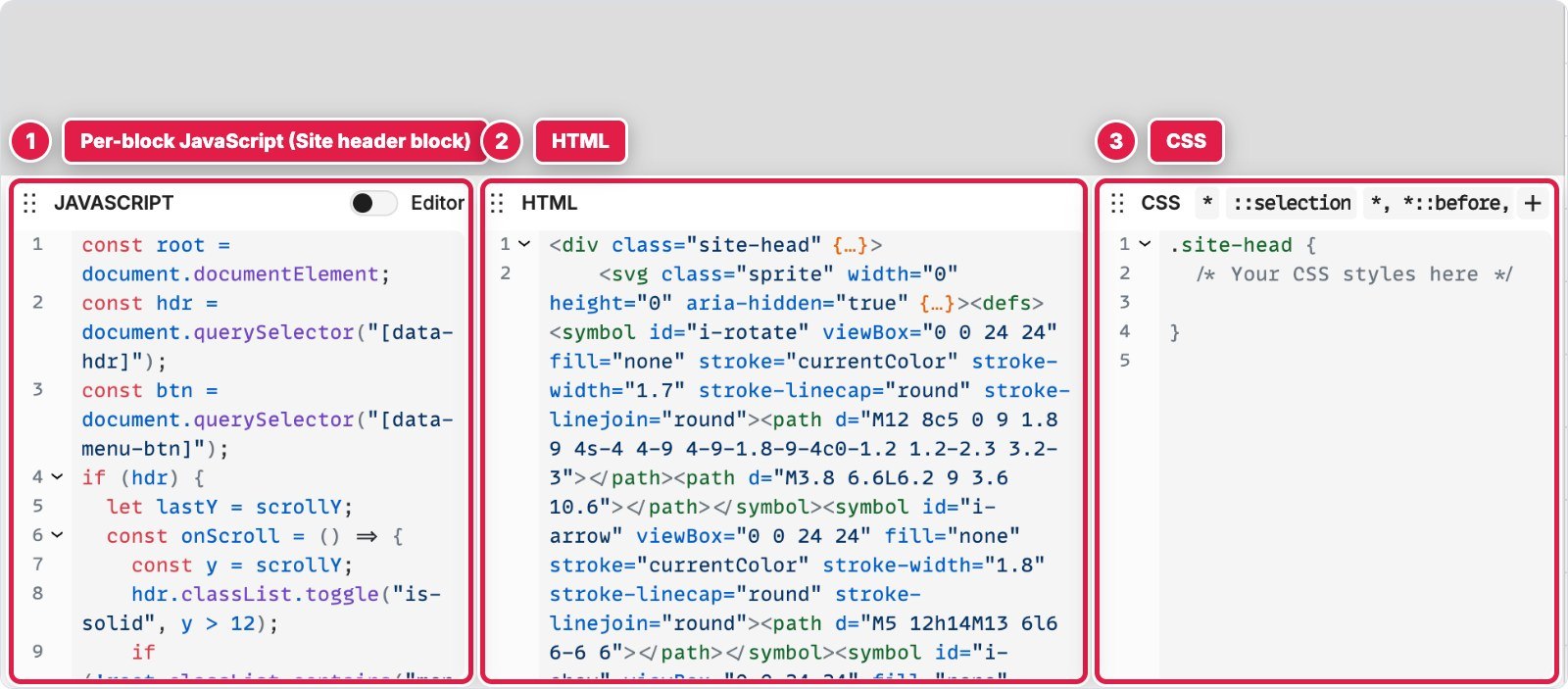

In Unblock, CSS is the builder, so “custom CSS” is a slightly unfair label: those 31 KB replace the per block settings Kadence stores in block attributes. In Kadence, the 31 KB is on top of everything Kadence generates itself, and it lives in one long box nobody on a client team will want to touch. When I needed to find the strip script in Kadence, I scrolled a single footer file. In Unblock I clicked the strip.
The honest catch on the Unblock side: a few things are fiddly. Universal selectors like *, ::selection and :focus-visible need a global scope flag, and a test keyframe I created while probing the parser could not be removed through the CSS tool and still prints about 40 bytes on the page.
Performance: What Each One Ships
I measured both homepages the same way: compressed transfer by type, DOM size, unused CSS and JavaScript, and Lighthouse as the median of three runs on mobile and desktop. The hand coded original is the baseline.
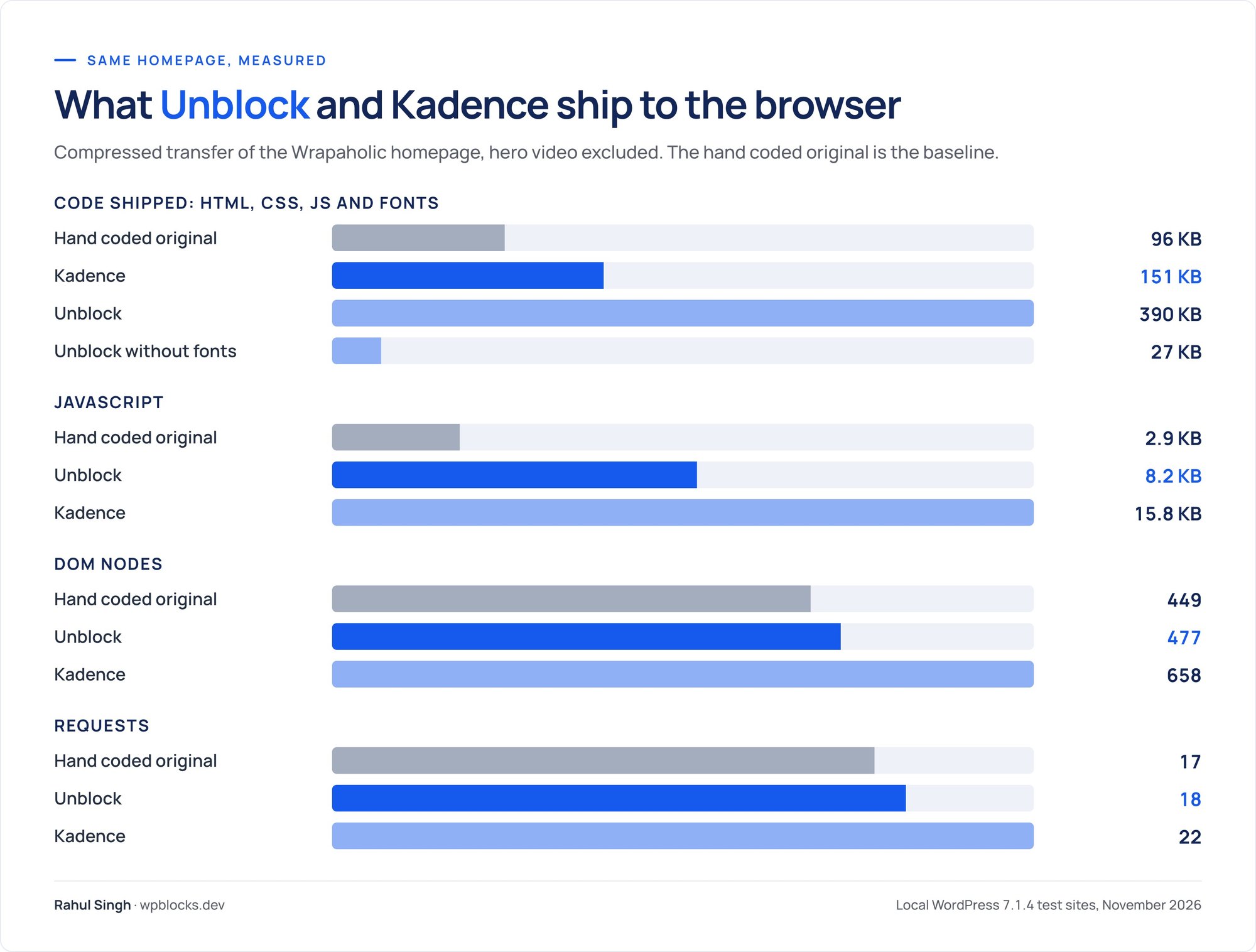
| Hand coded | Unblock | Kadence | |
|---|---|---|---|
| Code shipped (HTML, CSS, JS, fonts) | 96 KB | 390 KB | 151 KB |
| Of which fonts | 75 KB | 363 KB | 65 KB |
| JavaScript | 2.9 KB | 8.2 KB | 15.8 KB |
| HTML document, uncompressed | 22 KB | 89 KB | 315 KB |
| CSS total / unused | 64 KB / 71% | 50 KB / 44% | 384 KB / 75% |
| DOM nodes / max depth | 449 / 10 | 477 / 12 | 658 / 23 |
| Requests | 17 | 18 | 22 |
| Lighthouse mobile | 76 | 70 | 84 |
| Lighthouse desktop | 97 | 96 | 99 |
| Mobile first contentful paint | 1.6 s | 3.0 s | 1.4 s |
| Lighthouse accessibility | 96 | 96 | 100 |
Strip the fonts out and Unblock ships 27 KB of HTML, CSS and JavaScript, which is close to hand written code. Its DOM is 477 nodes against the original’s 449, and the deepest node is 12 levels down. Kadence ships 658 nodes up to 23 levels deep, a 315 KB HTML document because 232 KB of CSS is inlined into it, and three quarters of the CSS it loads goes unused on this page. On markup, Unblock wins clearly.
So why did Kadence score higher? Two reasons. First, fonts: Unblock served 363 KB of font files against Kadence’s 65 KB. Kadence’s “Load Google Fonts Locally” and “Preload Local Fonts” options load only the weights in use, while the Unblock build installed ten Inter Tight faces plus Instrument Serif and JetBrains Mono through the Font Library. That is the single biggest gap between them and the most likely reason Unblock’s mobile first paint landed at 3.0 seconds against 1.4. It is fixable by installing fewer faces, and I left it as built because I tested each builder the way its own setup produced it. Second, on every page in this test, mobile included, the largest contentful paint is the 2.3 MB hero video, so the mobile scores mostly measure how the video loads. Desktop, where the video matters less, is 96 against 99.
Accessibility: Kadence scored 100, Unblock 96. Unblock’s one axe violation is a colour contrast issue that the original design has too, so Unblock reproduced it faithfully. Kadence ended up without it.



My take: Kadence won the scores, Unblock won the code. If you trim Unblock’s fonts, I would expect the gap to close, but I did not test that, so I will not claim it.
Building It With AI
Unblock sells itself on AI building, so I also had an AI agent build each version from the same written brief, with the same pixel comparison as the finish line. That measures how easy each builder is to drive from text, which is where a lot of agency work is heading.
| AI build | Unblock | Kadence |
|---|---|---|
| Tokens used | 352,000 | 479,000 |
| Pixel check runs to pass | 2 | 6 |
| Time to a passing build | 19 minutes | 36 minutes |
| Final pixel difference at 1440 / 768 / 390 | 0.003% / 0.003% / 0.002% | 0.091% / 0.112% / 0.134% |
Unblock was the cheapest and fastest build of the six builders I tested, and Kadence was among the slowest. The reason is the model. An agent thinks in HTML and CSS already, and Unblock’s blocks are HTML elements with CSS selectors, so there is almost nothing to translate. Unblock also exposes its own abilities (create post, insert blocks, update CSS, install fonts) that the agent called directly, and it ships an MCP Bridge for WordPress 6.9 and newer with 16 listed MCP tools and 31 more through the adapter, which connects clients like Claude Code, ChatGPT and Cursor. Its built in assistant, Unbot, uses your own API key through the WordPress AI connectors; I did not use it for this build.
Kadence has to be translated. The agent generated Kadence block markup through the block editor itself, so that every static block carried exactly the HTML its save function expects, and it still needed six comparison runs to chase down Kadence’s defaults: the inner column min height, the mobile centring, theme CSS that loads after Additional CSS, the filled SVG icons. A human hits the same walls, just more slowly.
Lock-in: Switch the Builder Off
I deactivated each builder plugin, left the theme on, and measured what survived on the homepage.


| Plugin switched off | Unblock | Kadence |
|---|---|---|
| Text still visible | 0% | 91% |
| Links still there | 0 of 44 | 26 of 44 |
| Form fields | 0 of 4 | 0 of 4 |
| Hero video | Gone | Gone |
| Page height (original 5,772 px) | 900 px, empty | 7,774 px, sections stacked |
Kadence’s blocks save their HTML into the post, so with the plugin off WordPress still prints the content, and the theme, the Customizer header, the Additional CSS and the Kadence Pro Elements keep most of it styled. The tiles stack and the form disappears, but a visitor could still read the page and call the studio.
Unblock renders its elements on the server. Without the plugin there is nothing to render them, and since the Unblock Theme’s header and footer parts are Unblock elements too, the page is empty. This is the price of Unblock’s model, and you should decide up front whether you accept it. If you stop renewing, the plugin keeps working and only updates, AI and support stop, so the risk is removing it, not lapsing.
Winner: Kadence, by a mile.
WooCommerce: the Same Product Page on Both
A homepage tells you how a builder handles layout. A shop tells you how it handles data, so I went one step further and built a WooCommerce single product template on both sites, against a hand coded reference page that uses the same header, footer and design tokens as the homepage. Both builds run WooCommerce 11.3.0 on the same WordPress 7.1.4 installs as before.
The template had to serve two real products from the Wrapaholic shop. The first is the AlloyGator velgbescherming (wheel protection rings), a variable product with 7 rim sizes from 16 to 22 inch and 5 colours: 35 variations, with the price depending on the size. The second is the XPEL PPF Compact pakket, a simple product on sale from € 895 to € 795. One template had to render both: gallery with thumbnails and a lightbox, breadcrumb, title, price, short description, size buttons and colour swatches with the chosen value next to the label, a variation box with live price and stock note, a quantity stepper, tabs with a renamed “Specificaties” tab, a related product card with a promo banner, and a product bar with the live price on phones.
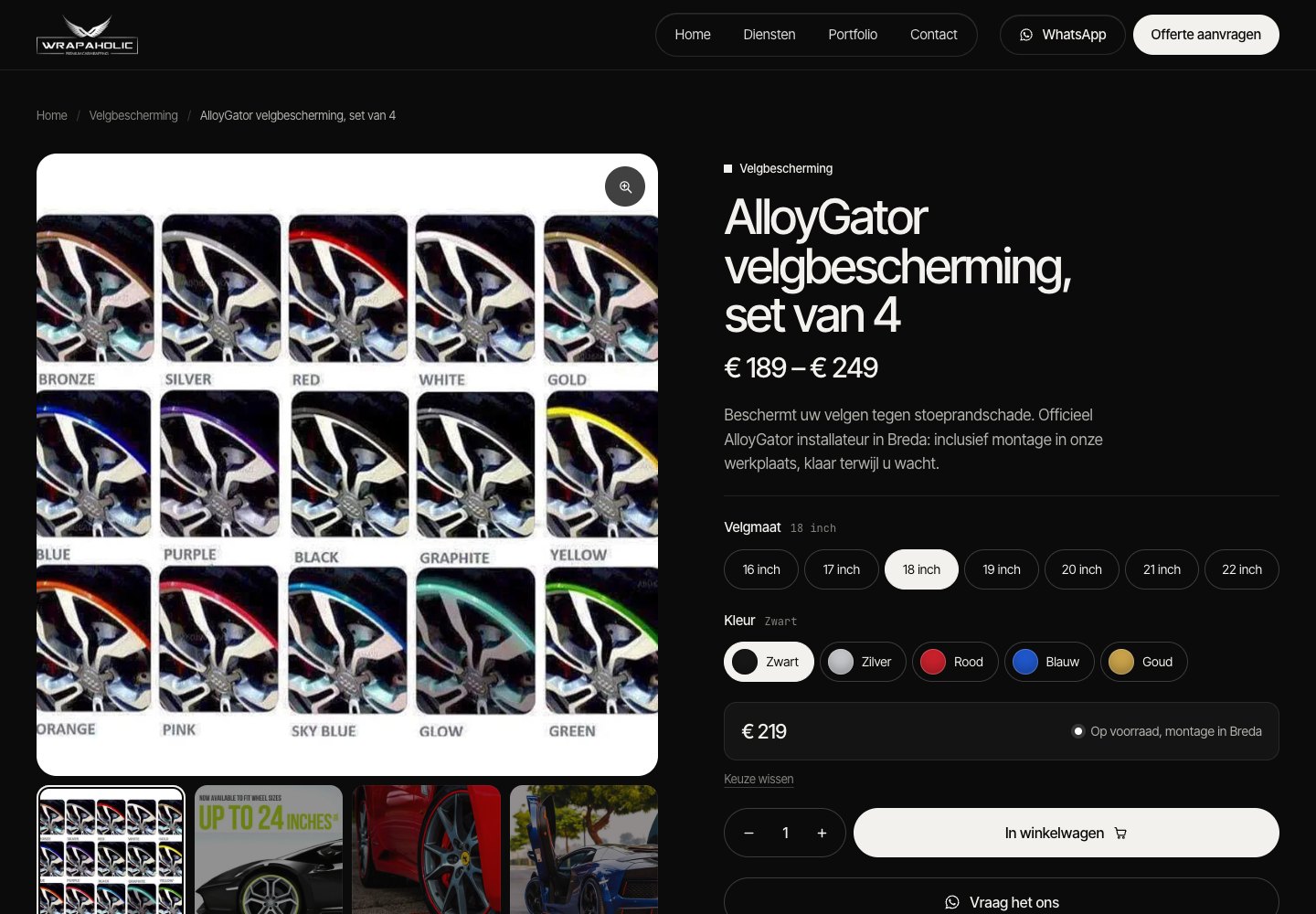
The finish line was the same as for the homepage: under 1% pixel difference at all three widths on both products, and a real cart test. On both builds I chose 20 inch and Rood (red), set the quantity to 2, and got € 498,00 in the WooCommerce cart with the right variation on the line.
How each one builds the product template
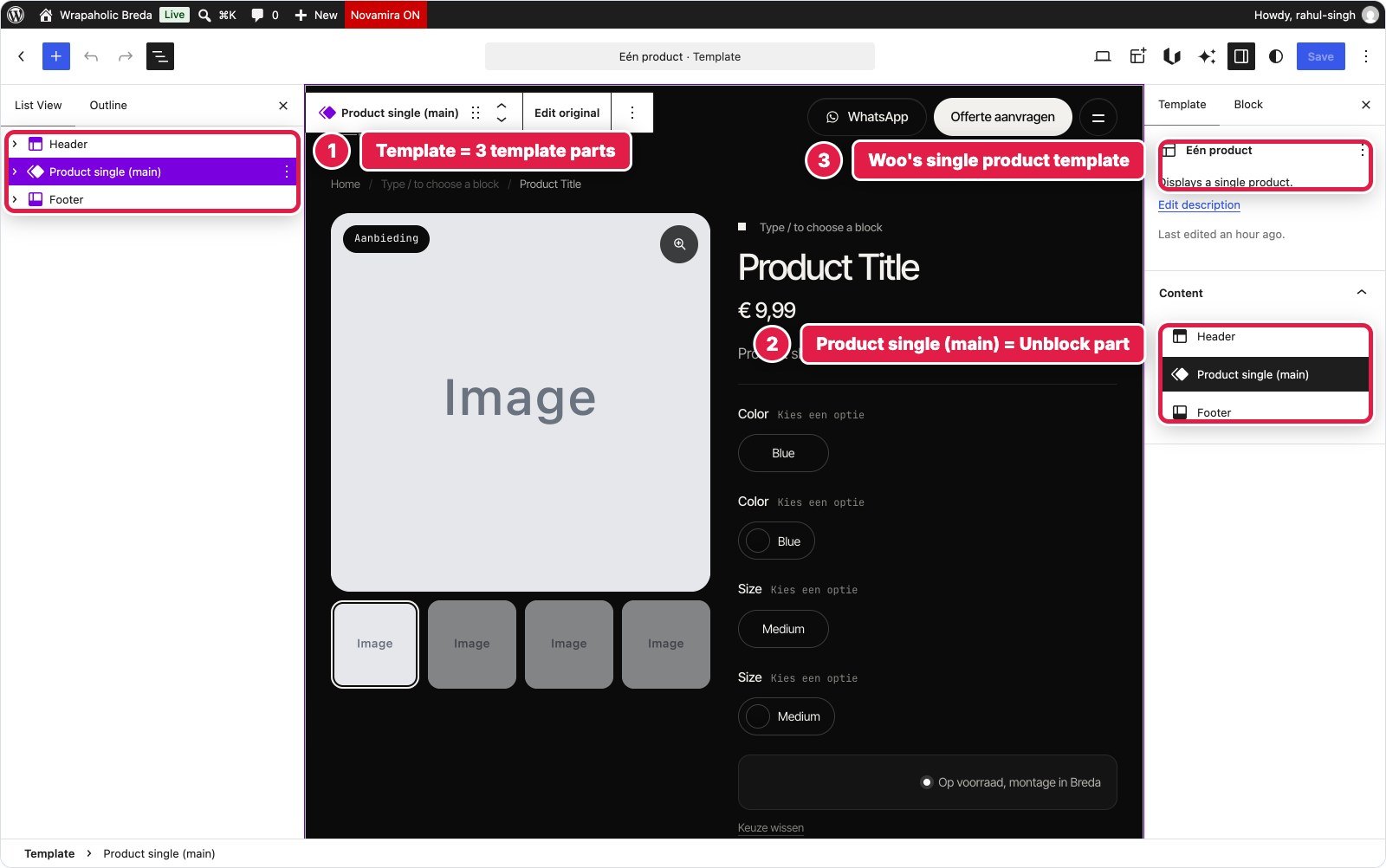
Unblock has WooCommerce data built in. The template reads the current product straight in Twig: post.price_html, post.product_gallery, post.attributes, post.variations, post.is_on_sale, SKU and stock. There is no product template builder with display conditions, because Unblock uses the block theme’s template hierarchy, and that is where I hit its biggest WooCommerce limitation. WooCommerce registers a template called single-product, and every Unblock tool refused to write to that name (“Both a template and a template part have this id”), because WordPress looks templates up by slug without checking the type. Unblock also cannot place WooCommerce’s own blocks in a template. The workaround was clean but manual: a single product template written once with WP CLI that only holds three template parts (header, product, footer), and the whole product page built with Unblock inside a new template part of 193 blocks.
Kadence does it with Kadence Shop Kit, its paid WooCommerce add-on (version 3.0.10, installed from the vendor zip). Shop Kit adds a Woo Templates post type: one Single Product template assigned to all products in a Template Settings sidebar, built from Kadence Row Layouts around Shop Kit’s “Product:” blocks (gallery, title, price, excerpt, add to cart, tabs, upsell). It worked without entering a licence key; the licence only drives updates. The whole template is 67 blocks, plus 9 in the product card template and 5 in the mobile bar Element. Kadence’s pricing page does not say which bundle includes Shop Kit, so check that before you count on it.

The variation picker is where the two models split completely. In Unblock the picker is generated, not placed: a Loop over post.attributes renders one fieldset per attribute, an inner Loop renders the buttons, and a Condition sends the colour attribute to swatches and every other attribute to pill buttons. Each swatch colour is a design token named after the colour term, so adding a colour means adding one token. The buttons sit on a real WooCommerce add to cart form, and a 6.6 KB block script matches the choice against the product’s variations, updates price, stock note and SKU, sets the variation ID and posts to WooCommerce’s AJAX endpoint. Without JavaScript the form still adds the right variation through WooCommerce’s own form handler; I tested that too.
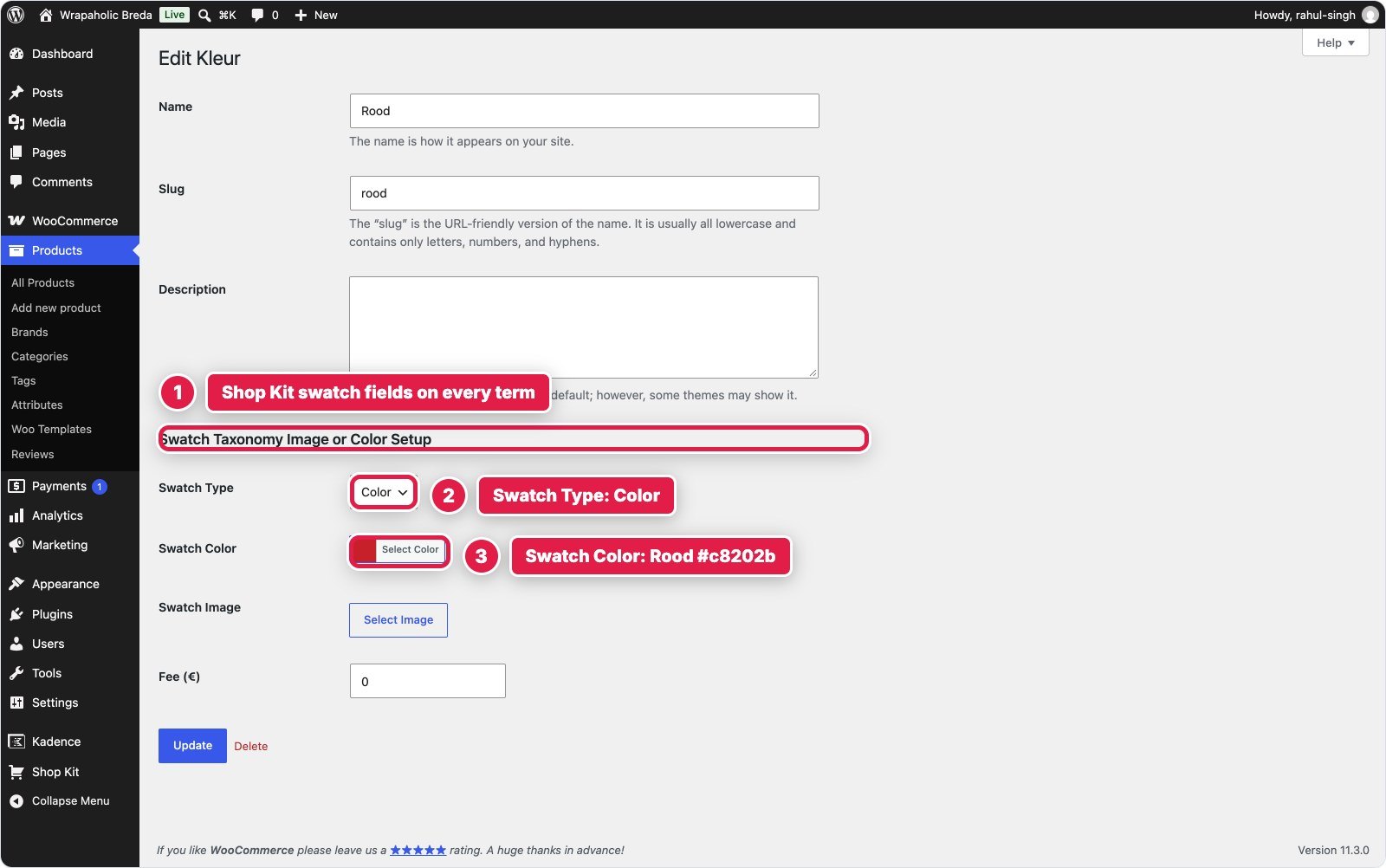
In Kadence the picker is WooCommerce’s own variation form, printed by the Shop Kit Add to cart block and dressed by Shop Kit Variation Swatches. You set the swatch type on the WooCommerce attribute itself (Radio Boxes for the size, colour swatches for Kleur) and a colour on each term, and WooCommerce’s variation script stays in charge of price, SKU, image and variation ID. That is less code to own. The catch is everything around the form: the chosen value next to the label, the “Keuze wissen” reset button, the stock note and two Dutch labels needed 3.9 KB of template JavaScript, and turning Woo’s variation table into the reference pills took 5.4 KB of the template CSS. With 35 variations the product is also over WooCommerce’s limit of 30 for loading variations up front, so every click is an AJAX request with a loading overlay, and only a PHP filter changes that limit.

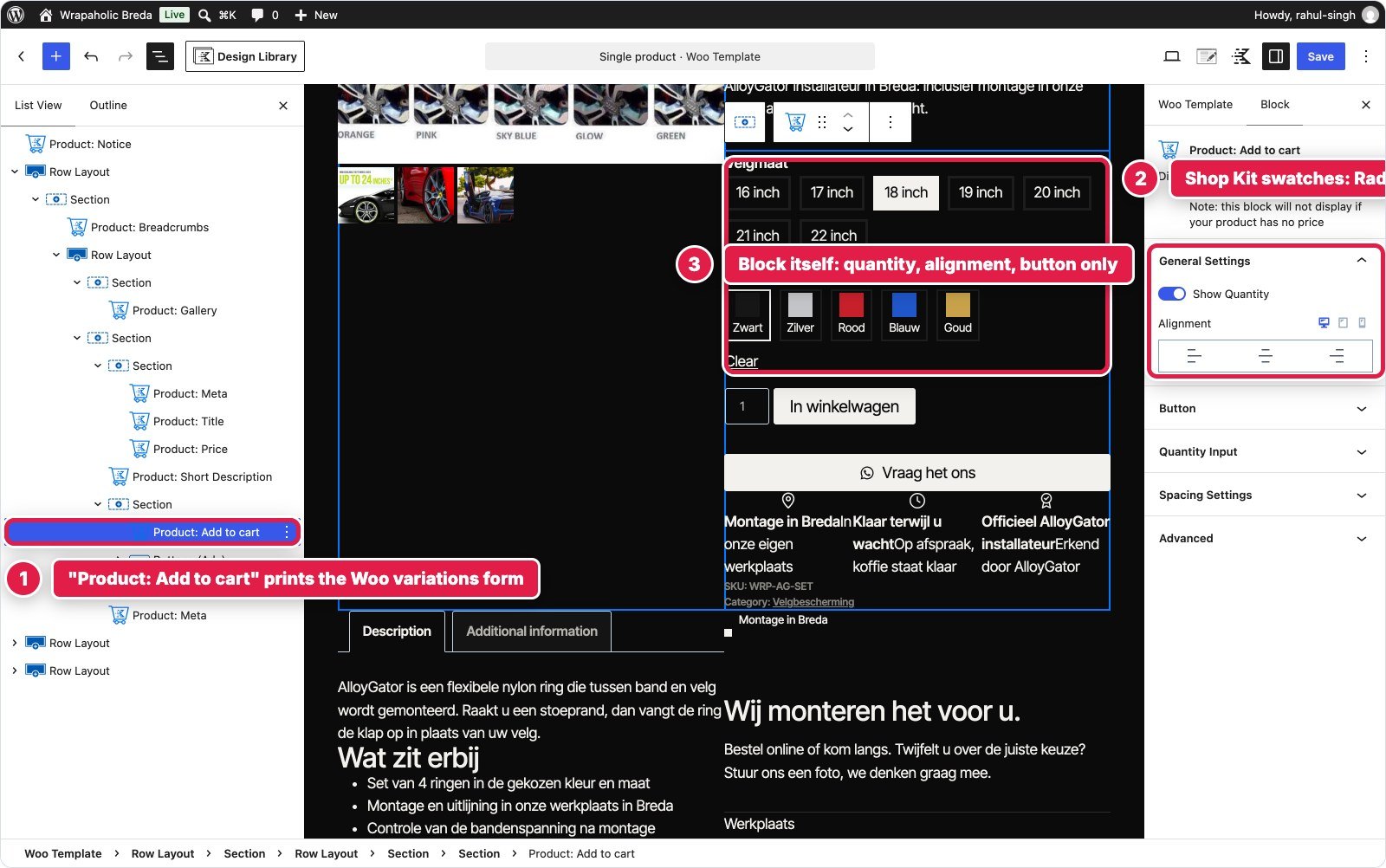
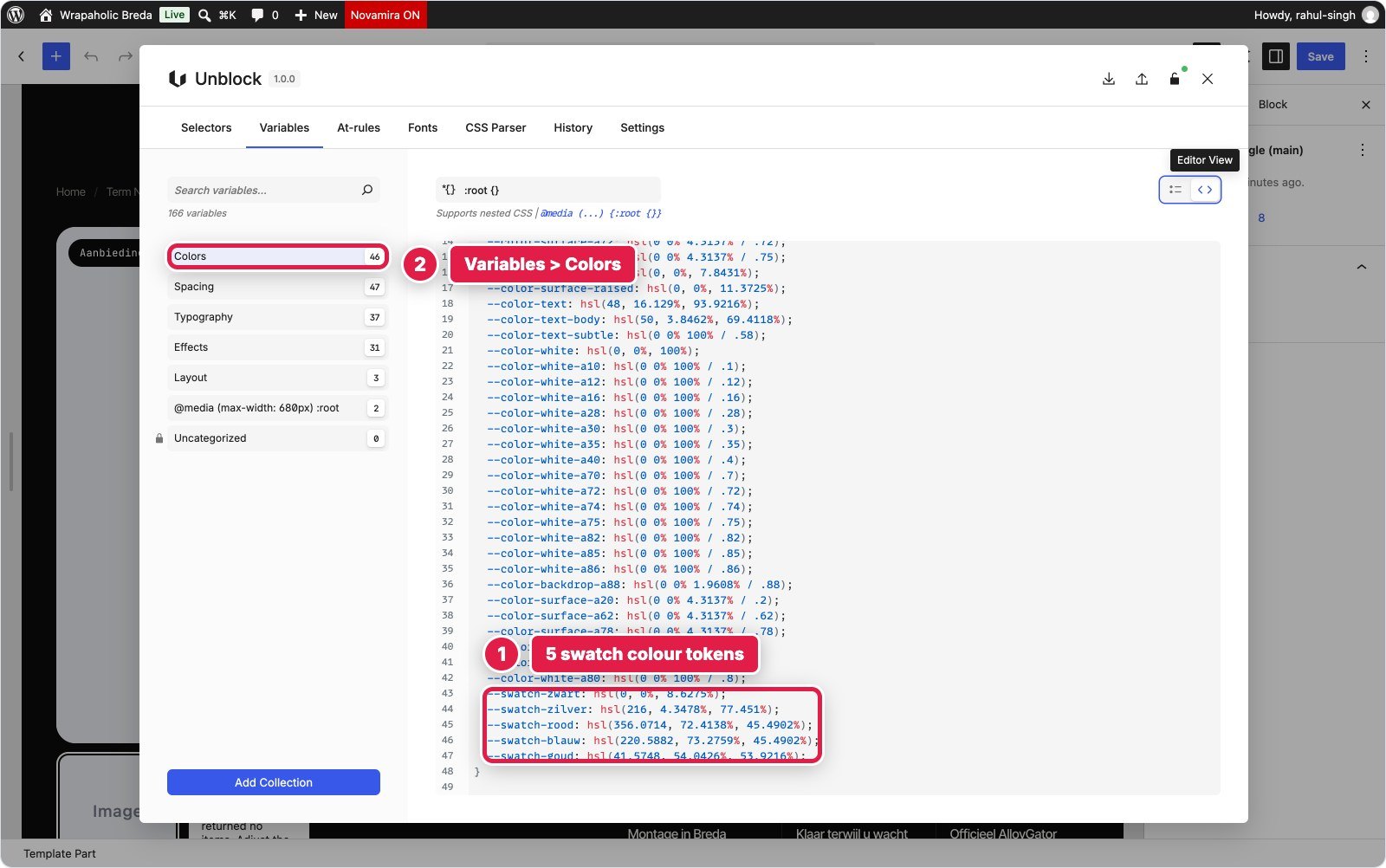
Two more editor differences matter in daily use. Kadence’s Shop Kit blocks render a real product while you edit (you pick the preview product), although the canvas does not load the template’s own custom CSS, the same blind spot as on the homepage. Unblock’s template part has no product context in the editor, so you see “Product Title”, grey “Image” boxes and “No results” in the loops until you view the front end.
| Product template | Unblock | Kadence (Shop Kit) |
|---|---|---|
| Where it lives | Template part in the Site Editor, inside a 3 part single product template | Shop Kit Woo Template (post type), display rule Single Product, all |
| Add-ons | None | Kadence Shop Kit 3.0.10 (no key entered) |
| Blocks | 193 | 67, plus 14 in the card template and mobile bar |
| Variation picker | Own buttons on a real Woo form, 6.6 KB script | Shop Kit swatches on Woo’s form, no picker script |
| Custom CSS | 25.7 KB (incl. about 3 KB of new tokens) | 35.6 KB in the template’s custom CSS |
| Custom JavaScript | 6.6 KB (gallery, tabs, variations, cart, toast, bar) | 3.9 KB (labels, reset, stock note, bar) |
| Store settings changed | Colour term order only | Term order, attribute types, swatch colours, image sizes 800 px, Kadence quantity buttons |
| Build time and pixel runs | 21 minutes, 2 runs per product | 27 minutes, 9 runs (AlloyGator) and 5 (PPF) |
WooCommerce results
Both pages passed. The numbers below are for the variable AlloyGator page, compressed transfer, with Lighthouse as the median of 3 runs.
| AlloyGator page | Hand coded | Unblock | Kadence (Shop Kit) |
|---|---|---|---|
| Code shipped (HTML, CSS, JS, fonts) | 104 KB | 467 KB (363 KB fonts) | 288 KB |
| JavaScript | 5 KB | 59 KB | 115 KB |
| Requests | 14 | 27 | 58 |
| DOM nodes | 388 | 453 | 654 |
| Lighthouse mobile / desktop | 95 / 100 | 76 / 99 | 81 / 99 |
| Mobile CLS | 0 | 0 | 0.03 |
| Lighthouse accessibility | 99 | 99 | 94 |
| Variation picker | static | Own buttons on a real Woo form, 6.6 KB JS | Shop Kit swatches on Woo’s form, no picker JS |
| Pixel difference 1440 / 768 / 390 | n/a | 0.16% / 0.22% / 0.34% | 0.85% / 0.59% / 0.97% |
| Cart test (20 inch, Rood, x2) | n/a | € 498,00, passed | € 498,00, passed |
The homepage pattern repeats with one twist. Unblock’s fonts are again its single biggest cost: without them its page is about 105 KB of code against about 224 KB for Kadence. And most of Unblock’s 59 KB of JavaScript is not Unblock: WooCommerce enqueues jQuery, its cart scripts and order attribution on every product page even though this template uses none of them, and no setting removes them. The twist is that on this page Unblock scored higher on accessibility (99 against 94; Lighthouse flagged a link without a name on the Kadence page) and needed 27 requests against 58.
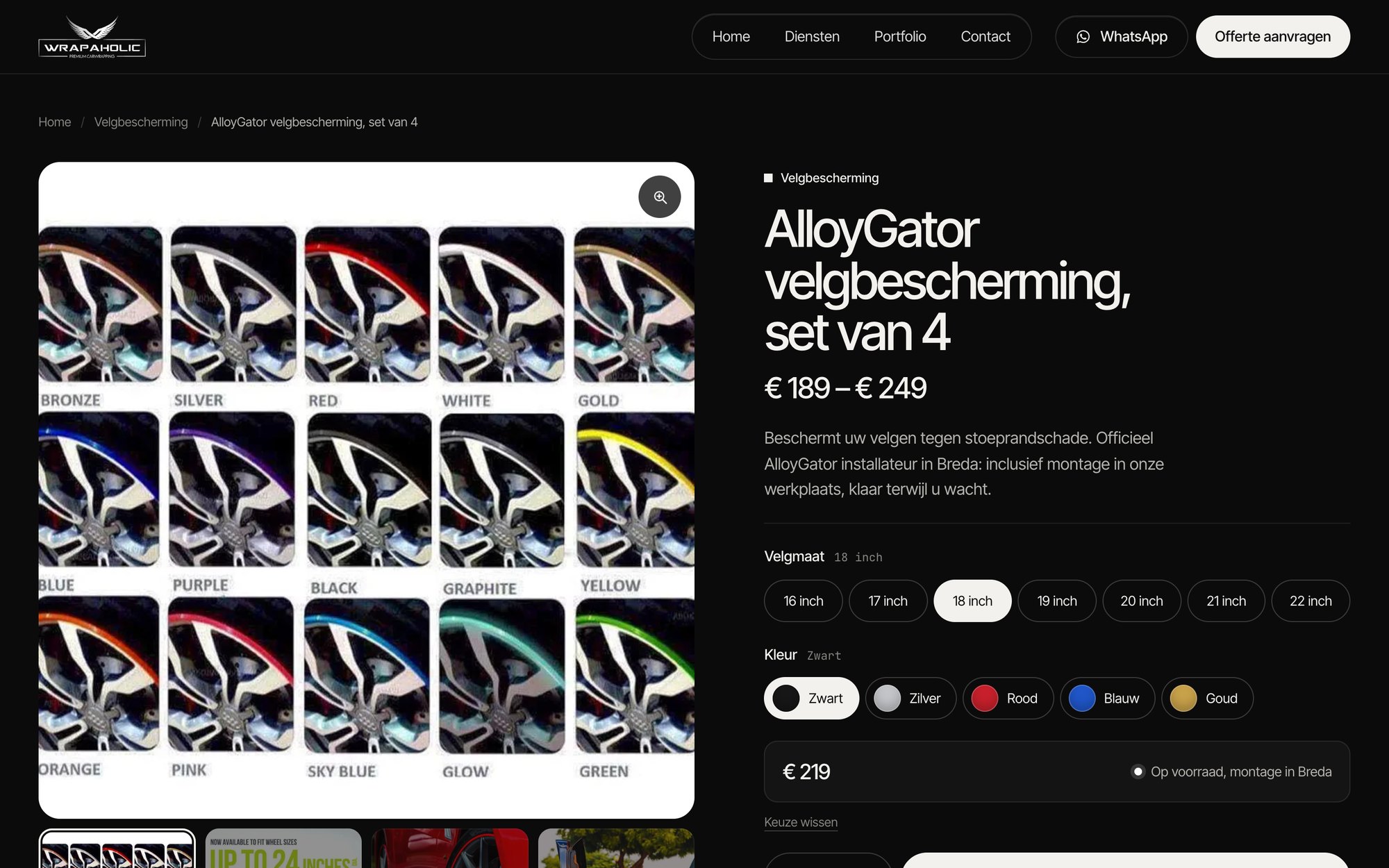
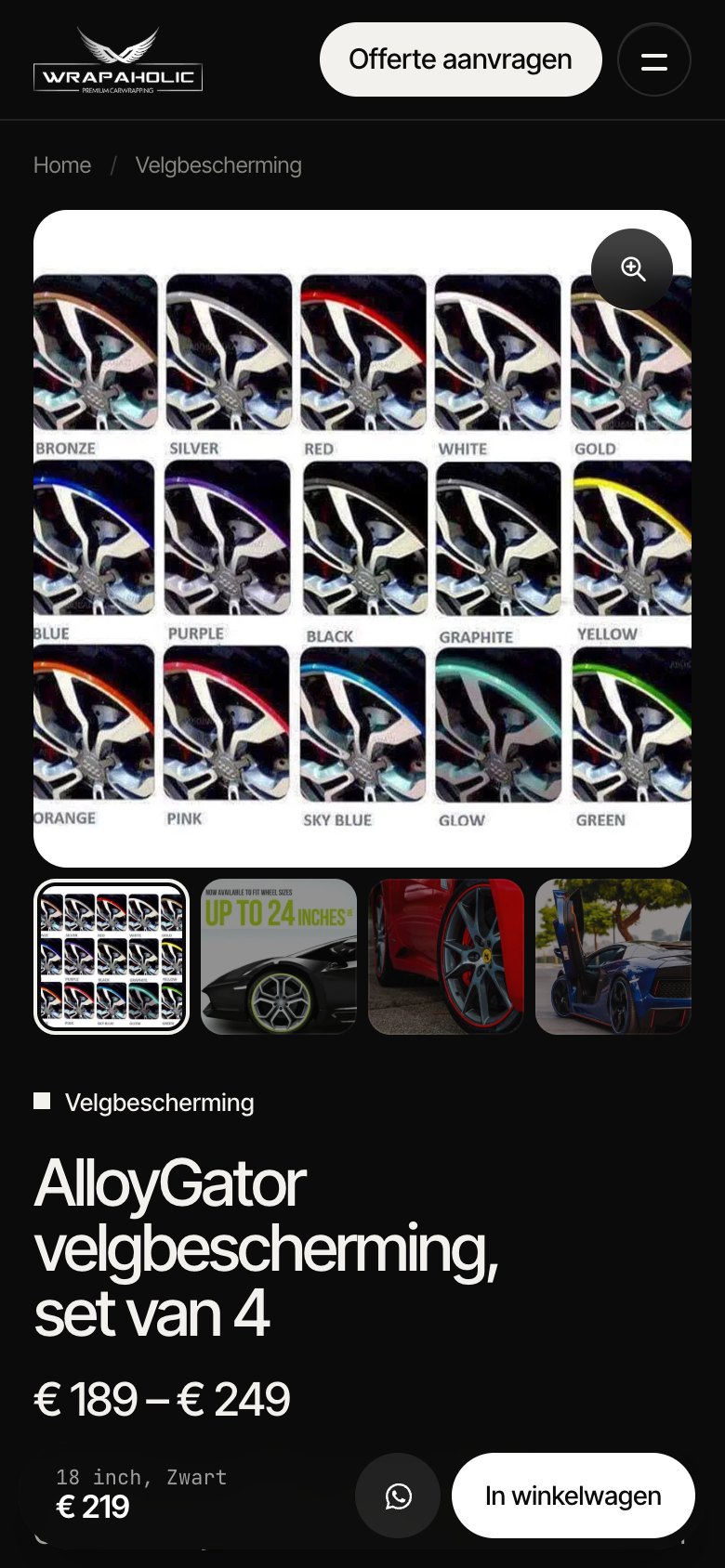
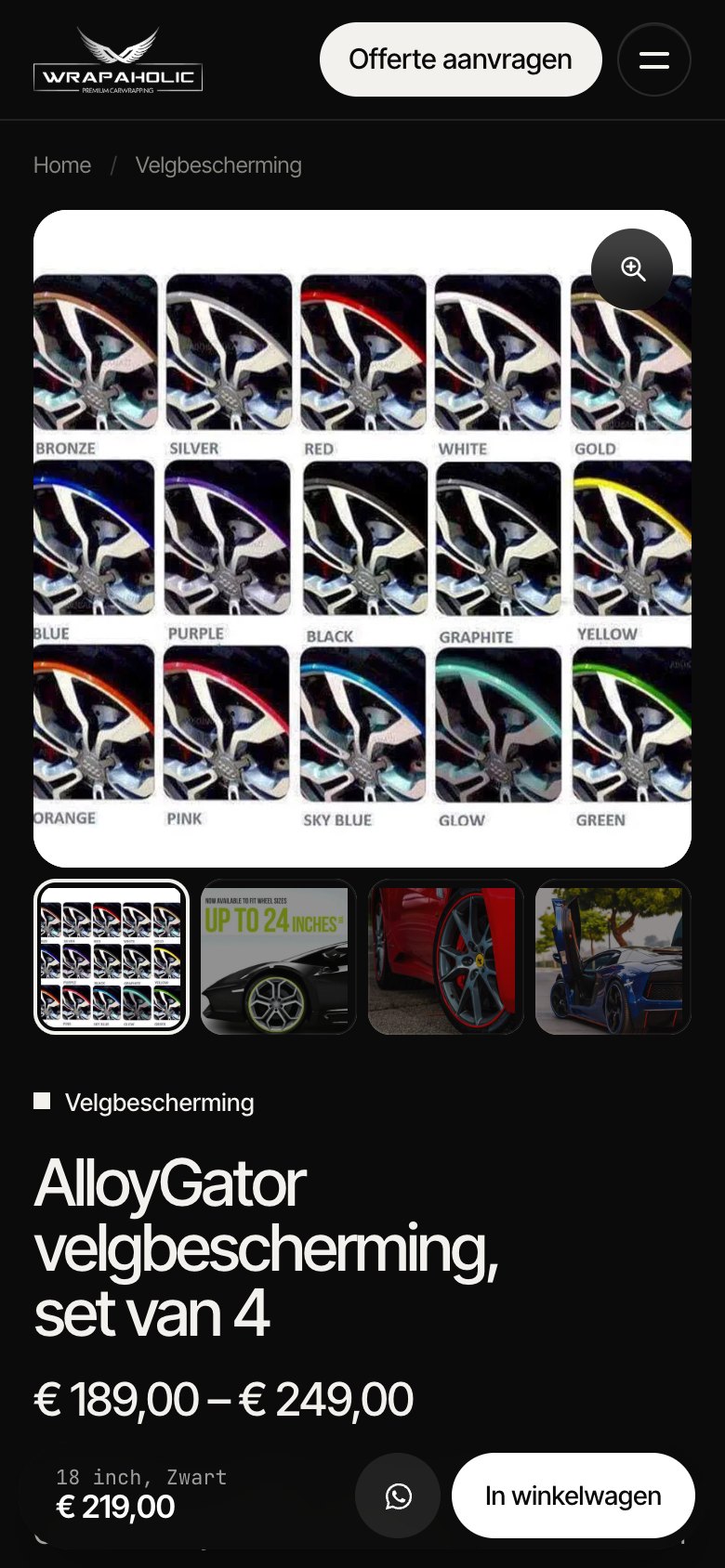
Store settings were not identical, and two of them show up in the screenshots. Kadence’s build raised WooCommerce’s image sizes to 800 pixels to match the reference, so its page loads 358 KB of images against 155 KB on Unblock. Both stores keep 2 decimals so the cart reads € 498,00, but Unblock’s template strips “,00” on the product page in Twig, so it shows € 219 where Kadence shows € 219,00. That and Woo’s softer 100 pixel gallery thumbnails are most of Kadence’s remaining pixel difference.

The layout shift on phones
The one result that can hurt a store in search is layout shift on mobile, and both builders did well here, for different reasons. Unblock scored a CLS of 0: its main image box has a fixed 1:1 aspect ratio with width and height on the image, and WooCommerce’s gallery script never runs because Unblock draws its own gallery. Kadence scored 0.03. Its template CSS already sizes the main image, so the only movement comes when WooCommerce’s slider wraps the gallery after the page loads and builds the thumbnail strip, which makes the gallery 49 pixels taller and pushes the summary column down. That is well under Google’s 0.1 limit.
Why the page jumps on phones
WooCommerce’s gallery slider lays every gallery image out at full width for a moment before it starts, so on a phone the gallery briefly grows to around 3,600 pixels and everything next to or under it jumps. Builders that leave Woo’s gallery alone scored a mobile CLS of 0.47 to 0.49 in my six builder test. Templates that reserve the main image box barely move: Unblock because it draws its own gallery at a fixed 1:1, Kadence because its template sizes the main image.
The fix is a few lines of CSS on any builder: give the gallery’s main image wrapper an aspect-ratio: 1 / 1 (or your image ratio), and reserve the height of the thumbnail row so it does not appear late.
My WooCommerce verdict
For a WooCommerce store, I would pick Kadence with Shop Kit when the store owner adds products and expects standard WooCommerce behaviour: swatches set per attribute, WooCommerce’s own variation logic, a live product preview in the editor, and extensions that hook into the normal add to cart form. I would pick Unblock when a developer owns the template and wants a custom product page with fewer requests, no layout shift and the closest match to the design, and is happy to own the 6.6 KB of cart and variation JavaScript that comes with it. Trim Unblock’s fonts first, and keep in mind that its single product template needs a one time workaround.
Pricing in 2026
Both companies sell yearly plans, and that is where the similarities end.
Unblock
| Plan | Price | Sites | Black Friday |
|---|---|---|---|
| Starter | $69/yr | 1 | $48.30 |
| Professional | $129/yr | 10 | $90.30 |
| Agency | $199/yr | 100 | $139.30 |
| Lifetime | $499 once | 1,000 | $349.30 |
Kadence
| Sites | Price per year | Per site |
|---|---|---|
| 1 | $350 | $350 |
| 10 | $599 | $59.90 |
| 25 | $799 | $31.96 |
| 50 | $899 | $17.98 |
| 100 | $999 | $9.99 |
Kadence does have something Unblock does not: a free tier. Kadence Blocks and the Kadence theme are free on WordPress.org, and a lot of this homepage could be built with them. My build used Pro features though: the two Elements for the footer and mobile bar, the second header button, the custom SVG icons and the custom scripts box. Kadence no longer sells Blocks Pro or Kadence Pro on their own, so getting those means the bundle.
| What you need | Unblock | Kadence | Cheaper |
|---|---|---|---|
| 1 site, free only | Not possible | $0 | Kadence |
| 1 site, everything | $69 a year | $350 a year | Unblock |
| 10 sites | $129 a year | $599 a year | Unblock |
| 25 sites | $199 a year (Agency) | $799 a year | Unblock |
| 100 sites | $199 a year | $999 a year | Unblock |
| Lifetime | $499 once, 1,000 sites | Not offered | Unblock |

The comparison that should decide it for freelancers
Ten client sites cost $129 a year on Unblock Professional and $599 a year on Kadence. Over three years that is $387 against $1,797. Unblock Lifetime at $499 once covers 1,000 sites, which is less than one year of the Kadence 10 site plan.
Kadence gives you more product for the money, since Give, The Events Calendar and LearnDash come in the bundle. If you do not need those, you are paying for them anyway.
When Unblock Makes Sense, and When It Does Not
Unblock suits developers and designers who already write HTML and CSS and want the block editor to stop fighting them. It suits agencies building custom designs, because every section in my test that had no matching Kadence component was quicker and leaner in Unblock. It suits teams using AI agents, because the agent writes what it already knows. And it suits anyone who cares about markup: 477 DOM nodes, real dl, figure, fieldset and nav elements, and 27 KB of code before fonts.
Unblock does not suit a client who will edit the site alone. The visual panels help, but they still edit a CSS class, and a client changing the padding on one tile will change it on all eight. It does not suit people who want ready made components: there is no slider, no header builder, no background video setting, no form validation. It does not suit anyone who needs a free start or who cannot live with a blank page if the plugin ever goes, and it is a 1.0.0 release from November 2026, which it reached on 10 November 2026, against Kadence Blocks’ eight years on WordPress.org.
Kadence suits sites the owner maintains, freelancers who want native header, form and video features, and anyone starting on the free plugin. Kadence does not suit custom designs that need fluid sizes, uneven grids or glass effects without writing CSS anyway, and in my build that CSS ended up in one Customizer box the editor does not even load.
Pick Unblock if
- You write HTML and CSS and want each block to be exactly one element.
- You build custom client designs where no ready made component fits.
- You build with AI agents or plan to, through its abilities or its MCP Bridge.
- You run 10 or more sites and want $129 a year, or $499 once for up to 1,000.
- You want a custom WooCommerce product page with no layout shift, and you are fine owning its cart JavaScript.
- You accept that switching the plugin off leaves a blank page.
Pick Kadence if
- Your client will edit the site without you.
- You want a native header builder, off canvas menu, background video and validated form.
- You want a free version first, with 600,000 installs and eight years of history behind it.
- You want the higher Lighthouse and accessibility scores out of the box.
- Losing the builder plugin one day must not take the content with it.
- You run a WooCommerce store and want product templates and swatches from an add-on (Shop Kit) instead of code you maintain.
Pros and Cons
My verdict on Unblock
Unblock
4.0/5
The best builder I tested for developers and AI driven agencies: the leanest markup, the fastest build and the lowest price per site. Held back by heavy default fonts, total lock-in and a very young release. On WooCommerce it built the cleaner product page, with the cart logic in your own hands.
What works
What does not
My verdict on Kadence Blocks
Kadence Blocks
4.5/5
The safer all rounder: mature native components, the best measured scores in this test and content that survives without the plugin. Held back by a high price, settings spread over four places and an editor that does not show your custom CSS. On WooCommerce, Shop Kit makes it the easier store to hand over.
What works
What does not
The Conclusion
I built the same homepage on both, to the same pixel, and I came away with a clear split. Kadence is the better product for the average WordPress site. It has the components most sites need, it scored higher on every Lighthouse score that differed between them, it was the only build with a perfect accessibility score, and if the plugin disappears tomorrow the site is still readable. For a client who edits their own pages, I would choose Kadence without hesitating.
Unblock is the better tool for the person building the site. It shipped a page within 28 nodes of the hand coded original, it let me put every rule and every script exactly where it belongs, its editor showed me the real design while I worked, and an AI agent built it in about half the time and with over a quarter fewer tokens. On a custom design, Kadence needed almost exactly as much CSS as Unblock did, and stored it somewhere worse.
Price tilts it further for anyone with more than one site. Kadence charges $350 a year for one site and $599 for ten. Unblock charges $69 and $129, and $499 once covers a thousand sites. That gap pays for a lot of font trimming.
The WooCommerce round did not change that split, it sharpened it. Both builders produced a working product page with a correct cart, and both kept layout shift under control. Kadence with Shop Kit got there with WooCommerce’s own variation form and less code to own, which is what I want for a store the owner runs. Unblock got there with fewer requests, half the JavaScript, no layout shift and the closer match to the design, but only because I wrote the picker, the gallery and the cart call myself, and it needed a workaround to own the single product template at all.
So my pick depends on who holds the keys. If I am building and maintaining the site, or an agent is building it for me, I choose Unblock. If the client is going to run it alone, I choose Kadence.
Frequently Asked Questions
Is Unblock better than Kadence Blocks?
For developers and AI driven builds, yes: in my test it shipped leaner markup (477 DOM nodes against 658), built faster and costs far less per site. For sites the owner edits, Kadence is better, with native components, higher Lighthouse scores (84 against 70 on mobile) and content that survives without the plugin.
Can I use Unblock with the Kadence theme?
Unblock is a block editor plugin and its free Unblock Theme is optional, but I only tested it on that theme, which is a blank block theme built for it. Template parts for the header and footer need a block theme, and Kadence is a classic Customizer theme.
Does Unblock work without the plugin?
No. With Unblock deactivated my homepage rendered as a blank page with 0% of its text. Kadence Blocks kept 91% of the text visible and styled. If you stop renewing Unblock the site keeps working, you only lose updates, AI and support.
Is Unblock code only?
No. Its inspector has visual Layout, Sizing, Spacing, Borders, Typography, Background and Effects panels. They edit the same reusable CSS selector the code editor shows, and changes sync both ways.
How much does Unblock cost compared with Kadence?
Unblock costs $69 a year for 1 site, $129 for 10, $199 for 100, or $499 once for 1,000 sites, with 30% off until 1 December. Kadence costs $350 a year for 1 site, $599 for 10 and $999 for 100, as a bundle with Give, The Events Calendar and LearnDash.
Does Unblock have a lifetime deal?
Yes, $499 once for up to 1,000 sites, or $349.30 during the Black Friday sale. Kadence has no lifetime plan.
Is there a free version of Unblock?
No, and there is no free trial, only a live demo and a 14 day refund. Kadence Blocks and the Kadence theme are free on WordPress.org.
Which one is faster?
Kadence scored higher in Lighthouse (84 mobile and 99 desktop against 70 and 96), mostly because Unblock served 363 KB of fonts in my build. Unblock shipped less code otherwise: 27 KB of HTML, CSS and JavaScript against 151 KB total for Kadence, and half the JavaScript.
Which one is better for building with AI?
Unblock. An AI agent built my homepage in 19 minutes with 352,000 tokens and 2 check runs on Unblock, against 36 minutes, 479,000 tokens and 6 runs on Kadence. Unblock also offers an MCP Bridge and a built in assistant that uses your own API key.
Can Unblock build a WooCommerce product page?
Yes. Unblock reads WooCommerce data in Twig (price, gallery, attributes, variations, stock), and one template part served both my products. It cannot write WooCommerce’s single product template by name or place Woo blocks, so I used a three part template and wrote the variation picker and add to cart call as a 6.6 KB block script. The cart test added 20 inch, Rood, x2 for € 498,00.
Do I need Kadence Shop Kit for WooCommerce?
For a custom single product template and colour swatches, I used Shop Kit, Kadence’s WooCommerce add-on: it adds Woo Templates, Variation Swatches and toast style notices. It worked without a licence key entered; the licence drives updates. The design still needed 35.6 KB of custom CSS and 3.9 KB of JavaScript.
Which one gives the faster WooCommerce product page?
Kadence scored higher on mobile Lighthouse (81 against 76) because Unblock served 363 KB of fonts. Unblock shipped half the JavaScript (59 KB against 115 KB), 27 requests against 58 and no layout shift (CLS 0 against 0.03). Both scored 99 on desktop.