Disclosure: I earn a commission if you buy Unblock through the Unblock links on this page, at no extra cost to you. The Spectra and Astra links are plain links with nothing attached. Neither company saw this post before it went live.
Unblock is the better builder for a custom designed site in November 2026, and Spectra is the better choice if you already live in the Astra world, want to start for free, and hand sites to clients who edit them visually. On the same homepage Unblock shipped 27 KB of code before fonts against Spectra’s 168 KB, wrote an HTML document a sixth the size, handled the quote form natively, and an AI agent finished it in about half the time. Spectra answered with a free plugin, real visual controls for grids and spacing, and a theme that keeps your header and footer alive if you ever switch the builder off.
To get there I built the same real client homepage twice, pixel perfect, on identical local WordPress 7.1.4 installs running PHP 8.5: once with Unblock 1.0.0 on the Unblock Theme 1.0.0, and once with Spectra Blocks 1.0.15 and Spectra Blocks Pro 1.0.6 on Astra 4.14.2 with Astra Pro 4.13.12. This is the new Spectra Blocks plugin that arrived on WordPress.org in July 2026, not Spectra Legacy, the old Ultimate Addons for Gutenberg plugin. Both versions match the hand coded original to within 0.25% of pixels at 1440, 768 and 390 pixels wide, with page heights identical to the pixel. Every screenshot below comes from those two builds, and every number comes from my build logs and measurements, all taken in November 2026.
Quick verdict
- Pick Unblock if you are comfortable in HTML and CSS, want every block to be one real element with a class you named, want lean pages without a jQuery stack underneath, plan to build with an AI agent over MCP, and can accept a plugin your pages cannot exist without. On a WooCommerce product page it also gave the steadier result: no layout shift and 76 on mobile Lighthouse against 54.
- Pick Spectra if you already run Astra, want a free starting point with 70,000 installs behind it, prefer grids, spacing and colours as visual settings, need clients to edit menus and footers in familiar WordPress screens, and want the theme to carry your header and footer if you leave. For WooCommerce, Astra Pro keeps Woo’s own product template, so hook based add-ons such as a swatch plugin keep working.
- Either is fine if your design is mostly sections, cards and a grid of tiles. Both reached a pixel perfect result on a demanding homepage, both needed about 30 KB of hand written CSS and 5 KB of JavaScript, and both use real semantic tags where you ask for them.
Spectra vs Unblock at a Glance
| Unblock | Spectra | |
|---|---|---|
| Owner | Themeone (Loïc Blascos, maker of WP Grid Builder) | Brainstorm Force (makers of Astra) |
| Free version | No, and no free trial (live demo only) | Yes, Spectra Blocks on WordPress.org |
| WordPress.org rating and installs | Not on WordPress.org | 92 out of 100 (53 ratings), 70,000+ installs |
| Current version | 1.0.0, released 10 November 2026 | Spectra Blocks 1.0.15 (11 November 2026), Pro 1.0.6 |
| On the market since | Alpha January 2026, 1.0 in November 2026 | Spectra Blocks added July 2026 (Legacy since 2018) |
| Cheapest paid plan | $69 a year, 1 site | $69 a year for Spectra Pro, 3 sites (plus $69 for Astra Pro as I used it) |
| Lifetime option | $499 once, 1,000 sites | $319 Spectra Pro (3 sites), $799 Business Toolkit (1,000 sites) |
| Sites on the top yearly plan | 100 ($199) | 1,000 ($279 first year, $429 renewal) |
| Theme used | Unblock Theme (blank block theme) | Astra + Astra Pro (classic theme) |
| Editor | Block editor plus docked HTML, CSS and JS editors | Block editor with visual panels plus a Pro Block CSS and JS dock |
| Styling model | Global CSS selectors and variables, edited visually or as code | Per block settings, Style Guide palette, per section custom CSS |
| Header and footer | Block theme template parts in the Site Editor | Astra Header and Footer Builder in the Customizer |
| Quote form | Native form element with server side handling | No form block: raw HTML in a Custom HTML block |
| Code shipped (HTML, CSS, JS, fonts) | 390 KB (27 KB without fonts) | 254 KB (168 KB without fonts) |
| JavaScript transferred | 8.2 KB | 76 KB |
| HTML document, uncompressed | 89 KB | 536 KB |
| DOM nodes | 477 | 688 |
| Lighthouse mobile / desktop | 70 / 96 | 76 / 96 |
| WooCommerce product page code | 467 KB (105 KB without fonts), 27 requests | 385 KB (299 KB without fonts), 63 requests |
| WooCommerce mobile Lighthouse / CLS | 76 / 0 | 54 / 0.49 |
| Text left with the builder off | 0%, blank page | 11%, header and footer only |
| Best for | Developers, custom designs, AI agent builds | Astra users, free starts, client edited sites |
How Each One Thinks
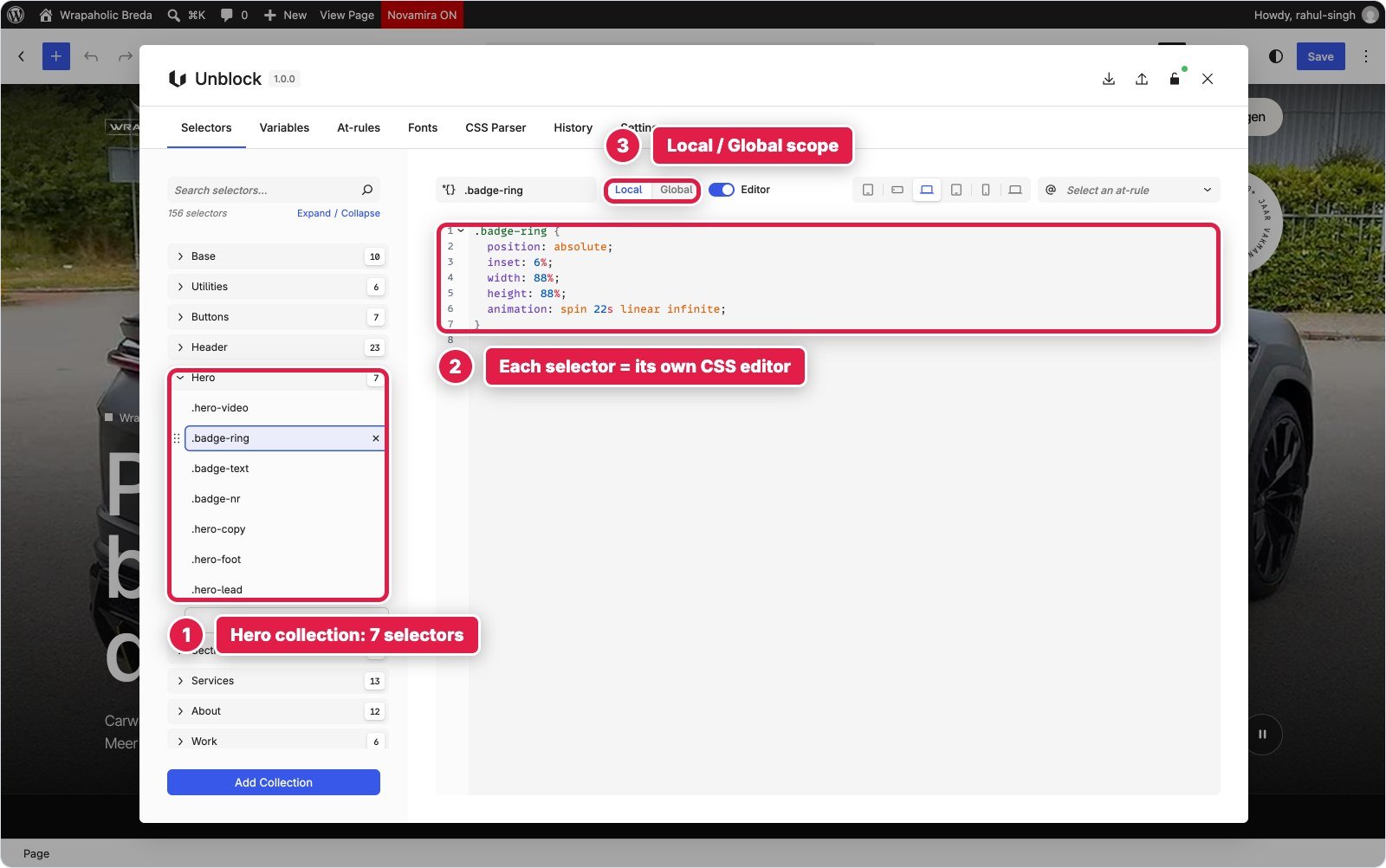
Unblock has one idea and follows it all the way: one block is one HTML element. Every block on the page is an unblock/element (plus a text block), and you choose its tag, its id, its classes and any attribute in an Attributes panel. A section is a section, a tile is an a, the stats are a real dl. Styling lives in global CSS selectors and variables that Unblock stores, scopes to the page and inlines for you. You edit a selector with visual Layout, Sizing, Spacing, Borders, Typography, Background and Effects panels, or in a CSS editor docked under the canvas, and both write the same rule. Each block can also carry its own JavaScript, and Twig expressions work inside text.
Spectra Blocks 1.0 is a big break from the old Spectra. It is built around one generic Container block that you can render as any tag (section, a, button, ul, li, dl, figure), a Content block for text, plus buttons, icons and a slider. You style each block with visual panels: Flex or Grid layout, dimensions, typography, background (including a native video background) and responsive overrides that follow WordPress 7.1’s own tablet and mobile breakpoints. Spectra Pro adds a Style Guide for the palette and a Block CSS and JS dock where each block can carry scoped CSS and a script. The header, footer and hooks are not Spectra at all: they come from Astra’s Header Builder, Footer Builder and Site Builder.
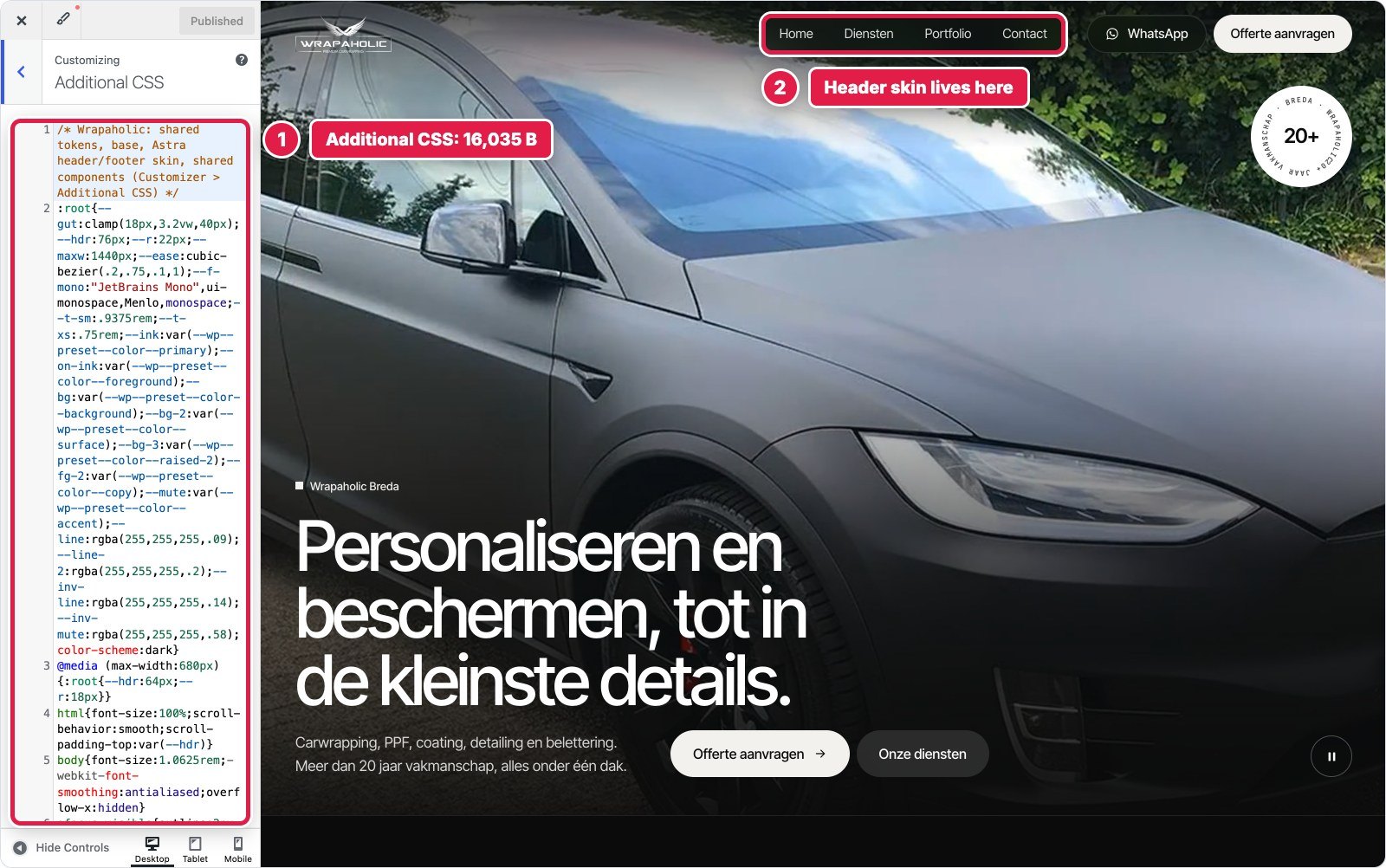
So both builders end up in the same place, semantic HTML with a bit of custom CSS, from opposite directions. Unblock starts from code and adds visual panels on top of it. Spectra starts from visual settings per block and gives you a CSS box for whatever the settings cannot express. In my build that box held 13 KB of section CSS, and Astra’s Additional CSS held another 16 KB.


The List View tells you a lot about daily use. Unblock shows the names you gave each block (Hero, Service tile, Offerte form) and otherwise the tag. Spectra labels almost everything Container or Text, and the only thing telling them apart is a small anchor chip on the section rows. The services section alone is 20 Containers deep in places. Spectra Pro’s dock is the nicer of the two code panels for quick fixes, with CSS and JS side by side and an & shortcut for the current block. One trap: core WordPress also puts an Additional CSS field in the Advanced panel of every block, so Spectra gives you two separate per block CSS boxes.
| Unblock | Spectra | |
|---|---|---|
| Blocks on the page body | 243 | 186 |
| Header | 57 blocks (template part) | 7 Customizer elements + 1 hook |
| Footer and mobile bar | 64 blocks (template part) | 31 widget blocks + 5 blocks in a hook |
| Block types used | 2 (element, text) | 6 on the page (container, content, buttons, button, icon) plus core image and HTML |
| Deepest nesting in a section | 7 levels | 7 levels |
Header and Full Screen Mobile Menu
The header needed a logo, a glass pill menu, WhatsApp and quote buttons, a background that turns solid after 12 pixels of scrolling and hides when you scroll down, and below 1080 pixels a full screen menu with nine numbered services. The front end copy is Dutch throughout, because this is a real client site for a car wrapping studio in Breda.
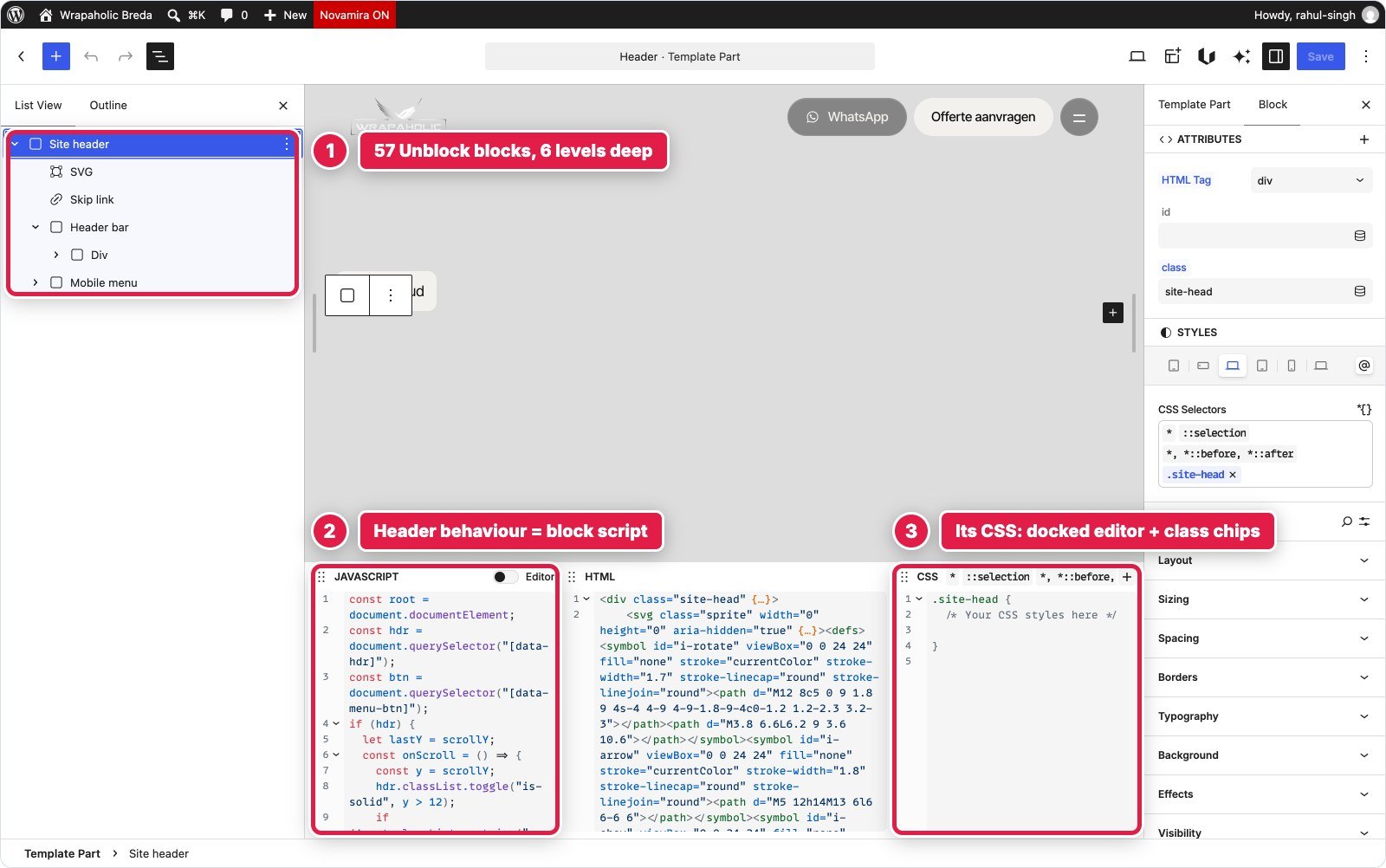
In Unblock the header is the theme’s header template part, edited in the Site Editor. It is one Site header element with 57 blocks inside: an inline SVG sprite of 16 icons, the skip link, the header bar and a Mobile menu element that is the full screen overlay. There is no header, menu or off canvas component. Every node is a plain element, styled by 23 selectors in a Header collection (5,205 bytes of CSS), and one 1,355 byte block script handles the scroll states, the menu toggle, Escape to close, the scroll lock and aria-current. The menu links are typed into the markup, so a client cannot edit them under Appearance, Menus.
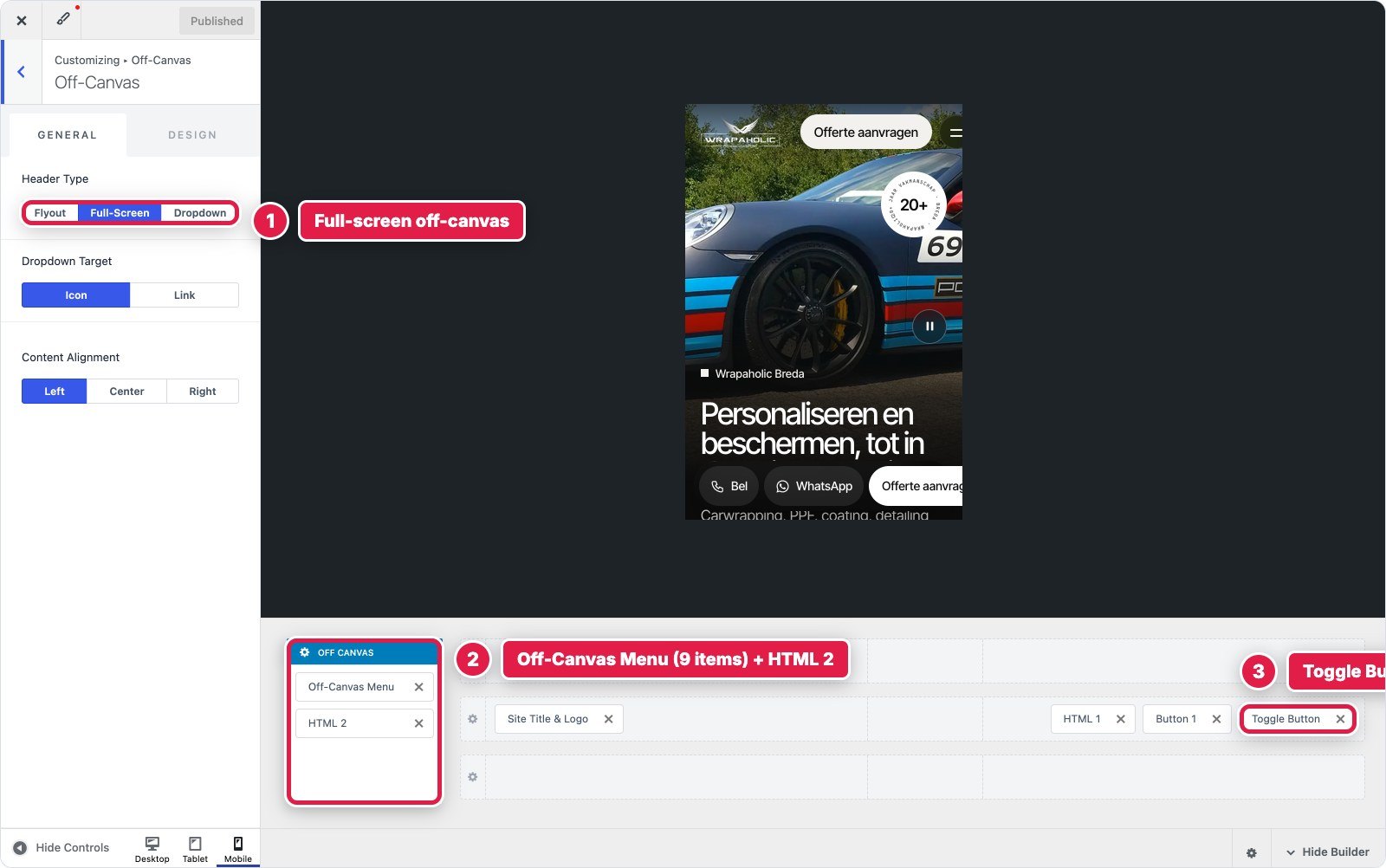
In Spectra the header is not a block at all. It is Astra’s Header Builder in the Customizer: logo, the Primary menu, an HTML element for the WhatsApp pill and Button 1 on the desktop row, and a toggle on the mobile row. Astra’s Transparent Header lays it over the hero, and its Full Screen off canvas holds an Off Canvas Menu with the nine services plus a second HTML element for the contact line. Astra’s popup script gives you aria-expanded, Escape to close and a focus trap for free, and both menus are real WordPress menus. The look took 7,605 bytes of Additional CSS and the scroll behaviour a 1,538 byte script in an Astra Site Builder hook.
Astra fought the design in five places. The transparent header forces position: absolute, so making it fixed needed a raised selector. The HTML element strips inline SVG, so the WhatsApp icon became a CSS mask. Astra writes inline display on its toggle and popup, which cost two !important rules. WordPress marks every /#anchor menu link as current. And the header breakpoint is fixed at 921 pixels unless you write a PHP filter, so between 922 and 1080 pixels the Spectra build still shows the desktop menu where the design already switches to the menu button. That is the one place in this test where the Spectra page does not follow the design, and the pixel check did not catch it because it only measures 1440, 768 and 390.


| Header | Unblock | Spectra (Astra) |
|---|---|---|
| Built from | 57 element blocks | 7 Customizer elements and a hook |
| Custom CSS | 5,205 bytes | 7,605 bytes |
| Custom JavaScript | 1,355 bytes | 1,538 bytes |
| Accessible menu behaviour | Hand written | Native (Astra popup) |
| Menu breakpoint | 1080px, as designed | 921px, fixed by Astra |
| Client editable menus | No, links in markup | Yes, WordPress menus |
Winner for this section: Spectra, narrowly. Astra gives you an accessible popup and real menus a client can edit, even though it cost more CSS and the 921 pixel breakpoint does not match the design.
Video Hero with the Rotating Badge
The hero is a full screen autoplaying video with a gradient over it, a rotating circular badge reading 20+, the headline, two pill buttons and a round pause button that also respects reduced motion and pauses when you scroll past.
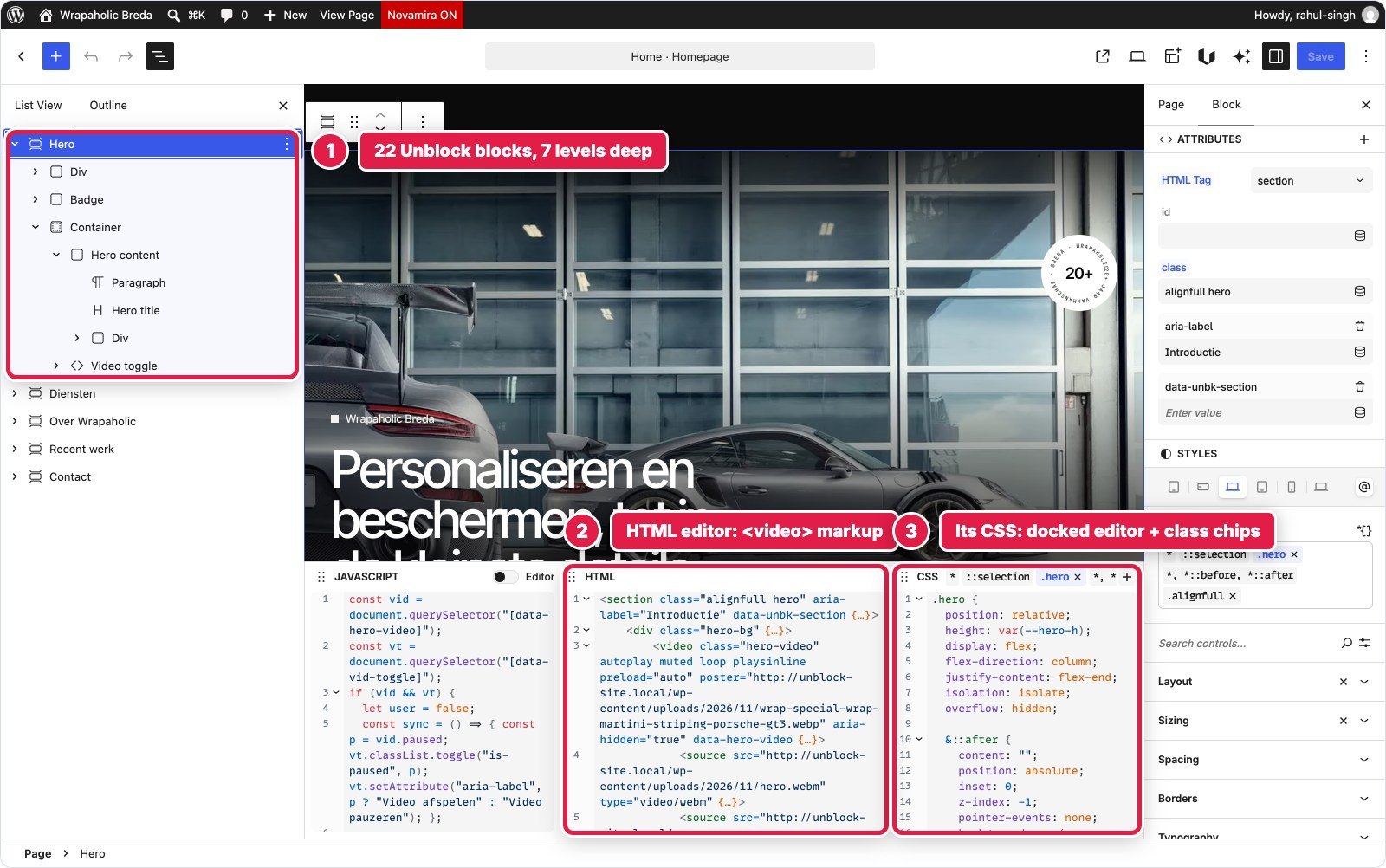
In Unblock the hero is one section of 22 blocks. The video is a real video element with autoplay muted loop playsinline, a poster and two source children, WebM first and MP4 second, all typed as attributes. The badge is an inline SVG with text on a path, and the overlay, layout and spin animation are 2,136 bytes across 7 selectors in the Hero collection. A 756 byte block script runs the pause button. There is no video background setting, so you have to know how a background video is written in HTML.
In Spectra the hero is a Container rendered as section with Spectra’s native video background set to the MP4. The copy is Content blocks, the buttons are Spectra Buttons with custom SVG icons, and the pause button is a Container rendered as a button holding two icons. 17 blocks, seven levels deep. Layout and the mobile padding and type sizes are native settings. The gradient, the badge position and spin, and the icon swap are 2,585 bytes of Block CSS, and the toggle is 790 bytes of Block JS. The badge itself had to be a Custom HTML block, because no Spectra block draws text on a circle.
Spectra’s video background has costs. It serves MP4 only, with no WebM and no poster, so the Spectra page loads a 2.6 MB file where the Unblock page loads the 2.3 MB WebM, and the first frame is the only pixel difference left in the whole Spectra build. Spectra also forces position: relative; z-index: 2 on every child of a video background container, which broke the absolutely positioned badge until I added an inner container, and its video wrapper rules carry such high specificity that the mobile sizing needed a raised selector. It also drops clamp() from its own minimum height field without telling you.
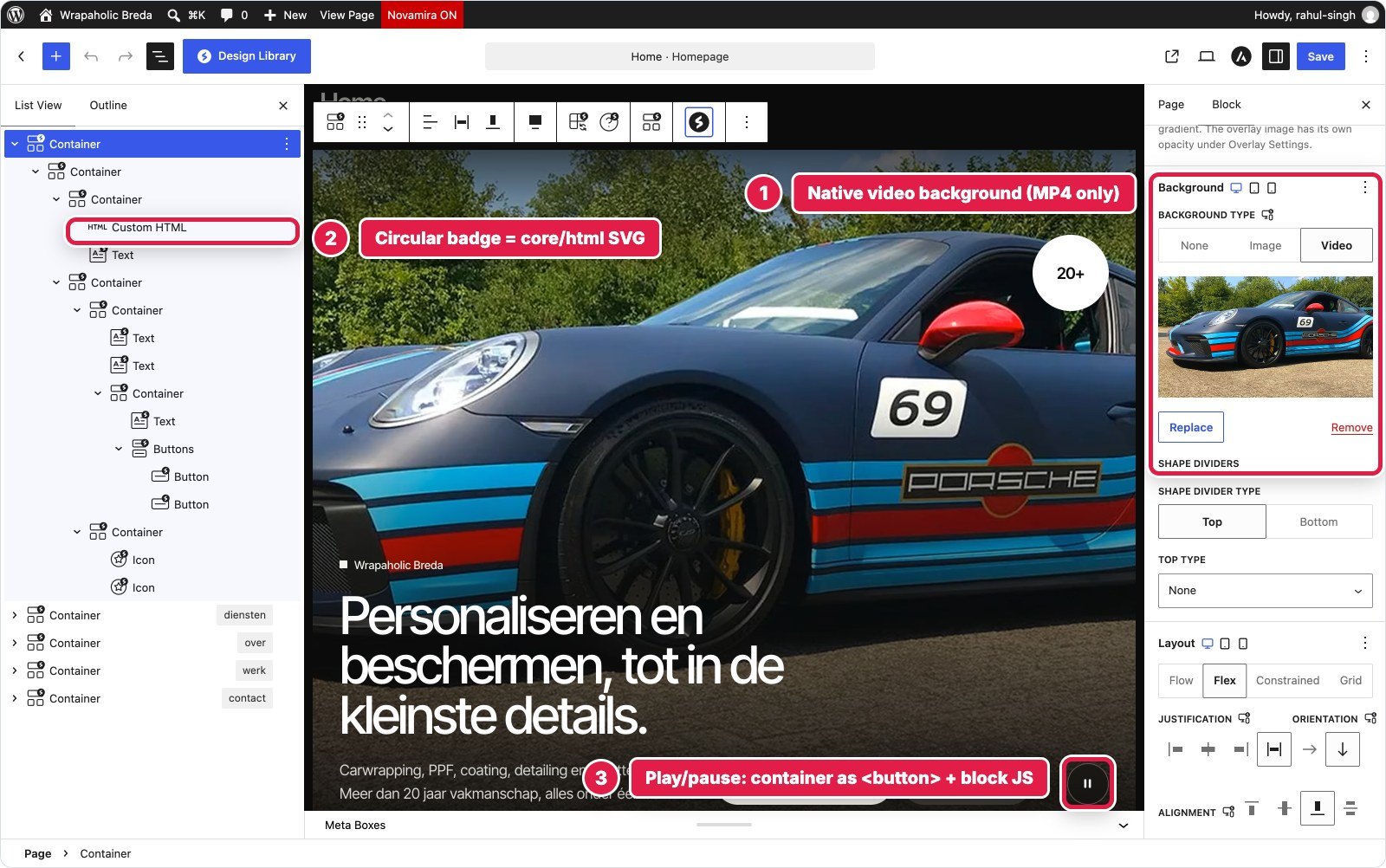
Winner for this section: Unblock. The hero is the markup a developer would write by hand, with WebM, a poster and no fight with the builder’s own positioning.
Eight Service Tiles
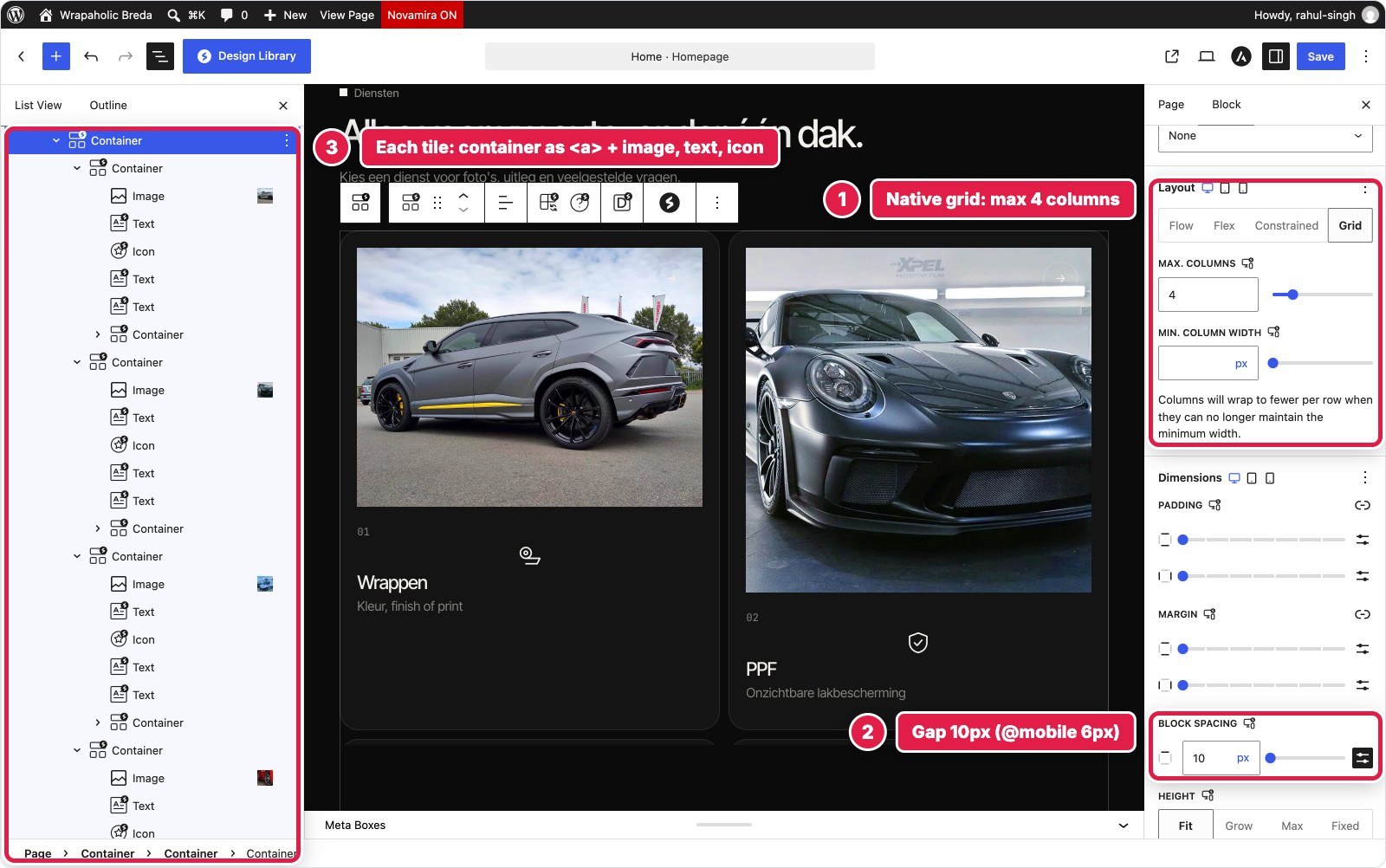
Diensten is a grid of eight dark tiles, four across on desktop and two on tablet and phone. Each tile has a photo that fades in on hover, a number, an icon, a title, a subtitle and an arrow, and the last tile is a frosted glass call to action.
In Unblock the section is 71 blocks. Each tile is an a element with an image, a number, an SVG icon, a title, a subtitle and the arrow badge, seven or eight blocks per tile. The grid, hover zoom and overlays are plain CSS in the Services collection: 13 selectors, 3,744 bytes, every colour and radius reading a design token. No JavaScript. The one oddity was WordPress curling the apostrophe in the Dutch word foto’s, which I fixed with a tiny Twig expression.
In Spectra the section is also 71 blocks: 20 Containers, 27 Content blocks, 8 images and 16 icons. The tiles container uses Spectra’s native Grid layout with four columns, dropping to two at the tablet and mobile bands, with a 10 pixel gap that becomes 6 on phones. Each tile is a Container rendered as a link with native padding, radius and the Style Guide surface colour, and the section head fades in with Spectra Animations. The tile skin, image layering, gradient, hover states and the glass tile, took 3,923 bytes of Block CSS. Two of those rules exist only because Spectra silently dropped values I set: clamp() in the icon size and rgba border colours.

| Service tiles | Unblock | Spectra |
|---|---|---|
| Blocks | 71 | 71 |
| Grid and columns | CSS in the .tiles rule | Native Grid setting, per device |
| Custom CSS | 3,744 bytes | 3,923 bytes |
| Values the builder silently dropped | None | clamp() icon size, rgba borders |
Winner for this section: Spectra. The grid and its column count per device are settings an editor can change without touching code, and the CSS bill was the same.
About, Stats and Pillars
The about section has a two column layout with copy on the left and a photo with a glass caption on the right, three stats under the copy, and four pillars with thin dividers that switch from four to two to one column.
In Unblock it is 33 blocks with real tags chosen per element: the stats are a dl with dt and dd, the pillars a ul of four li, the photo a figure with a figcaption. Twelve selectors in the About collection, 1,966 bytes, style it, including the photo’s aspect ratio and the caption chip.
In Spectra it is also 33 blocks, and it uses the same semantics: Containers rendered as dl, ul, li and figure, Content blocks rendered as dt, dd and figcaption. Native Grid handles the two columns, the three stats and the four, two, one pillars. Only 1,321 bytes of Block CSS were needed, for the unequal 1fr and 1.1fr columns (Spectra’s grid only does equal columns), the dividers per breakpoint, the caption chip and the image ratio. This section is Spectra at its best.


Winner for this section: Spectra. Same semantic HTML as Unblock, less custom CSS, and the responsive columns are settings.
Draggable Project Strip
Recent werk is a horizontal strip of six project cards and a portfolio card that snaps card by card, scrolls with round previous and next buttons, and can be dragged with a mouse.
In Unblock it is 41 blocks: a heading row with two button elements, and a Project strip div of seven card links. The strip is overflow-x with scroll snap in the .strip rule, 1,633 bytes of CSS in all, and a 1,048 byte block script moves it by one card and adds mouse drag. There is no slider component, so this is HTML, CSS and a script.
In Spectra it is also 41 blocks: the previous and next buttons are Containers rendered as button with arrow icons, the strip is a horizontal flex Container without wrapping, and each card is a Container link with an image and text. Spectra does ship a Slider block, but it is a Swiper carousel and could not reproduce a free scrolling snap strip, so I left it out. Scroll snap and card sizing took 1,566 bytes of Block CSS and the buttons and drag 1,115 bytes of Block JS. One more silent drop: Spectra’s HTML attributes field skips empty values, so data-strip="" vanished until I gave it a value.
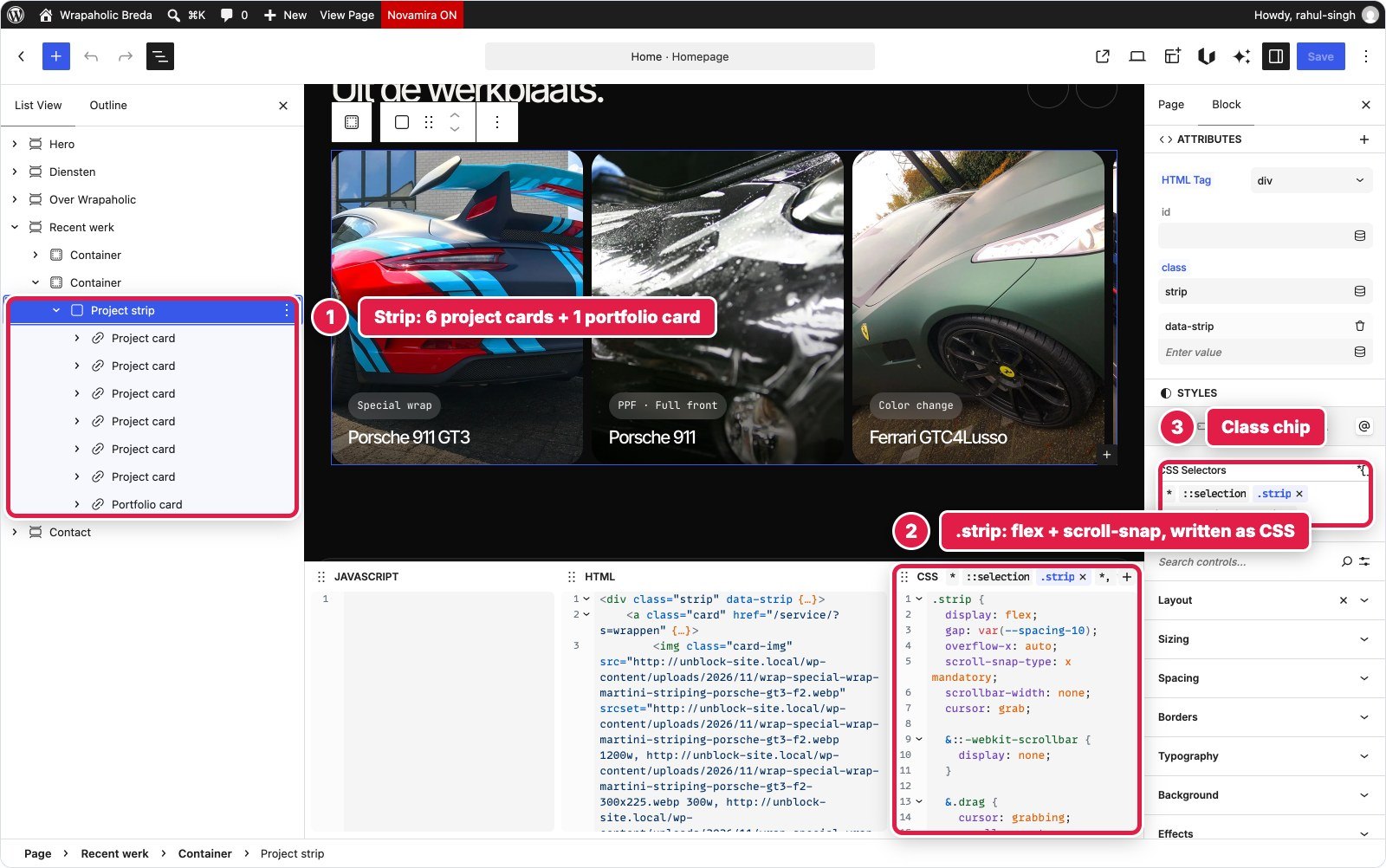
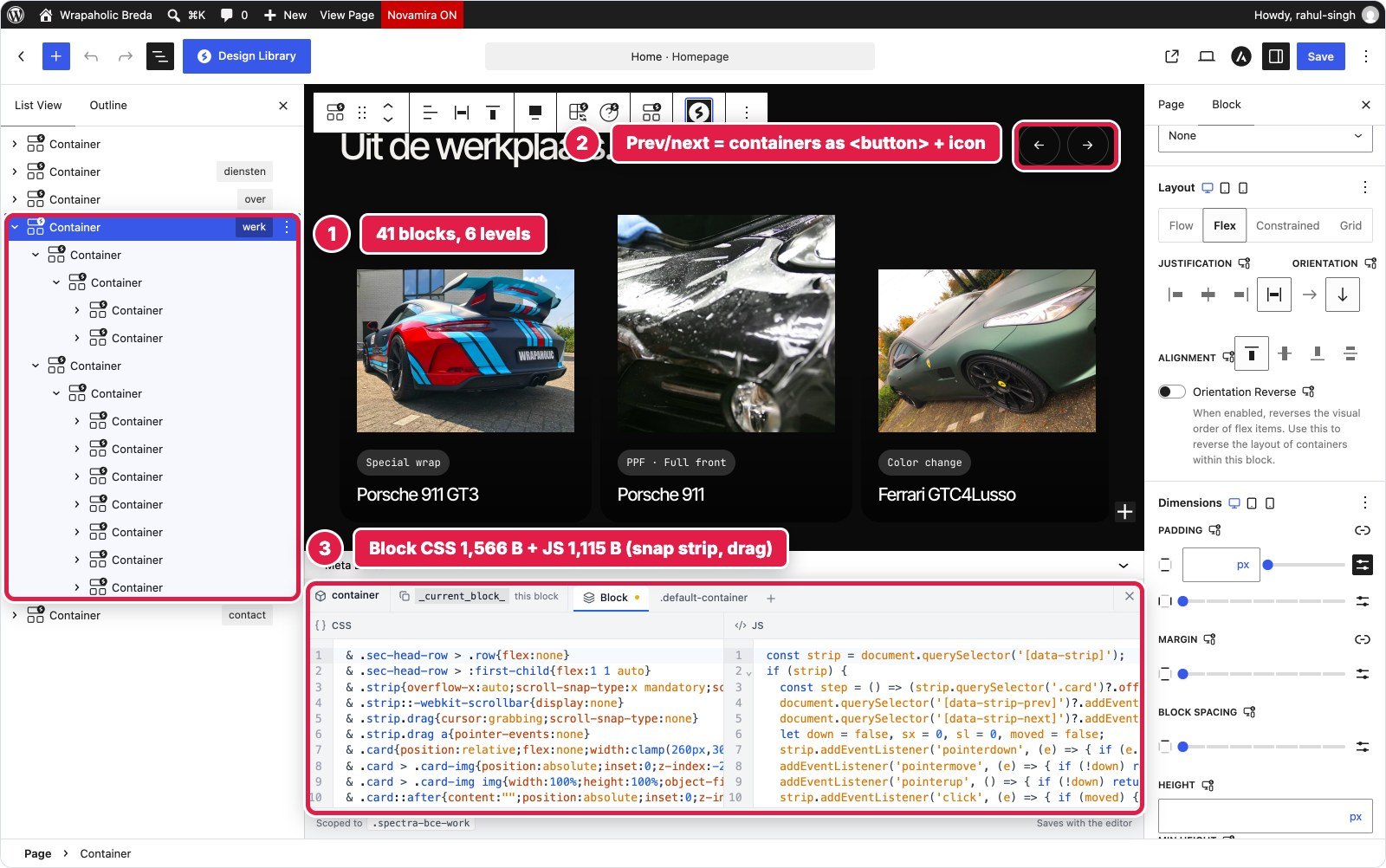
Winner for this section: Draw. Both needed the same CSS and the same script, within 70 bytes of each other, and neither has a native component for this.
Contact and the Quote Form
The contact section has an open or closed status pill based on Amsterdam time, a list of contact details with today’s opening hours highlighted, and a quote form with service chips, required fields, inline validation and a success message.
In Unblock this is the largest section, 76 blocks, because every label, input, fieldset and legend is its own element. The form is Unblock’s own form mechanism: a plain form element with a data-unbk-form attribute, and Unblock injects the action, a honeypot and a timestamp on the server and handles the submission. A 1,819 byte script adds client side validation and posts the form with fetch, and a 774 byte script runs the status pill. I sent a test submission and got the Dutch thank you message back from the real endpoint. This is also where the visual panels show their worth: the Borders, Typography and Background panels on the right edit the same .contact rule you see in the CSS dock.
In Spectra the section is 24 blocks with a native two column grid and the Style Guide surface colour, and the form is not a Spectra block at all. Spectra Blocks has no form block, so the form is 1,697 bytes of raw markup in a Custom HTML block, styled by the section’s 3,624 bytes of Block CSS, with 1,854 bytes of Block JS for validation, the success message and the status pill. It looks and behaves the same on the front end, but nothing receives the submission. On a live site you would add a form plugin; Brainstorm Force sells SureForms, and its Business Toolkit includes SureForms Agency.


| Contact and form | Unblock | Spectra |
|---|---|---|
| Blocks | 76 | 24 (form is one HTML block) |
| Custom CSS | 6,607 bytes | 3,624 bytes |
| Custom JavaScript | 2,593 bytes | 1,854 bytes |
| Form handling on the server | Native (endpoint, honeypot, timestamp) | None without a form plugin |
Winner for this section: Unblock, clearly. It is the only one of the two with a working form out of the box, and the form fields stay editable blocks.
Footer with the Giant Word
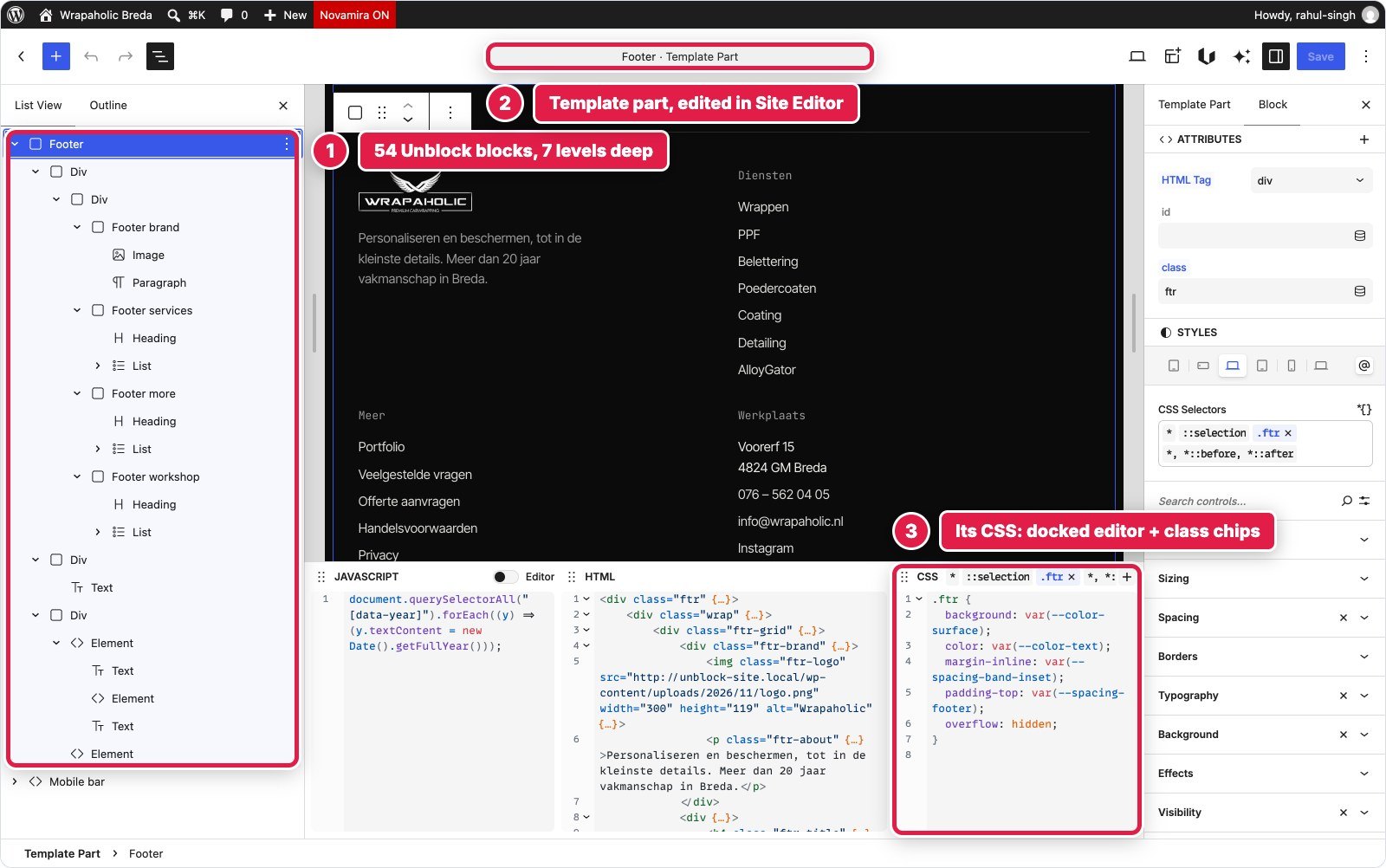
The footer has four columns (brand, services, more links, workshop address), a giant outlined Wrapaholic word across the full width, and a bottom bar with the current year.
In Unblock it is the theme’s footer template part: a Footer element of 54 blocks with real ul, li and h4 elements, the giant word as a single div with CSS text stroke, and a bottom bar. 2,198 bytes of CSS in the Footer collection and a 100 byte script for the year.
In Spectra it is Astra’s Footer Builder in the Customizer: four widget areas filled with block widgets (logo and blurb, then three heading and list columns), an HTML element for the giant word, and Astra’s Copyright element, whose [current_year] shortcode renders the year with no script. The 1.4fr column proportions, the outline word and the bar took 3,205 bytes of Additional CSS. The HTML element opens in a TinyMCE visual editor, which is an odd place to edit a design element in 2026.

Winner for this section: Spectra. Footer widgets and the year shortcode are familiar to every WordPress client, and the footer survives if you ever drop Spectra.
Mobile Contact Bar
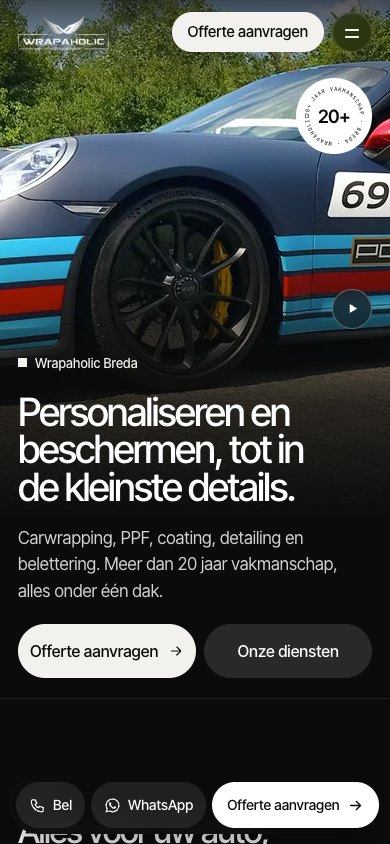
On phones a fixed glass bar with call, WhatsApp and quote buttons sits at the bottom of the screen, and hides while the menu is open or the visitor is typing in the form.
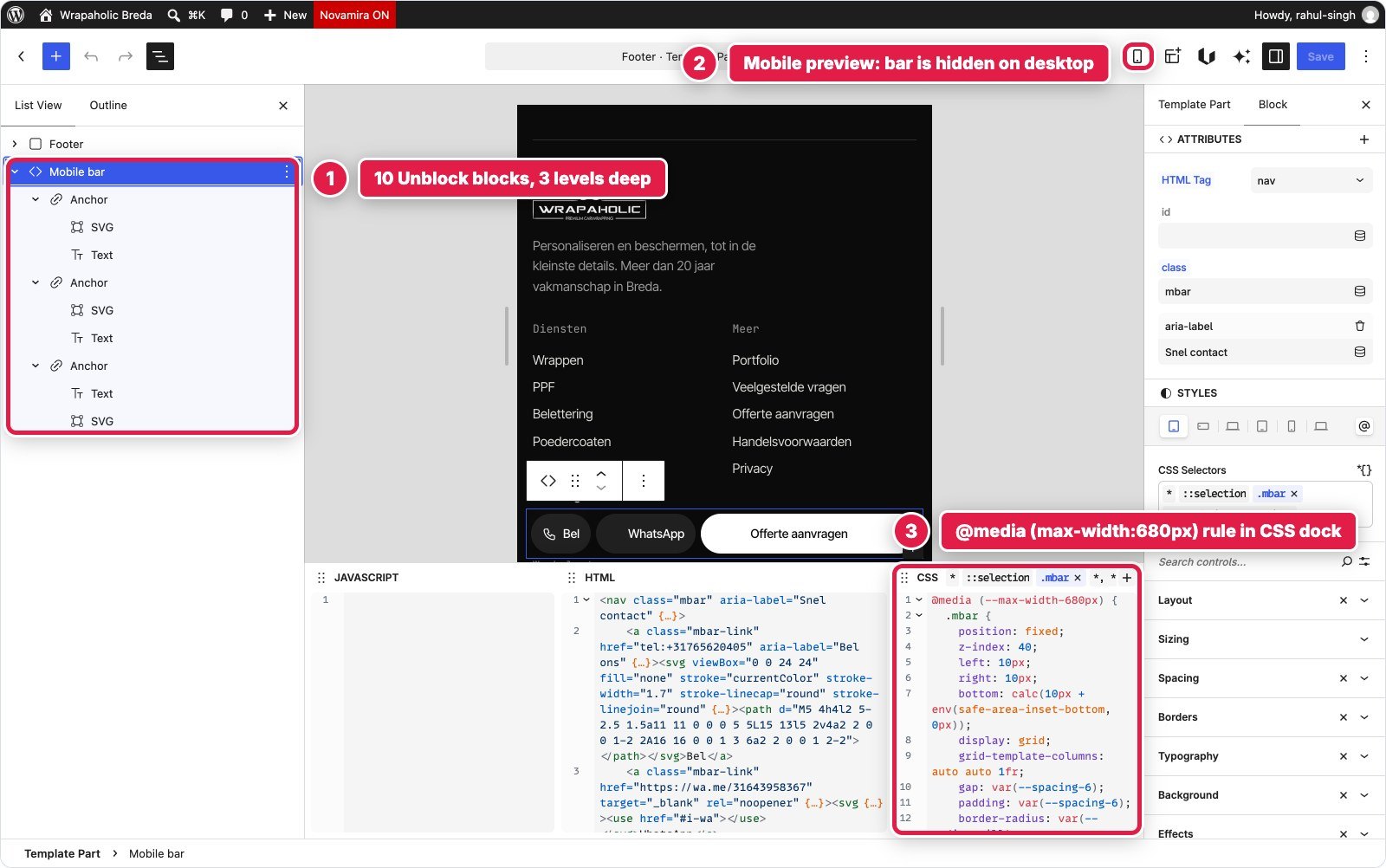
In Unblock it is a Mobile bar nav of 10 blocks in the footer template part, hidden on desktop and turned into a fixed pill bar by a 680 pixel rule inside the .mbar selector, 974 bytes in all. It hides itself through classes the header and form scripts set on the page, so it needs no script of its own.
In Spectra it is an Astra Site Builder layout on the wp_footer hook for the entire site, edited in the block editor: one Spectra Container with a Buttons group of three buttons, 5 blocks. Its fixed glass look and mobile only display are 1,393 bytes in Astra’s Additional CSS, a different place from the blocks themselves, and it hides through the header hook script and the contact Block JS.


Winner for this section: Unblock. The bar, its CSS and its mobile rule live together in one block, while Spectra splits it across a hook, the block editor and the Customizer.
Design System, Fonts and Global Styles
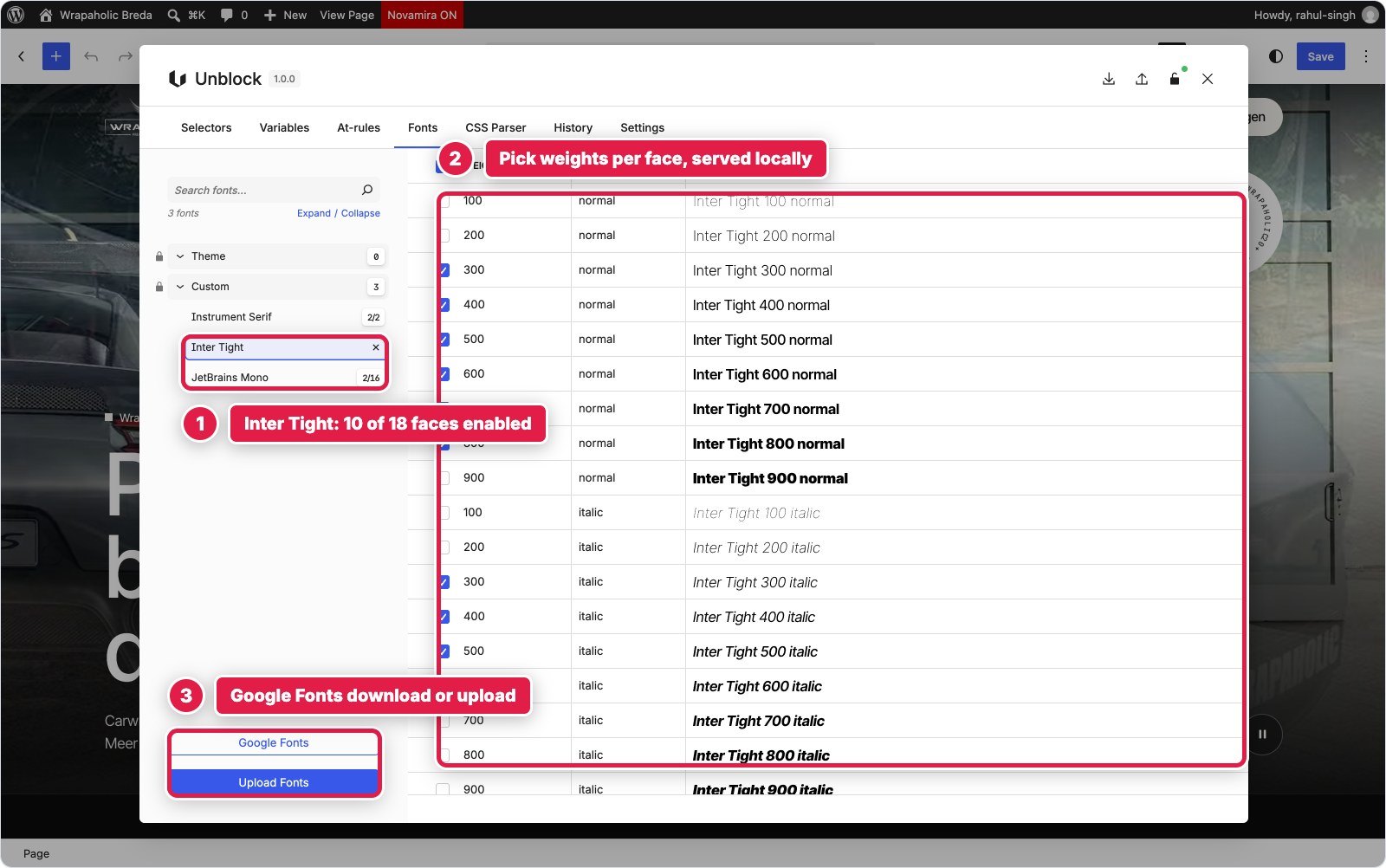
Unblock keeps the whole design system in its own manager. My build has 120 CSS variables in five collections (34 colours in HSL, 36 spacing values, 25 typography tokens including fluid clamps, 20 effects such as radii, shadows and easing, and 3 layout values), 156 selectors in 11 collections, and 11 at rules for the 1080, 680 and 380 pixel breakpoints, hover and reduced motion. Unblock’s own preset breakpoints are 780 and 360, so using the design’s values meant creating new site at rules, which worked fine. Fonts come in through the WordPress Font Library from the Fonts tab, served locally, and you pick the faces you need.
Spectra splits it across three places. The Spectra Pro Style Guide holds the palette, 10 slots plus 3 custom colours, and syncs them into Astra’s global palette. Typography lives in Astra’s Customizer. Breakpoints come from WordPress 7.1’s own viewport setting, which Spectra 1.0.15 follows, so setting it to 680 and 1080 pixels made Spectra’s tablet and mobile bands match the design, a clean touch. Everything else (gutters, header height, radii, easing) went into Astra’s Additional CSS as variables. Fonts are served locally through Astra’s Load Google Fonts Locally and Preload Local Fonts settings; Spectra has its own local fonts option too, but in 1.0.15 it has no screen to switch it on.
Astra caused the strangest bug of the build: it writes a 17 pixel body size as html { font-size: 106.25% }, which made every rem in the design 6% too big until I reset it. If you bring an existing design system into Astra, check that first.




Custom CSS and JavaScript: How Much Each Needed and Where It Lives
The hand written totals are close. Unblock took 33,666 bytes of CSS source (31,394 as served) and 5,852 bytes of JavaScript. Spectra took 29,054 bytes of CSS and 5,297 bytes of JavaScript, plus 1,925 bytes of raw HTML for the form and the badge. The difference is what that CSS means. In Unblock the CSS is the styling: there is nothing else, and the visual panels write into it. In Spectra the 29 KB sits on top of hundreds of visual settings, and covers what those settings could not do.
| Where it lives | Unblock | Spectra |
|---|---|---|
| Design tokens | 4,963 bytes in Unblock variables | Style Guide palette, rest in Additional CSS |
| Header and menu | 5,205 bytes CSS, 1,355 JS (block script) | 7,605 bytes Additional CSS, 1,538 JS (Astra hook) |
| Hero | 2,136 CSS, 756 JS | 2,585 Block CSS, 790 Block JS |
| Service tiles | 3,744 CSS | 3,923 Block CSS |
| About | 1,966 CSS | 1,321 Block CSS |
| Project strip | 1,633 CSS, 1,048 JS | 1,566 Block CSS, 1,115 Block JS |
| Contact and form | 6,607 CSS, 2,593 JS | 3,624 Block CSS, 1,854 Block JS, 1,697 HTML |
| Footer and mobile bar | 3,172 CSS, 100 JS | 4,598 Additional CSS |
| Number of places | 2 (CSS manager, block scripts) | 4 (Additional CSS, Block CSS and JS dock, Site Builder hook, Custom HTML) |

The fourth bar in that chart is the part nobody sees in the editor. Spectra writes each block’s CSS once per device. When a Content block has a desktop only font size, Spectra prints the rule, then prints it again inside the tablet media query, then again inside the mobile one, three identical copies of a value I set once. On this page that adds up to 2,176 CSS rules and 334 KB of inline CSS, and 1,237 of the 1,908 style rules are exact repeats of another rule. That one stylesheet is most of the 536 KB HTML document. Gzip shrinks it well on the wire (the document transfers at 49 KB), but the browser still parses all of it on every visit, and Lighthouse counts 76% of the page’s CSS as unused. Unblock prints each selector once, page scoped, 31 KB in total.


Performance: What Each One Ships
I measured both homepages logged out with no page cache, on the same machine, and ran Lighthouse three times per device, taking the median. The hand coded original is the baseline.
| Measured | Unblock | Spectra | Hand coded |
|---|---|---|---|
| Code shipped (HTML, CSS, JS, fonts) | 390 KB | 254 KB | 96 KB |
| The same without fonts | 27 KB | 168 KB | 22 KB |
| Fonts | 363 KB | 86 KB | 75 KB |
| JavaScript transferred | 8.2 KB | 76 KB | 2.9 KB |
| HTML document, uncompressed | 89 KB | 536 KB | 22 KB |
| Requests | 18 | 42 | 17 |
| Stylesheets / scripts | 0 / 2 | 16 / 11 | 2 / 1 |
| DOM nodes / divs | 477 / 49 | 688 / 161 | 449 / 43 |
| Unused CSS | 44% of 52 KB | 76% of 676 KB | 71% of 66 KB |
| Server response, local, uncached | 52 ms | 201 ms | 6 ms (static) |
| Lighthouse desktop | 96 | 96 | 97 |
| Lighthouse mobile | 70 | 76 | 76 |
| Mobile LCP | 8.0 s | 6.2 s | 7.0 s |
| Lighthouse accessibility | 96 | 96 | 96 |
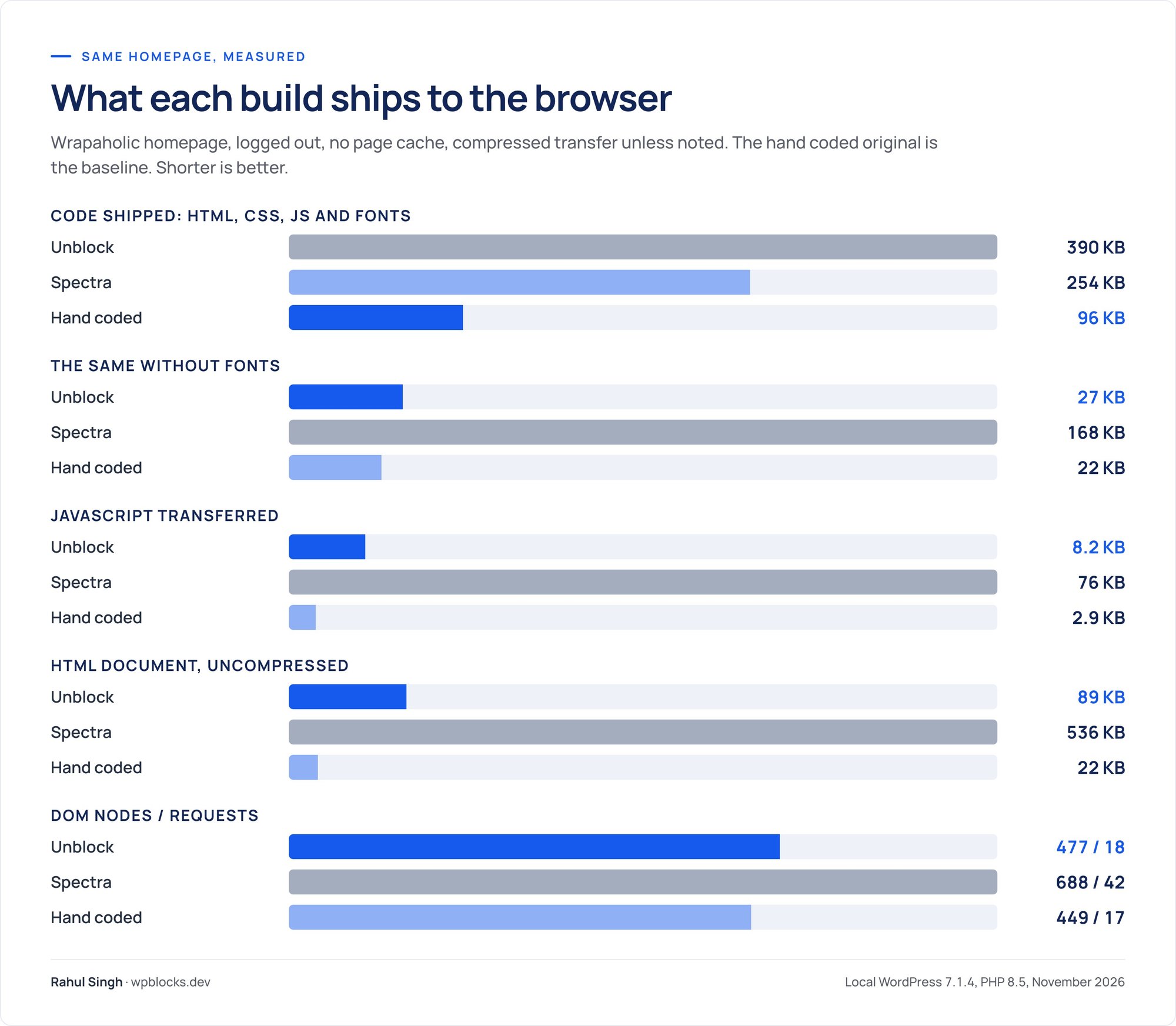
Two honest caveats. First, Unblock’s total is mostly fonts: the WordPress Font Library downloaded three full Inter Tight files of about 110 KB each, while Astra’s local fonts are trimmed files around 45 KB. That is a font file problem you can fix by uploading subset files, not Unblock code, but it is what you get by default, and it likely explains Unblock’s slower mobile first paint (3.0 seconds against 2.1). Second, the mobile scores are mostly about the video: on every page in this test the largest paint on mobile is the 2.3 to 2.6 MB hero video, so a few points of mobile score tell you little about the builder. Desktop is a tie at 96.
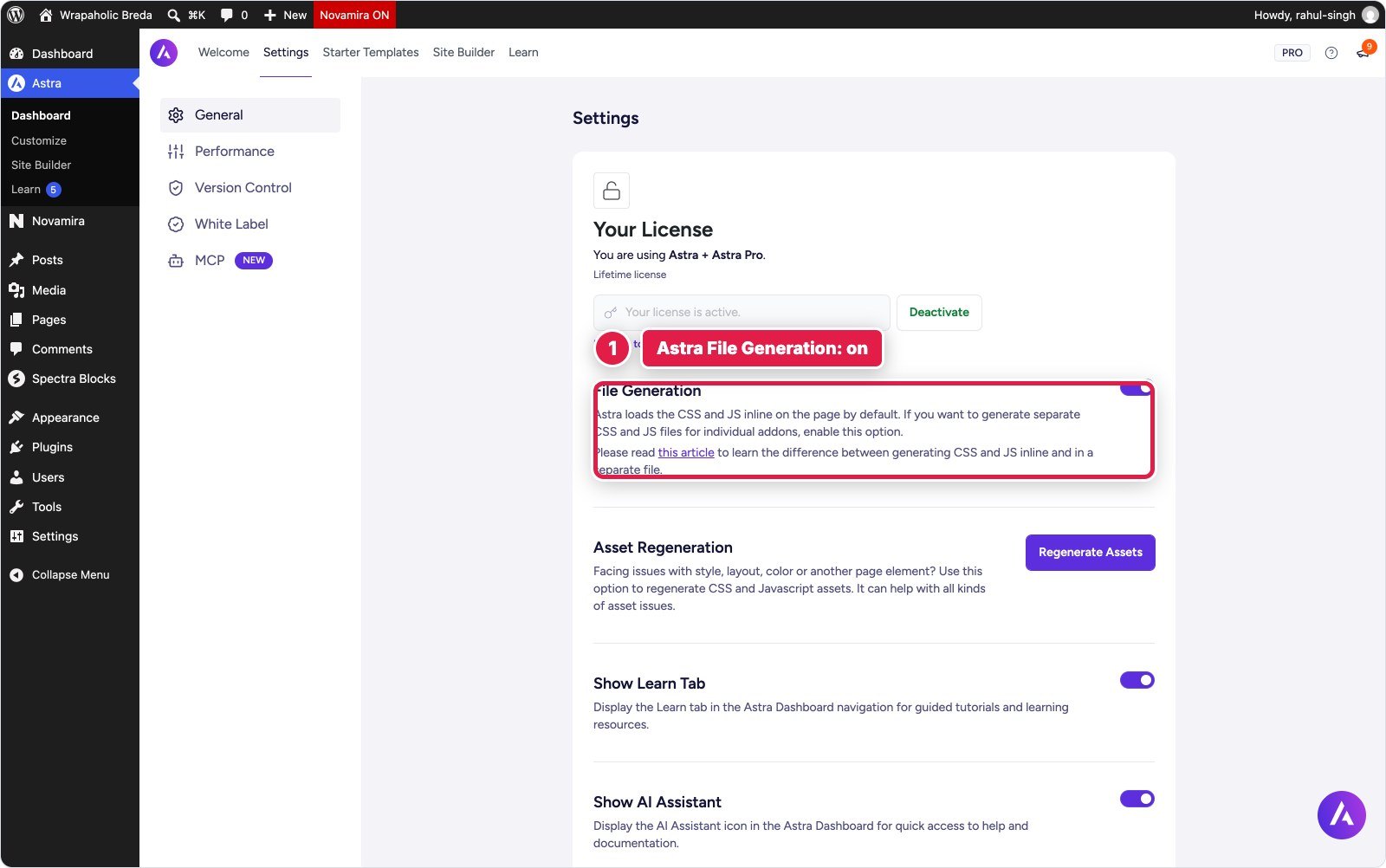
Where Spectra loses is everything around the content. It loads jQuery and jQuery Migrate (35 KB), Astra Pro’s scripts and a copy of DOMPurify (12 KB), the AOS animation library, Spectra Pro’s modal script on a page with no modal, and four Spectra Pro extension stylesheets (positioning, dynamic content, modal, popup builder) with no setting to turn them off. That is how one homepage ends up with 42 requests and 76 KB of JavaScript where Unblock needs 18 requests and 8.2 KB, most of which is WordPress’s own emoji script. Spectra’s page also nests deeper (17 levels against 12) with more than three times the divs, because every Container adds a wrapper.


Building It with AI
Unblock sells itself on AI building, so I also had an AI agent build each version from the same written brief, with the same pixel check available, and logged what it cost. Spectra Blocks also calls itself an AI website builder on WordPress.org; I did not use either product’s built in AI assistant, only an outside agent working through each builder’s normal settings and content.
| AI build | Unblock | Spectra |
|---|---|---|
| Tokens used | 352K | 518K |
| Pixel check runs to pass | 2 | 7 |
| Time from start to pass | 19 minutes | 35 minutes |
| Final pixel difference (1440 / 768 / 390) | 0.003% / 0.003% / 0.002% | 0.124% / 0.193% / 0.251% |

The reason is the model. In Unblock the agent writes what it already knows, HTML elements and CSS rules, through Unblock’s own abilities, and the result is what it wrote. The Spectra build failed its first runs on things the agent could not see coming: a gap setting that threw a PHP warning, the Astra font size trick, the 10 pixel default padding and full width on every Container, clamp() values that disappeared, a transparent header that would not stay fixed. Each one cost a check run to find. The first Spectra run was 29% off the original; the first Unblock run was 8.7% off and the second was a pass.
Unblock also ships an MCP Bridge that connects Claude, ChatGPT, Cursor and other clients to a site through the official WordPress MCP Adapter, with 16 listed tools plus 31 more abilities, and an Unbot assistant that uses your own API key with no markup. If you plan to let an agent do the first draft of every site, that is a real reason to pick Unblock.
Lock In: Switch the Builder Off
Then I deactivated each builder plugin, left the theme active, and checked what was left of the homepage.
Unblock leaves a blank page. 0% of the text, 0 of 44 links, 0 of 4 form fields. Even the header and footer are Unblock blocks inside the Unblock Theme, so nothing renders at all. Unblock is clear that sites keep working if you stop paying for updates; it is removing the plugin that empties them.
Spectra keeps 11% of the text, and it is the wrong 11%: Astra’s header and footer survive because they live in the theme, the raw HTML form survives, and so do the core image blocks. Every Spectra Container and Content block renders nothing, so the headline, the services, the stats and the contact details are gone, and the badge SVG blows up to fill the screen. The page grows from 5,772 to 16,182 pixels tall, mostly empty. In practice both pages need a rebuild if you leave.


WooCommerce: the Same Product Page on Both
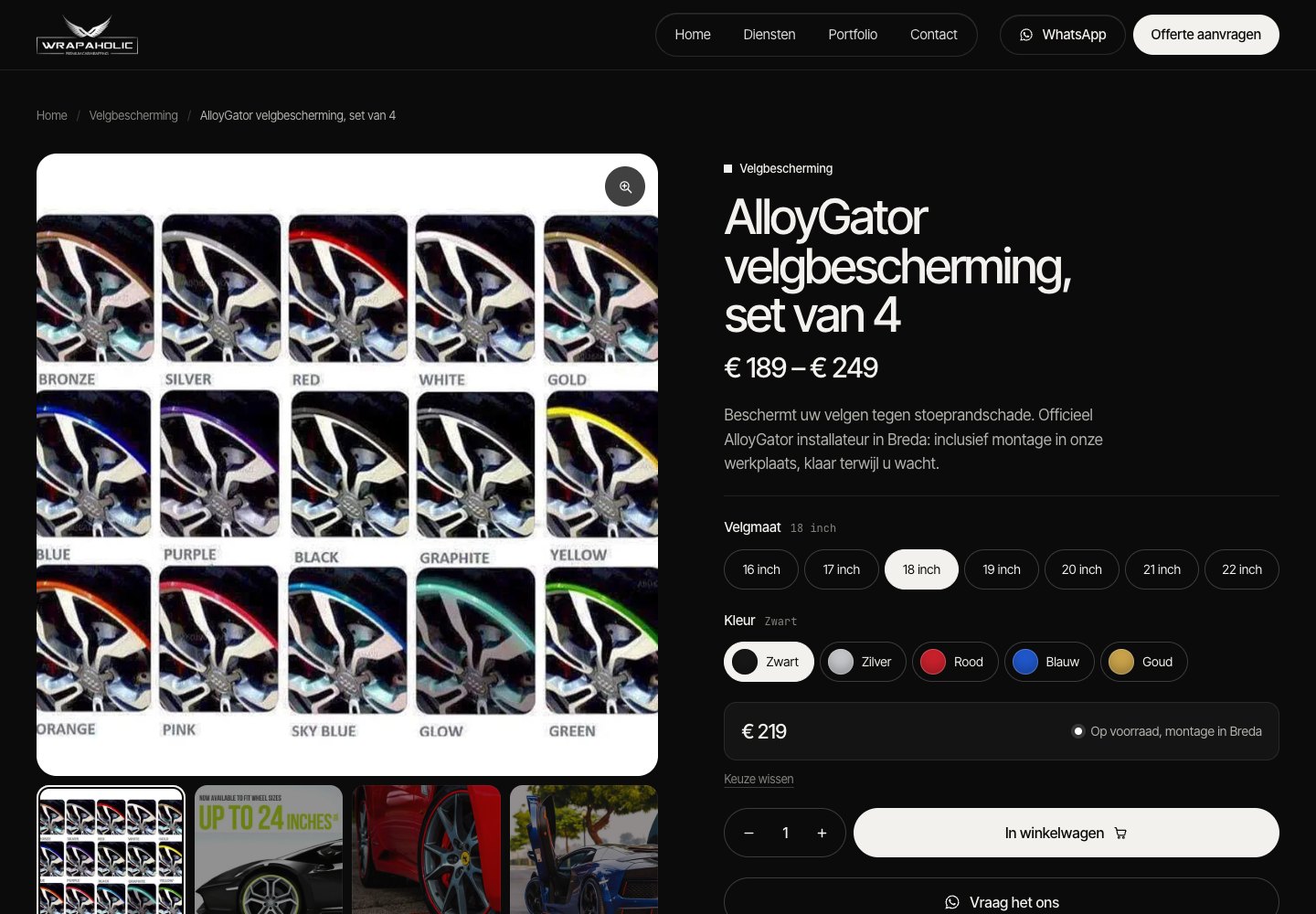
A homepage says little about a shop, so I ran a second round on the same Dutch client site: its WooCommerce product page. Two real products had to share one template. The AlloyGator rim protection set is a variable product with 7 rim sizes (16 to 22 inch) and 5 colours, so 35 variations priced from € 189 to € 249. The XPEL PPF Compact package is a simple product on sale. I hand coded the product page first as the reference, then rebuilt it on both stacks with the same rules as the homepage: pixel compared at 1440, 768 and 390 pixels wide, page heights equal to the reference, and a real cart test at the end.
Both builds passed. On both, choosing 20 inch and Rood with a quantity of 2 put exactly that variation in the cart at € 498,00, and both match the reference to within 0.5% of pixels at every width. The interesting part is how differently they got there.
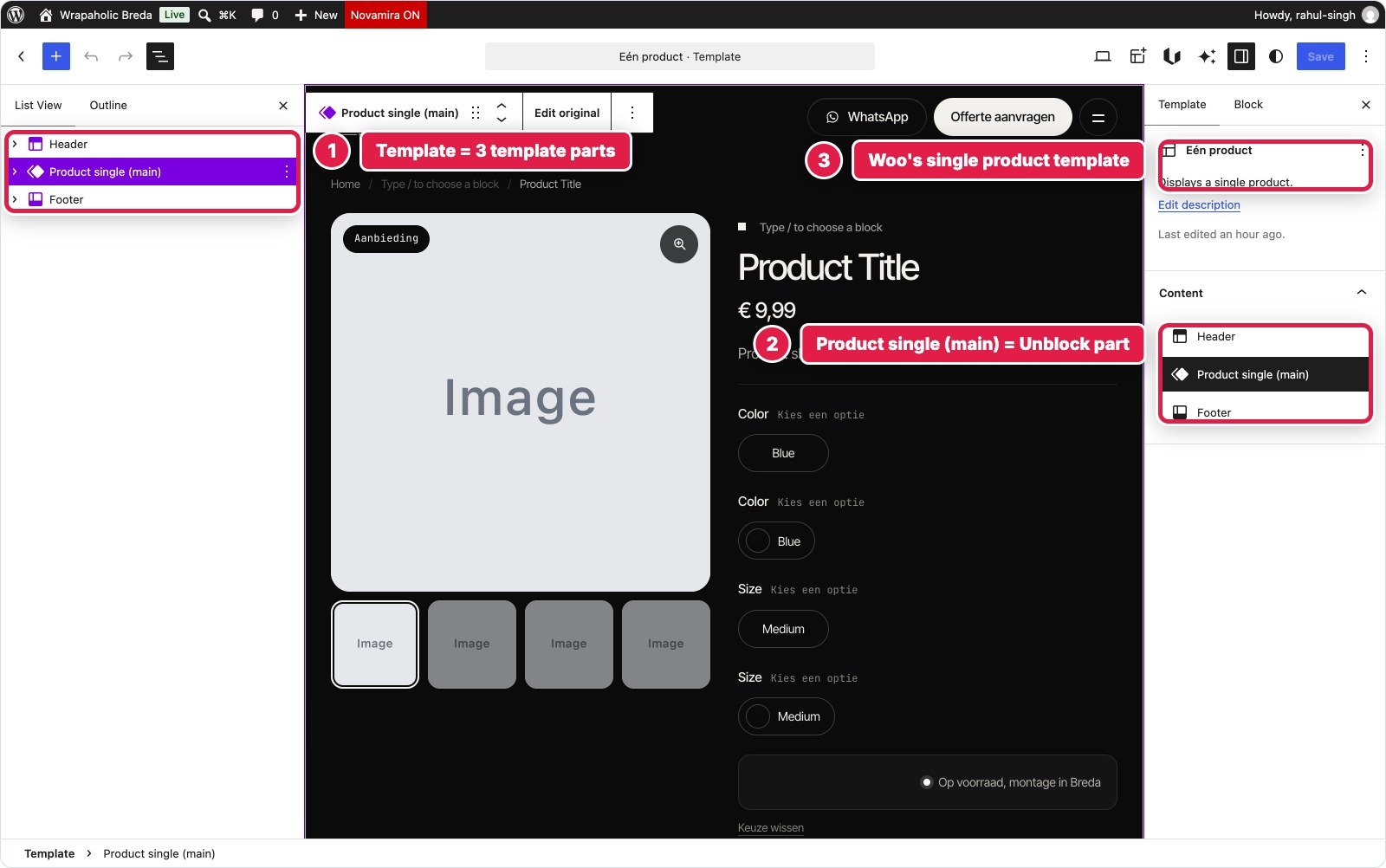
How Unblock built the product template
Unblock uses the block theme template hierarchy, so there is no display condition to set: the single product template applies to every product. There is one catch. WooCommerce registers a template with the same name, single-product, and every Unblock tool refused to write to it because WordPress then finds a template and a template part with the same id. The workaround is a three line template shell (header, product part, footer) written once with plain WordPress, and the whole product page lives in a new Unblock template part with 193 blocks. Twig pulls everything from Unblock’s built in WooCommerce data: title, price, gallery, attributes, SKU, stock and the related product.
Unblock cannot place WooCommerce blocks inside its templates, so the variation picker is its own. It is a real Woo add to cart form whose size buttons and colour swatches are generated by a Loop over the product attributes. Each swatch colour is a design token named after the term slug, so a new colour is one new token. A 6.6 KB block script matches the choice against the product’s variations, updates price, stock and SKU, sets the variation id and posts to Woo’s own add to cart endpoint. Without JavaScript the form still works through Woo’s normal form handler; I tested that too. No plugin was added, and the only store setting I touched was the colour order.
The weak spots are real. In the template part editor there is no product to preview, so you edit placeholders like “Post Title” and loops that say “No results”. Variation images would need extra script, and the cart and variation logic is code you now maintain.
How Spectra and Astra built it
On this stack there is no product template you design on a canvas. Astra Pro’s WooCommerce module prints Woo’s classic product template, the Customizer decides which parts show and in what order, and everything else is injected at hook points: eight Astra Site Builder layouts, each set to All Products. Five hold Spectra blocks (trust points, the ask button, the help card, the promo banner and the mobile product bar), and three are code layouts for the CSS, the PHP filters and a one line breadcrumb call.
The variation picker is Woo’s own form with the free Variation Swatches for WooCommerce add-on from the same company behind Astra. You set Velgmaat to Label and Kleur to Color on the attributes screen and pick a colour per term. Its colour swatches are dots without names, so the names come from a CSS trick that reads the swatch title. The skin for all of this is 36.3 KB of CSS, 31.4 KB of it in one code layout, plus 2.4 KB of PHP filters for shop text such as “Keuze wissen” and trimming “,00” from prices, and 1.4 KB of JavaScript for the mobile bar.
Two things cost real time. Astra Pro’s generated files went stale after I switched on its WooCommerce module, so the gallery thumbnails did nothing until the assets were regenerated, and the regeneration then turned the thumbnail row into a carousel that broke the layout until CSS hid it. And every rule needed the prefix body.single-product #content div.product to beat Astra’s and Woo’s own CSS, about 6 KB of selectors on its own. This build also changed more store settings: reviews off, the main image width from 600 to 800 pixels, and the attribute types for the swatch add-on.


| Unblock | Spectra on Astra Pro | |
|---|---|---|
| Where the template lives | Block theme template + one Unblock template part | Woo’s classic template + Customizer + 8 hook layouts |
| Edit the whole page in one editor | Yes, with placeholder data | No, it is assembled |
| Add-ons installed | None | Variation Swatches for WooCommerce |
| Variation picker | Own buttons on a real Woo form, 6.6 KB script | Add-on swatches on Woo’s form, 1.4 KB script for the bar |
| Custom CSS for the product page | 25.7 KB | 36.3 KB |
| PHP filters | None | 2.4 KB |
| Store settings changed | Colour order only | Reviews, image size, attribute types, colour order |
| Pixel difference at 1440 / 768 / 390 | 0.16 / 0.22 / 0.34% | 0.20 / 0.30 / 0.46% |
| AI agent build time | About 21 minutes | About 33 minutes |
Winner for building the template: Unblock. One editor, no add-on and fewer store changes, at the price of writing the variation logic yourself.
What each product page ships
| Variable product page | Hand coded | Unblock | Spectra on Astra Pro |
|---|---|---|---|
| Code shipped (HTML, CSS, JS, fonts) | 104 KB | 467 KB | 385 KB |
| The same without fonts | 29 KB | 105 KB | 299 KB |
| JavaScript transferred | 5 KB | 59 KB | 137 KB |
| Requests | 14 | 27 | 63 |
| DOM nodes | 388 | 453 | 690 |
| Lighthouse mobile / desktop | 95 / 100 | 76 / 99 | 54 / 98 |
| Mobile CLS | 0 | 0 | 0.49 |
| Mobile LCP | 2.9 s | 4.7 s | 5.9 s |
| Variation picker | Static | Own buttons, 6.6 KB script | Add-on swatches, 1.4 KB script |
| Pixel difference 1440 / 768 / 390 | n/a | 0.16 / 0.22 / 0.34% | 0.20 / 0.30 / 0.46% |
The pattern from the homepage repeats. Unblock’s total is mostly the same 363 KB of Font Library files; without fonts it ships about a third of Spectra’s code. Most of Unblock’s 59 KB of JavaScript is not Unblock at all: WooCommerce loads jQuery and its classic shop scripts on every product page even though this template uses none of them, and there is no setting to stop it. Spectra’s page adds Astra Pro’s scripts, the swatch add-on with its 24 KB of CSS and JS plus dashicons, and Woo’s form with all 35 variations embedded in the page. Desktop scores are a tie. On mobile the gap is 22 points, and most of it is one problem.
The layout shift on phones
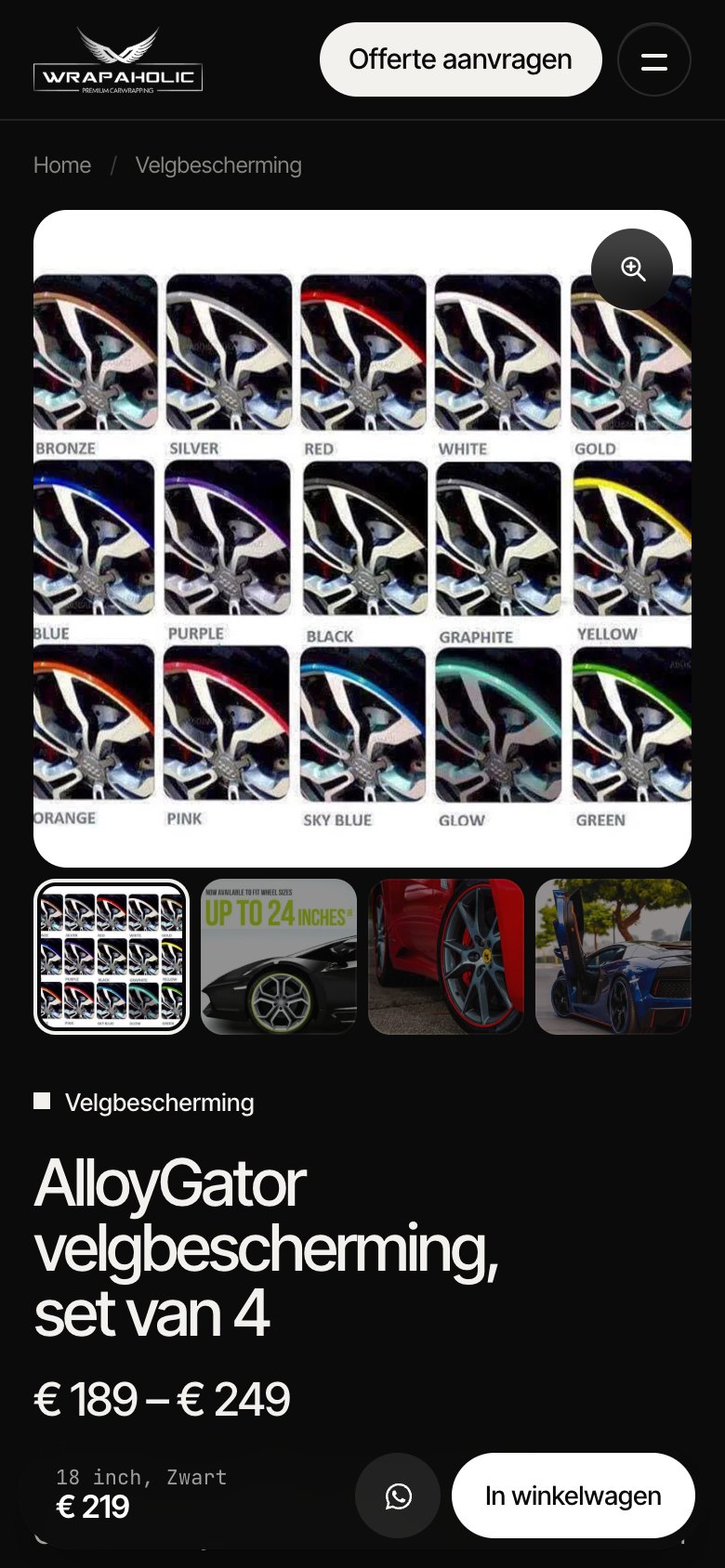
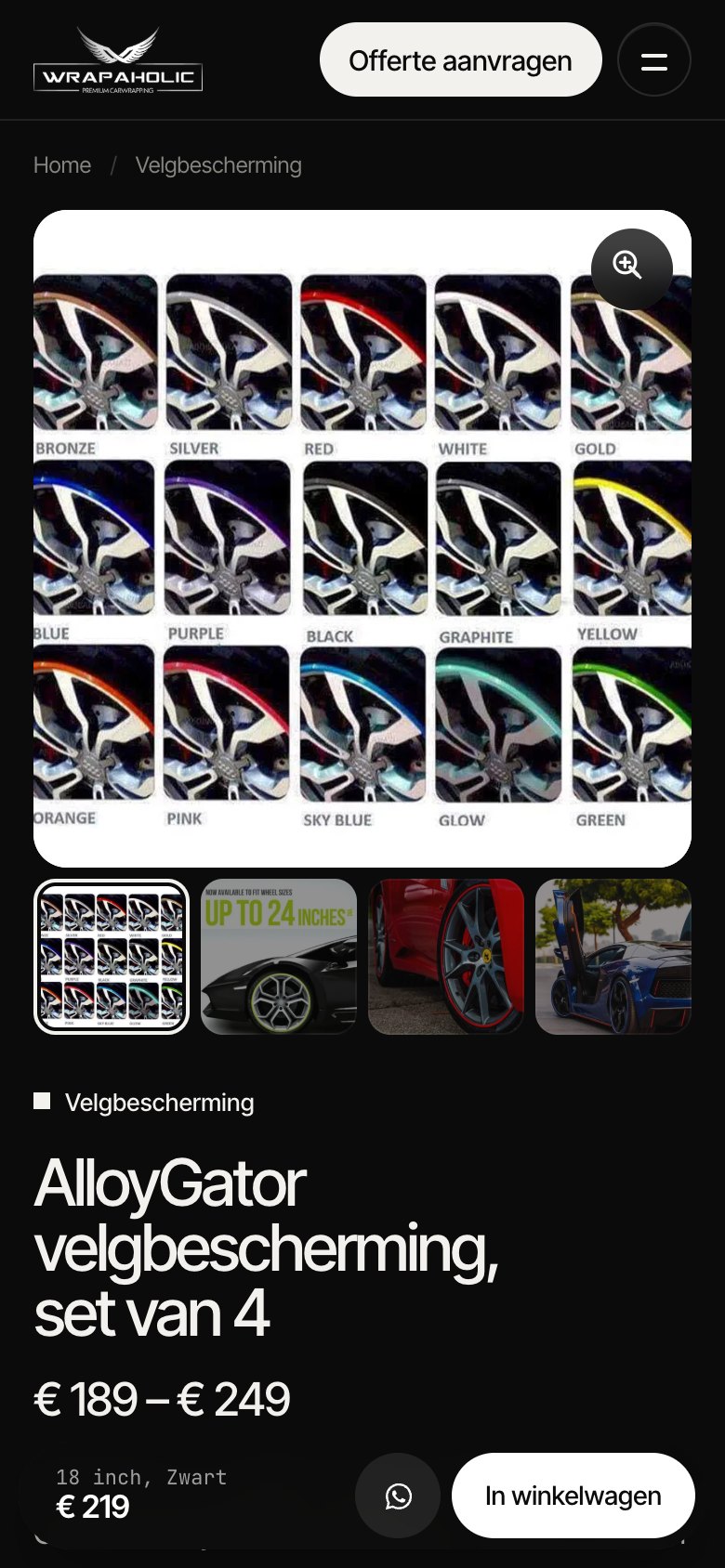
On a phone the summary column with the title and price sits under the gallery. Woo’s gallery slider, which the Spectra build uses as Woo ships it, lays every slide out at full size before it starts, so in my trace the gallery measured 1,506 pixels at first paint and 3,637 pixels when the page finished loading, before the slider shrank it to its final 444 pixels. The price block starts far below the screen and then jumps up. Lighthouse scores that as a CLS of 0.49, well into the red.
Unblock’s gallery is its own markup: the main image sits in a fixed square box with width and height on the image, and Woo’s gallery script never runs. It is 444 pixels tall from the first paint to a second after load, so its CLS is 0. To be fair to Spectra, this is a WooCommerce and Astra behaviour you can fix, and I left it unfixed so you see what each stack does out of the box.

Why the page jumps on phones
Woo’s gallery slider renders all slides at full size for a moment before it starts, so the gallery grows to thousands of pixels and the summary column below it jumps. Templates that reserve the main image box do not move.
- Reserve the gallery’s final size with a few lines of CSS:
aspect-ratio: 1 / 1on the main image wrapper, with the extra slides clipped until the slider is ready. - Keep
widthandheighton the main image so the browser knows its box before it loads. - Test on a throttled phone profile, not only on desktop: both builds score 98 or more on desktop and still differ by 22 points on mobile.
My WooCommerce verdict for this pair
For a WooCommerce store, I would build the product template on Unblock when a developer owns the site: it gave the faster, steadier page with no add-on and fewer store changes, and the variation script is small enough to read in one sitting. I would stay on Spectra and Astra Pro when the shop leans on WooCommerce extensions that hook into Woo’s classic product template, because that template stays intact there, and I would add the gallery CSS fix on day one. What I would not do is pick Spectra for speed: out of the box its product page was the heavier and the jumpier of the two.
Pricing in 2026
Unblock has no free version and four plans, all with every feature, the AI assistant and updates. Local and staging sites do not count toward the limit. Until 1 December 2026 every plan, lifetime included, is 30% off for Black Friday. Refunds are within 14 days.
| Unblock plan | Price | Sites | Black Friday price |
|---|---|---|---|
| Starter | $69 a year | 1 | $48.30 |
| Professional | $129 a year | 10 | $90.30 |
| Agency | $199 a year | 100 | $139.30 |
| Lifetime | $499 once | 1,000 | $349.30 |
Spectra Blocks and Astra are free on WordPress.org. My build used two paid parts: Spectra Pro for the Block CSS and JS dock and the Style Guide, and Astra Pro for the Site Builder hooks that hold the header script and the mobile bar. You can buy them separately or in Brainstorm Force’s toolkits, whose first year prices are introductory and renew higher, fixed at purchase. Refunds are within 14 days.
| Spectra option | Price | Sites | Renews at |
|---|---|---|---|
| Spectra Pro | $69 a year | 3 | $69 |
| Astra Pro (add on only) | $69 a year | 3 | not stated |
| Essential Toolkit + AI (Astra Pro, Spectra Pro, more) | $199 first year | 10 | $299 |
| Business Toolkit + AI (adds SureForms Agency) | $279 first year | 1,000 | $429 |
| Spectra Pro Lifetime | $319 once | 3 | n/a |
| Astra Pro Lifetime | $249 once | 3 | n/a |
| Essential Toolkit + AI Lifetime | $549 once | 10 | n/a |
| Business Toolkit + AI Lifetime | $799 once | 1,000 | n/a |
| What you pay for this build | Unblock | Spectra stack |
|---|---|---|
| 1 site, first year | $69 | $138 (Spectra Pro + Astra Pro, 3 sites each) |
| 10 sites, first year | $129 | $199 (Essential Toolkit) |
| 10 sites, every year after | $129 | $299 |
| 100 sites, first year | $199 | $279 (Business Toolkit, 1,000 sites) |
| 100 sites, every year after | $199 | $429 |
| Lifetime | $499 for 1,000 sites | $568 for 3 sites, $549 for 10, $799 for 1,000 |
| Free way in | None (demo only) | Spectra Blocks + Astra, without the Pro features |
The comparison that should decide it for freelancers
If you build ten client sites a year, Unblock costs $129 every year, while the Spectra and Astra stack costs $199 the first year and $299 after that. At lifetime, $499 covers 1,000 Unblock sites against $799 for the Business Toolkit. Unblock is cheaper at every paid tier.
Spectra’s answer is the free tier. If your sites can live without per block custom CSS and Site Builder hooks, Spectra Blocks and Astra cost nothing, and Unblock has no equivalent. I did not test a free only build, so I cannot tell you how much of this homepage it would cover.
When Unblock Makes Sense, and When It Does Not
Unblock fits developers and small agencies who think in HTML and CSS and want the block editor to stop getting in the way. It fits anyone handing first drafts to an AI agent, because the agent writes plain markup and CSS and gets it right sooner. It fits custom designs with their own breakpoints, their own tokens and semantic markup, and sites where page weight matters: 27 KB of code before fonts and 8 KB of JavaScript is close to hand coded. And it fits people who need a working form without another plugin.
Unblock does not fit clients who will edit layouts alone, because the List View is a tree of elements and the menus are markup. It does not fit anyone who wants a big library of ready made blocks: there is no slider, no tabs, no off canvas component, you write them. It does not fit anyone who wants a free start or a long track record, since 1.0 shipped on 10 November 2026. And it does not fit anyone who cannot accept that switching the plugin off leaves a blank page.
Spectra is the other way round. It fits Astra shops, free starts and client handovers, where visual grids and standard WordPress menus and widgets matter more than page weight. It does not fit lean builds, designs that need a header breakpoint other than 921 pixels, or a form without a second plugin, and Spectra Blocks 1.0 is young too: I hit silent drops of clamp(), rgba borders and empty attributes, plus a PHP warning from a gap setting, in a single build.
Pick Unblock if
- You write HTML and CSS and want the editor to show you exactly that, with visual panels as a shortcut.
- You want the leanest output: 27 KB of code before fonts, 8 KB of JavaScript, an 89 KB HTML document.
- You build with AI agents over MCP and want fewer failed runs.
- You need a working form and a design specific breakpoint without extra plugins or PHP filters.
- You build 10 or more sites a year and want the cheaper paid plan.
- You want a custom WooCommerce product page without a swatch add-on or a layout jump on phones, and can maintain a small variation script.
Pick Spectra if
- You already run Astra and want blocks that follow its palette and settings.
- You want a free start, and a product backed by the company behind Astra.
- You prefer grids, columns, spacing and colours as visual settings that clients can change.
- You want menus, footer widgets and the year in standard WordPress places for client handover.
- You want the theme to keep your header and footer alive if you ever remove the builder.
- You run WooCommerce on Woo’s own product template and want hook based add-ons to keep working.
Pros and Cons
My verdict on Unblock
Unblock
4.0/5
The best fit in this test for developers and AI agent builds: clean semantic markup, the smallest code before fonts and a native form. It also built the steadier WooCommerce product page. New, paid only, and the page disappears without it.
What works
What does not
My verdict on Spectra
Spectra
3.5/5
A capable free builder with good visual grids, carried by Astra for the header, footer and client friendly editing. Heavy output, no form block and custom code spread across four places, and on WooCommerce a product page assembled from hooks.
What works
What does not
The Conclusion, in Full
Unblock is the better builder for this kind of work. On one demanding custom homepage it produced markup close to what I would write by hand, shipped a sixth of Spectra’s code once you set fonts aside, handled the quote form natively, and let an AI agent finish in two check runs where Spectra needed seven. The visual panels are better than its reputation: they are a front end to the same CSS rule, so you can work either way and never end up with two sources of truth.
Spectra Blocks 1.0 is a good step forward from Spectra Legacy. The single Container block that can be any HTML tag, native Grid with responsive columns, and breakpoints that follow WordPress itself gave me the same semantic about section with less CSS than Unblock. But the output is heavy for what it is. Writing each block’s CSS three times turned one homepage into a 536 KB document, and the Pro and Astra layers add jQuery, extension stylesheets nobody asked for, and 42 requests. Spectra also leans on Astra for everything outside the page content, so your custom code ends up in four places.
Neither one is easy to leave: Unblock leaves a blank page and Spectra leaves 11% of the text, so treat either as a long term choice.
The WooCommerce round points the same way. Unblock built the product page in one editor with no add-on, shipped about a third of Spectra’s code without fonts and did not move on phones, but it cannot use Woo’s own blocks, so the cart and variation logic is a script you own. Spectra and Astra keep Woo’s classic template and its add-on ecosystem intact, at the cost of a product page you assemble from hooks, 36 KB of CSS fighting Astra’s selectors, and a 0.49 layout shift until you reserve the gallery’s size.
My pick for a developer or a small agency building custom designed sites in 2026 is Unblock, especially at the Professional plan for ten sites, which costs less every year than the Spectra and Astra stack. Fix the font files on day one. My pick for an Astra shop that hands sites to clients is Spectra, with a form plugin added and an eye on page weight.
FAQ
Is Unblock better than Spectra?
For custom designs built by developers or AI agents, yes. On the same homepage Unblock shipped 27 KB of code before fonts against 168 KB, an 89 KB HTML document against 536 KB, and had a native form. Spectra is the better choice for Astra users who want a free start and client friendly visual editing.
Is Spectra Blocks the same plugin as Spectra?
No. Spectra Blocks (slug spectra-blocks) is a new plugin added to WordPress.org in July 2026 with about 70,000 installs. The old plugin is now called Spectra Legacy (Ultimate Addons for Gutenberg) with over a million installs. This comparison uses Spectra Blocks 1.0.15 with Pro 1.0.6.
Can I use Unblock with Astra or Spectra?
Unblock works in the block editor, and its Unblock Theme is optional according to its documentation, so you can run it on another theme. I built on the Unblock Theme and did not test it on Astra. Running both builders on one site is possible, but you would load both and gain little.
Does Unblock work without the plugin?
No. With the plugin deactivated my homepage was blank, header and footer included. Sites keep working if you stop renewing the license; you lose updates, the AI assistant and support, not the pages.
What happens to a Spectra site if I deactivate Spectra?
In my test 11% of the text stayed visible: Astra’s header and footer, the raw HTML form and core images. Every Spectra Container and Content block disappeared, so the page needs a rebuild.
Does Spectra have a form block?
Spectra Blocks 1.0.15 does not. I built the quote form as raw HTML in a Custom HTML block, which nothing receives without a form plugin. Brainstorm Force sells SureForms, and the Business Toolkit includes SureForms Agency. Unblock has a native form mechanism.
Which is faster, Unblock or Spectra?
Both scored 96 on Lighthouse desktop. On mobile Spectra scored 76 and Unblock 70, mostly because of the hero video and Unblock’s larger default font files. Without fonts Unblock ships far less: 8.2 KB of JavaScript against 76 KB and 18 requests against 42.
Why is the Spectra page HTML so large?
Spectra prints each block’s CSS once per device: desktop, then again in the tablet media query, then in the mobile one, even when the value is the same. On my homepage that is 2,176 rules and 334 KB of inline CSS inside a 536 KB document.
Does Unblock have a free version or a lifetime deal?
There is no free version or trial, only a live demo. Plans are $69 a year for 1 site, $129 for 10, $199 for 100, or $499 once for 1,000 sites, all 30% off until 1 December 2026. Spectra Blocks and Astra are free, with paid Pro plans from $69 a year.
Which is better for building with AI?
Unblock in my test. An AI agent built the Unblock page with 352K tokens, 2 check runs and 19 minutes, against 518K tokens, 7 runs and 35 minutes on Spectra. Unblock also has an MCP Bridge for Claude, ChatGPT, Cursor and other clients.
Do I need Astra Pro and Spectra Pro for a site like this?
I used Spectra Pro for the Block CSS and JS dock and the Style Guide, and Astra Pro for the Site Builder hooks that hold the header script and the mobile bar. Together that is $138 a year for 3 sites, or $199 for the 10 site Essential Toolkit in the first year.
Can Unblock build a WooCommerce product page?
Yes. I built a variable product page with 35 variations on Unblock with no extra plugin. The template is an Unblock template part fed by its built in WooCommerce data, and the size and colour picker is its own buttons on a real Woo form with a 6.6 KB script. Unblock cannot place WooCommerce blocks in templates, so you write that logic yourself.
Do I need a swatch plugin for variation swatches with Spectra and Astra?
In my build, yes. I used the free Variation Swatches for WooCommerce add-on from the makers of Astra, with Label for sizes and Color for colours. Its colour swatches have no text, so I added the colour names with CSS. Astra Pro also has a dropdown to buttons option, which stays off while the add-on is active.
Why does the Spectra WooCommerce product page jump on mobile?
Woo’s gallery slider renders every slide at full size before it starts, so on a phone the gallery briefly grows to over 3,600 pixels and the price block below it jumps. Lighthouse scored it 0.49 CLS. Reserving the gallery size with aspect-ratio in CSS fixes it. The Unblock page uses a fixed square gallery and scored 0.