Disclosure: the Unblock links on this page are affiliate links, so I earn a commission if you buy through them, at no extra cost to you. Kadence, Elementor, GenerateBlocks, Greenshift and Spectra are linked plainly, with nothing attached. None of the six companies saw this post before it went live.
GenerateBlocks is the best WordPress page builder for most people in November 2026. I rebuilt the same real client homepage, pixel for pixel, on six builders, and GenerateBlocks came out with the best balance of everything I measured: the third lightest page, native navigation and forms, a design system of tokens and reusable classes, a free version, and a page that keeps most of its content if you ever switch the plugin off. Kadence is the safest choice when a client edits the site alone, Greenshift is the cheapest and lightest, and Unblock is the best tool for developers and for anyone who builds with AI agents. Elementor and Spectra both got the page right, and both shipped far more code than it needed.
The homepage belongs to Wrapaholic Breda, a Dutch car wrapping studio, so the copy in every screenshot is Dutch. It has a sticky header with a full screen mobile menu, a video hero with a rotating circular badge, eight service tiles, an about block with stats and pillars, a draggable project strip, a contact section with a quote form, a footer with a giant outlined word, and a fixed contact bar on phones. I built it on six identical local installs of WordPress 7.1.4 with PHP 8.5, each builder on its own theme, set up the way its vendor recommends for maximum speed. All six finished under 0.3% pixel difference from the hand coded original at 1440, 768 and 390 pixels wide, so every difference in this post comes from how each builder gets there, and what it ships when it does.
This is the hub of a series. Each builder also has a full head to head with Unblock: Unblock vs Kadence Blocks, Unblock vs Elementor, Unblock vs GenerateBlocks, Unblock vs Greenshift and Unblock vs Spectra. Those go deeper on each pair. This post puts all six side by side, section by section, number by number.
My recommendation
- Best for most people: GenerateBlocks. 120 KB shipped, native navigation and forms, Global Styles and Design Tokens, a free version, and $149 a year for 10 sites.
- Best for developers and AI agent builds: Unblock. One block is one HTML element, 27 KB of code before fonts, the fastest AI build of the six, $499 once for 1,000 sites. Total lock in.
- Best when the client edits alone: Kadence. Native components, the best Lighthouse scores and a styled page with the plugin off. By far the most expensive, $350 a year for one site.
- Best for a WooCommerce store: Kadence. Shop Kit gives it a designed product template and named swatches, and its product page had the best mobile score of the six (81) with almost no layout shift.
- Cheapest and lightest: Greenshift. 104 KB shipped, 8 KB more than the hand coded original, lifetime licences on every pack, and 99.6% of the text survives. The editor is the hardest of the six to read.
- Only if you are already invested: Elementor or Spectra. Elementor V4 is a big step forward and keeps your words if you leave, but it shipped 257 KB of JavaScript. Spectra suits Astra shops, but wrote a 536 KB HTML document and has no form block.
All Six Builders at a Glance
Here is the whole test on one table. Scroll sideways on a phone. Every price was checked on the vendor’s own pricing page, every rating comes from the WordPress.org API, and every measurement comes from my six builds.
| Unblock | Kadence | Elementor | GenerateBlocks | Greenshift | Spectra | |
|---|---|---|---|---|---|---|
| Owner | Themeone (Loïc Blascos) | Liquid Web (StellarWP) | Elementor Ltd. | EDGE22 Studios (Tom Usborne) | Wpsoul | Brainstorm Force |
| Version tested | 1.0.0 | Blocks 3.9.1, Pro 2.9.1 | 4.4.0, Pro 4.4.0 (V4) | 2.5.1, Pro 2.8.0 | 13.2.3 | Blocks 1.0.15, Pro 1.0.6 |
| Theme used | Unblock Theme 1.0.0 | Kadence 1.6.0 + Pro | Hello Elementor 3.5.2 | GeneratePress 3.6.1 + GP Premium | Greenshift theme 2.6.6 | Astra 4.14.2 + Astra Pro |
| Free version | No | Yes | Yes | Yes | Yes | Yes |
| WordPress.org installs, rating | Not listed | 600,000+, 96 | 10 million+, 90 | 200,000+, 98 | 70,000+, 96 | 70,000+, 92 |
| Cheapest paid plan | $69/yr, 1 site | $350/yr, 1 site | $60/yr, 1 site | $99/yr, 1 site | $39.99/yr, 1 site | $69/yr, 3 sites |
| Lifetime | $499, 1,000 sites | No | No | $596, 100 sites | Every pack, from $79.99 | From $319, 3 sites |
| Header and footer | Template parts | Customizer + Pro Element | Pro Theme Builder | GP Elements | Template parts | Astra Customizer |
| Quote form | Native, server handled | Advanced Form | Pro atomic Form | Pro Forms | Contact Form preset | None (raw HTML) |
| Code shipped | 390 KB (27 KB without fonts) | 151 KB | 398 KB | 120 KB | 104 KB | 254 KB |
| JavaScript | 8.2 KB | 15.8 KB | 257 KB | 12.9 KB | 5.6 KB | 76 KB |
| HTML document | 89 KB | 315 KB | 137 KB | 88 KB | 95 KB | 536 KB |
| DOM nodes | 477 | 658 | 558 | 520 | 465 | 688 |
| Requests | 18 | 22 | 48 | 24 | 16 | 42 |
| Lighthouse mobile / desktop | 70 / 96 | 84 / 99 | 74 / 93 | 77 / 98 | 76 / 97 | 76 / 96 |
| Accessibility | 96 | 100 | 96 | 96 | 96 | 96 |
| Text left, builder off | 0% | 91%, styled | 99.6%, unstyled | 65% | 99.6%, unstyled | 11% |
| AI build: tokens, runs, minutes | 352K, 2, 19 | 479K, 6, 36 | 457K, 3, 34 | 450K, 4, 26 | 408K, 3, 20 | 518K, 7, 35 |
| WooCommerce product page code | 467 KB (363 KB fonts) | 288 KB | 497 KB | 249 KB | 248 KB | 385 KB |
| WooCommerce mobile Lighthouse / CLS | 76 / 0 | 81 / 0.03 | 57 / 0.49 | 67 / 0.47 | 80 / 0.08 | 54 / 0.49 |
| My score | 4.0 | 4.5 | 3.5 | 4.5 | 4.5 | 3.5 |
| Best for | Developers, AI builds | Client edited sites | Elementor teams | Most block builders | Low cost, low weight | Astra shops |
How I Ran the Test
The rules were simple and the same for all six. One real client homepage, designed and hand coded first, so there was a fixed target. Six fresh local WordPress 7.1.4 installs on PHP 8.5, identical apart from the builder and its theme. Each builder ran on the theme its vendor pairs it with, with the vendor’s own Pro add ons active, set up the way its documentation recommends for speed: local fonts, external or inlined CSS as recommended, caches and optimised loading on. No page cache, no CDN and no optimisation plugin on any site, because I wanted to measure the builder and nothing else.
Every build had to reproduce the original pixel for pixel at three widths, 1440, 768 and 390 pixels, with the same page height. That rule matters more than it sounds. It means no builder could drop the glass effects, the clamp based type sizes or the badge to save itself work, so every custom CSS rule and every line of JavaScript in this post was needed to reach the same result. A build passed when the screenshot difference against the original was under 1% at all three widths with an identical height. All six landed far below that line.
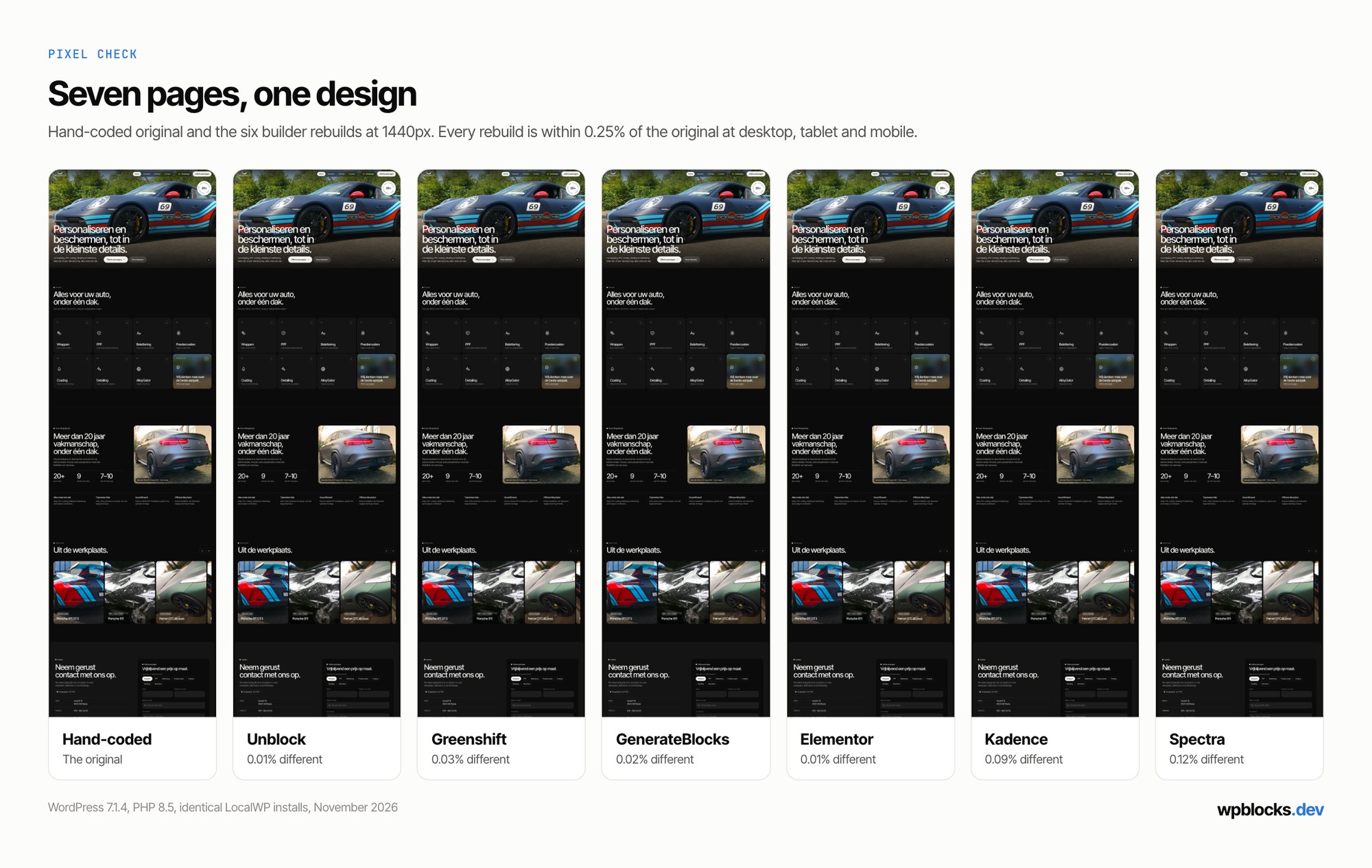
I logged every native setting, every custom CSS rule and script and why it was needed, and every bug, then measured each finished homepage logged out: transfer by type, requests, DOM size, unused code, axe checks, and Lighthouse three times per device. Finally I switched each builder off and measured what was left. Because Unblock sells itself on AI building, I also had an AI agent build each version from the same written brief; those numbers get their own section.
How Each Builder Thinks
Before the sections, it helps to know what each builder believes a page is, because that decides where your time goes.
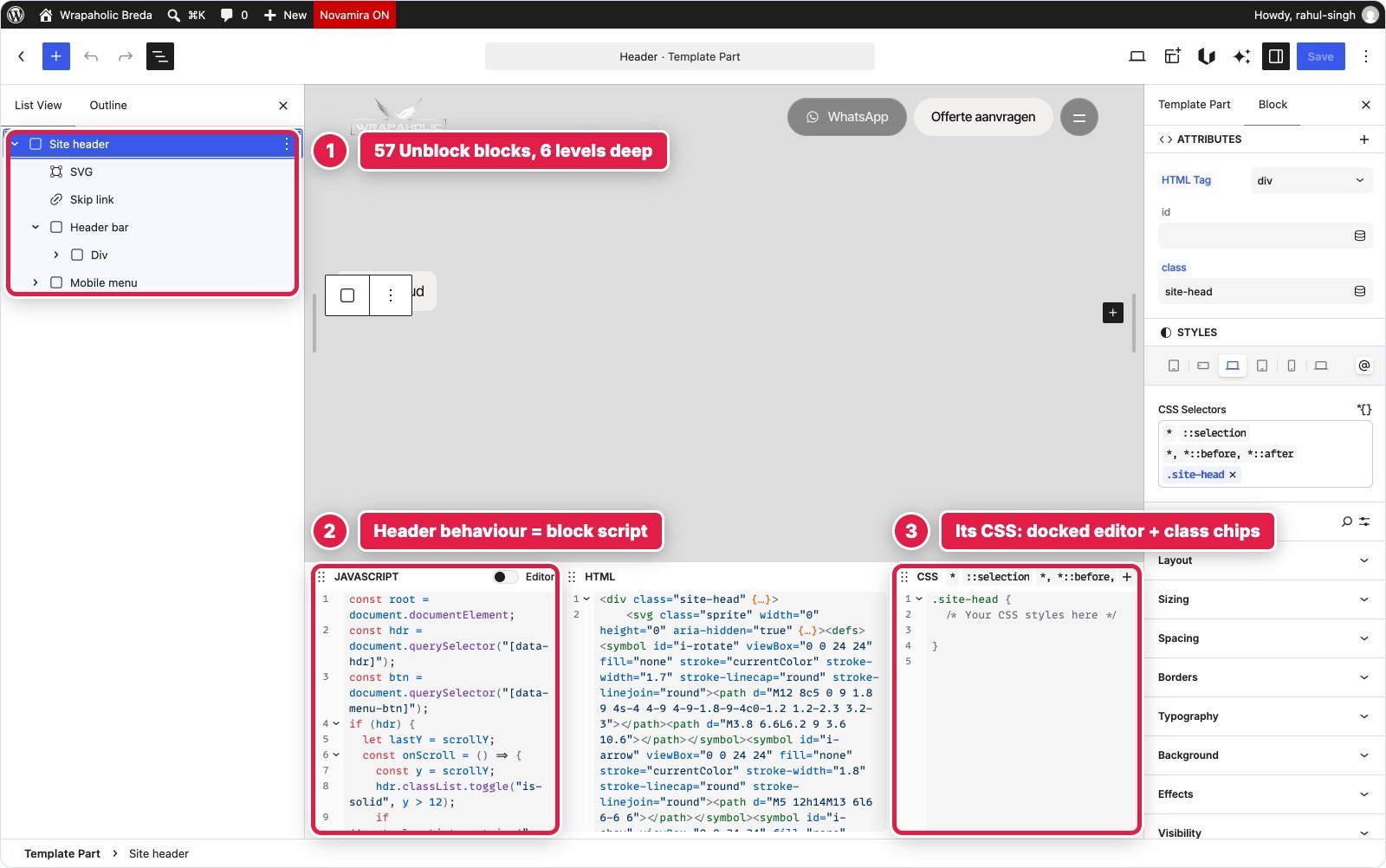
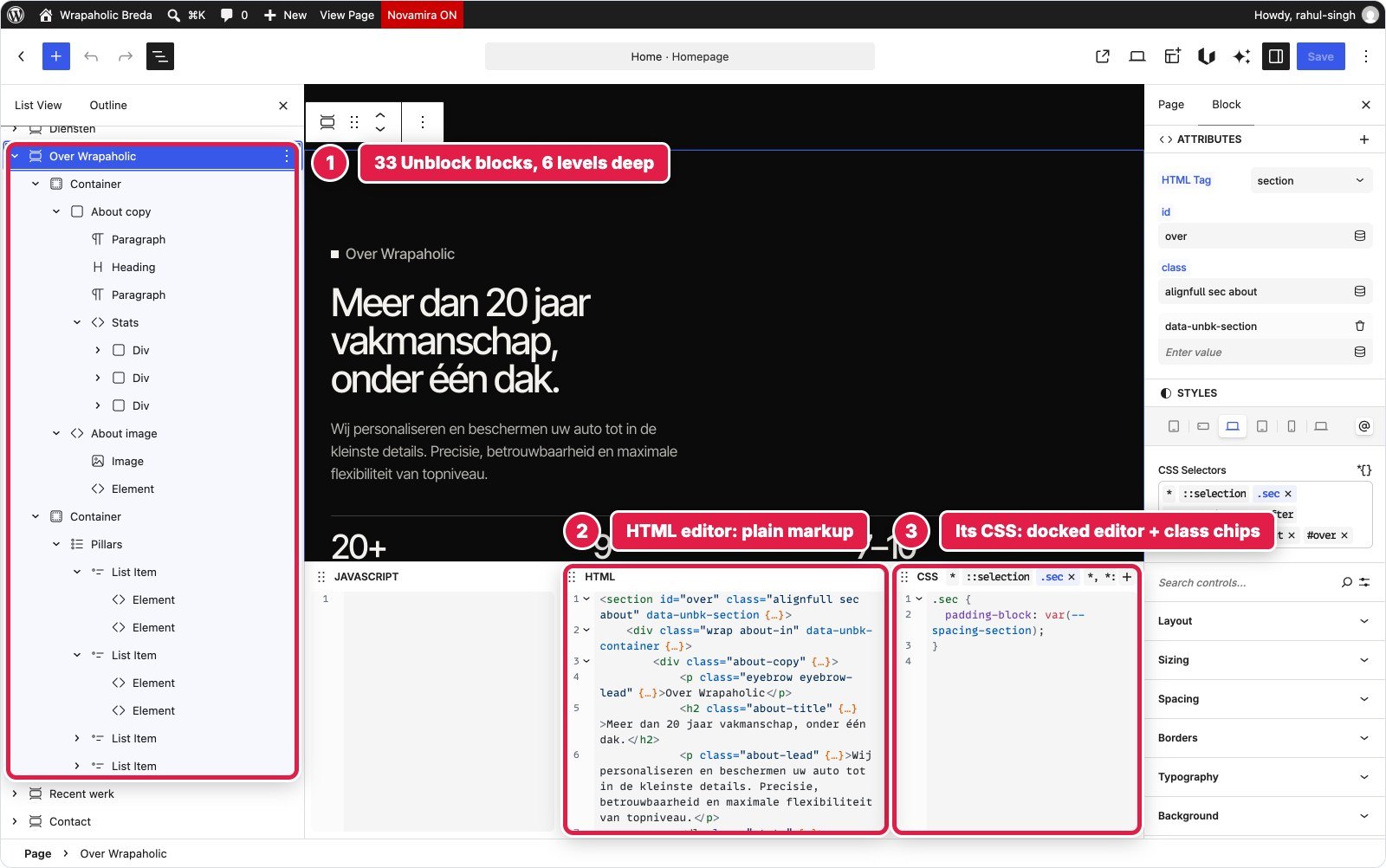
Unblock believes a block is one HTML element. You choose its tag and attributes, give it classes, and style those classes as global selectors, either with visual Layout, Sizing, Spacing, Borders, Typography, Background and Effects panels or in a CSS editor docked under the canvas. Both write the same rule, in both directions, so it is CSS first with visual panels on top, not code only. Each block can carry its own JavaScript, and Twig works inside text.
Kadence believes in purpose built blocks (Row Layout, Section, Advanced Text, Advanced Form) with a value per device, a Global Palette, and the header in the Customizer. Elementor lives in its own editor; version 4 styles atomic elements through Global Classes and Variables, with headers and footers from the Pro Theme Builder.
GenerateBlocks 2 gives you four generic blocks plus Pro blocks for header, navigation and forms, styled in a visual Styles builder whose reusable output is Global Styles (real classes) and Design Tokens (CSS variables). Greenshift builds everything from one Element block and keeps the CSS in Style Manager blocks, one per page and template part; I built it through its bundled HTML converter, as the vendor recommends. Spectra Blocks 1.0, the new plugin and not Spectra Legacy, is one Container block that renders as any tag, styled per block, with Astra supplying the header, footer and hooks.
| Unblock | Kadence | Elementor | GenerateBlocks | Greenshift | Spectra | |
|---|---|---|---|---|---|---|
| Editor | Block editor | Block editor + Customizer | Own editor | Block editor | Block editor | Block editor + Customizer |
| Basic unit | 1 element block | Purpose built blocks | Atomic elements | Element, Text, Media, Shape | 1 Element block | Container, Content |
| Styling lives in | Global selectors | Block settings + Additional CSS | Global Classes | Global Styles + local styles | Style Manager blocks | Block settings + Block CSS |
| Any HTML tag per block | Yes | Limited | Some (no ul, dl, figure) | Yes | Yes | Yes |
| Blocks for the homepage | 364 | 213 | 340 | 291 | 370 | 222 |
Two things stand out in that table. Four of the six let you pick any HTML tag for a generic container, so semantic markup is no longer a question of which builder, only of whether you use it. And the block count says little about effort. Kadence and Spectra have the lowest counts because their headers and footers are Customizer settings, not blocks. Unblock and Greenshift have the highest because every span and every SVG is its own block.
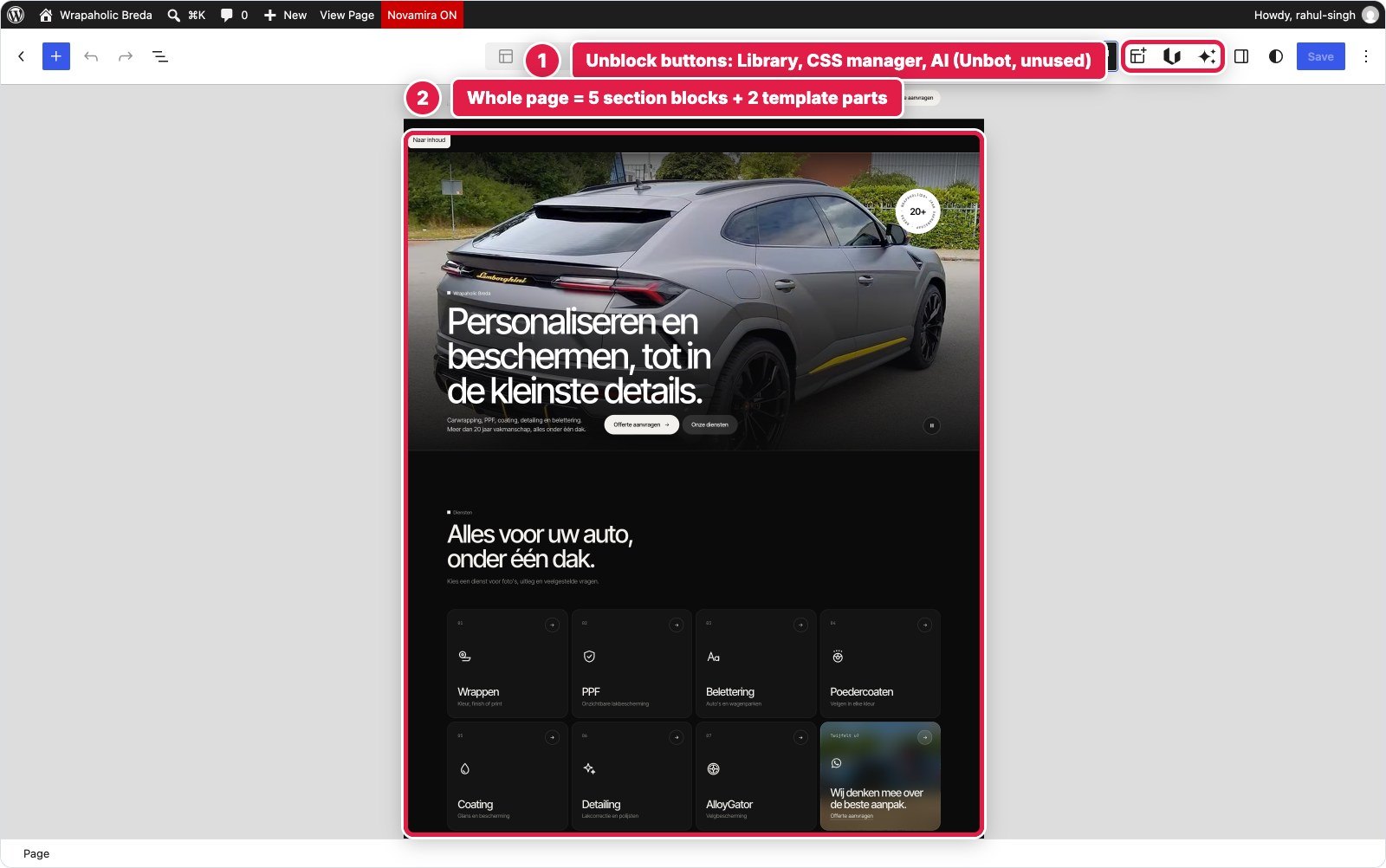
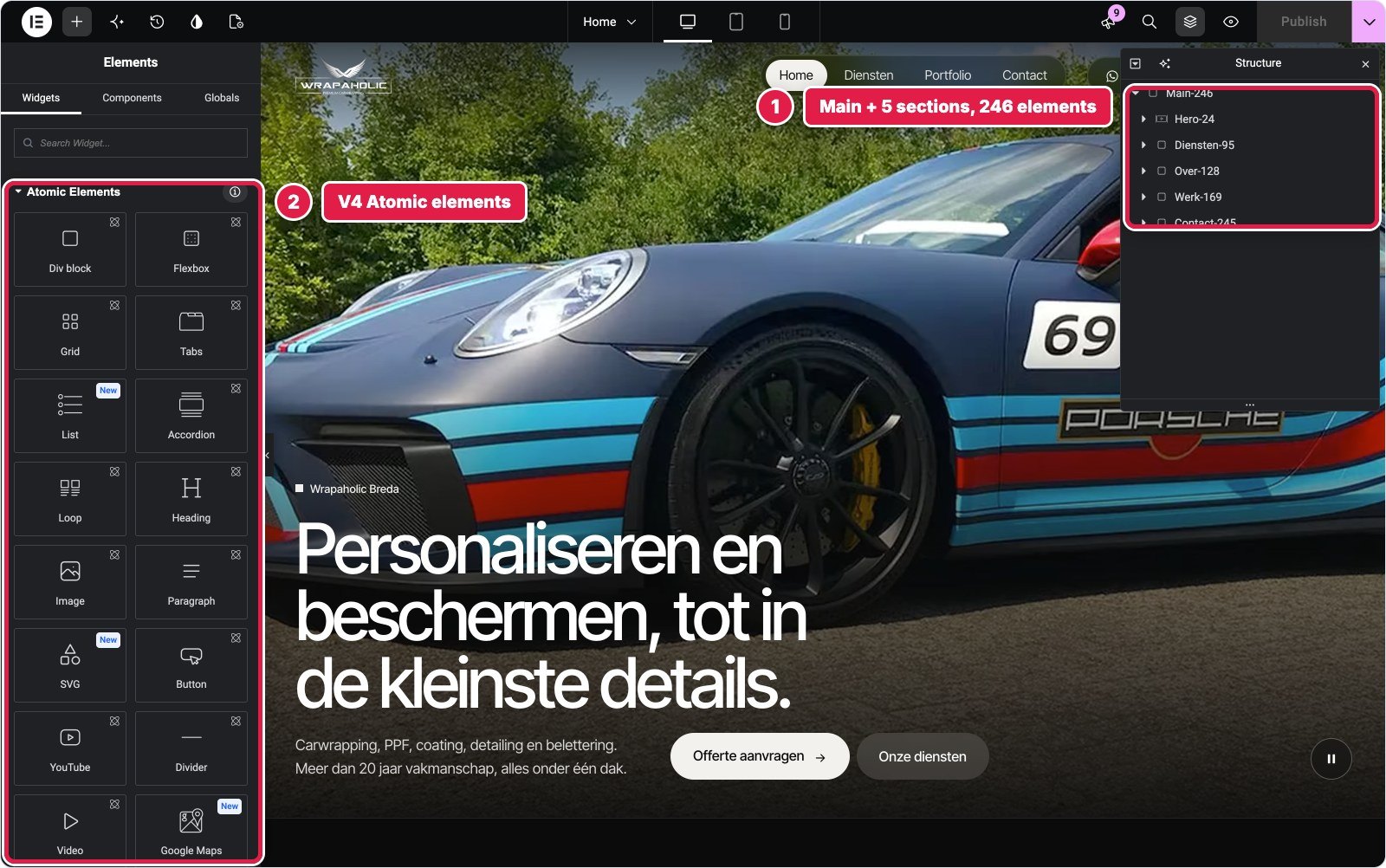
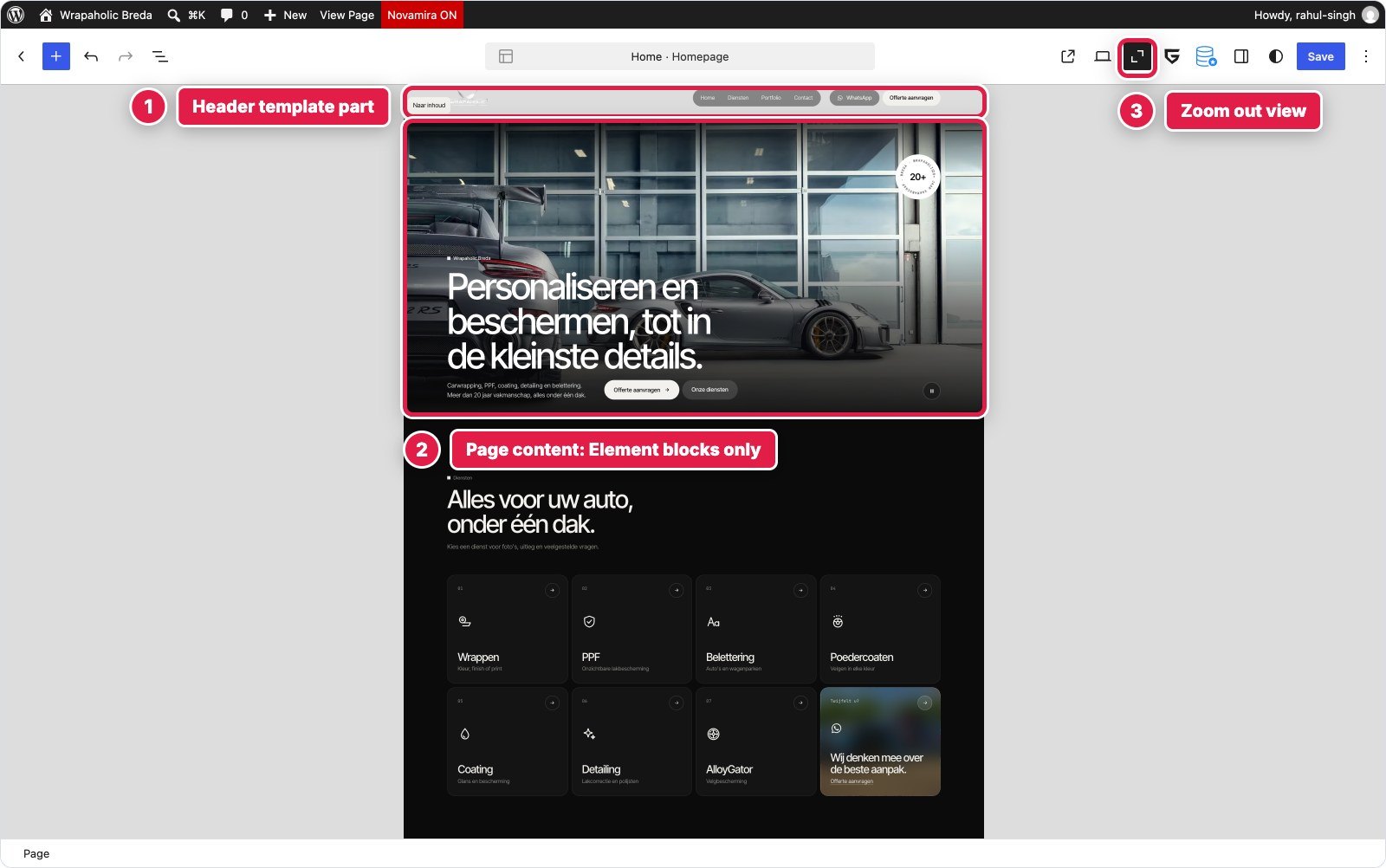

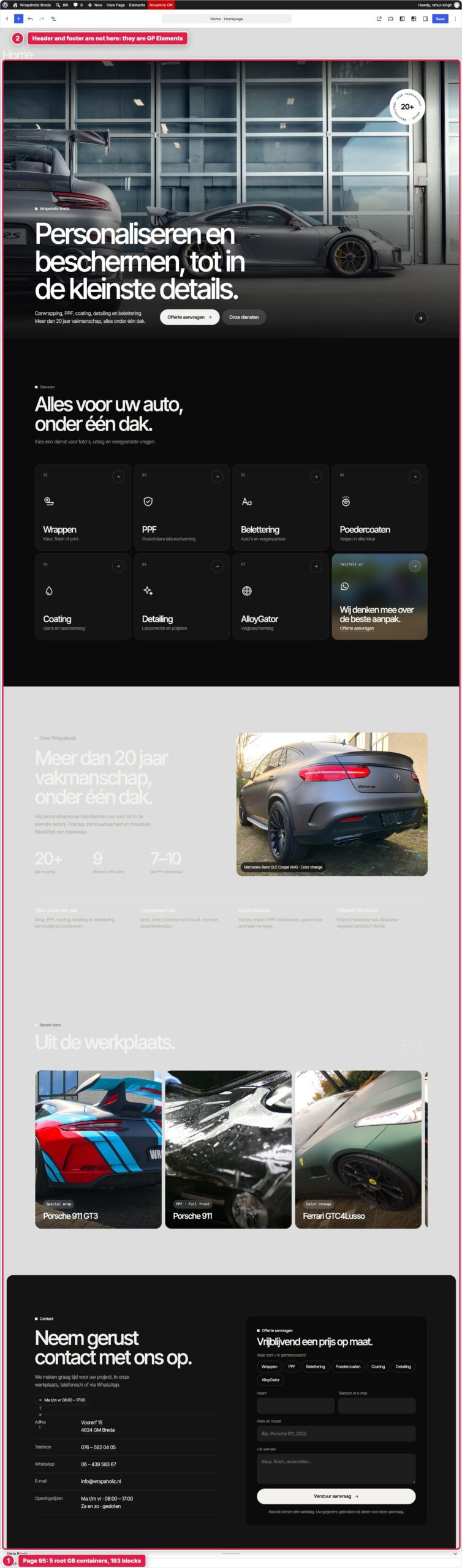
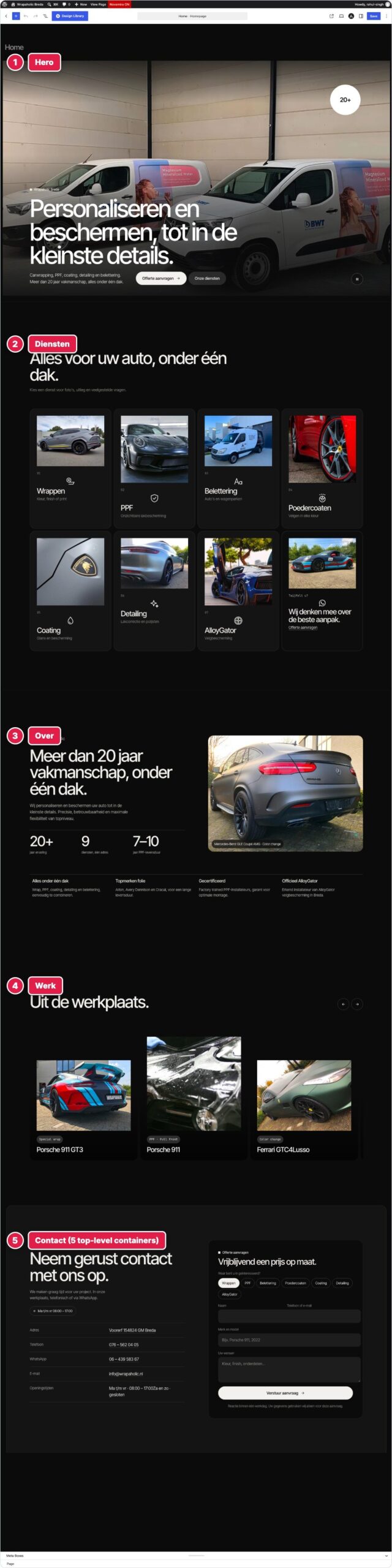
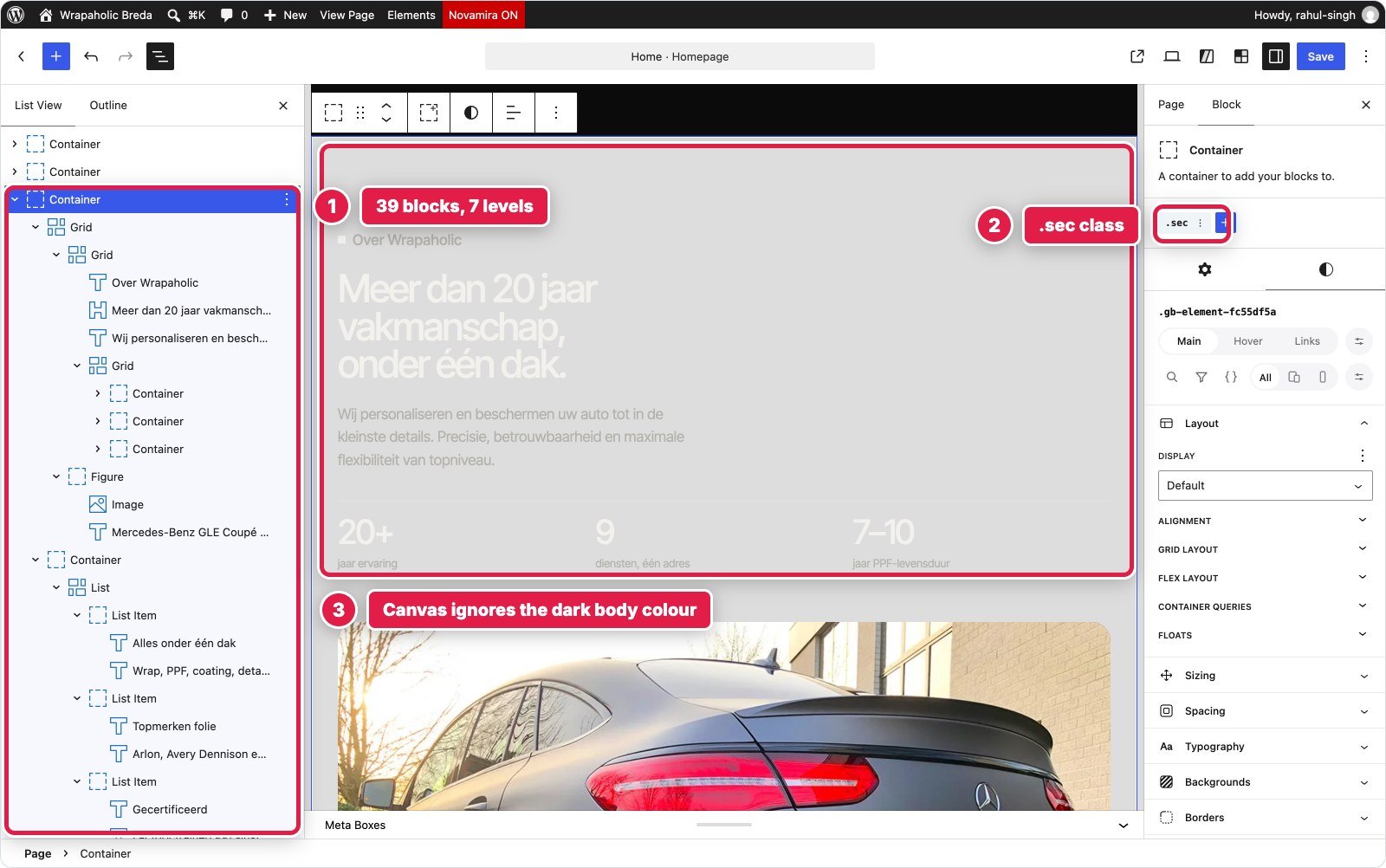
The editors also differ in how honest they are. Unblock’s canvas shows the finished design. Kadence’s editor does not load the Customizer Additional CSS, so the badge was a white disc and the project strip a tall stack of cards until I opened the front end. GenerateBlocks’ canvas does not paint GeneratePress’s dark page background, so light text sits on grey. Greenshift’s token and class names are near invisible in its dark panels. Elementor drops its class styling from the canvas when you open Site Settings, and opened an AI promo modal over the canvas in its template editors. Spectra’s List View says Container on almost every row. None of these breaks a build, but you live with them every day.
Header and Full Screen Mobile Menu
The design needed a logo, a pill shaped menu with a blurred glass background, WhatsApp and quote buttons, a header that turns solid after 12 pixels of scrolling and hides on scroll down, and below 1080 pixels a full screen menu with nine numbered services, a clip path reveal, Escape to close and scroll lock. It is the section where builders with a native menu component should win, and mostly they did.
Unblock and Greenshift have no header or menu component, so both built it by hand in a template part: 57 and 55 blocks, with 1,355 and 1,664 bytes of script for the scroll states, toggle, Escape, scroll lock and aria-current.
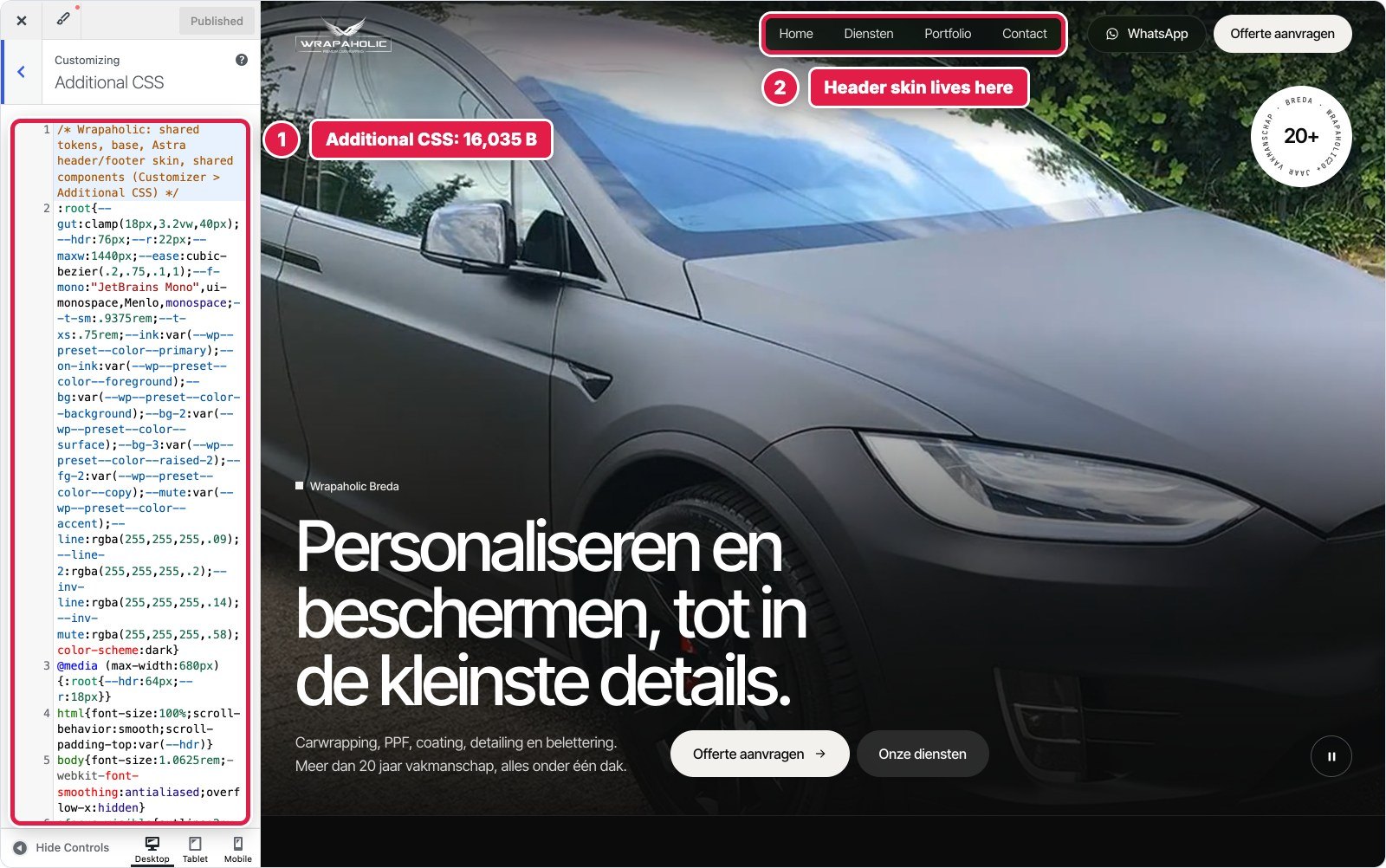
Kadence and Spectra put the header in the Customizer, which gave both a keyboard friendly drawer and real WordPress menus for free, at the cost of the most CSS in the section (6,602 and 7,605 bytes) for the pill and glass. Astra also fixes the mobile breakpoint at 921 pixels, so between 922 and 1080 pixels the Spectra page still shows the desktop menu.
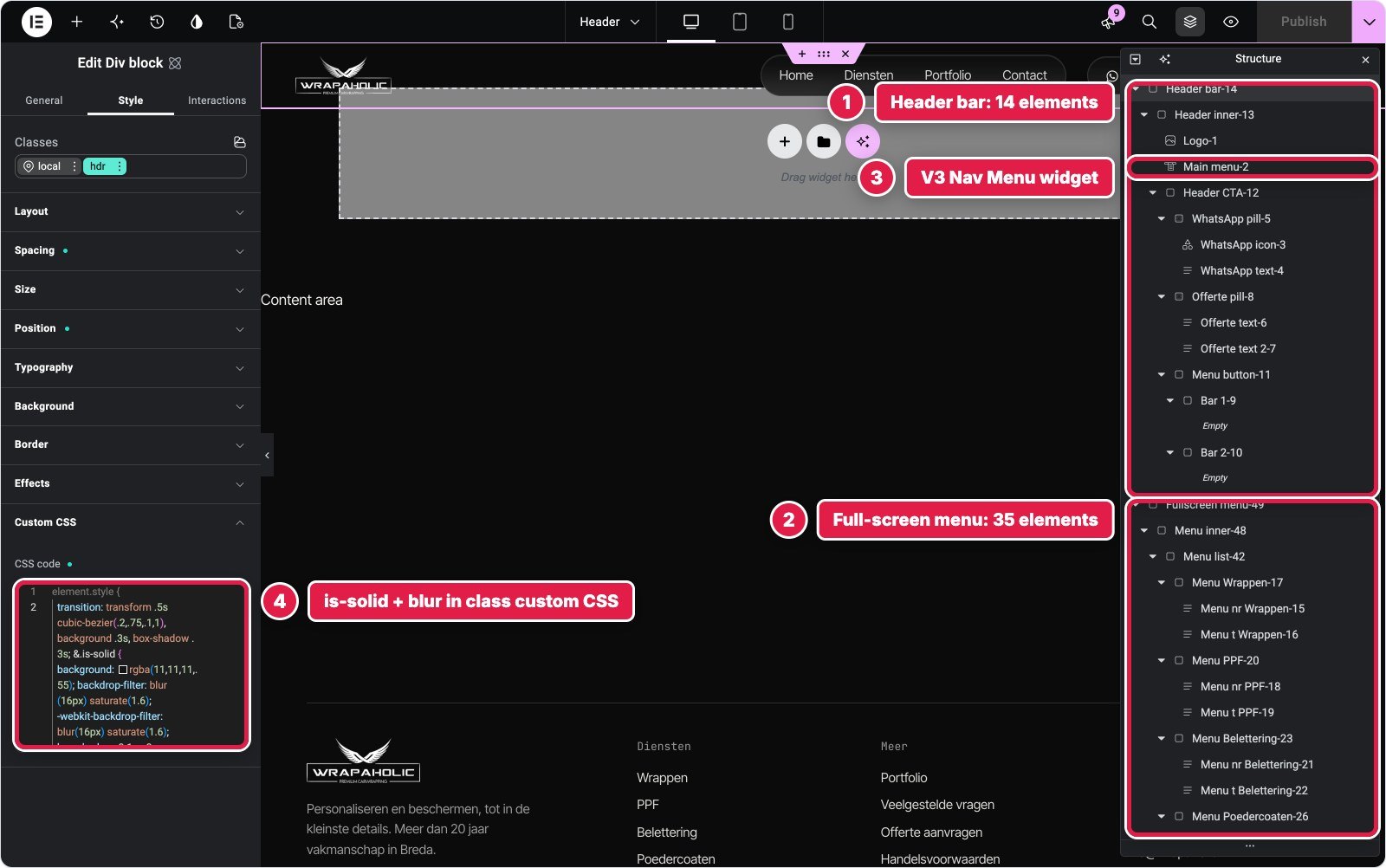
Elementor built the bar from 49 atomic elements in a Theme Builder template, but the main nav is the Pro Nav Menu widget, the only V3 widget on the site. That one widget pulls jQuery, jQuery Migrate and SmartMenus onto every page.
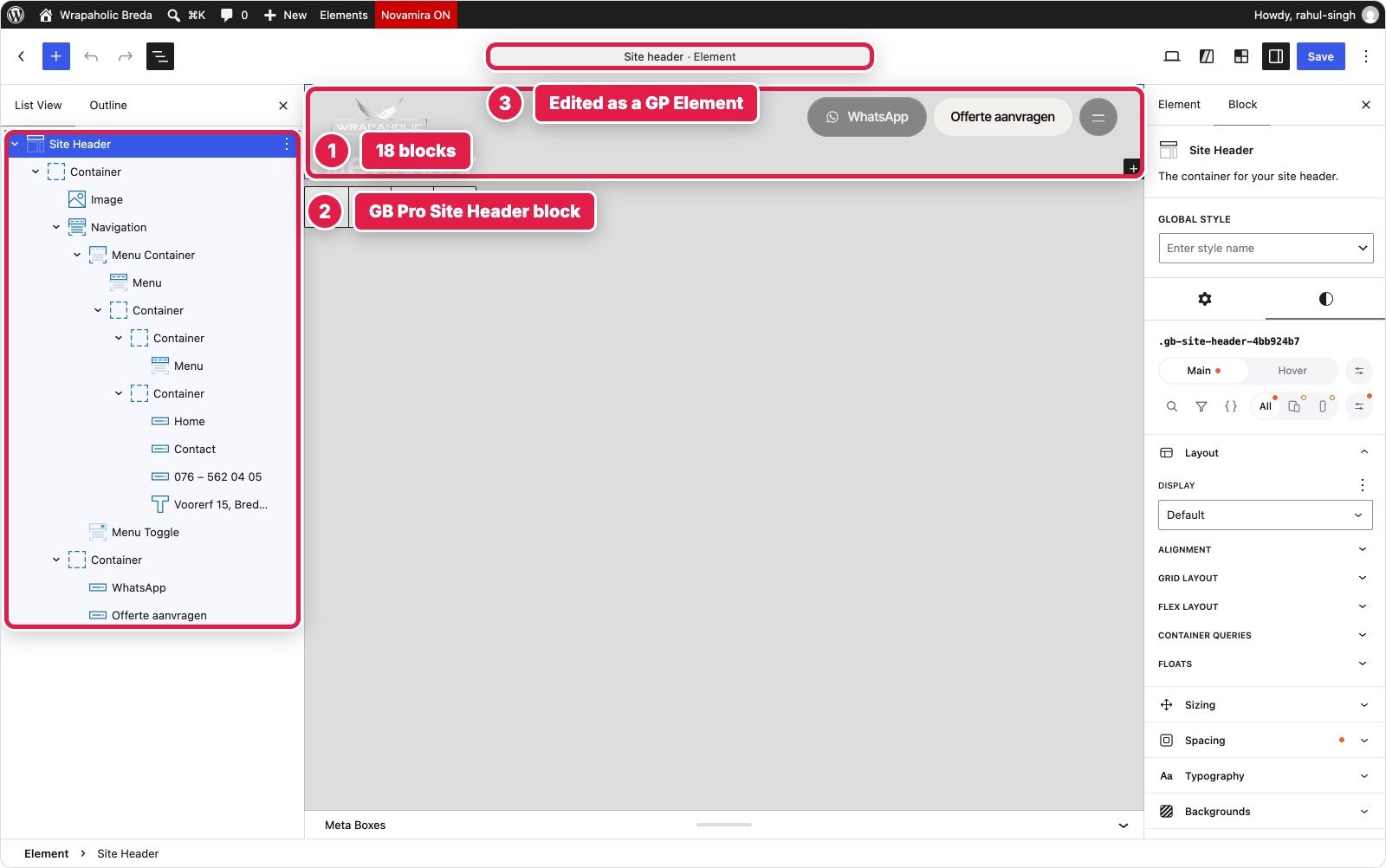
GenerateBlocks did it best. The header is a GP Premium Element holding the Pro Site Header and Navigation blocks: 18 blocks. The Navigation block takes the design’s 1080 pixel breakpoint as a setting and gives you the overlay menu, Escape, aria-expanded and a focus trap natively, wired to real WordPress menus. Only the scroll behaviour and the toggle label needed script, 717 bytes.



| Builder | Blocks (depth) | Custom CSS | Custom JS | Native or code |
|---|---|---|---|---|
| Unblock | 57 (6) | 5,205 B | 1,355 B | All hand built |
| Kadence | Customizer settings | 6,602 B | 688 B | Native drawer and menu |
| Elementor | 49 (5) | 2,934 B | 1,299 B | Atomic + V3 Nav Menu (jQuery) |
| GenerateBlocks | 18 (7) | 5,267 B local + 750 B global | 717 B | Native nav, 1080px breakpoint |
| Greenshift | 55 (5) | 5,358 B | 1,664 B | All hand built |
| Spectra | Customizer + 1 hook | 7,605 B | 1,538 B | Native popup, 921px breakpoint |
Winner for this section: GenerateBlocks. A third of the blocks, half the JavaScript of the hand built headers, and an accessible menu at the breakpoint the design asked for. Kadence is a close second.
Video Hero with the Rotating Badge
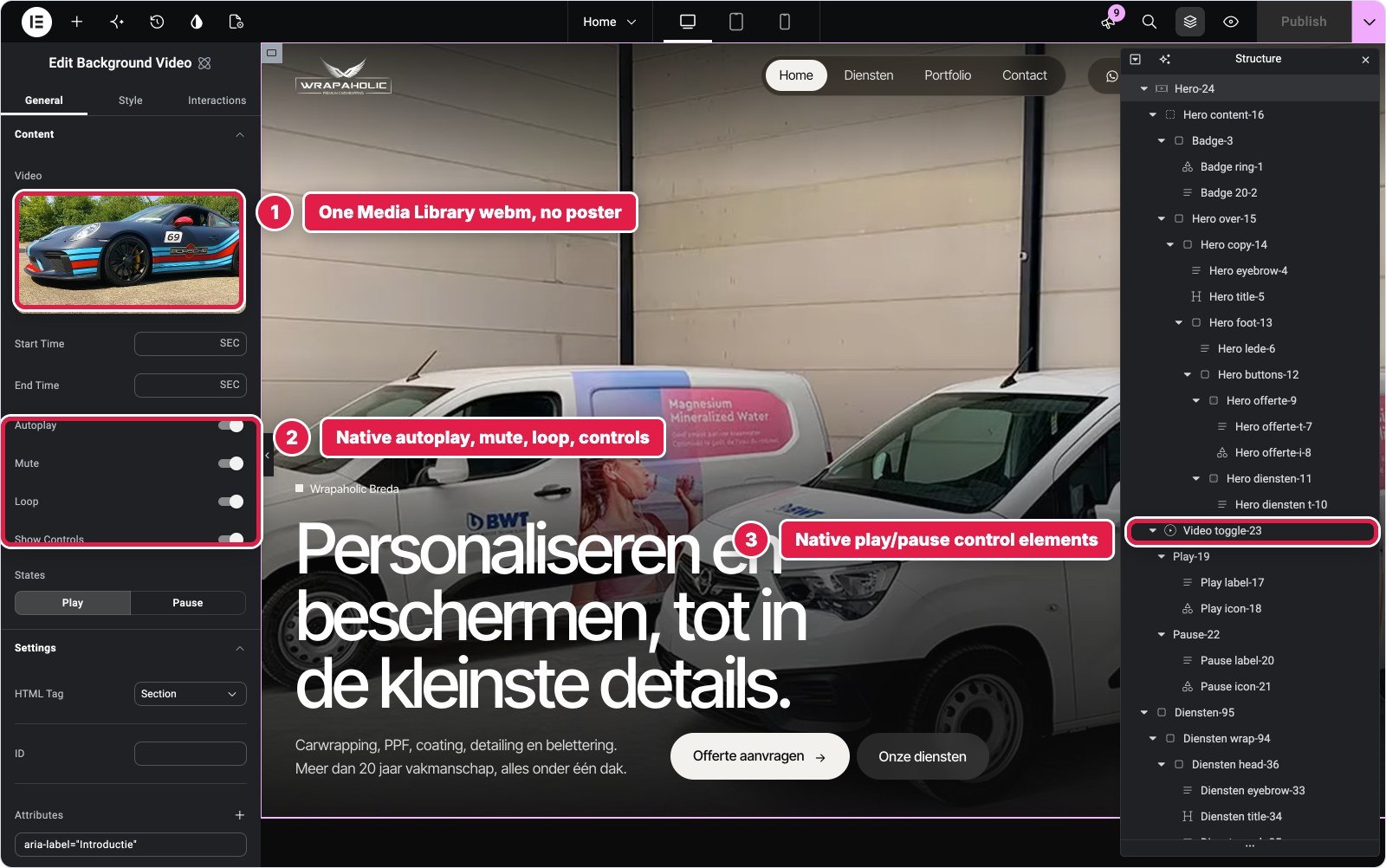
The hero is a full screen muted looping video with a WebM and an MP4 source and a poster, a dark gradient, a badge with text running around a circle, the headline, two pill buttons, and a pause button that respects reduced motion and pauses when you scroll past.
Three builders have a native video background, and none fully fit. Kadence’s has a poster but English only button labels and no reduced motion handling, so it still took 1,121 bytes of script. Elementor’s atomic Background Video is the nicest, with play and pause as real elements, but takes one source and no poster. Spectra’s serves MP4 only with no poster. Kadence and Spectra both needed a Custom HTML block for the text ring.
GenerateBlocks uses the core Video block, which WordPress shows as its GIF variation once autoplay, muted and loop are on. One source, no aria-hidden setting, and the badge rotation’s keyframes had to go into the Customizer because the Styles builder cannot write @keyframes. Greenshift has a Video element that takes every attribute, but its sidebar shows nothing except “Video tag”, so you check the settings in code view.
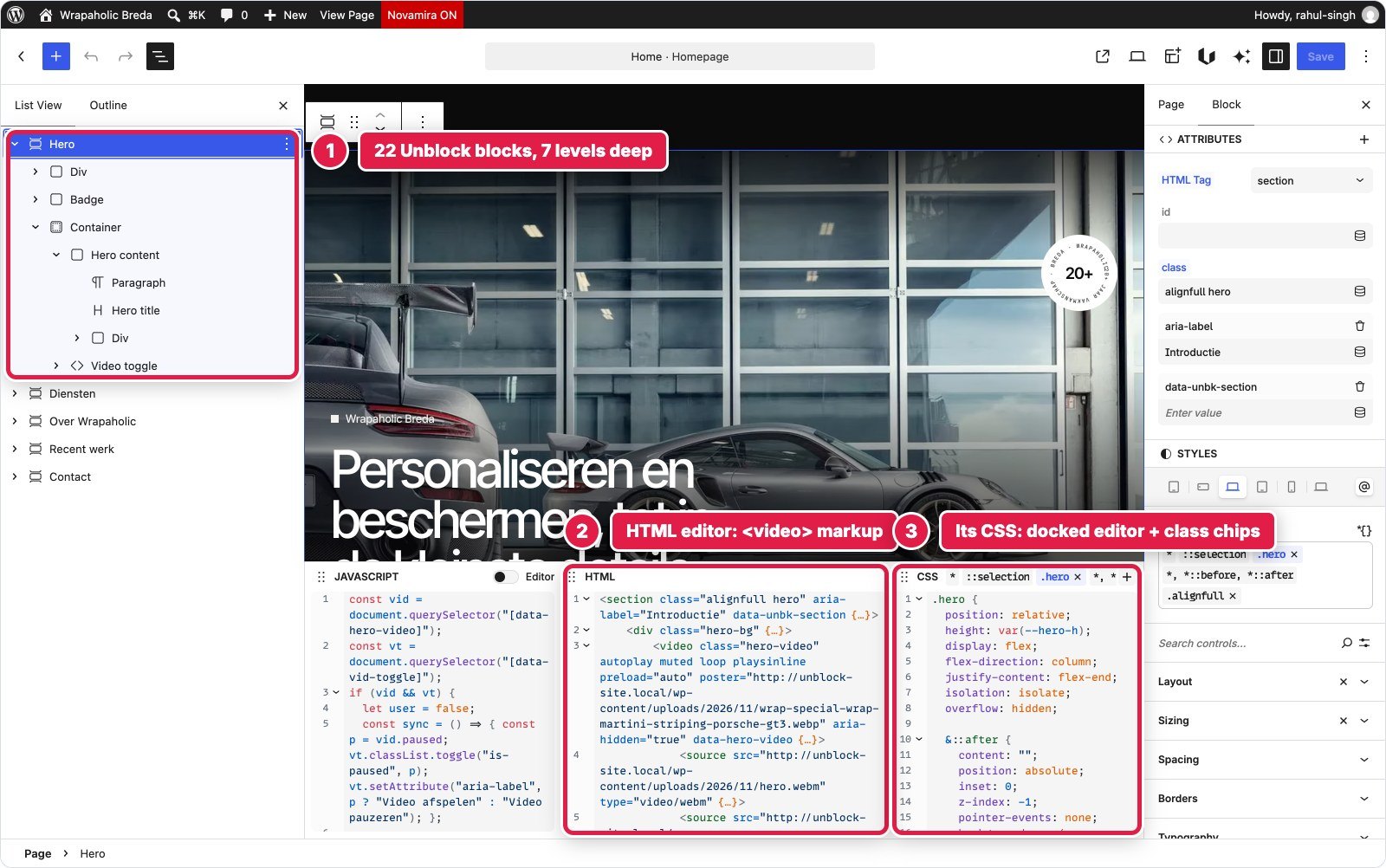
Unblock has no video setting at all, and that turned out to be the advantage. The video is a real video element with two source children and a poster, every attribute typed in, readable in the HTML editor. It is what a developer would write by hand, with 756 bytes of script for the toggle, the smallest of the six.



| Builder | Blocks (depth) | Custom CSS | Custom JS | Native or code |
|---|---|---|---|---|
| Unblock | 22 (7) | 2,136 B | 756 B | Video element, 2 sources, poster |
| Kadence | 12 (5) + 1 HTML | 3,447 B | 1,121 B | Native background video |
| Elementor | 24 (8) | 1,751 B | 928 B | Native Background Video, 1 source |
| GenerateBlocks | 16 (6) | 2,994 B local + 1,454 B global | 695 B | Core Video, 1 source |
| Greenshift | 22 (7) | 3,321 B | 778 B | Video element, settings hidden |
| Spectra | 17 (7) | 2,585 B | 790 B | Native background, MP4 only |
Winner for this section: Unblock. Two sources, a poster, Dutch labels and the least script, without fighting a component built for something else.
Eight Service Tiles
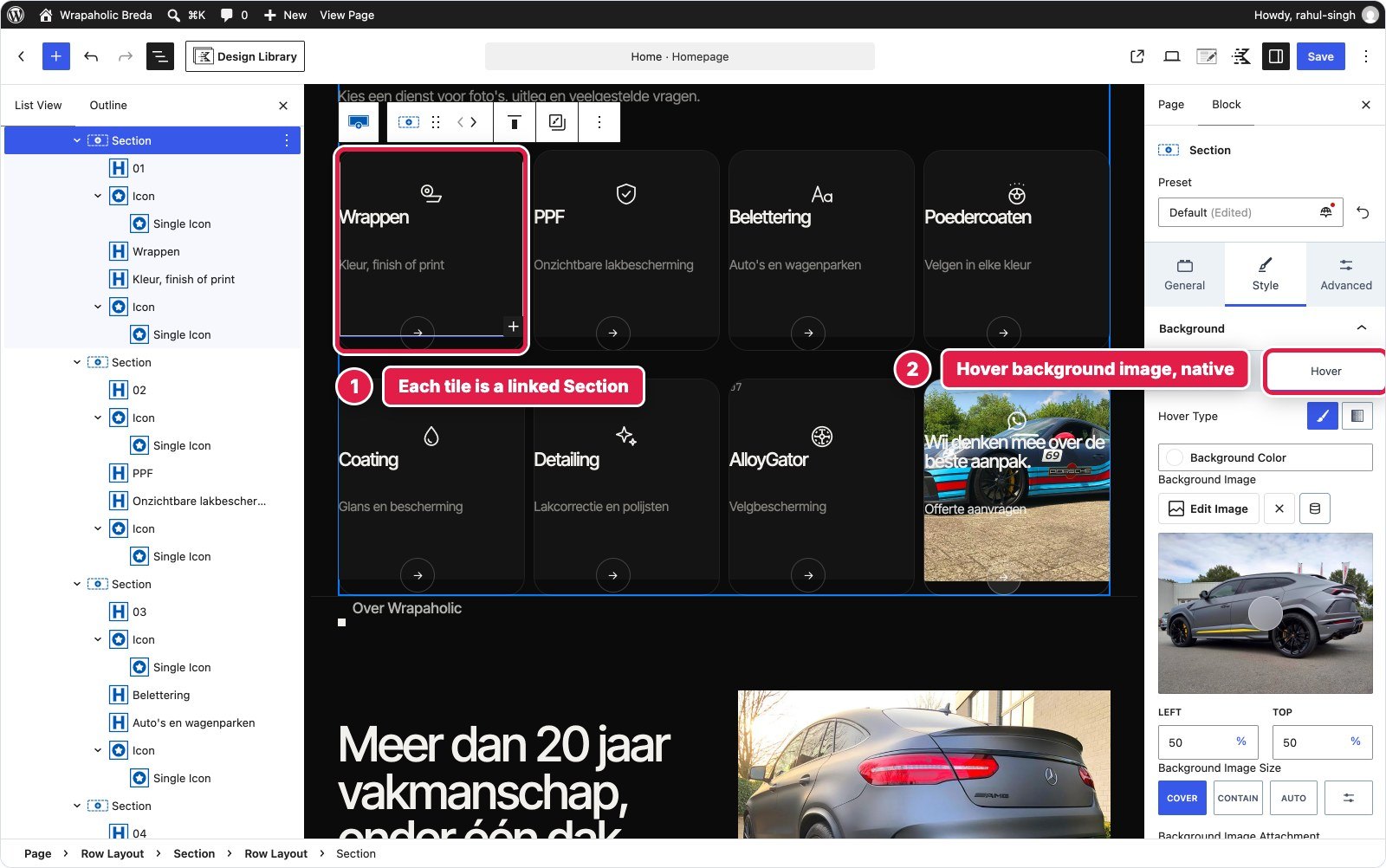
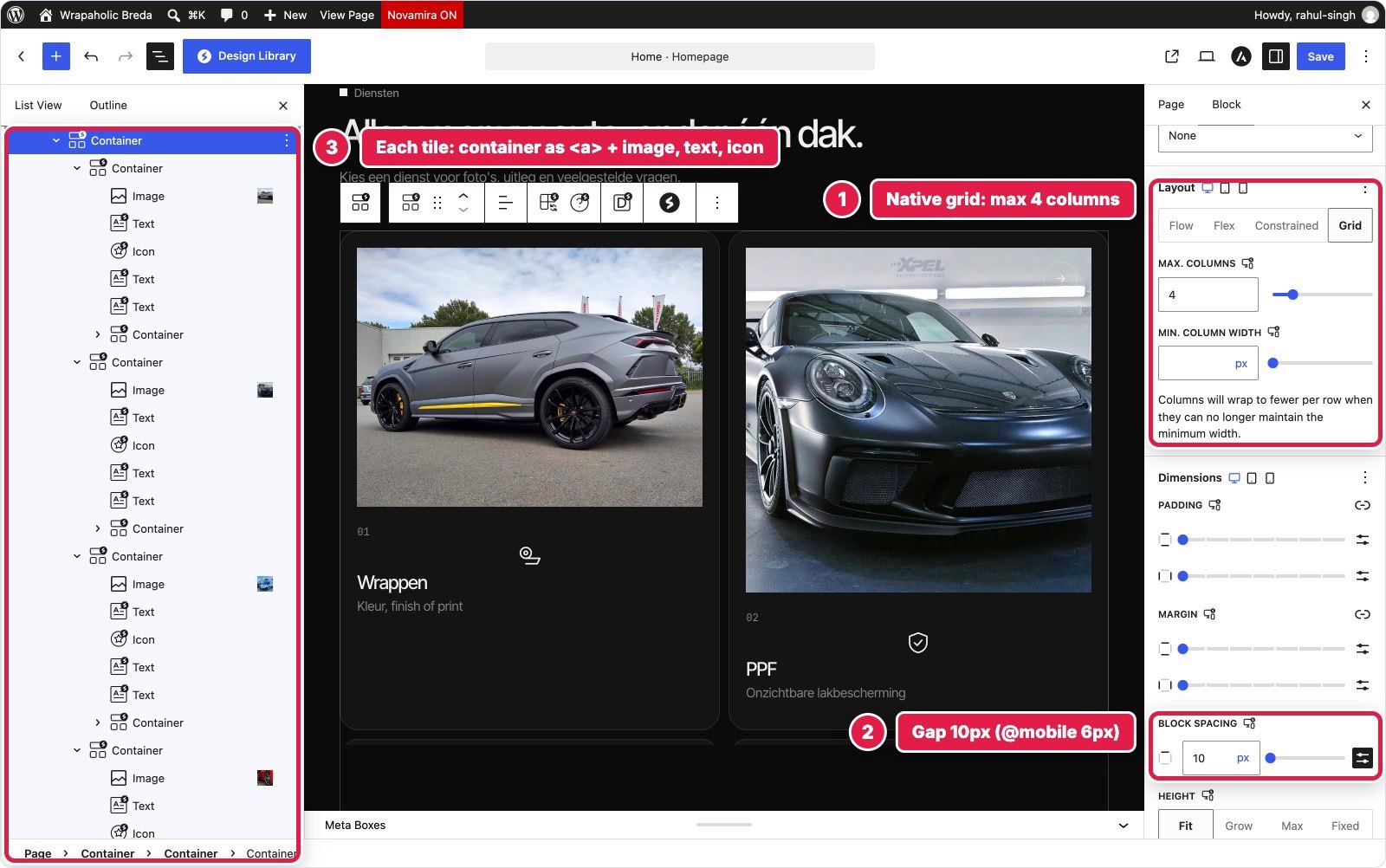
Diensten is a grid of eight dark tiles, four across on desktop and two on tablet and phone. Each tile has a number, an icon, a title, a subtitle, an arrow and a photo that fades in on hover, and the last tile is a frosted glass call to action. It is the most repetitive section, so it tests how well each builder reuses styling.
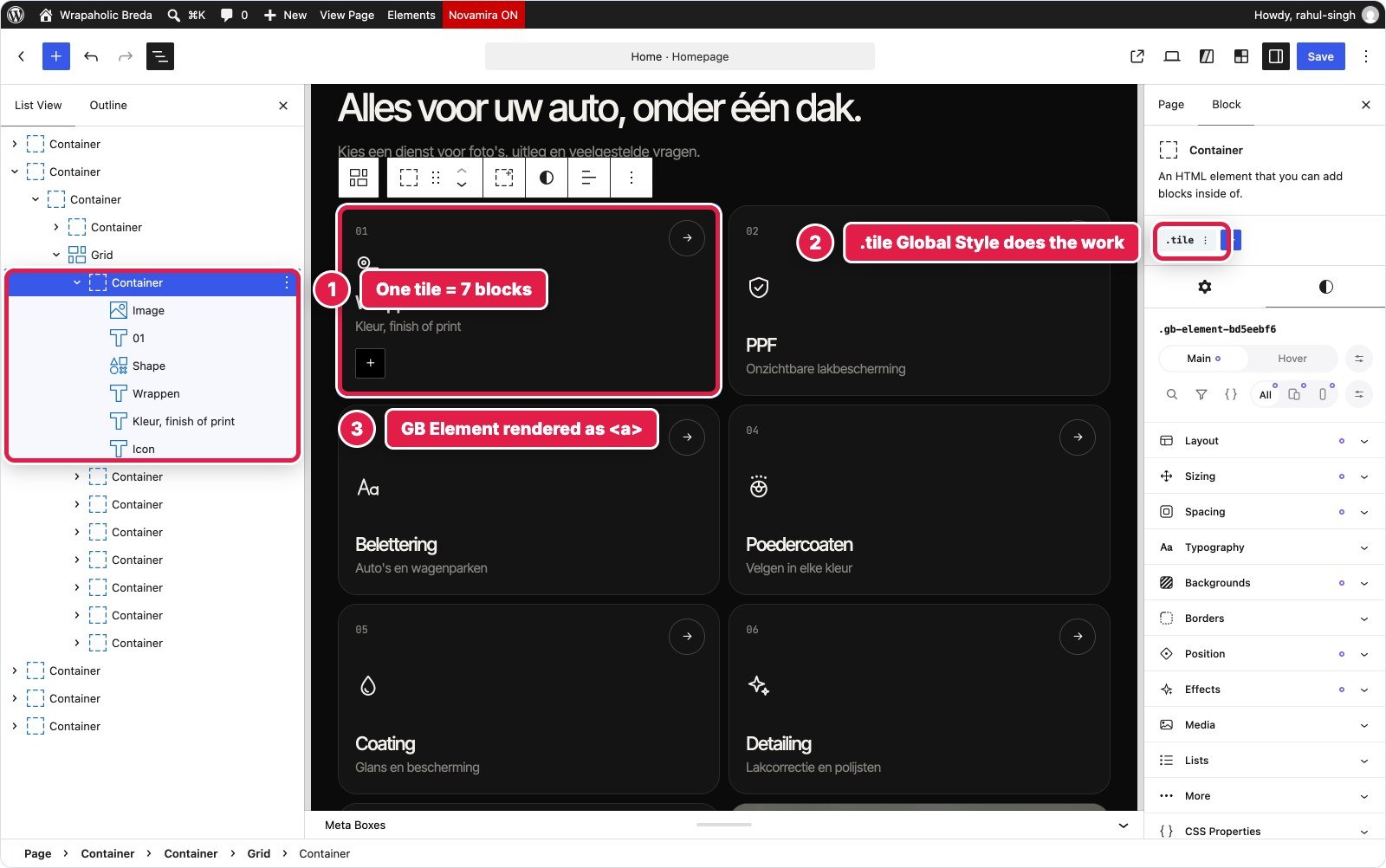
Every builder landed between 63 and 71 blocks here, because every tile needs the same seven or eight pieces. The differences are in how you style tile one and make the other seven follow. Unblock and Greenshift use one class rule with the hover states nested inside it; Greenshift splits that between visual style groups and a raw CSS field per class. Elementor uses a Global Class with native props, but the hover image needs a descendant selector, so it went into class CSS, plus 1,107 bytes of local CSS for the glass tile. Two V4 traps cost time: a default 10 pixel padding on every atomic container, and a CSS converter that stored flex: none as 0 1 auto.
Kadence has a lovely native touch: a hover background image under Style, Background, Hover, on a Section set to link. Spectra set the four, two, two columns with its native Grid per device, though it silently dropped a clamp() icon size and rgba border colours I had set.
GenerateBlocks did it in the fewest blocks, 63, with the styling almost entirely in Global Styles: tile, tile number, icon, title, subtitle, arrow and CTA, 4,325 bytes, with only 319 bytes of local CSS for the whole section and no script. And you edit those Global Styles with the same visual controls as a single block.



| Builder | Blocks (depth) | Custom CSS | Custom JS | Native or code |
|---|---|---|---|---|
| Unblock | 71 (6) | 3,744 B | None | One class rule |
| Kadence | 71 (6) | 3,661 B | None | Native hover image |
| Elementor | 71 (6) | 2,321 B | None | Global Class + class CSS |
| GenerateBlocks | 63 (5) | 319 B local + 4,325 B global | None | Global Styles, visual |
| Greenshift | 71 (6) | 4,907 B | None | Local classes + raw CSS |
| Spectra | 71 (6) | 3,923 B | None | Native Grid per device |
Winner for this section: GenerateBlocks. The fewest blocks and the tile is one Global Style you edit visually. Spectra and Kadence are close behind for client editability.
About, Stats and Pillars
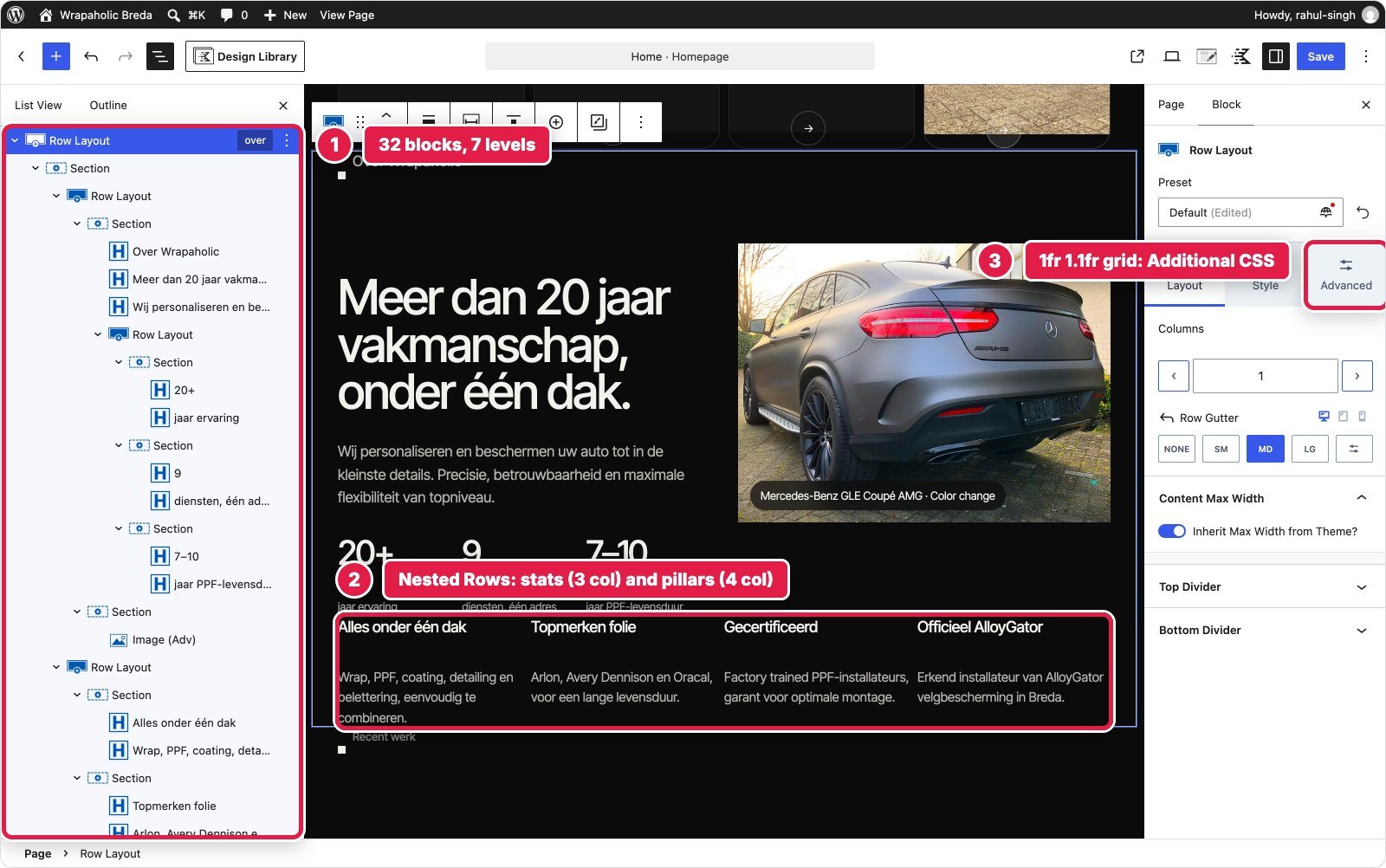
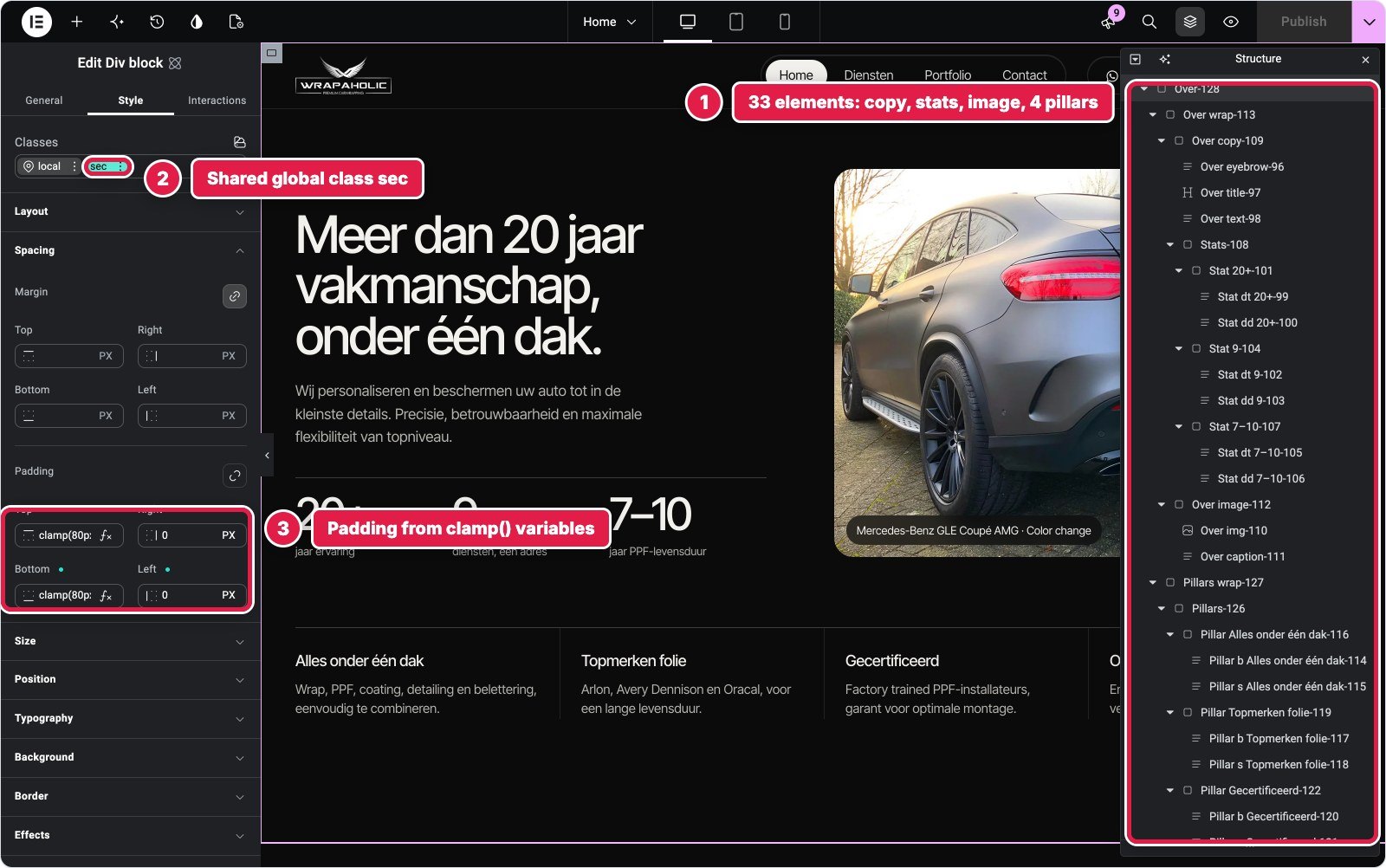
A two column block with uneven columns (1fr and 1.1fr), three stats, a photo with a frosted caption, and four pillars with dividers that switch from four to two to one column. This is the semantics test: stats are a description list, pillars a list, the photo a figure.
Four builders gave me the right HTML. Unblock, GenerateBlocks, Greenshift and Spectra all produced a real dl with dt and dd, a ul of four li, and a figure with a figcaption. Kadence nests Row Layouts seven levels deep with Advanced Text for every item, and its column controls cannot set 1fr and 1.1fr. Elementor V4’s atomic containers offer no dl, ul, li, figure or figcaption tags at all, so the stats and caption became divs and paragraphs. Its 611 bytes of CSS look good on paper; the markup does not.
Among the four that got the HTML right, Spectra needed the least CSS, 1,321 bytes, because its native Grid handled the three stats and the four, two, one pillars as settings. Only the uneven columns, the dividers and the caption chip were code. GenerateBlocks would have tied it, but its editor canvas showed this transparent section as light grey text on light grey, the worst editing view in the whole test.
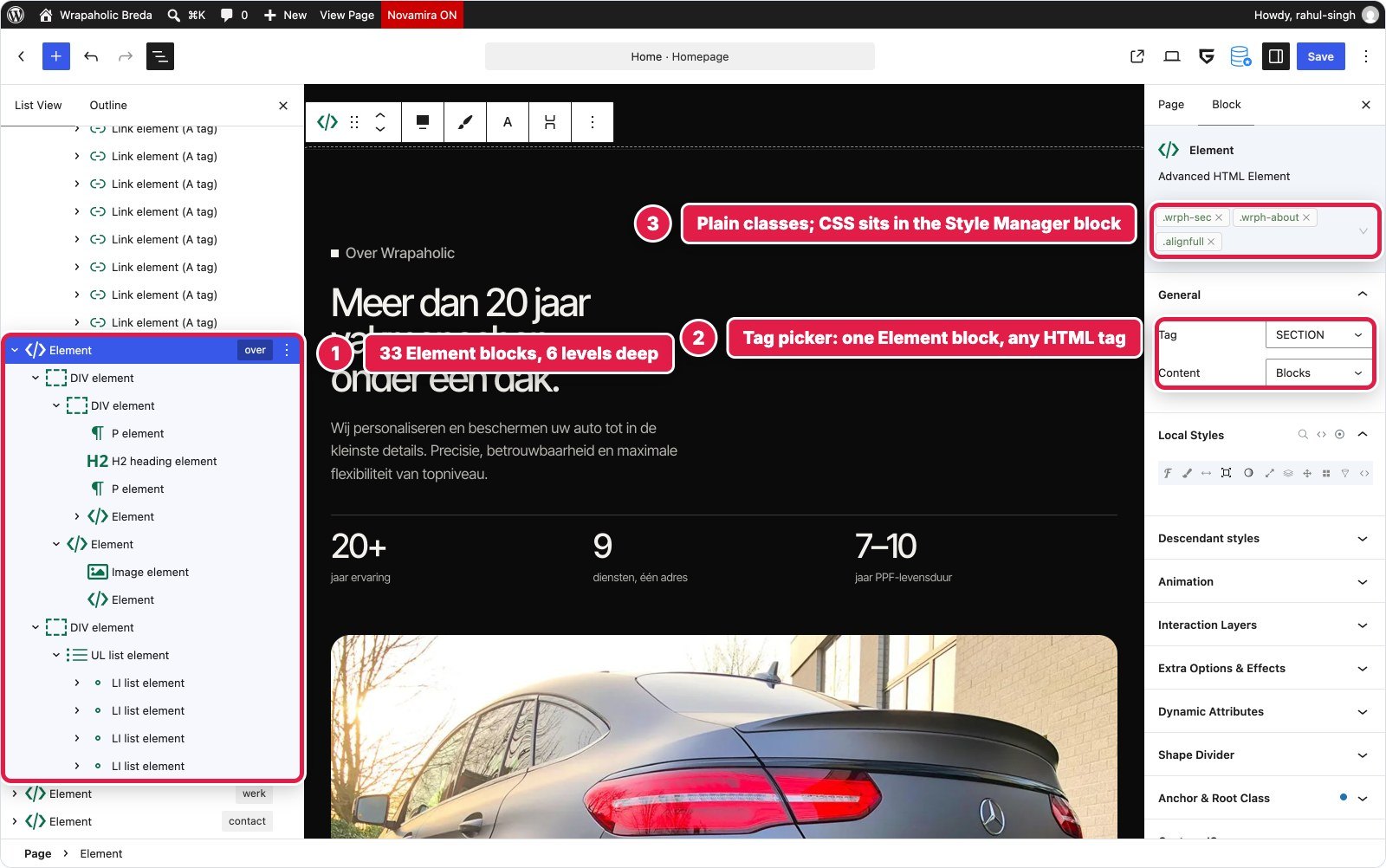
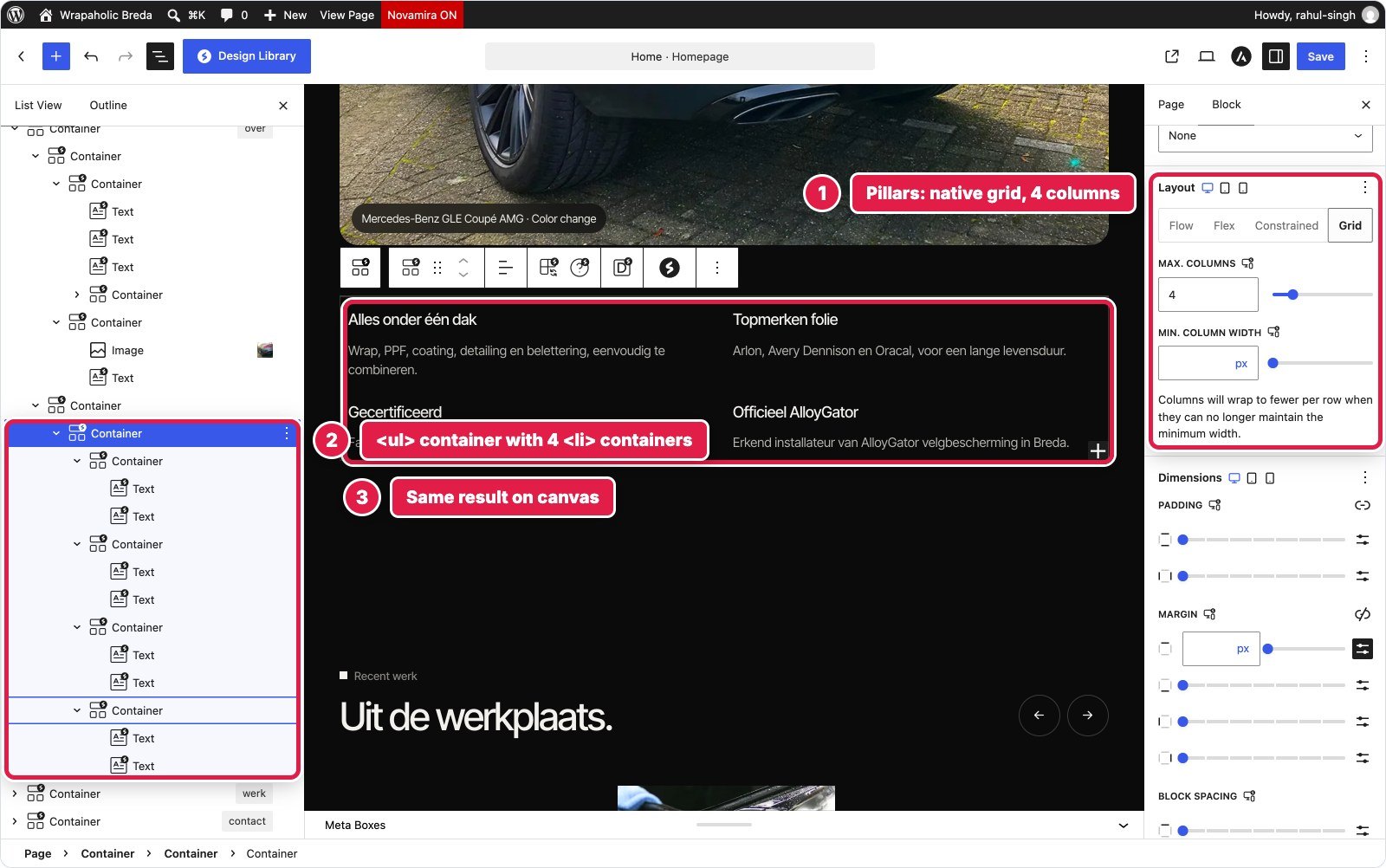
| Builder | Blocks (depth) | Custom CSS | Custom JS | Native or code |
|---|---|---|---|---|
| Unblock | 33 (6) | 1,966 B | None | dl, ul, figure |
| Kadence | 32 (7) | 2,224 B | None | Nested rows, no dl |
| Elementor | 33 (6) | 611 B | None | Divs only |
| GenerateBlocks | 39 (7) | 2,342 B local + 384 B global | None | dl, ul, figure |
| Greenshift | 33 (6) | 2,586 B | None | dl, ul, figure |
| Spectra | 33 (6) | 1,321 B | None | dl, ul, figure, native grid |
Winner for this section: Spectra. The same semantic HTML as the best of them, the least CSS among those that got it right, and responsive columns as settings.
Draggable Project Strip
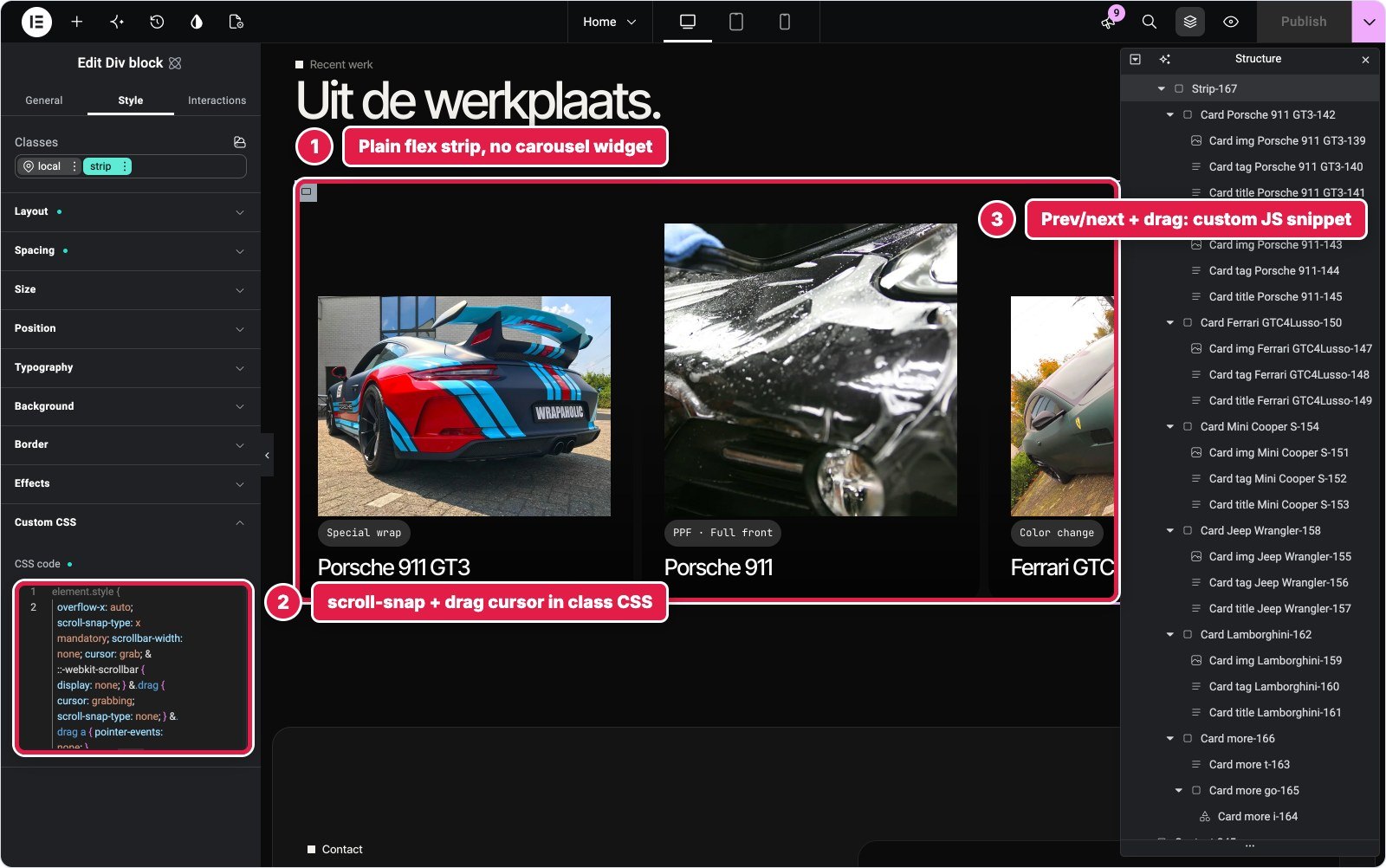
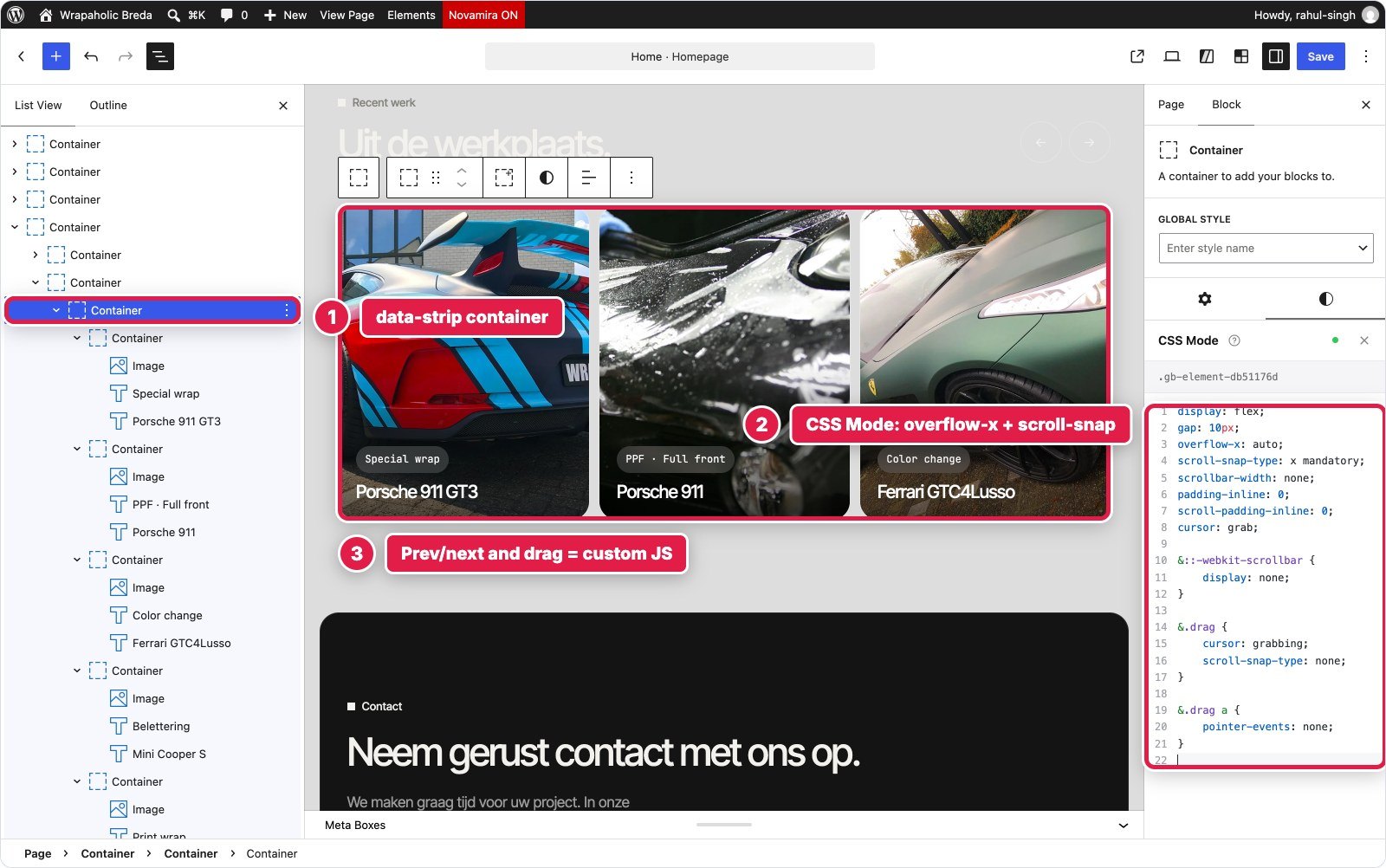
Recent werk is a horizontal strip of six project cards and a portfolio card that snaps card by card, with round previous and next buttons that move exactly one card, and mouse drag on desktop.
Not one of the six has a native component for this. GenerateBlocks Pro, Greenshift and Spectra all ship a carousel, and all three are Swiper based: GenerateBlocks’ would have added about 131 KB, and none of them can do a free scrolling snap strip with a one card step. Kadence had no option that behaves like it. So every build used the same pattern: a flex row with overflow-x and scroll snap in CSS, and about a kilobyte of script for the buttons and drag. The scripts came out between 1,048 and 1,274 bytes.
The real difference is in the editor. In Kadence the cards stack vertically while you edit, because the strip CSS lives in Additional CSS and the editor does not load it. You edit seven tall cards that look nothing like the site. Spectra dropped an empty data-strip="" attribute until I gave it a value. Unblock, Elementor, GenerateBlocks and Greenshift all show the strip as it looks live.
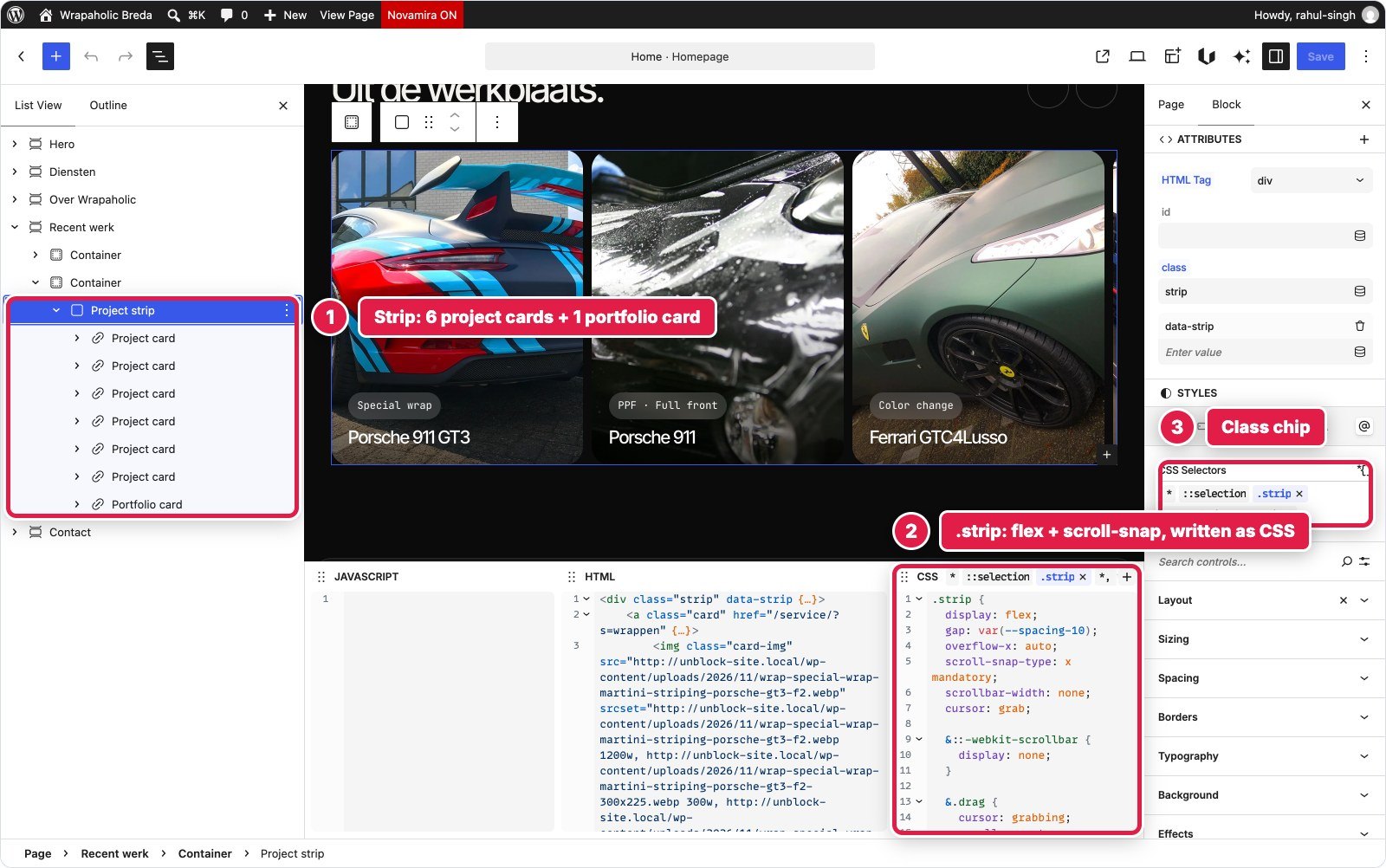
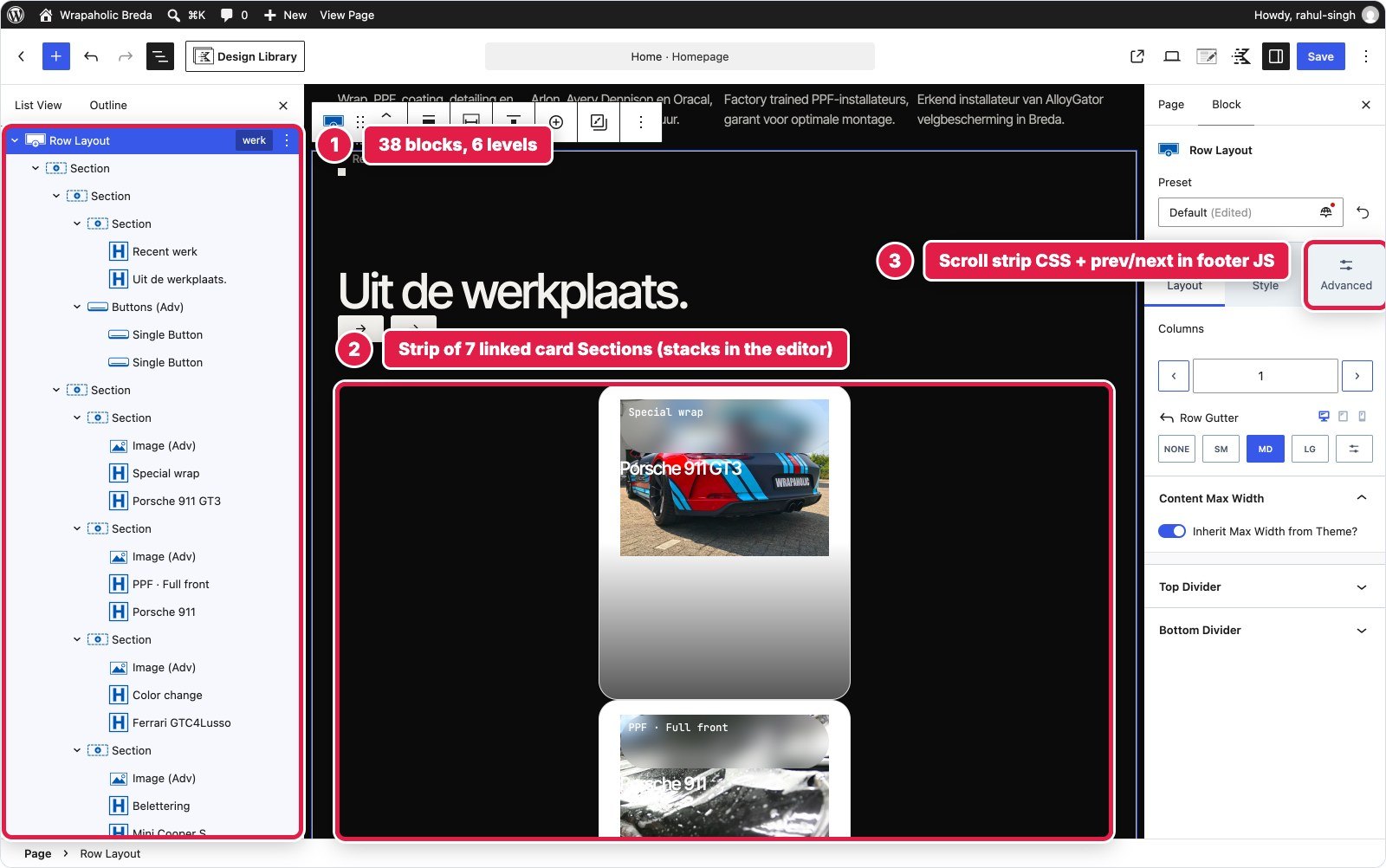


| Builder | Blocks (depth) | Custom CSS | Custom JS | Native or code |
|---|---|---|---|---|
| Unblock | 41 (6) | 1,633 B | 1,048 B | CSS + block script |
| Kadence | 38 (6) | 2,285 B | 1,261 B | CSS + footer script |
| Elementor | 41 (6) | 1,164 B | 1,274 B | Class CSS + site snippet |
| GenerateBlocks | 38 (5) | 870 B local + 2,093 B global | 1,057 B | Styles + hook script |
| Greenshift | 44 (6) | 2,410 B | 1,180 B | Local classes + page JS |
| Spectra | 41 (6) | 1,566 B | 1,115 B | Block CSS and JS |
Winner for this section: A draw. Same pattern, same kilobyte of script everywhere. Kadence loses on editing comfort, since its editor cannot show the strip at all.
Contact and the Quote Form
The largest section: address, phone, WhatsApp, email and opening hours with a live open or closed pill on Amsterdam time, and a quote form with service chips, required fields, inline validation and a personal thank you. This is the one section that takes leads, so the form back end matters more than markup purity.
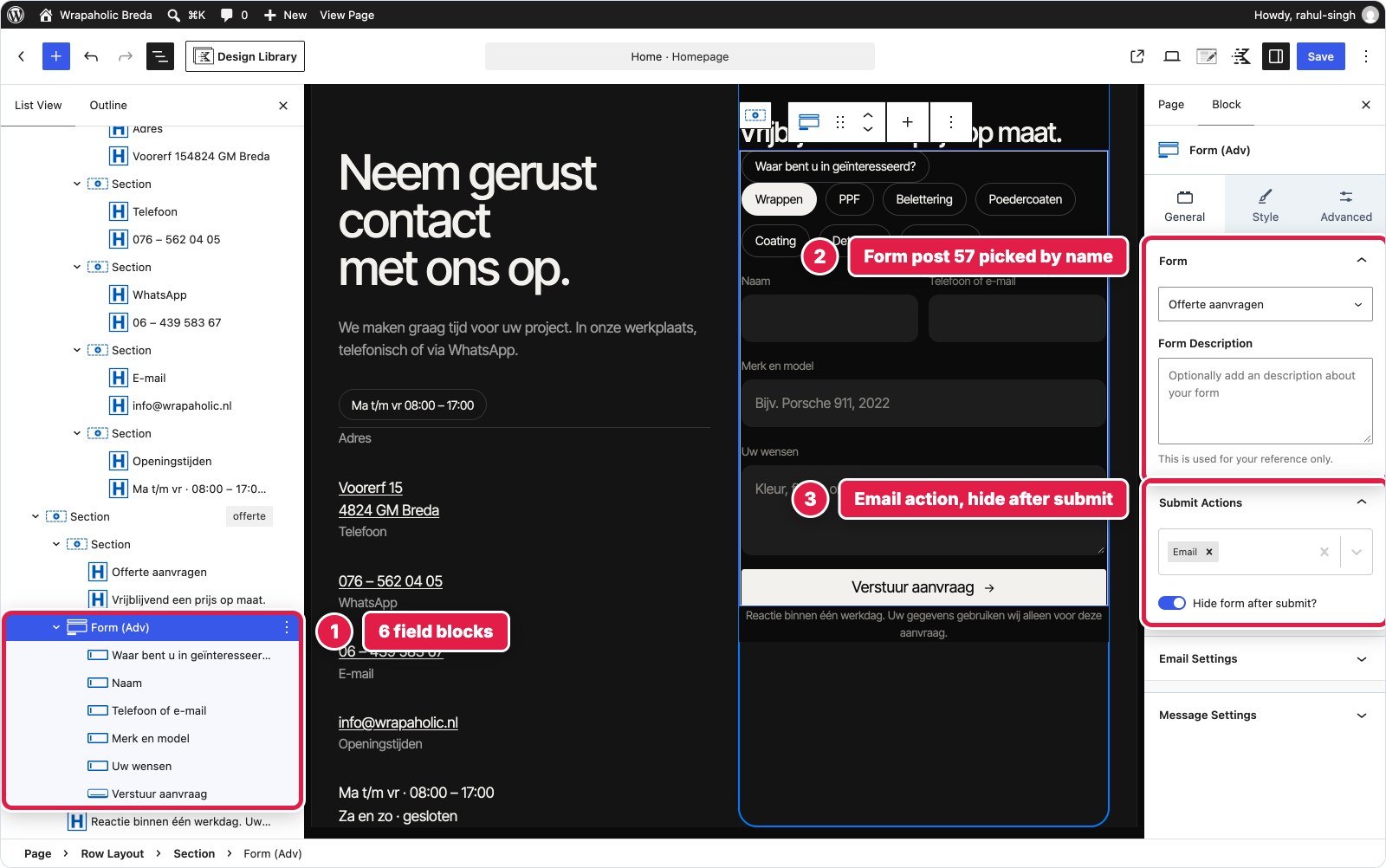
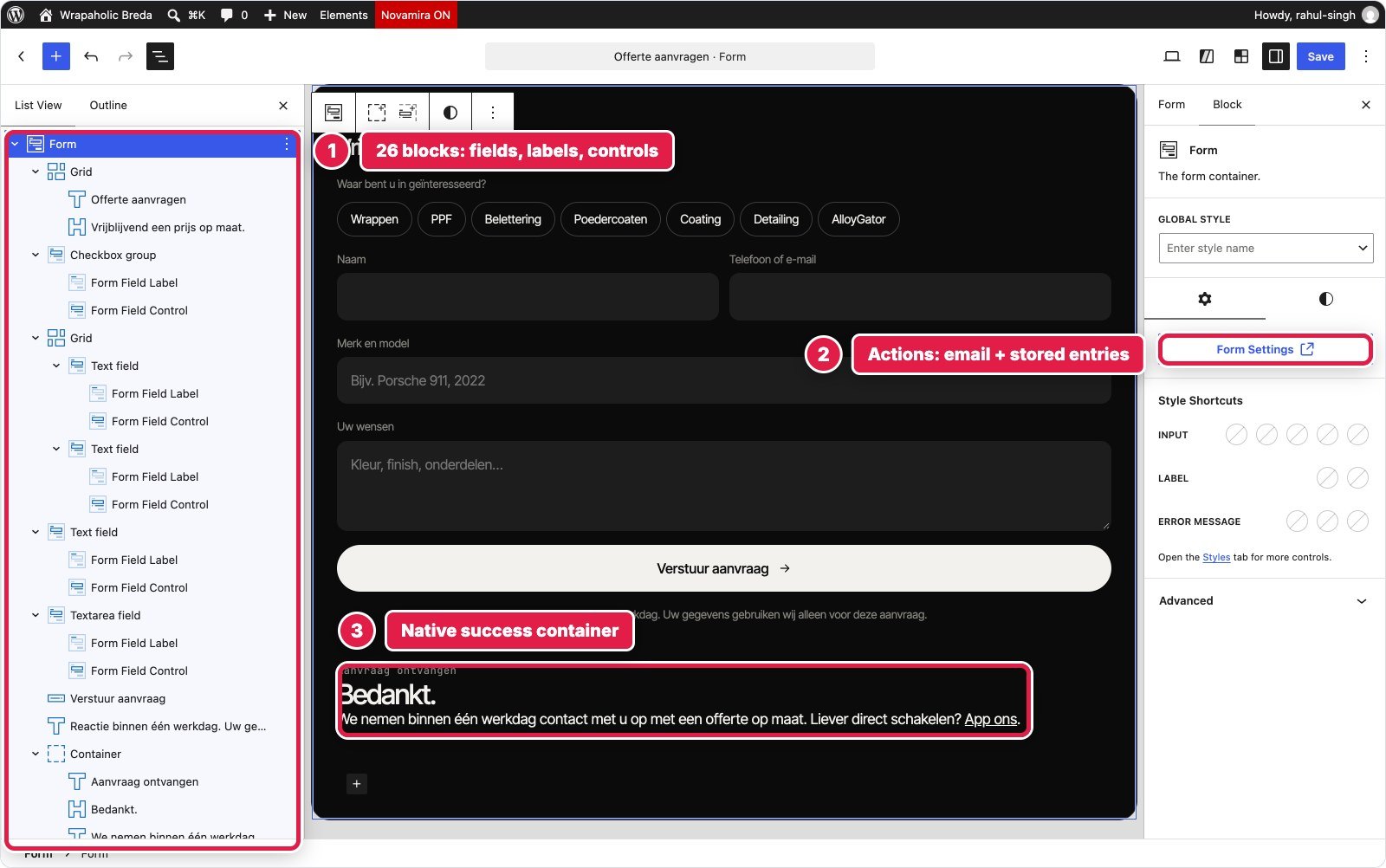
Three builders have a full form builder. GenerateBlocks Pro Forms live in their own post type with 26 blocks: validation, REST submission, an email action and stored entries, all native, with 1,253 bytes of script for the status pill and the personal greeting. Forms are switched off by default, and required labels get an asterisk the design did not want. Kadence’s Advanced Form gave me validation, AJAX submit, an Email action and hide after submit with no form script at all; the status pill took 805 bytes, the least of the six. Elementor’s Pro atomic Form stores submissions, with 2,062 bytes of script.
Unblock and Greenshift have native forms that post and are handled on the server: Unblock injects the action, a honeypot and a timestamp, Greenshift adds a nonce with optional Turnstile. Neither has client side validation or a success state, so both needed about 2.3 to 2.6 KB of script. Unblock’s contact section is also where its visual panels show best: Borders, Typography and Background edit the same .contact rule the CSS dock shows. Spectra Blocks has no form block. The form is raw HTML in a Custom HTML block that nothing receives without a second plugin.


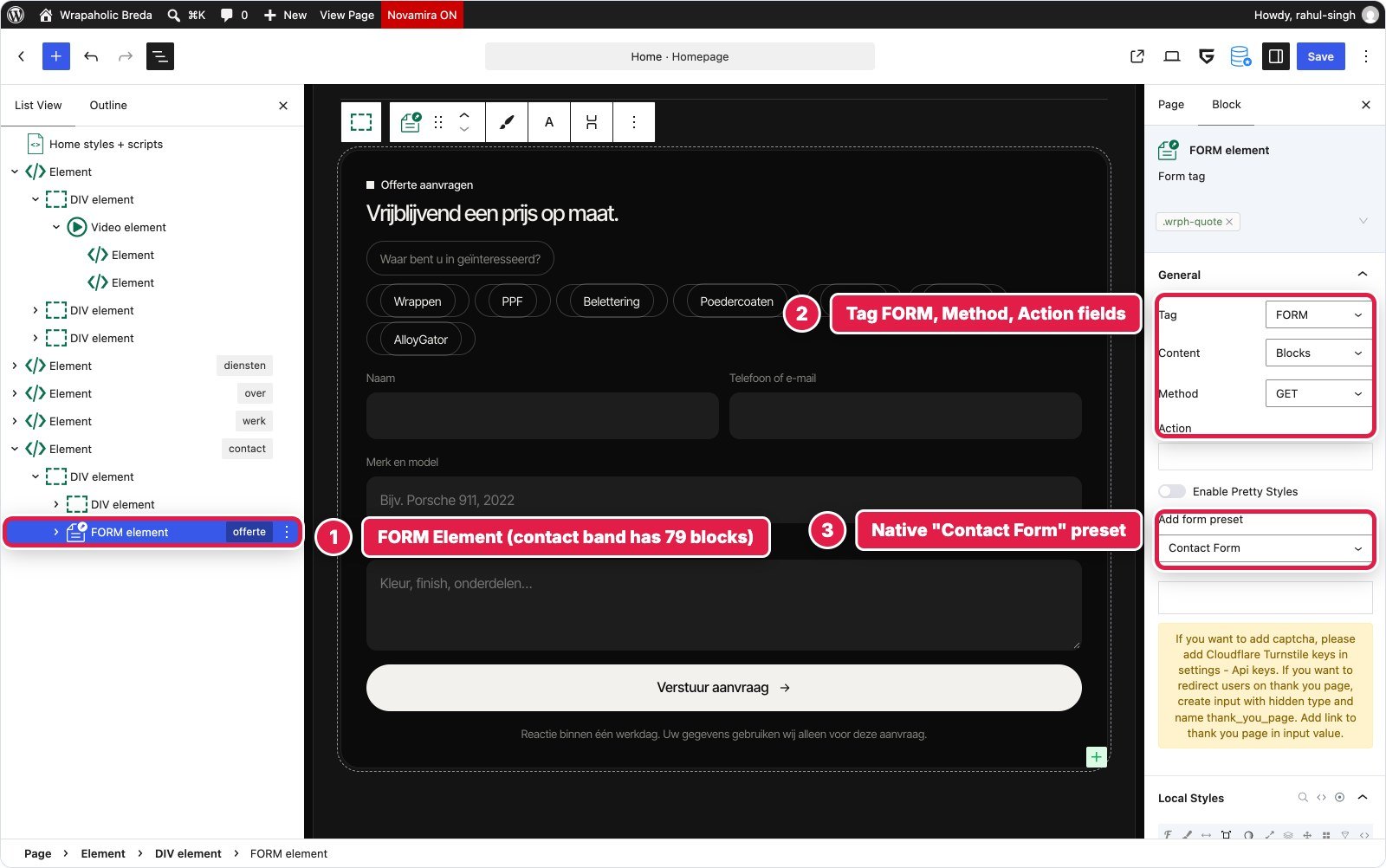

| Builder | Blocks | Custom CSS | Custom JS | Validation | Submission handled |
|---|---|---|---|---|---|
| Unblock | 76 | 6,607 B | 2,593 B | Script | Yes, honeypot and timestamp |
| Kadence | 28 + 7 in form | 5,447 B | 805 B | Native | Yes, email action |
| Elementor | 76 | 2,784 B | 2,062 B | Native | Yes, stored submissions |
| GenerateBlocks | 37 + 26 in form | 4,198 B | 1,253 B | Native | Yes, stored + email |
| Greenshift | 79 | 4,441 B | 2,263 B | Script | Yes, nonce, optional Turnstile |
| Spectra | 24 | 3,624 B | 1,854 B | Script | No, needs a form plugin |
Winner for this section: GenerateBlocks, narrowly over Kadence. Validation, stored entries and an email action are native, and the form survives as its own reusable post. Spectra comes last by a distance.
Footer with the Giant Word
Four columns (brand, services, more links, workshop address), a giant outlined Wrapaholic word across the full width, and a bottom bar with the current year.
Unblock and Greenshift built it as a block theme footer part with real ul, li and h4 elements and a 100 byte year script. Elementor used 35 elements in a Theme Builder template, but its link lists are paragraphs, because atomic containers have no list tags. Kadence used a Pro Element on the replace footer hook, 20 blocks, and Elements print their CSS after Additional CSS, so my overrides needed extra specificity.
Spectra used Astra’s Footer Builder with widget areas and Astra’s copyright element, whose [current_year] shortcode writes the year with no script. The giant word sits in an HTML element that opens in a TinyMCE editor. GenerateBlocks did the same job as a block layout in a GP Element of type Site Footer, with the Pro {{current_year}} dynamic tag: 50 blocks, 1.8 KB of styling, no script.
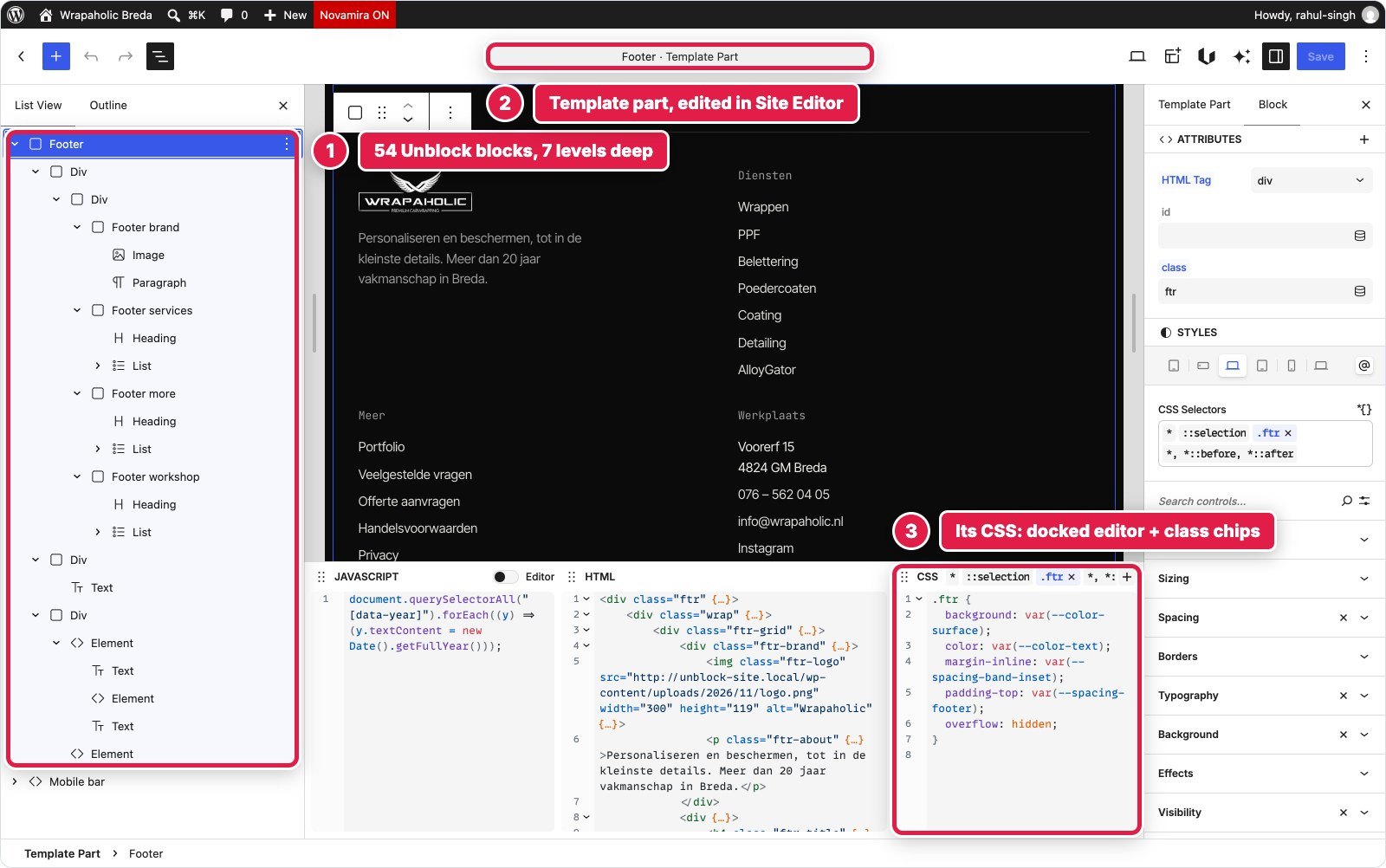
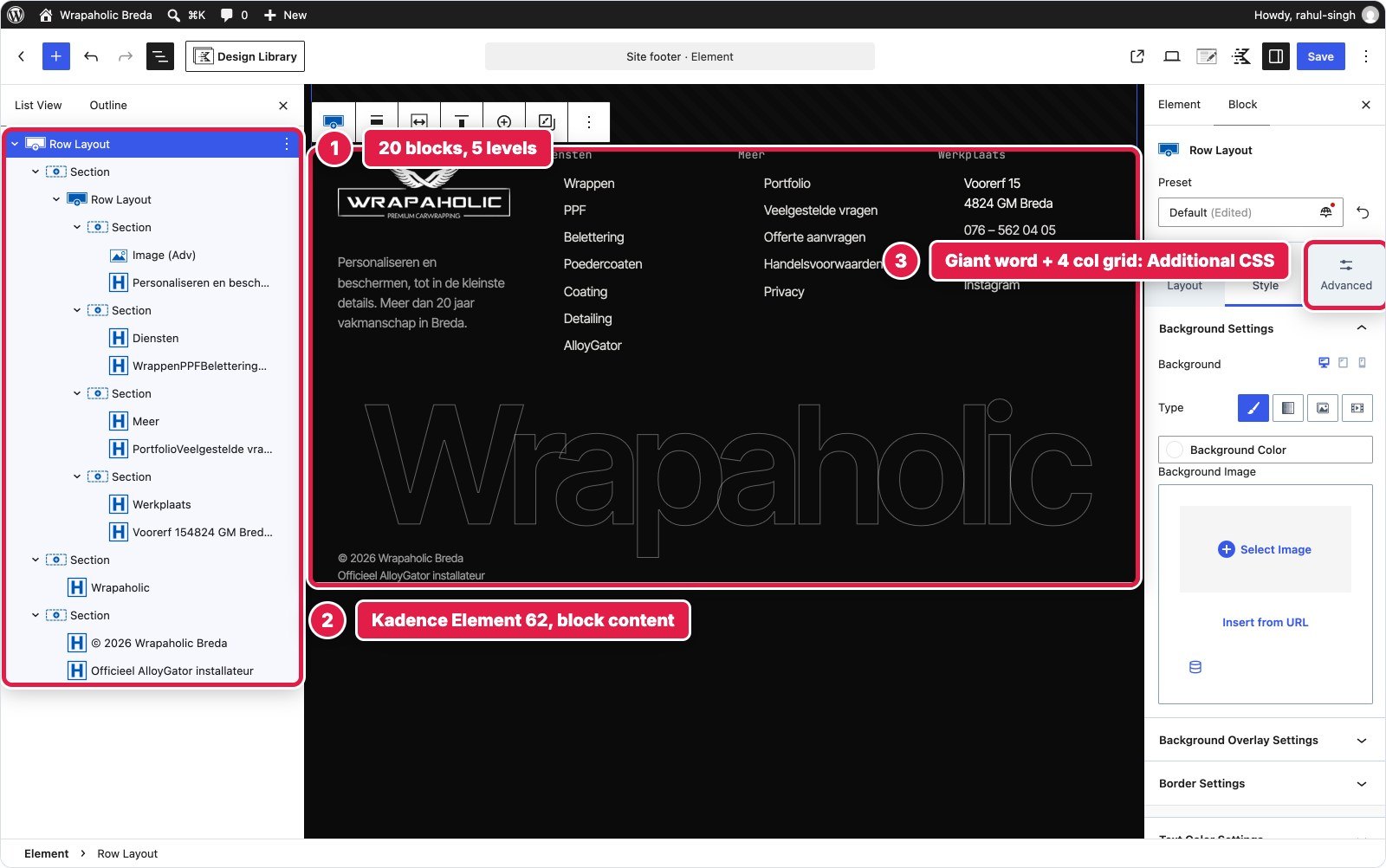
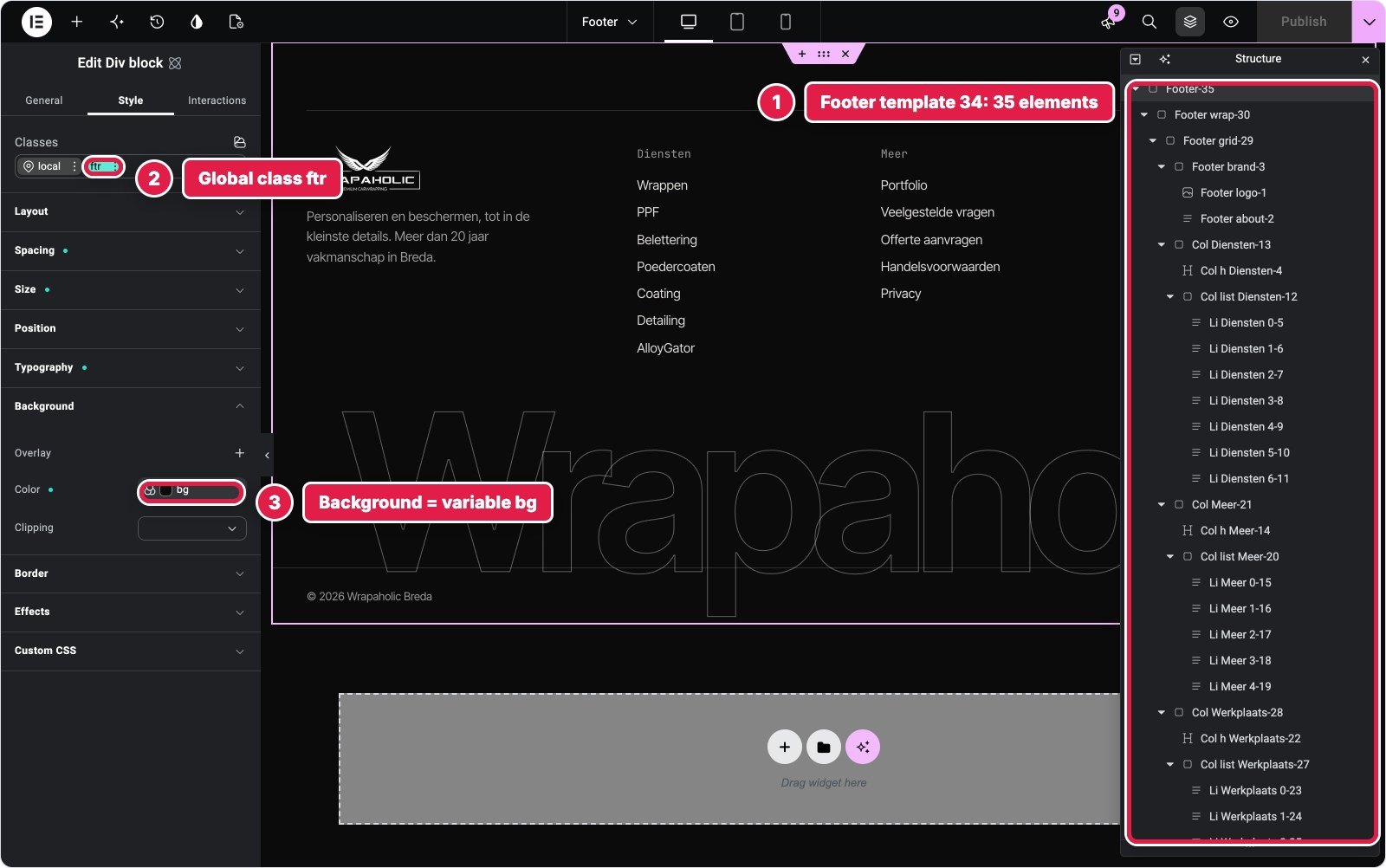
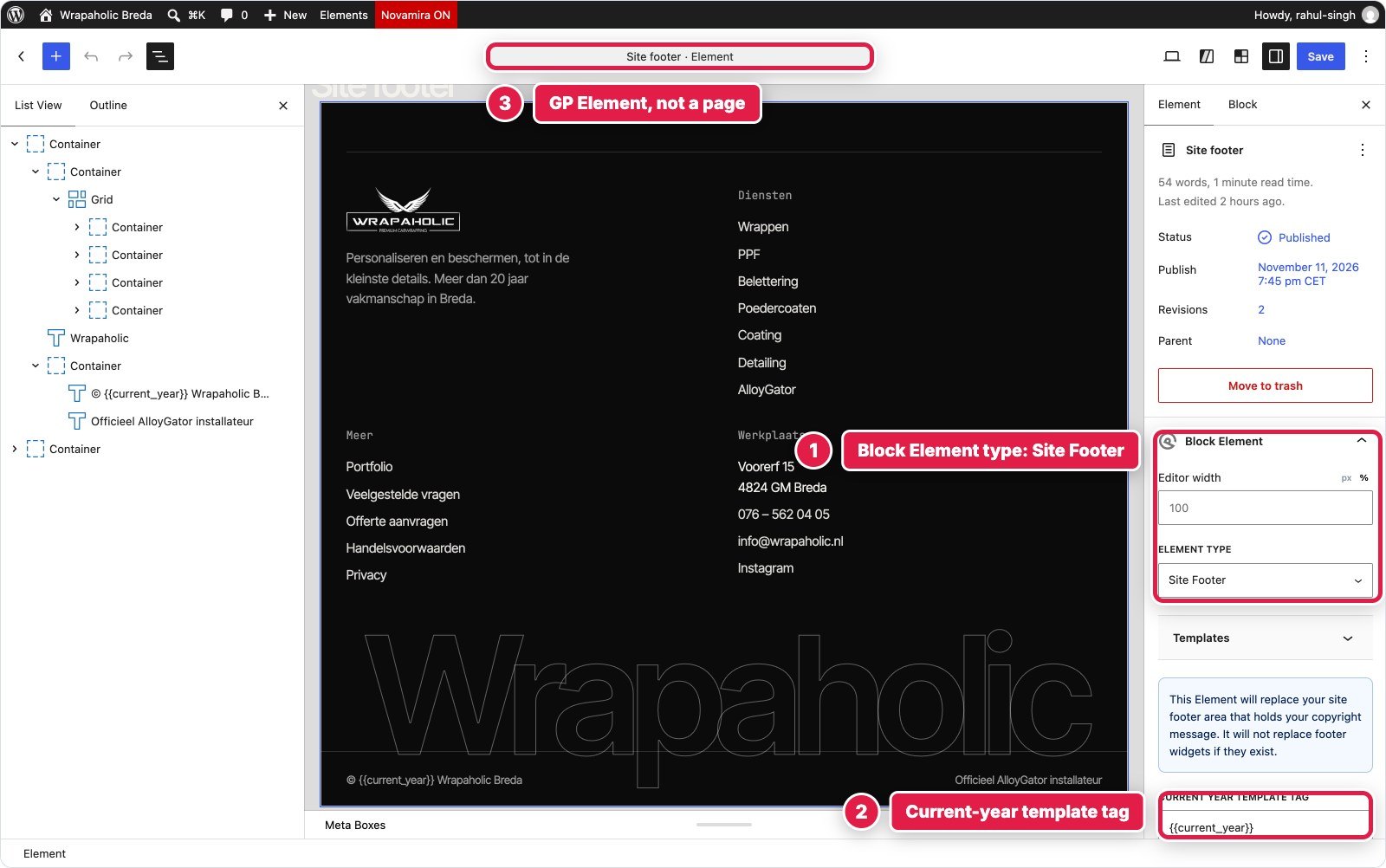


| Builder | Blocks (depth) | Custom CSS | Custom JS | Native or code |
|---|---|---|---|---|
| Unblock | 54 (7) | 2,198 B | 100 B | Template part |
| Kadence | 20 (5) | 1,839 B | 89 B | Pro Element on a hook |
| Elementor | 35 (6) | 456 B | 128 B | Theme Builder, no lists |
| GenerateBlocks | 50 (7) | 1,281 B local + 512 B global | None | GP Element + year tag |
| Greenshift | 56 (7) | 1,638 B | 109 B | Template part |
| Spectra | 31 widget blocks | 3,205 B | None | Astra Footer Builder |
Winner for this section: GenerateBlocks, narrowly. A block built footer with site wide display rules and a dynamic year, and no JavaScript. Spectra’s widget footer is the friendliest for clients.
Mobile Contact Bar
On phones a fixed glass bar with call, WhatsApp and quote buttons sits at the bottom of the screen, and slides away while the menu is open or the visitor types in the form.
This tiny section exposes how each builder handles a mobile only element. Unblock keeps the bar, its CSS and its 680 pixel media rule together on one selector, with no script, since it reacts to classes the header and form scripts already set. GenerateBlocks did the same in 4 blocks and 1,002 bytes, reacting to its own menu open attribute. Greenshift matched them, except the body padding had to go into the Stylebook, because its own rules forbid body styles on blocks.
The other three split it up. Kadence needed a second Pro Element plus 314 bytes of script to hide it while the form has focus. Elementor has no breakpoint below mobile, so the 380 pixel rule went into the kit CSS. Spectra put the blocks in an Astra Site Builder hook and the styling in Customizer Additional CSS, two places for one small bar.
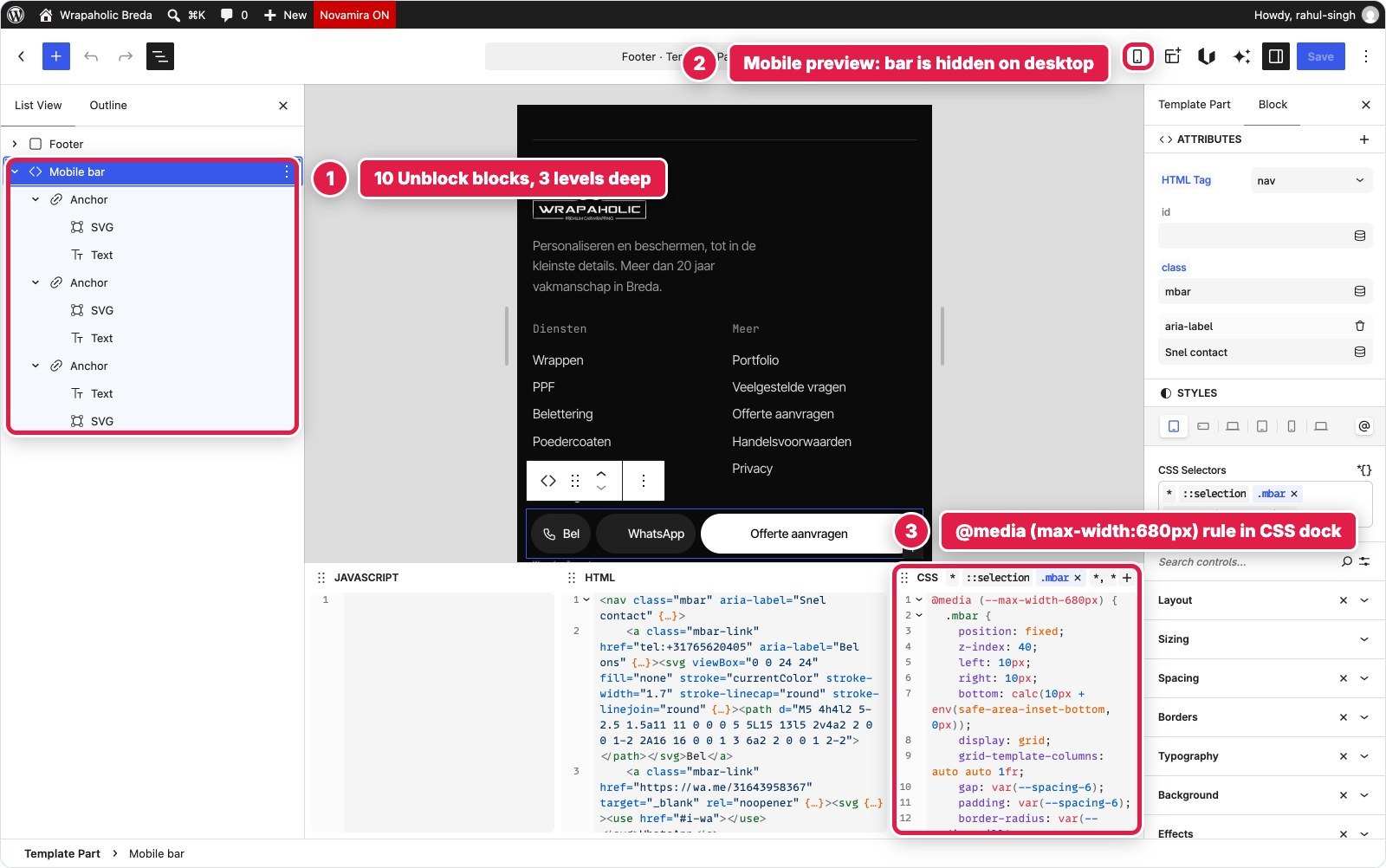

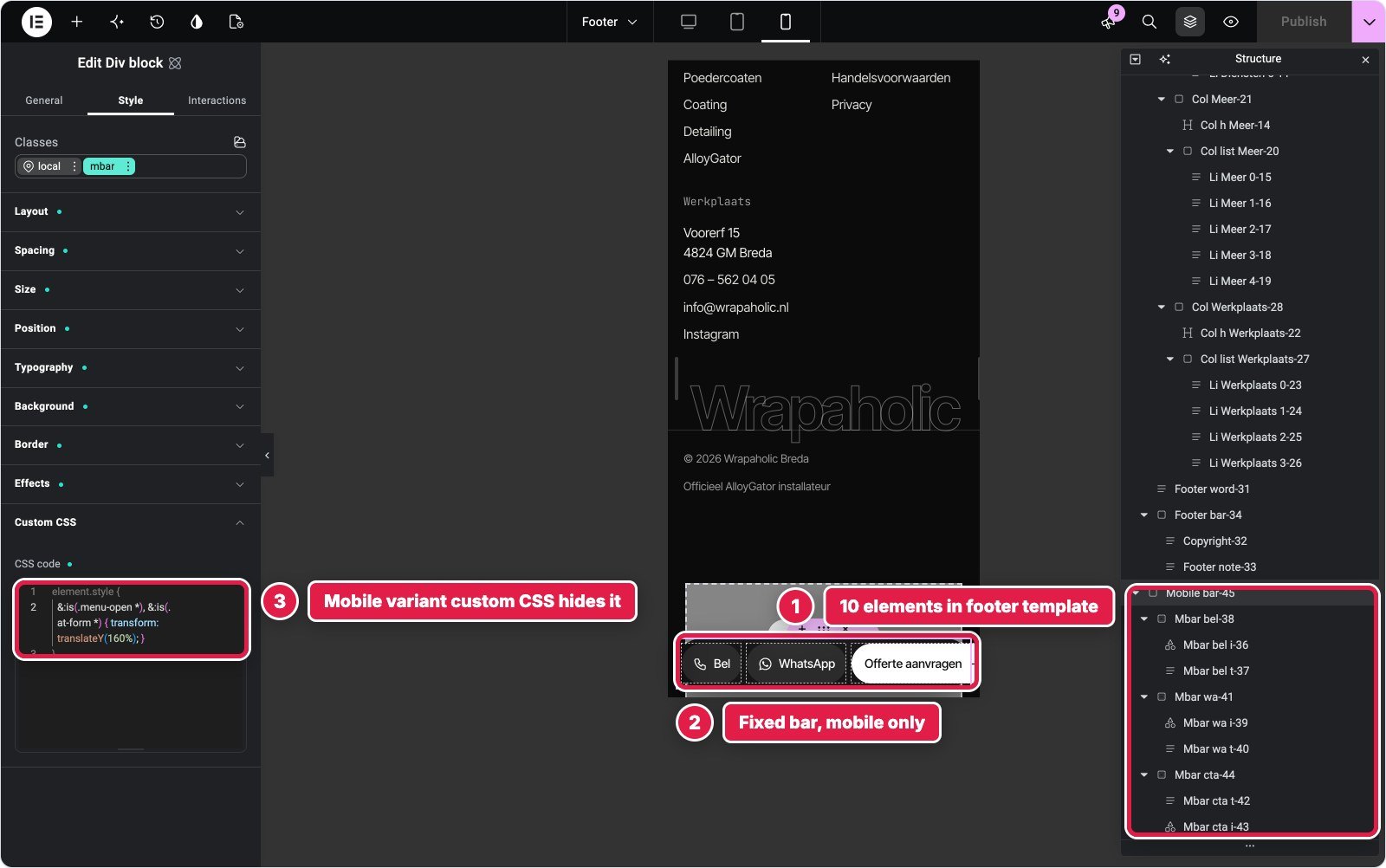


| Builder | Blocks (depth) | Custom CSS | Custom JS | Native or code |
|---|---|---|---|---|
| Unblock | 10 (3) | 974 B | None | One selector with a media rule |
| Kadence | 5 (3) | 1,129 B | 314 B | Second Pro Element |
| Elementor | 10 (3) | 150 B + kit CSS | None | Mobile class variant |
| GenerateBlocks | 4 (2) | 1,002 B | None | Local styles |
| Greenshift | 10 (3) | 1,052 B | None | Local class + Stylebook |
| Spectra | 5 (3) | 1,393 B | None | Astra hook + Additional CSS |
Winner for this section: Unblock and GenerateBlocks, tied. About a kilobyte of CSS, no script, and everything in one place.
Section by section: the scoreboard
| Section | Winner | Runner up | Why |
|---|---|---|---|
| Header and menu | GenerateBlocks | Kadence | Native accessible nav at the design breakpoint |
| Video hero | Unblock | Elementor | Two sources, poster, least script |
| Service tiles | GenerateBlocks | Spectra | Fewest blocks, one visual Global Style |
| About and stats | Spectra | Unblock | Semantic HTML with the least CSS |
| Project strip | Draw | Draw | No native component anywhere |
| Contact and form | GenerateBlocks | Kadence | Validation, stored entries, email |
| Footer | GenerateBlocks | Spectra | Dynamic year, no script |
| Mobile bar | Unblock and GenerateBlocks | Greenshift | One place, no script |
GenerateBlocks took four sections and shared a fifth, which is the first reason it tops my ranking. Its pattern is consistent: a native component where one makes sense (navigation, forms, dynamic tags), a Global Style everywhere else. Unblock won where the design asked for something no component offers, and on a custom agency design that is more of the page than you would think.
Design Systems, Fonts and Global Styles
A design system decides how fast the second and third page go, and how safely a client can change the brand colour. The six differ more here than anywhere else.
| Builder | Tokens | Reusable classes | Where breakpoints live | Fonts served |
|---|---|---|---|---|
| Unblock | 120 variables in 5 collections | 156 selectors in 11 collections | 11 site at rules (1080, 680, 380) | 363 KB |
| Kadence | 10 slot Global Palette | None, per block settings | Fixed per device | 65 KB |
| Elementor | 21 variables | 104 Global Classes, 628 props | Kit breakpoints (680, 1080) | 84 KB |
| GenerateBlocks | 23 Design Tokens | 35 Global Styles | Media rules in each style | 75 KB |
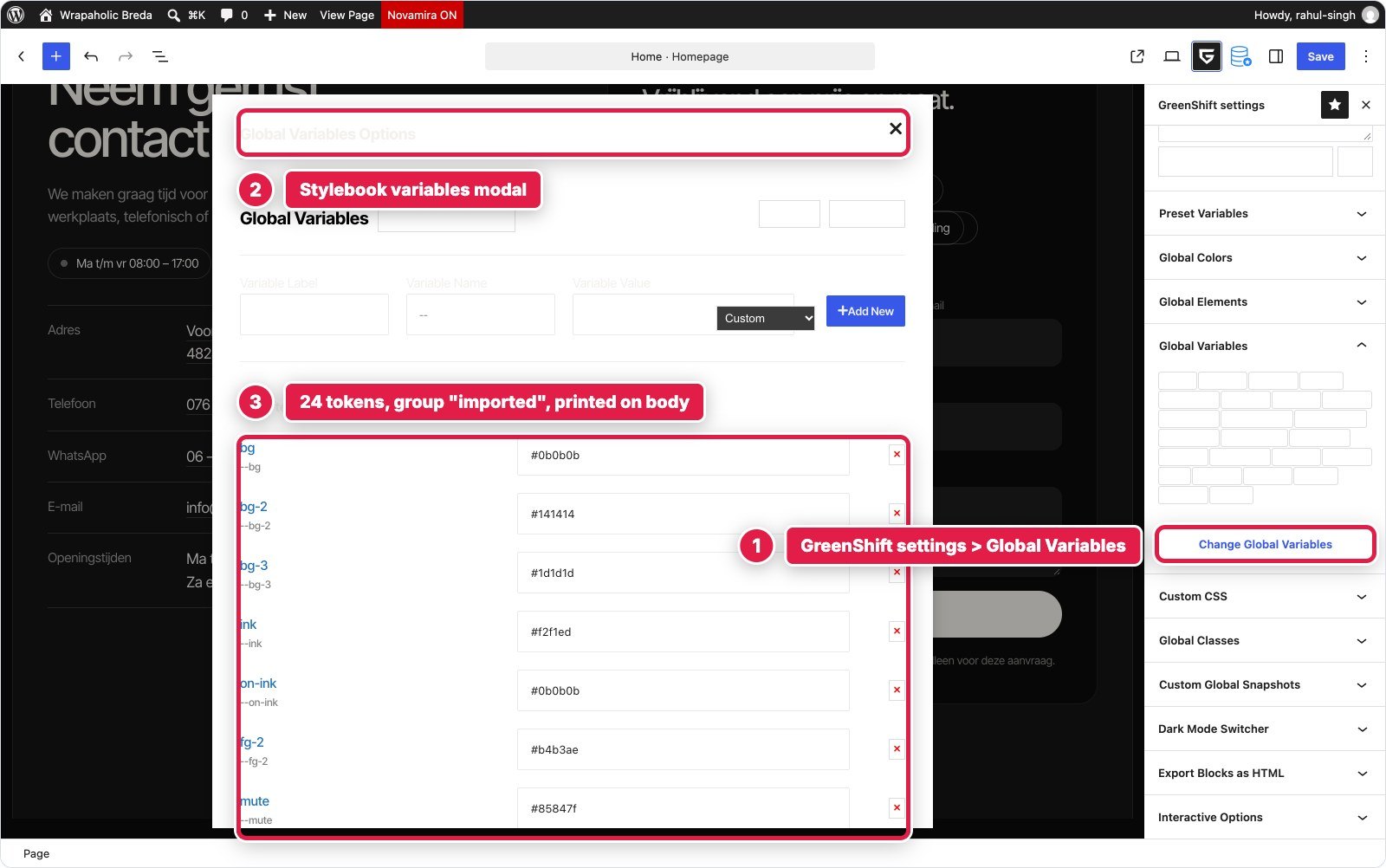
| Greenshift | 24 Global Variables | 7 global + 70 local classes | In class CSS | 75 KB |
| Spectra | 10 slot Style Guide + 3 | None, per block settings | WordPress 7.1 viewport setting | 86 KB |
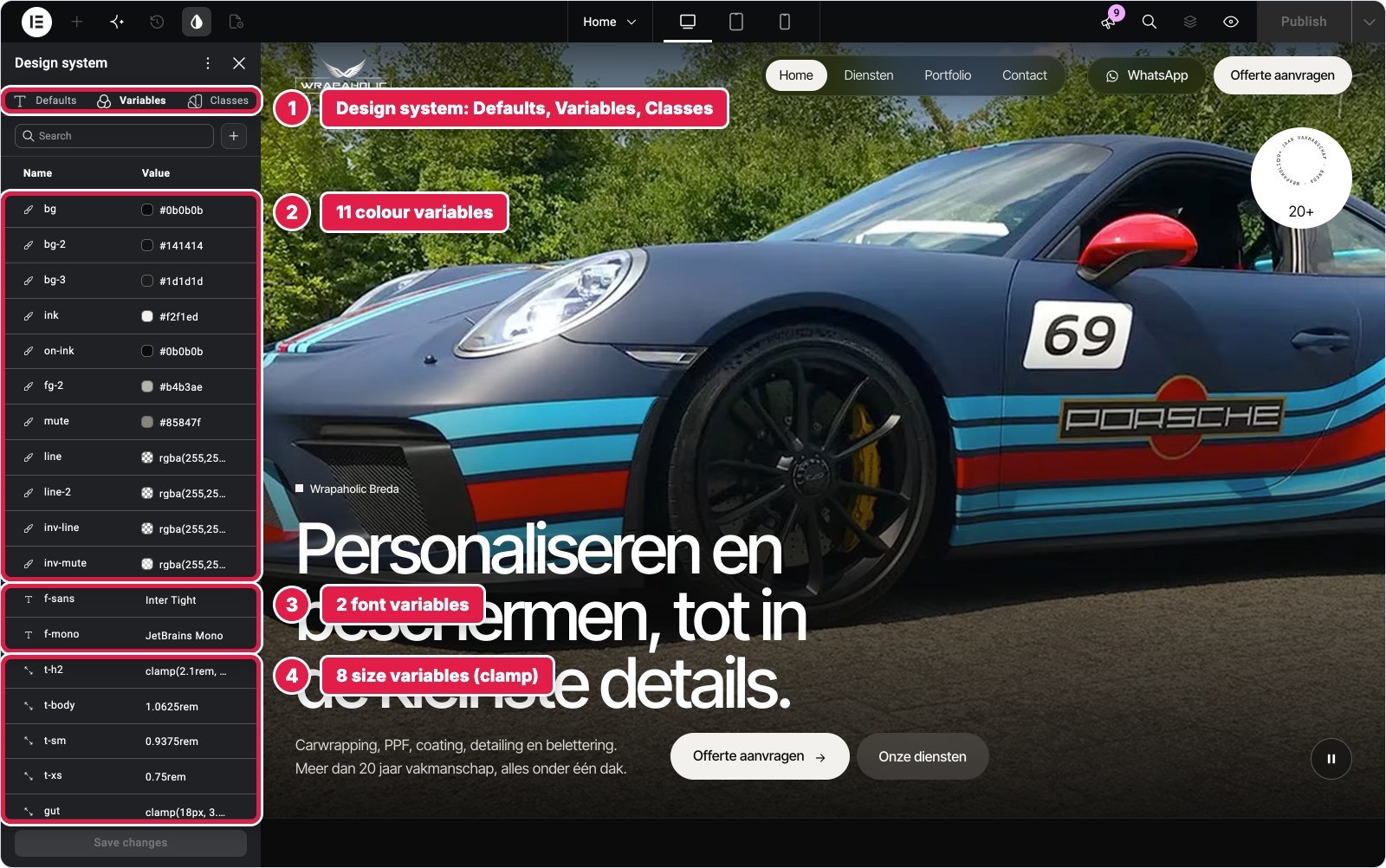
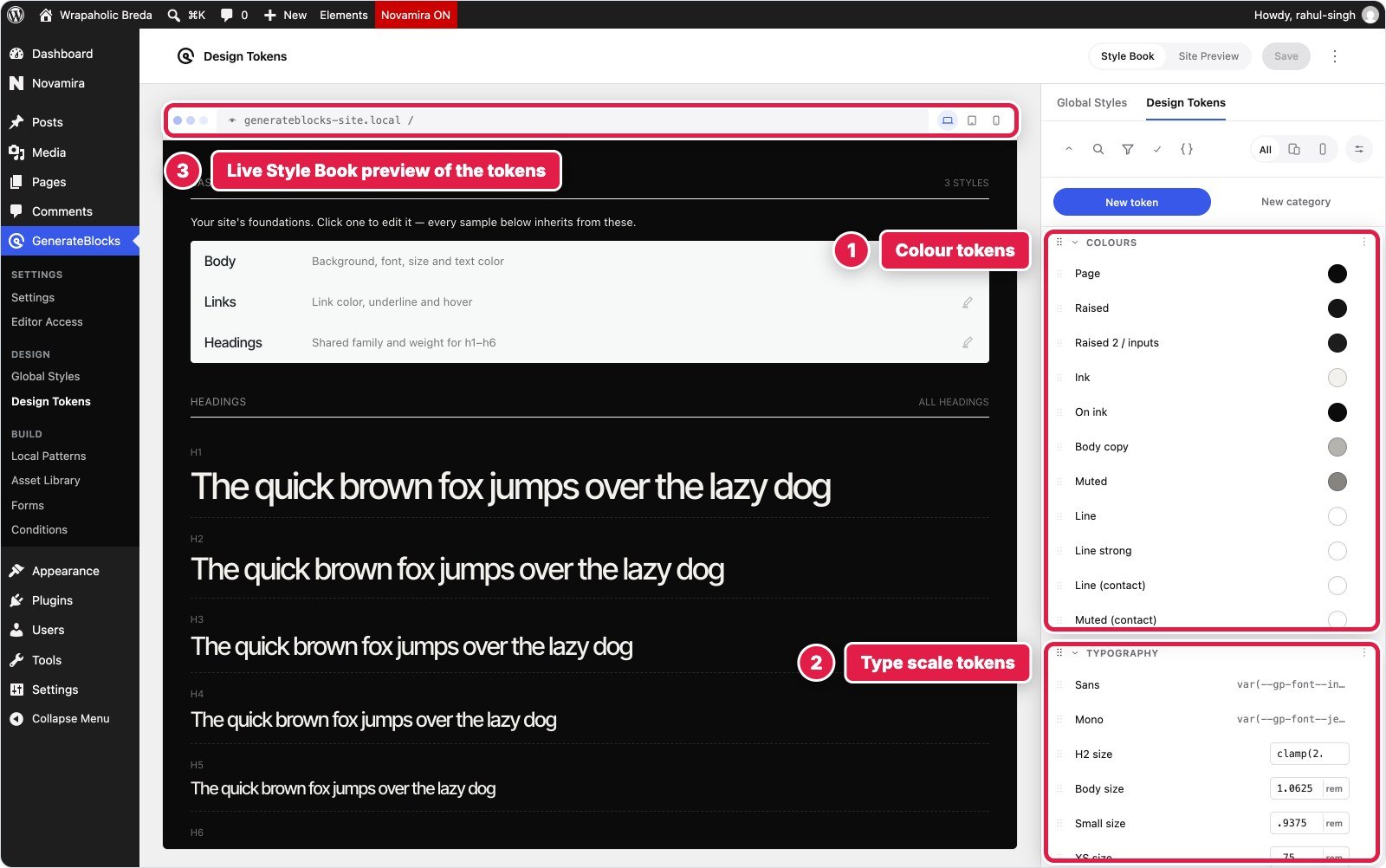
Unblock has the most complete system for anyone who thinks in CSS: 120 custom properties (34 colours in HSL, 36 spacing values, 25 typography tokens with fluid clamps, 20 effects, layout), 156 selectors grouped like a stylesheet, at rules for the design’s own breakpoints, and a history tab. GenerateBlocks is the friendliest strong system: 23 Design Tokens and 35 Global Styles compiled into one cached 9 KB file, with a live Style Book that shows your tokens on real elements. Elementor V4 finally has one too, though new classes take the highest priority by default, so a base class overrode its modifiers until I reordered them.
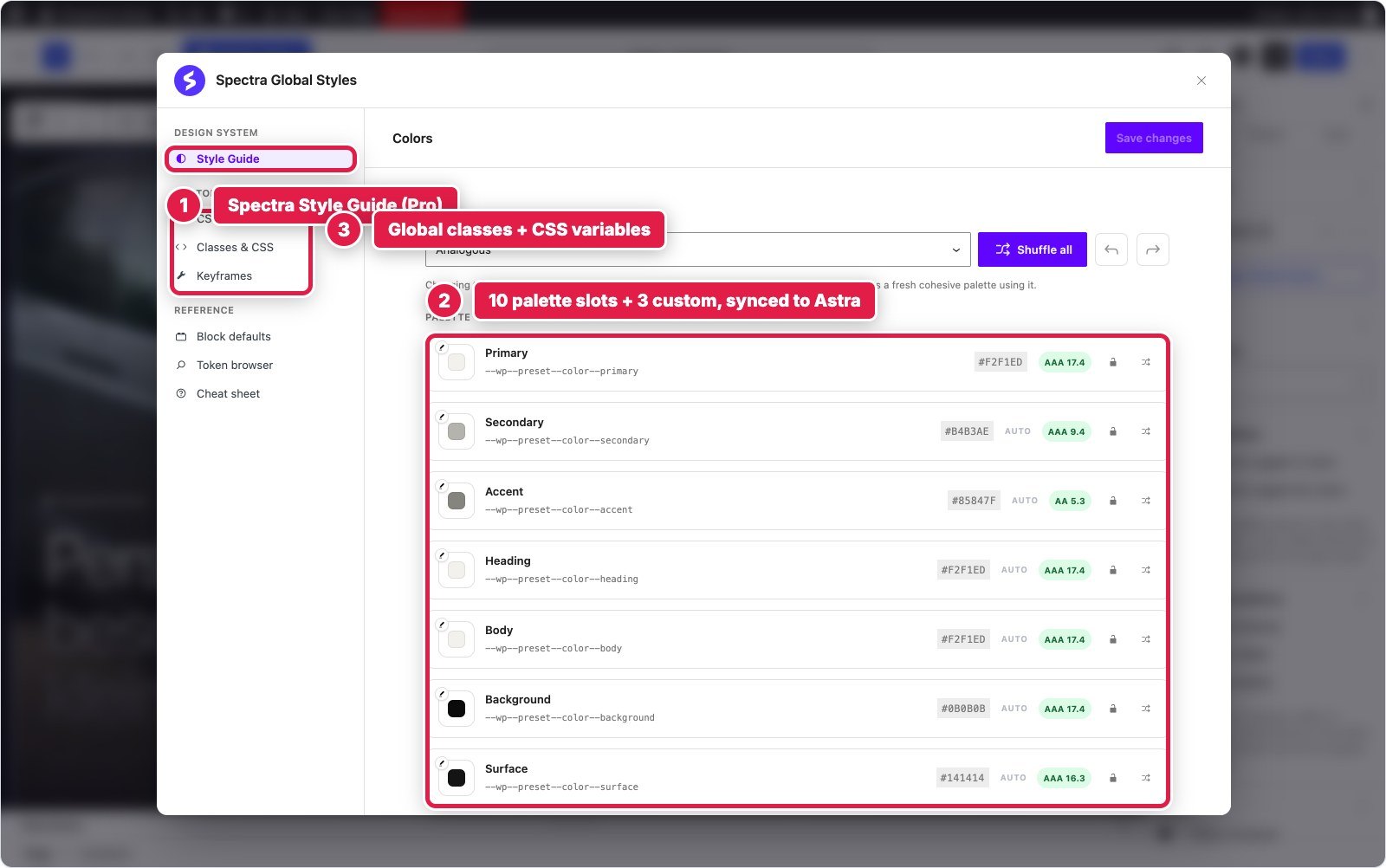
Kadence and Spectra are palette systems: ten colour slots every block references, excellent for a client recolouring the site and thin for spacing and fluid type. Watch Astra under Spectra: it writes a 17 pixel body size as html { font-size: 106.25% }, which made every rem 6% too big until I reset it. Greenshift’s system is smaller and flatter.
Fonts are the one place Unblock clearly loses. Its Fonts tab installs through the WordPress Font Library and served three full Inter Tight files of about 110 KB each, 363 KB in total, where every other builder served between 65 and 86 KB. That is a default you can fix by uploading variable or subset files, and it is the biggest single reason for Unblock’s mobile score below.


Custom CSS and JavaScript: How Much Each Needed and Where It Lives
This is the number people ask about first, and it needs a warning label. In Unblock, Greenshift and GenerateBlocks, CSS is how styling works, so their “custom CSS” is their entire style layer. In Kadence, Elementor and Spectra, custom CSS is what the settings could not express, on top of hundreds of settings. Read the two groups differently.
| Builder | Hand written CSS | Hand written JS | Where the CSS lives | Where the JS lives | Places to look |
|---|---|---|---|---|---|
| Unblock | 31.4 KB (all styling) | 5.9 KB | Global selectors manager | On each block, bundled | 2 |
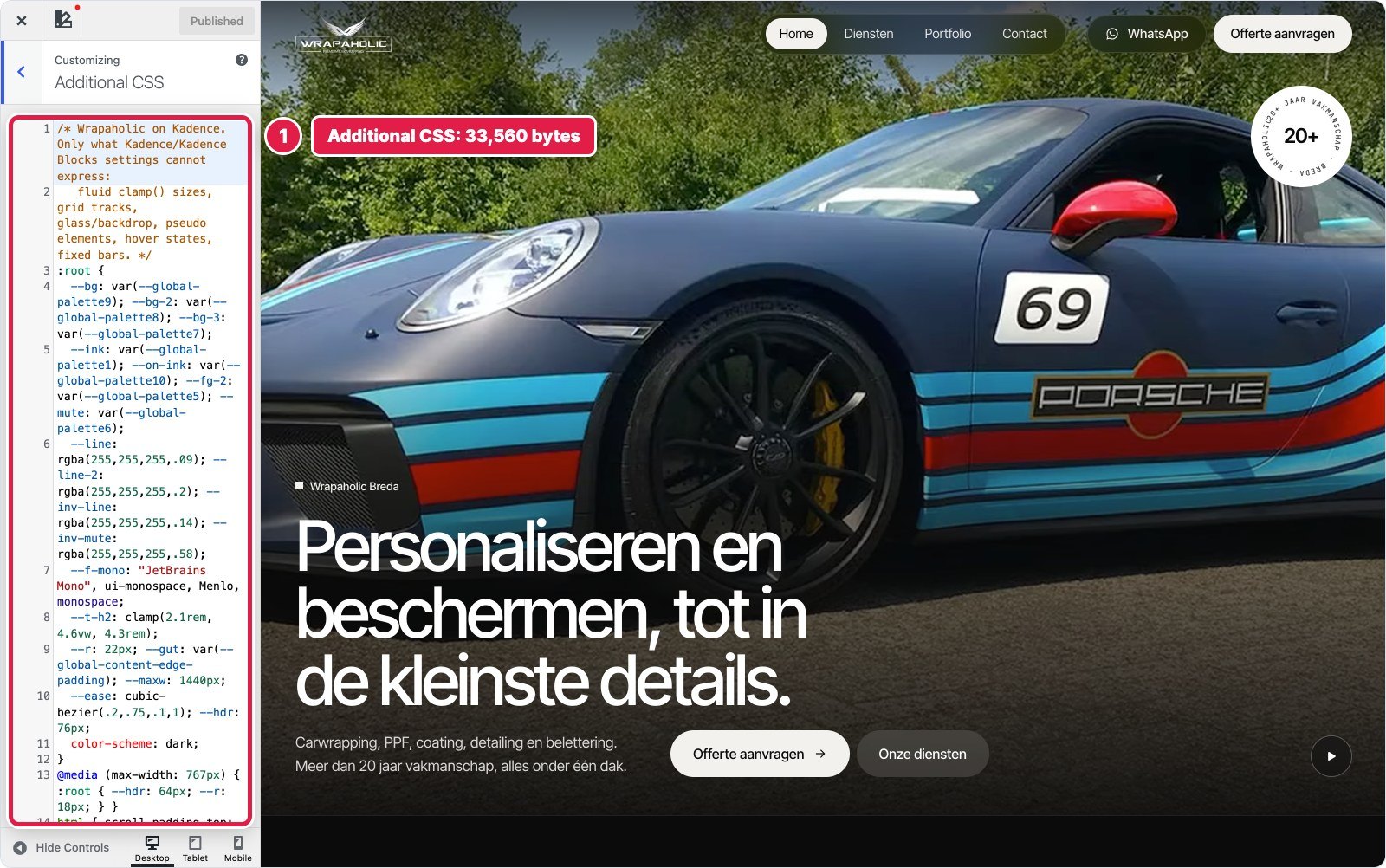
| Kadence | 31.6 KB (on top of settings) | 4.6 KB | One Additional CSS box | One Pro footer script | 2 plus Elements |
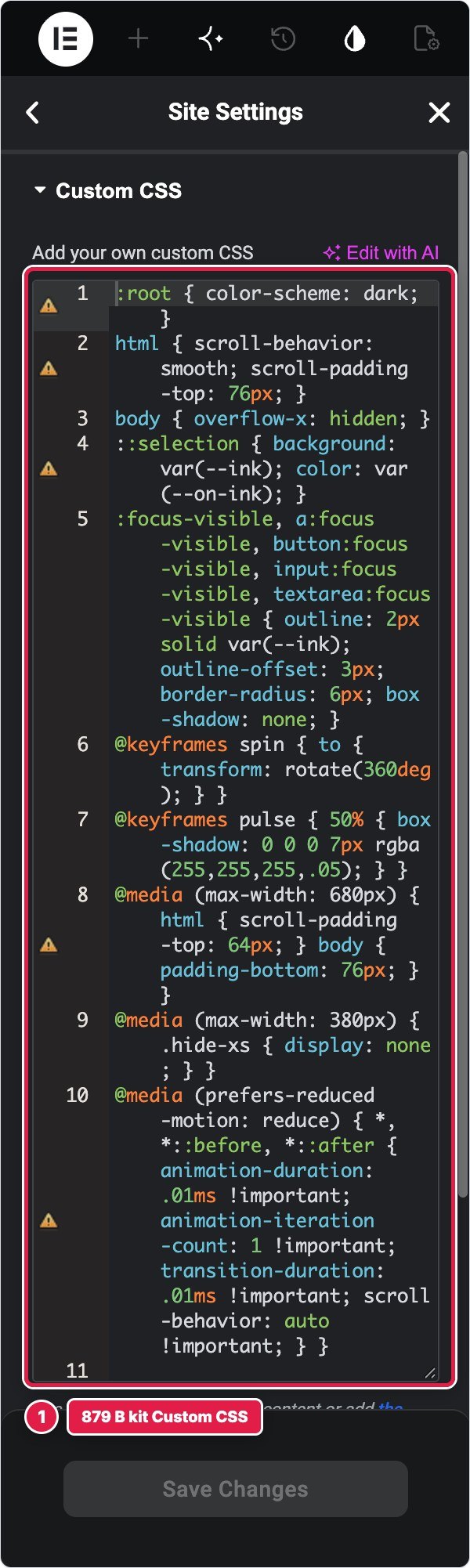
| Elementor | 12.4 KB (on top of 628 props) | 6.0 KB | 52 class variants + kit | One Pro Custom Code snippet | 4 |
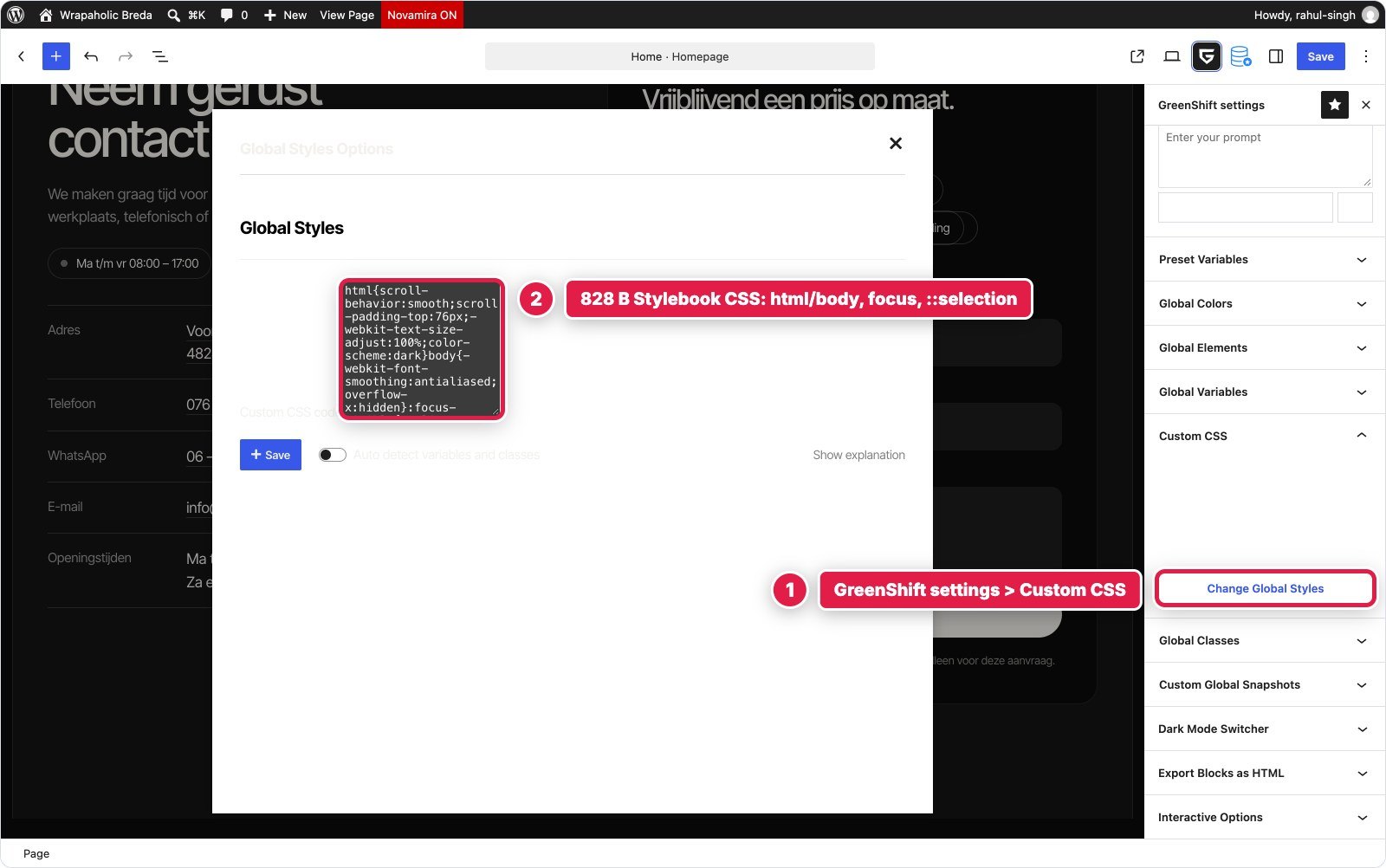
| GenerateBlocks | 27.8 KB (all styling) + 112 B | 4.2 KB | Global Styles + local styles | One GP Hook Element | 3 |
| Greenshift | 25.0 KB (all styling) | 6.6 KB | 3 Style Manager blocks + Stylebook | 3 Style Manager blocks | 4 |
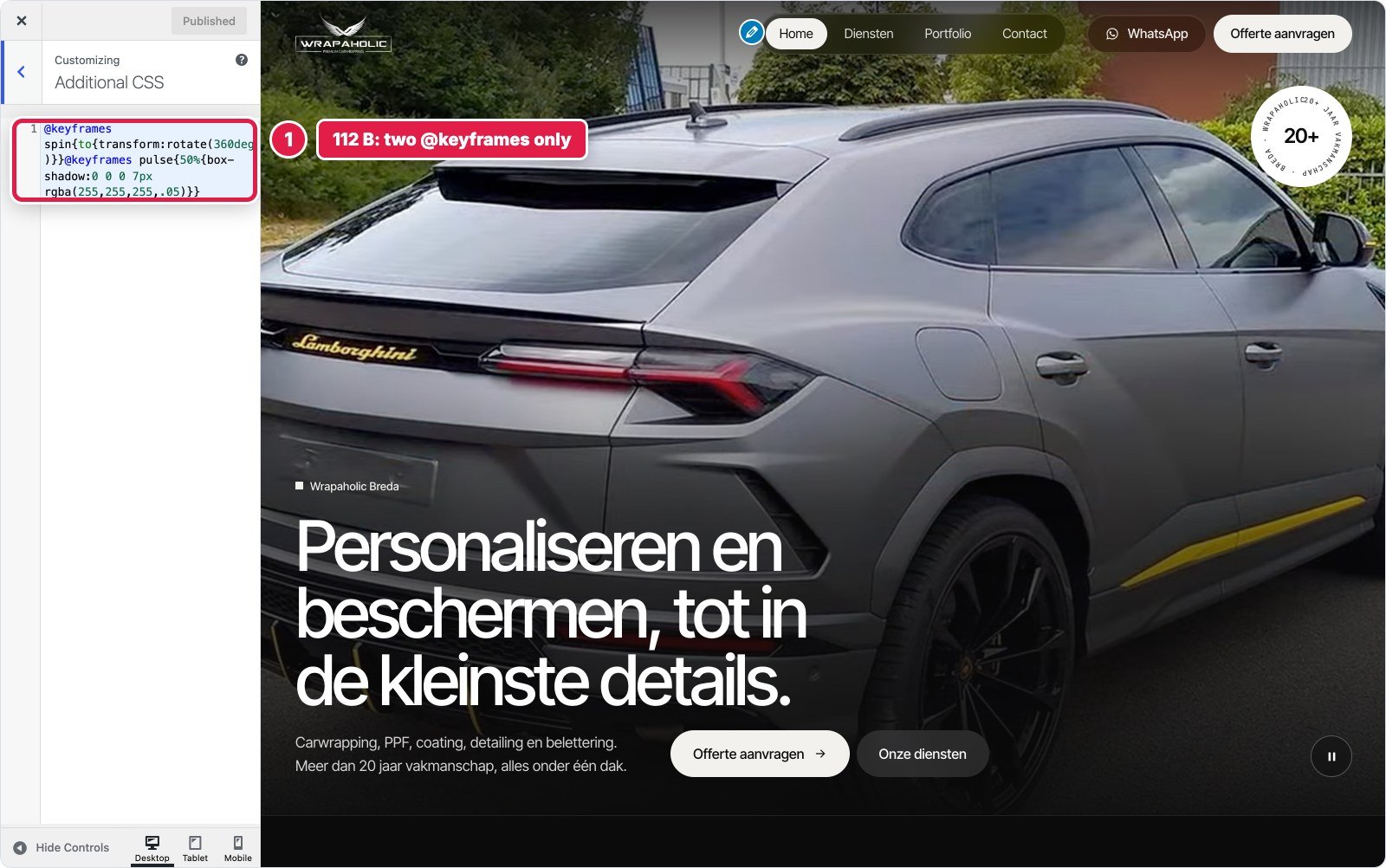
| Spectra | 29.1 KB (on top of settings) | 5.3 KB | Additional CSS + Block CSS | Block JS + Astra hook | 4 plus Custom HTML |
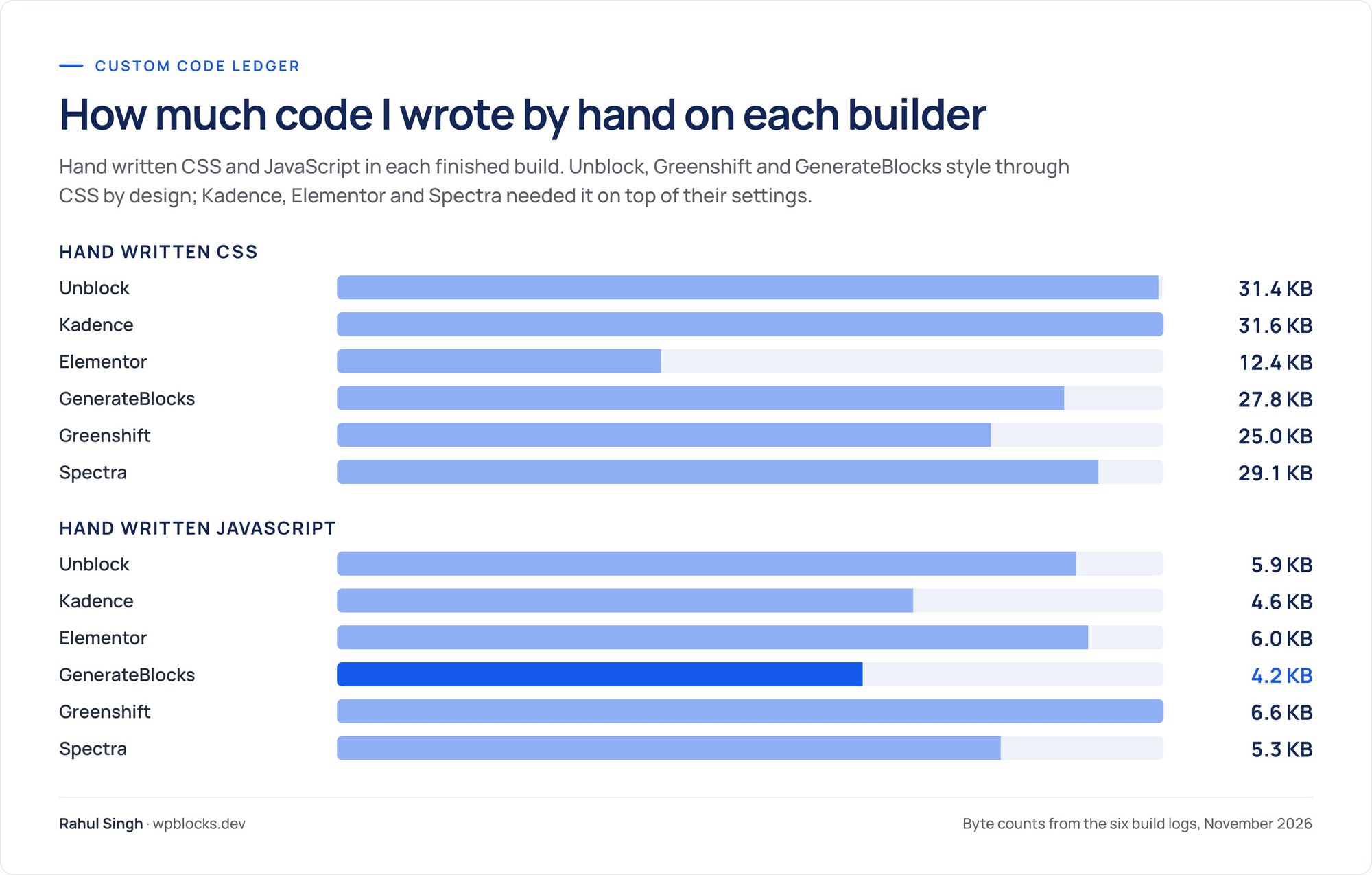
Three findings. First, the JavaScript barely moves: every builder needed between 4.2 and 6.6 KB, because the design needs a scroll aware header, a video toggle, a strip and opening hours, and no builder has native components for all of them. Native navigation and forms are why GenerateBlocks and Kadence sit at the low end.
Second, visual settings did not save as much CSS as you would expect. Kadence needed 31.6 KB of Additional CSS on top of its settings, more than Unblock’s entire style layer, and Spectra 29.1 KB. Elementor needed the least, 12.4 KB, because V4’s Global Classes carry most of the styling as native props, and still 52 class variants needed hand written CSS for pseudo elements, descendant rules and states.
Third, where code lives decides how a site ages. Unblock puts each script on the block it controls and each rule in a named collection, so you click the strip and see the strip’s code. Kadence puts 33 KB in one Customizer box the editor does not even load. Spectra spread mine across four places. Elementor, GenerateBlocks and Greenshift keep each script in a single site wide field you have to remember exists.

Performance: What Each Builder Ships
Same page, same images, same video, same machine. I measured every homepage logged out with no page cache. The hand coded original is the baseline. Transfer sizes are compressed unless noted, and the 2.3 MB hero video is left out of the code totals.
| Measured | Hand coded | Unblock | Kadence | Elementor | GenerateBlocks | Greenshift | Spectra |
|---|---|---|---|---|---|---|---|
| Code shipped (HTML, CSS, JS, fonts) | 96 KB | 390 KB | 151 KB | 398 KB | 120 KB | 104 KB | 254 KB |
| Without fonts | 22 KB | 27 KB | 86 KB | 314 KB | 45 KB | 28 KB | 168 KB |
| Fonts | 75 KB | 363 KB | 65 KB | 84 KB | 75 KB | 75 KB | 86 KB |
| JavaScript | 2.9 KB | 8.2 KB | 15.8 KB | 257 KB | 12.9 KB | 5.6 KB | 76 KB |
| HTML document, uncompressed | 22 KB | 89 KB | 315 KB | 137 KB | 88 KB | 95 KB | 536 KB |
| Requests | 17 | 18 | 22 | 48 | 24 | 16 | 42 |
| Stylesheets / script tags | 2 / 1 | 0 / 2 | 11 / 4 | 17 / 16 | 6 / 3 | 1 / 1 | 16 / 11 |
| DOM nodes / max depth | 449 / 10 | 477 / 12 | 658 / 23 | 558 / 14 | 520 / 17 | 465 / 13 | 688 / 17 |
| Unused CSS | 71% | 44% | 75% | 79% | 69% | 52% | 76% |
| Server response, local | 6 ms | 52 ms | 129 ms | 209 ms | 64 ms | 63 ms | 201 ms |
| Lighthouse mobile | 76 | 70 | 84 | 74 | 77 | 76 | 76 |
| Lighthouse desktop | 97 | 96 | 99 | 93 | 98 | 97 | 96 |
| Mobile first paint | 1.6 s | 3.0 s | 1.4 s | 2.3 s | 1.5 s | 0.9 s | 2.1 s |
| Accessibility | 96 | 96 | 100 | 96 | 96 | 96 | 96 |
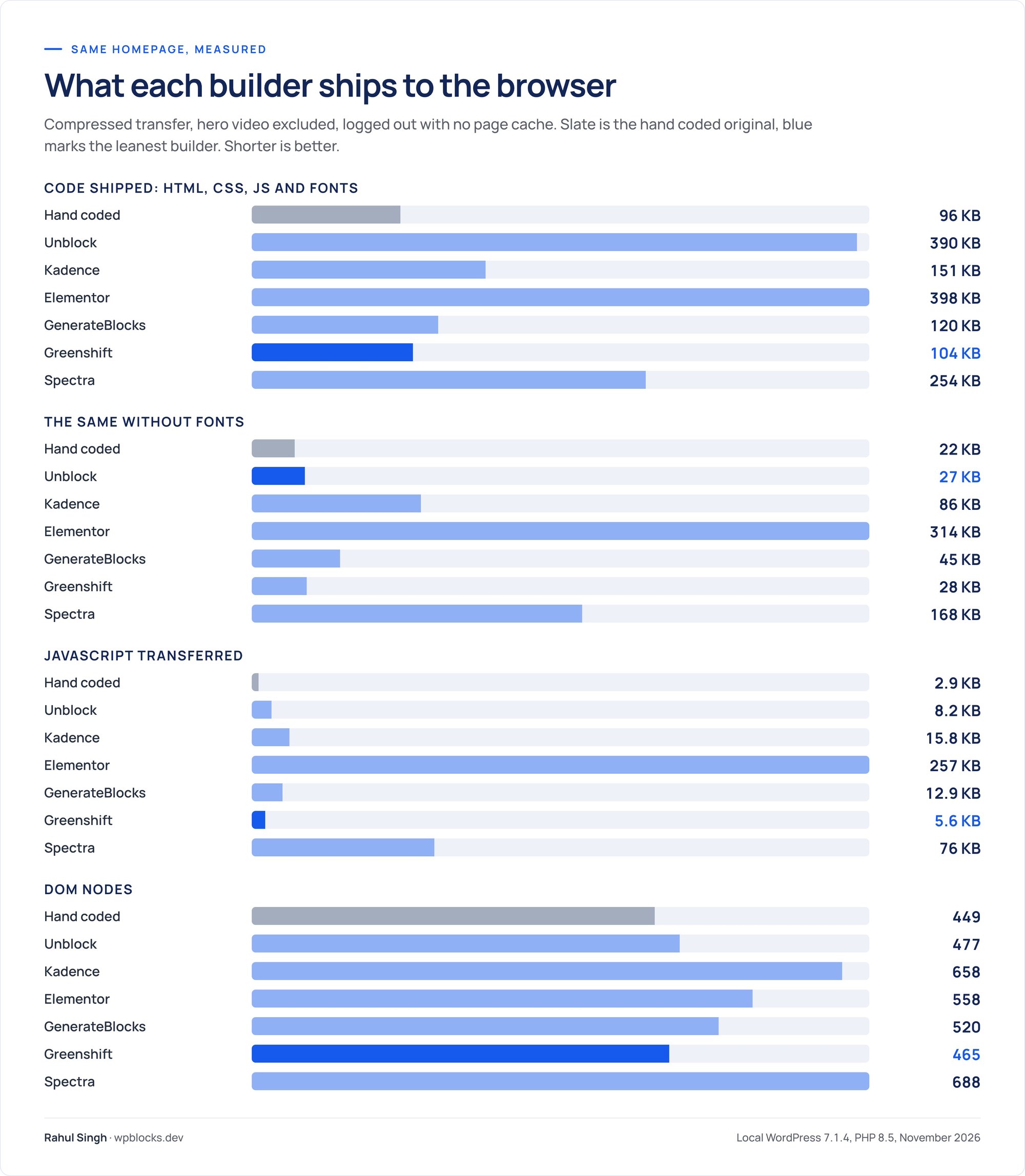
Three builders landed close to hand written code. Greenshift shipped 104 KB, 8 KB more than the original, with the fewest requests of all. GenerateBlocks shipped 120 KB. Unblock shipped the least code of any builder before fonts, 27 KB, and the least unused CSS, then lost it all on 363 KB of fonts.
Three did not. Kadence inlines 232 KB of CSS into a 315 KB document, and three quarters of its CSS goes unused on this page, though it still scored best because it preloads lean fonts. Spectra writes each block’s CSS once per device, desktop, then tablet, then mobile, even when the value is the same: 2,176 rules and 334 KB of inline CSS inside a 536 KB HTML document, plus jQuery, the AOS library and four Spectra Pro extension stylesheets on a page that uses none of their features. Elementor sent 257 KB of JavaScript, 30 times what Unblock sent, partly because one V3 Nav Menu widget pulled in jQuery, jQuery Migrate and SmartMenus.
Read the Lighthouse scores with care
On every one of the seven pages, the hand coded original included, the mobile Largest Contentful Paint element is the 2.3 MB hero video. Mobile scores therefore mostly measure how fast that video arrives, and the original itself only scores 76. A few points of mobile score between these builders tell you little about the builder.
Desktop runs from 93 to 99, and total blocking time was zero everywhere. The meaningful signals are first paint, where Unblock’s font files cost it (3.0 seconds against 0.9 for Greenshift), and JavaScript weight, which Lighthouse on a fast machine under counts. Elementor’s 257 KB will cost more on a cheap phone than its 74 suggests.
Accessibility was 96 on every build except Kadence’s 100. The one axe violation on the others is a colour contrast rule the original design trips as well, so they reproduced it faithfully, and Kadence’s markup happened to avoid it.
My performance ranking, as delivered: Greenshift, GenerateBlocks, Kadence, Unblock, Spectra, Elementor. With Unblock’s fonts swapped for variable files, I would expect it to move up to share the top with Greenshift, but I did not test that, so I will not claim it.
Building It with AI
Unblock sells itself on AI building, so I also had an AI agent build each version from the same written brief, using each vendor’s recommended programmatic route, with the same pixel check as the finish line. That measures how easy each builder is to drive from text, which is where a lot of agency work is heading. I did not use any builder’s built in AI assistant.
| AI build | Unblock | Greenshift | GenerateBlocks | Elementor | Kadence | Spectra |
|---|---|---|---|---|---|---|
| Tokens used | 352K | 408K | 450K | 457K | 479K | 518K |
| Pixel check runs to pass | 2 | 3 | 4 | 3 | 6 | 7 |
| Minutes to a passing build | 19 | 20 | 26 | 34 | 36 | 35 |
| Route | Unblock abilities | Vendor converter | Block markup + styles | Elementor MCP abilities | Block editor markup | Block markup + Astra |

The order follows each builder’s data model. Language models write HTML and CSS fluently, and the closer a builder’s storage is to plain HTML and CSS, the less there is to translate. Unblock stores exactly that: an element with a tag and attributes, a selector with rules. Its abilities, the same ones its MCP Bridge exposes to Claude, ChatGPT, Cursor and other clients, wrote them directly. Greenshift was a close second through its HTML converter, which dropped attributes and misordered media rules until patched.
GenerateBlocks stores styles twice, as style data and compiled CSS, so an outside writer must produce both. Elementor’s CSS goes through a converter into atomic props, and every gap in it cost a retry. Kadence and Spectra needed the most runs to discover their defaults, from Kadence’s inner column height to Spectra’s silent drops of clamp(). A human builder hits the same walls, more slowly.
Unblock’s MCP Bridge needs WordPress 6.9 or newer and an active licence, and lists 16 tools plus 31 more abilities through the WordPress MCP Adapter. Its Unbot assistant uses your own API key with no markup. If an agent does the first build of every site you make, the difference between 19 and 35 minutes repeats on every one of them.
Lock In: Switch the Builder Off
Then I deactivated each builder plugin, left its theme active, and measured how much of the original page text was still visible. This is the test that decides what happens if a client deactivates the plugin, a licence problem bites, or you want to move on.

| Builder off | Text visible | Links | Images | Form fields | Page height (original 5,772 px) |
|---|---|---|---|---|---|
| Kadence | 91%, styled | 26 of 44 | All | 0 of 4 | 7,774 px |
| Elementor | 99.6%, unstyled | 5 of 44 | 3 of 4 | Fields left, unstyled | 49,913 px |
| Greenshift | 99.6%, unstyled | All | 3 of 4 | Fields left, unstyled | 39,042 px |
| GenerateBlocks | 65%, unstyled | All | 3 of 4 | 0 of 4 | 37,985 px |
| Spectra | 11% | 22 of 44 | All | Raw HTML form left | 16,182 px |
| Unblock | 0%, blank page | 0 of 44 | 0 of 4 | 0 of 4 | 900 px, empty |
Kadence is the only build a visitor could still use: its blocks save HTML into the post, and the theme, the Customizer header, the Additional CSS and the Pro Elements keep most of it styled. Elementor and Greenshift keep almost every word, unstyled, with inline SVG icons blown up to full width. GenerateBlocks keeps two thirds, and its header and footer still print because GP Premium holds them. Spectra keeps the wrong 11%: Astra’s header and footer and the raw form survive, every Spectra block renders nothing.
Unblock leaves a blank page. Its elements are rendered by the plugin, and the Unblock Theme’s header and footer are Unblock elements too, so nothing prints. To be fair to it, if you stop paying the plugin keeps working, and you lose only updates, the AI assistant and support. The risk is removing it, never lapsing. Treat Unblock as permanent infrastructure, because it is.
WooCommerce: One Product Page, Six Builders
A homepage shows how a builder handles design. A shop shows how it handles data, so I went back to all six sites and built a WooCommerce product page on each, again against a hand coded reference. Two products share one template: AlloyGator rim protection, a variable product with 7 rim sizes and 5 colours (35 variations), and an XPEL paint protection film kit, a simple product. The page needed a breadcrumb, a gallery with thumbnails, size buttons and colour swatches that select the real variation, a price and stock box, a quantity stepper, tabs, related products and a fixed product bar on phones. Same six installs, WooCommerce 11.3.0, same rules as the homepage.
Every build matched the reference within 1% at 1440, 768 and 390 pixels, and every build passed a real cart test: I chose 20 inch in Rood, set the quantity to 2, and each cart showed the right variation at € 498,00. So all six can build a custom product page. The differences are in how they get there and what the page costs on a phone.

Where the product template lives
- Unblock has no display conditions; WordPress’s template hierarchy applies the template to every product. It cannot write to the
single-producttemplate, because WooCommerce registers the same name, and it cannot place WooCommerce blocks. So the template is a shell of three template parts, and the product page itself is an Unblock template part of 193 blocks that Unblock’s WooCommerce data fills from the current product. - Kadence gets a real product template from Shop Kit, its WooCommerce add on: a Single Product Woo Template set to all products, built from Row Layouts around Shop Kit’s product blocks (67 blocks). Shop Kit ran from the vendor zip without a licence key. The editor canvas does not load the template’s own custom CSS, so it looks unstyled while you edit.
- Elementor uses a Pro Theme Builder Single Product template with an all products condition, 90 elements. Version 4’s atomic elements have no WooCommerce versions, so six classic Pro WooCommerce widgets sit inside atomic Divs.
- GenerateBlocks has no WooCommerce code at all. GP Premium’s WooCommerce module prints the classic WooCommerce template, a Layout Element removes the sidebar, and ten Block Elements hung on WooCommerce hooks add everything the design needs on top. The two column layout is forced with CSS.
- Greenshift edits the Single Product template in the Site Editor with its WooCommerce add on blocks (gallery, price, add to cart, tabs, availability), 98 blocks, applied by the template hierarchy.
- Spectra has no visual product template, because Astra has none. WooCommerce’s classic template is arranged by Customizer toggles, and eight Astra hook layouts add the rest: five built with Spectra blocks, three of code. Astra Pro’s generated files went stale after I enabled its WooCommerce module and had to be refreshed.


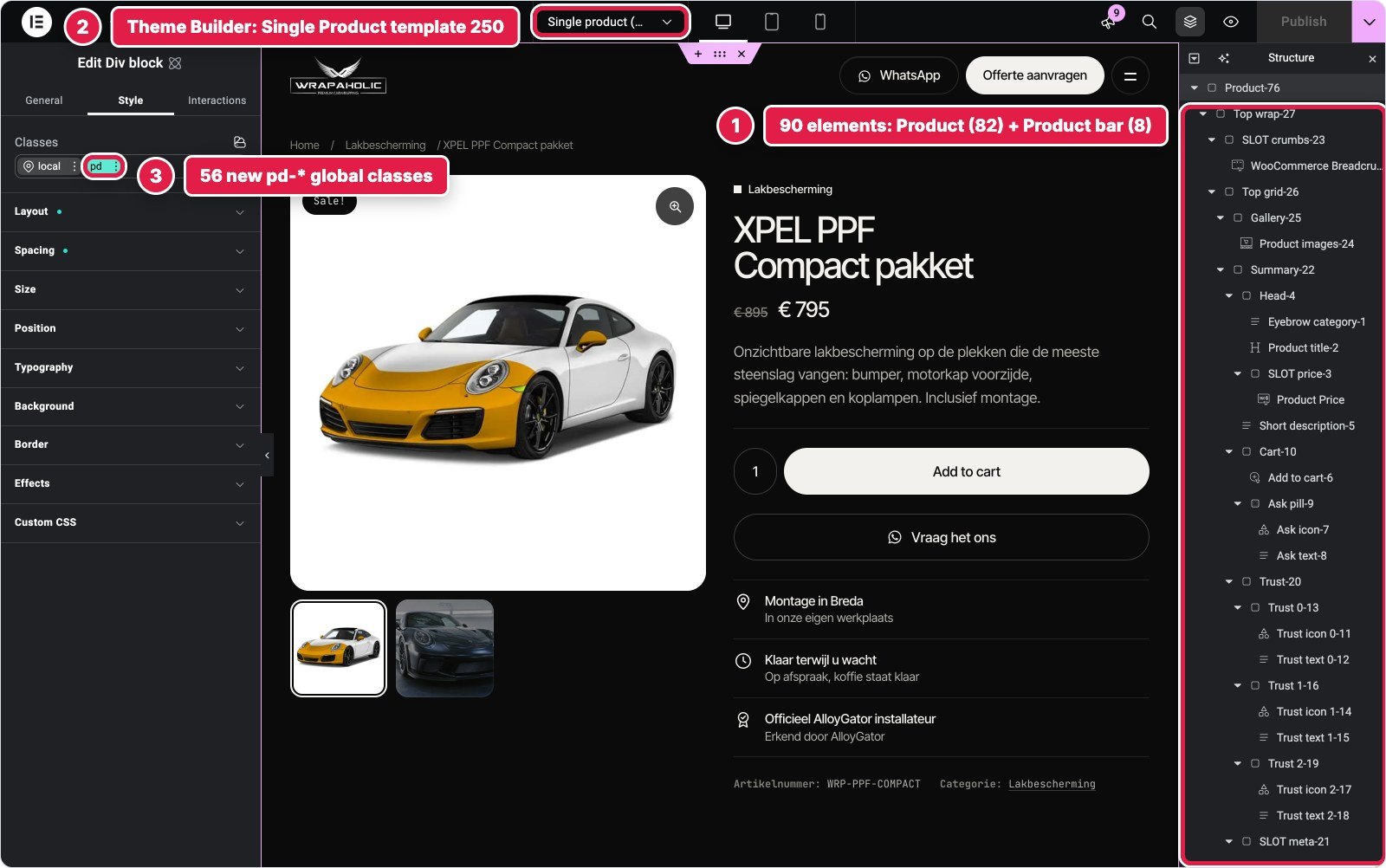
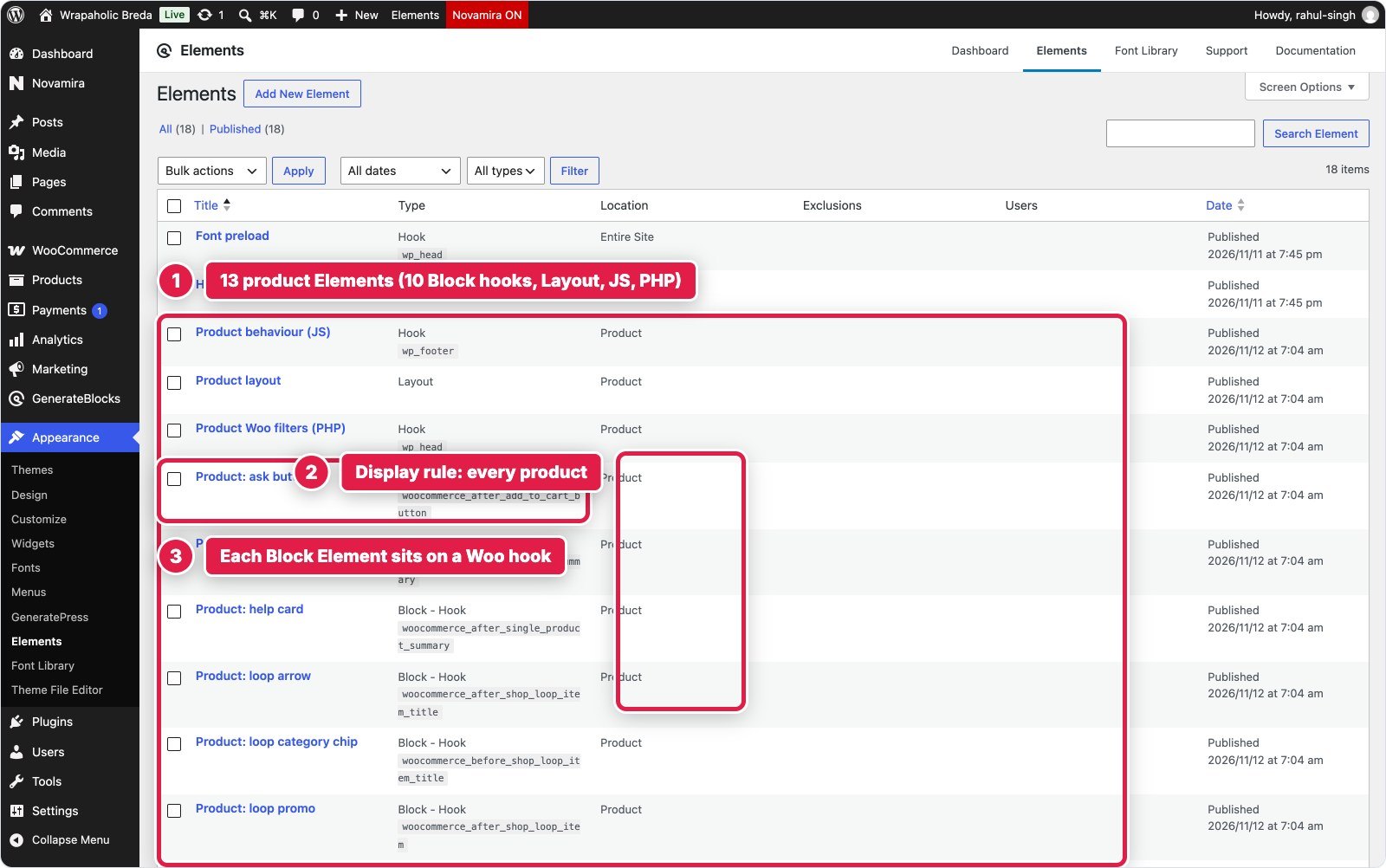


Only Kadence, Elementor and Greenshift give you a product template you design on a canvas with real WooCommerce blocks or widgets. Unblock gives you a canvas too, but you build the product parts yourself from elements and Twig. GenerateBlocks and Spectra leave the page to WooCommerce and let you hang content around it.
Size buttons and colour swatches
Classic WooCommerce prints dropdowns for variations, and the design wanted buttons and named colour swatches. The six builds took three routes.
- A swatch add on: Kadence (Shop Kit Variation Swatches, set per attribute and per colour term, no picker JavaScript), Greenshift (its WooCommerce add on, text and colour types on the attribute screen) and Spectra (the Variation Swatches add on from Brainstorm Force). Greenshift’s and Spectra’s colour swatches print dots without names, so the names come from CSS, and Greenshift’s swatch stylesheet loads on every page of the site, homepage included.
- Custom JavaScript over WooCommerce’s dropdowns: Elementor (a 9.8 KB Pro Custom Code snippet) and GenerateBlocks (a 3.1 KB Hook Element). Both turn the hidden selects into buttons, and the swatch colours live in code keyed by term slug.
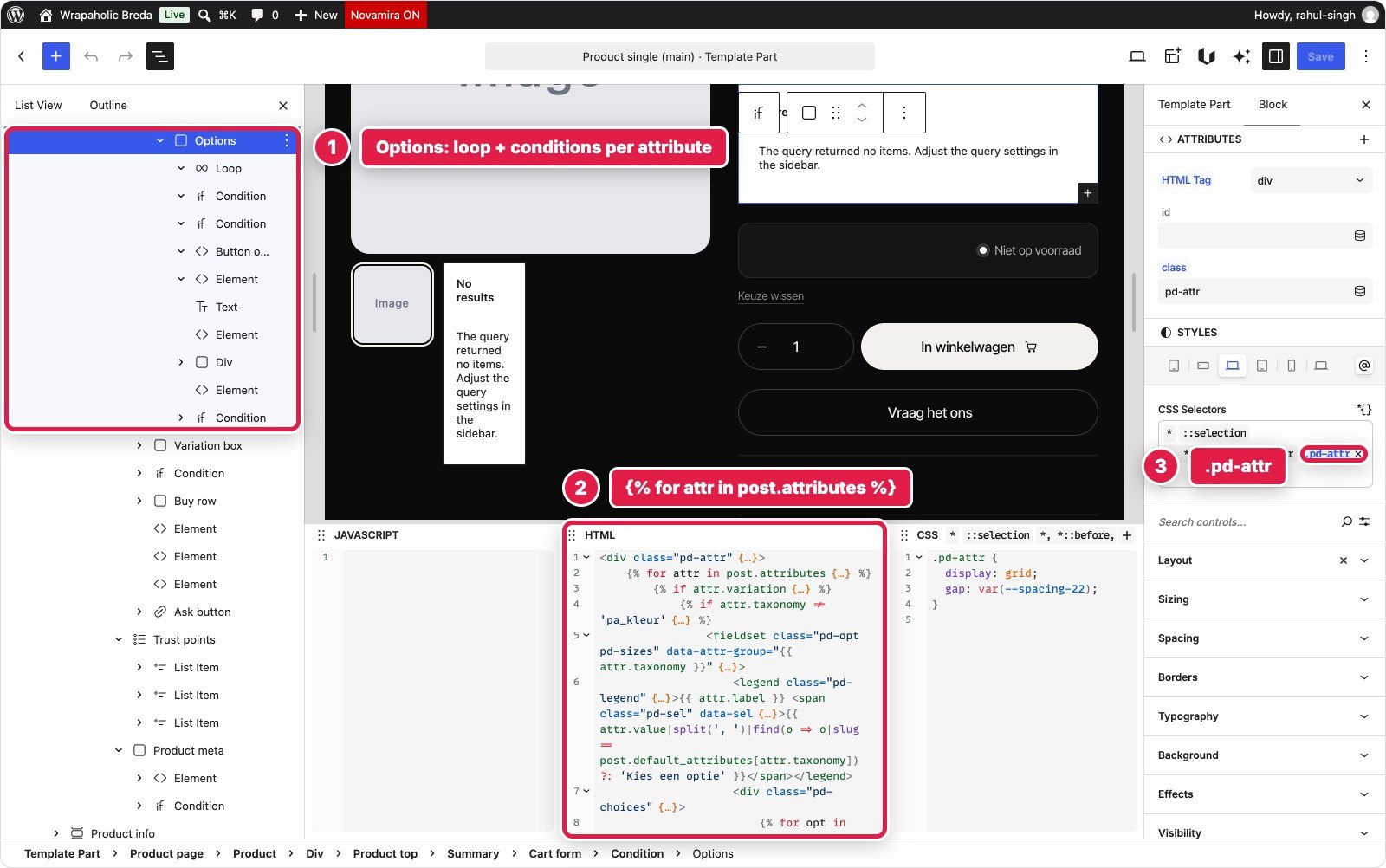
- Built in the builder: Unblock loops over the product’s attributes to print the buttons, takes swatch colours from its design tokens, and a 6.6 KB block script matches the choice to WooCommerce’s variation data and adds it to the cart. Without JavaScript the form still posts to WooCommerce.


What each product page ships
| Builder | Code shipped | JavaScript | Requests | Lighthouse mobile / desktop | Mobile CLS | Hand written CSS / JS | Variation picker | Pixel diff 1440 / 768 / 390 |
|---|---|---|---|---|---|---|---|---|
| Hand coded reference | 104 KB | 5 KB | 14 | 95 / 100 | 0 | n/a | Static | n/a |
| Kadence + Shop Kit | 288 KB | 115 KB | 58 | 81 / 99 | 0.03 | 35.6 KB / 3.9 KB | Shop Kit swatches, no picker JS | 0.85 / 0.59 / 0.97% |
| Greenshift + Woo add on | 248 KB | 119 KB | 45 | 80 / 99 | 0.08 | 31.5 KB / 4.8 KB | Add on swatches + 4.7 KB JS | 0.05 / 0.48 / 0.08% |
| Unblock | 467 KB (363 KB fonts) | 59 KB | 27 | 76 / 99 | 0 | 25.7 KB / 6.6 KB | Own buttons on a real Woo form, 6.6 KB JS | 0.16 / 0.22 / 0.34% |
| GenerateBlocks + GP Premium | 249 KB | 102 KB | 42 | 67 / 100 | 0.47 | 33.7 KB / 3.1 KB | Custom buttons over Woo dropdowns, 3.1 KB JS | 0.21 / 0.44 / 0.62% |
| Elementor Pro | 497 KB | 296 KB | 74 | 57 / 99 | 0.49 | 24.9 KB / 9.8 KB | Custom buttons, 9.8 KB JS | 0.02 / 0.03 / 0.04% |
| Spectra + Astra Pro + swatches add on | 385 KB | 137 KB | 63 | 54 / 98 | 0.49 | 36.3 KB / 1.4 KB | Add on swatches, 1.4 KB JS | 0.20 / 0.30 / 0.46% |
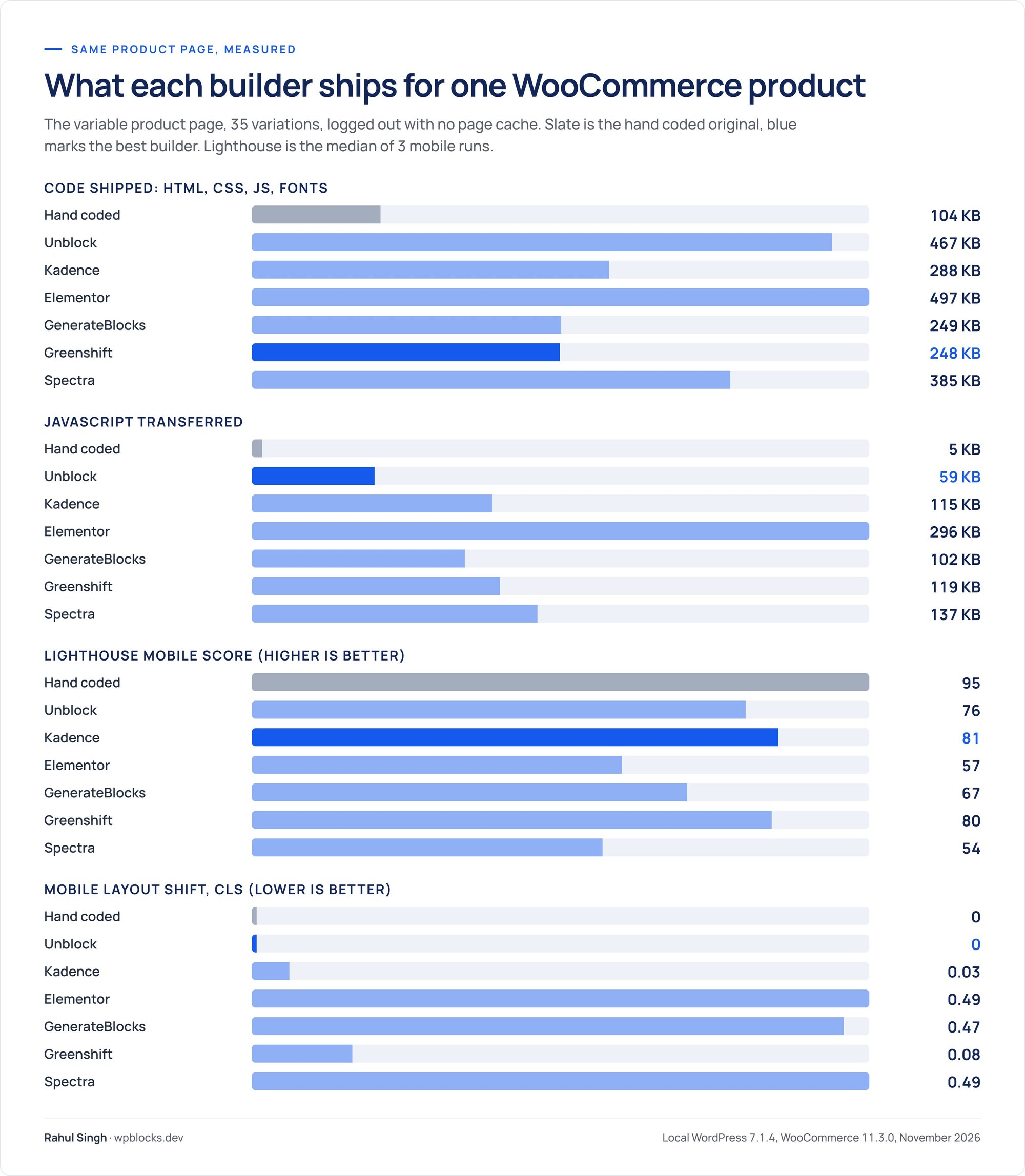
WooCommerce changes the order from the homepage. Every build now carries WooCommerce’s own scripts, so the JavaScript gap between the light builders and the heavy ones narrows: GenerateBlocks, Kadence and Greenshift all land between 102 and 119 KB. Unblock sends the least JavaScript (59 KB) and the fewest requests (27), because WooCommerce’s gallery and variation scripts never run on its page, and once again loses most of that lead to the same 363 KB of fonts. Greenshift and GenerateBlocks ship the least code overall, about 250 KB each. Kadence has the best mobile score of the six, 81. Elementor sends 296 KB of JavaScript and 74 requests, and Spectra scores 54 on mobile.
Desktop runs from 98 to 100 for every build, so the spread is a phone problem, and most of it comes from one cause, below. The six stores are also not set up identically, and I left that visible: Elementor prints whole euros, GenerateBlocks and Spectra trim the ,00 on product pages with a PHP filter, and Kadence keeps WooCommerce’s two decimals. Some builds switched reviews off or raised the image sizes from 600 to 800 pixels. GenerateBlocks and Spectra put all 35 variations in the page, while Greenshift’s page looks up the default variation with an extra request, because 35 is above WooCommerce’s limit of 30.
The layout shift on phones
Three builds score a mobile CLS of 0.47 to 0.49, well into what Google rates as poor (above 0.25). The cause is the same on all three: WooCommerce’s own gallery slider. Before WooCommerce’s gallery slider starts, it lays every slide out at full width for a moment. On a 390 pixel phone I measured the gallery grow from 450 to 3,637 pixels tall and fall back to 444, and because the summary column sits under the gallery on phones, the title, price and buttons drop off the screen and jump back. GenerateBlocks, Elementor and Spectra all use WooCommerce’s gallery as it comes, so all three get the full jump.
The other three show why the template matters. Greenshift uses its own Swiper gallery, whose thumbnail strip starts as tall as the main image and collapses to 84 pixels: a 270 pixel jump and a CLS of 0.08. Kadence pre-sizes the main image, so only the thumbnail row moves, 49 pixels, CLS 0.03. Unblock gives the main image a fixed square box and never runs WooCommerce’s gallery script, so nothing moves: CLS 0.
Why the page jumps on phones
WooCommerce’s classic gallery uses a slider (FlexSlider) that sizes its slides only after the page has loaded. Until then the slides stack at full size, the gallery becomes several screens tall, and everything under it is pushed down, then pulled back up when the slider starts. On desktop the summary sits beside the gallery, so nobody sees it. On a phone it sits underneath.
The fix is a few lines of CSS: reserve the gallery’s space before the script runs, with an aspect ratio on the main image area and the extra slides hidden until the slider is ready. I did not add it to the three builds, because every build here is measured as it was built, so treat 0.47 to 0.49 as what you get by default. All three builders can carry the fix.


My WooCommerce ranking
For a WooCommerce store, I would pick Kadence first: it is the only one of the six that gives you a designed product template, native swatches with names and no picker code, the best mobile score and almost no layout shift. Greenshift comes second, with the lightest page and add on swatches, minus a stylesheet on every page and swatches that need CSS for their names. Unblock is third: the least JavaScript and zero shift, but you build every product part yourself and own the cart code. GenerateBlocks drops to fourth, because it has no WooCommerce code at all and its page shifts until you add the CSS fix. Elementor and Spectra stay fifth and sixth, with the heaviest pages and the full jump. None of this changes my scores, which rate the builders overall, but it does change who I would send to which builder.
Pricing in 2026
All prices are in US dollars from each vendor’s own pricing page, checked on 12 November 2026, before any Black Friday discount unless stated. I priced the tier each build needed: Elementor custom code and CSS are not in its Essential plan, Kadence Pro features are only sold in the bundle, and the Spectra build used Spectra Pro and Astra Pro.
| What you pay | Unblock | Kadence | Elementor | GenerateBlocks | Greenshift | Spectra stack |
|---|---|---|---|---|---|---|
| Free version | None (demo only) | Yes | Yes | Yes | Yes | Yes |
| 1 site, a year | $69 | $350 | $84 (Advanced Solo) | $99 | $59.99 (All in One) | $138 (two Pro add ons, 3 sites) |
| 10 sites, a year | $129 | $599 | $204 (Expert, 25) | $149 | $109.99 (15 sites) | $199, renews $299 |
| 100 sites, a year | $199 | $999 | $432 (unlimited) | $199 | $129.99 (unlimited) | $279, renews $429 (1,000) |
| Lifetime | $499, 1,000 sites | None | None | $596, 100 sites | $109.99 to $399.99 | $549 (10) or $799 (1,000) |
| Refund window | 14 days | 30 days | 30 days, annual | 30 days | 14 days | 14 days |
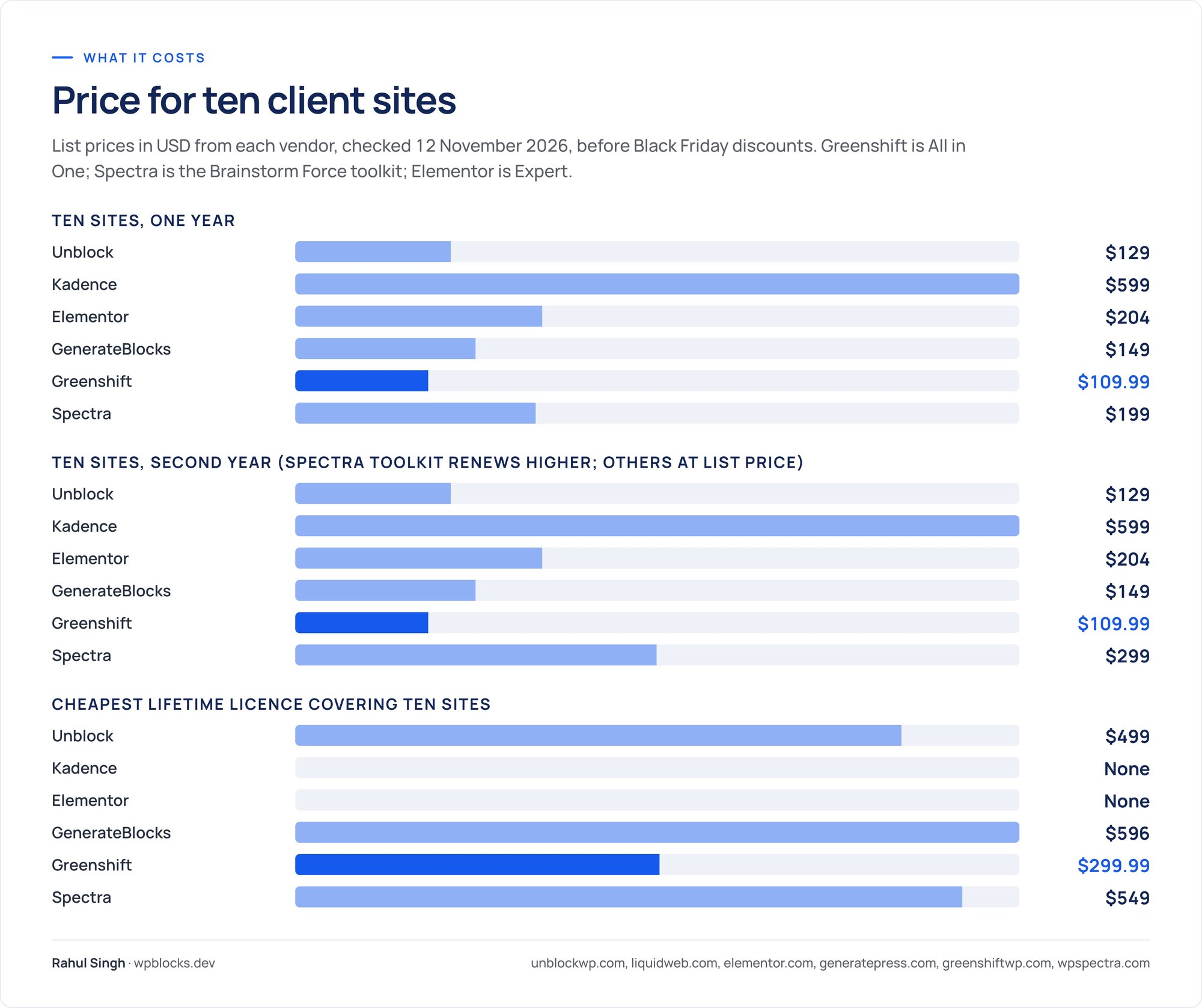
Two notes the table cannot show. Every Unblock plan is 30% off until 1 December 2026 ($48.30, $90.30, $139.30 and $349.30 lifetime), and local and staging sites do not count. Kadence’s bundle also includes Give, The Events Calendar and LearnDash, which you pay for whether you need them or not.
The comparison that should decide it for freelancers
At ten client sites a year, Greenshift is the cheapest at $109.99, then Unblock at $129 and GenerateBlocks at $149. Spectra’s toolkit starts at $199 and renews at $299, Elementor Expert costs $204, and Kadence costs $599, more than four times GenerateBlocks.
For lifetime, Greenshift’s $399.99 unlimited licence and Unblock’s $499 for 1,000 sites are the two best deals in the group. GenerateBlocks’ $596 caps you at 100 sites. Kadence and Elementor have no lifetime option at all. And five of the six let you start free; Unblock does not, so you pay before you can try it beyond the demo.
Which One Should You Pick?
Here is how I would choose, by who you are and who will own the site.
Pick GenerateBlocks if
- You want one builder for most client sites, with visual styling on a real design system.
- You need an accessible navigation and a form builder with stored entries, natively.
- You want a light page (120 KB), a free version, and content that survives without the plugin.
Pick Unblock if
- You write HTML and CSS and want each block to be exactly one element with your classes.
- You build with AI agents over MCP: 352K tokens and 19 minutes, the best of the six.
- You maintain the sites yourself and like $499 once for 1,000 sites.
- You accept that switching the plugin off leaves a blank page.
Pick Kadence if
- Your client will edit the site alone and needs native, familiar components.
- You want the best measured scores out of the box: 84 and 99, accessibility 100.
- Losing the plugin must not take the styled content with it, and the price is fine.
- You are building a WooCommerce store: Shop Kit adds a real product template and swatches with no picker code.
Pick Greenshift if
- Budget and page weight come first: 104 KB shipped and lifetime licences from $109.99.
- You are technical, comfortable with class based CSS, and can live with a busy editor.
- You run a small shop: its WooCommerce add on gave the lightest product page of the six, 248 KB.
- Elementor: your team already works in it, and you want the biggest ecosystem and stored form submissions. Budget for the JavaScript.
- Spectra: you run Astra already and want a free start that follows its palette. Add a form plugin and watch the page weight.
The Ranked Verdict
Scores out of five, defended by the evidence above. Three builders share 4.5; the order within that tie is my call, and I explain it under each card.
1. GenerateBlocks
GenerateBlocks
4.5/5
The best all rounder of the six: native navigation and forms, a real design system, a light page and a graceful exit. Its weak spot is the editor, not the output.
What works
What does not
It ranks first because it never lost badly anywhere. Every other builder has at least one section or metric where it fell far behind.
2. Kadence
Kadence
4.5/5
The safest pick for sites the owner edits: mature components, the best scores and the best exit. Held back by price and an editor that hides your CSS.
What works
What does not
Second, ahead of Greenshift, because it is the one I would hand to a client without worrying. The price is what keeps it off the top.
3. Greenshift
Greenshift
4.5/5
The lightest and cheapest builder in the test, with HTML that survives without it. The editing experience is the roughest of the six.
What works
What does not
4. Unblock
Unblock
4.0/5
The best editing model for developers and the best AI build of the six, held back by its font defaults, no free tier and total lock in.
What works
What does not
Fourth overall, first for its audience. If you are a developer or an agency building with agents, move it to the top of this list.
5. Elementor
Elementor
3.5/5
V4 is a big step forward and reached the same page with the same element count, but it ships far more JavaScript than this page needs.
What works
What does not
6. Spectra
Spectra
3.5/5
A capable free builder with good visual grids, carried by Astra, with heavy output and no form block.
What works
What does not
Elementor ranks above Spectra on a tie because it keeps your words if you leave and has a working form. Spectra does neither.
When Unblock Makes Sense, and When It Does Not
This site is about Unblock, so it deserves a straight answer of its own.
Unblock makes sense for developers and designers who already think in HTML and CSS and want the block editor to stop fighting them. It makes sense for agencies whose first build is done by an AI agent, because the agent writes what it already knows and got it right in two runs. It makes sense for custom designs with their own breakpoints and tokens, for anyone who wants semantic markup and the least code before fonts of the six, and for people who maintain many sites and like a one time price.
Unblock does not make sense for clients who edit alone: the visual panels edit a class, so changing one tile’s padding changes all eight. It does not suit anyone who wants ready made components, since there is no menu, slider, tabs, video background or form validation; GenerateBlocks and Kadence won the header and the form for exactly that reason. It does not suit anyone who needs a free start or a track record, with version 1.0.0 released on 10 November 2026. And it does not suit anyone who cannot accept a blank page if the plugin ever goes.
If you do pick it, upload variable or subset font files instead of relying on the Font Library default, because that one change is most of the gap between Unblock and the top three on performance.
The Conclusion, in Full
I built one demanding homepage six times to the same pixel, and the builders split into two groups. GenerateBlocks, Kadence, Greenshift and Unblock produced pages close to what I would write by hand, each with a clear strength. Elementor and Spectra produced the same picture with far more code underneath: 257 KB of JavaScript in one case, a 536 KB HTML document in the other.
GenerateBlocks is my pick for most people. It won the header, the tiles, the form and the footer, shipped 120 KB, has a free version and a design system that scales from one page to fifty, and leaves something to rescue if you ever switch it off. Its editor has rough edges, and you should rename your blocks, but nothing it does costs your visitors.
Kadence is the one I would hand to a client who edits alone, and the scores back that up: the best Lighthouse results and the only perfect accessibility score in the test, and a styled page with the plugin off. You pay for that peace of mind at four to five times the price of the others. Greenshift is the one I would pick on a tight budget for a technical team: the lightest page and the cheapest lifetime licence, with an editor you have to get used to.
Unblock is the best tool for the person building the site. It is the closest thing to writing HTML and CSS by hand inside WordPress, its visual panels and code editor never disagree, and it gave an AI agent the easiest job of the six by a wide margin. It is also brand new, paid only, heavy on fonts by default and impossible to leave. If you are a developer or an agency building with agents and you keep your clients on a care plan, those trade offs are worth it. If you hand sites over and walk away, they are not.
WooCommerce reshuffles the middle of that list. If the site is a shop, Kadence moves to the top: Shop Kit gives it a real product template and named swatches, and its product page scored best on mobile with almost no layout shift. GenerateBlocks, my pick for brochure sites, has no WooCommerce code at all, and its product page jumps on phones until you add a few lines of CSS. Unblock built the steadiest product page of the six, with the least JavaScript, at the price of building every product part yourself.
My ranking: GenerateBlocks, Kadence, Greenshift, Unblock, Elementor, Spectra. For the pair you are deciding between, read the head to head posts below.
FAQ
What is the best WordPress page builder in 2026?
In my test of six builders on the same homepage, GenerateBlocks was the best all rounder: 120 KB shipped, native navigation and forms, a free version and a graceful exit. Kadence is best for client edited sites, Greenshift for low cost and weight, and Unblock for developers and AI builds.
Which page builder is the fastest?
Greenshift shipped the least code (104 KB against 96 KB for the hand coded original) and had the fastest first paint. Kadence scored the highest Lighthouse results, 84 mobile and 99 desktop. Unblock shipped the least code before fonts, 27 KB, but 363 KB of fonts by default.
Kadence vs GenerateBlocks: which should I choose?
GenerateBlocks if you build many sites and care about weight and price: 120 KB shipped and $149 a year for 10 sites. Kadence if a client edits alone and you want the best scores and a styled page without the plugin, at $599 a year for 10 sites.
Is Unblock better than Kadence, Elementor or GenerateBlocks?
For developers and AI agent builds, yes: the least code before fonts and the fastest AI build of the six. For most other sites, GenerateBlocks and Kadence are safer, with native navigation and forms, free versions and content that survives without the plugin.
Is Unblock code only?
No. Its inspector has visual Layout, Sizing, Spacing, Borders, Typography, Background and Effects panels, and they edit the same global CSS rule the docked code editor shows. It is CSS first, with visual controls on top.
What happens if I deactivate my page builder?
In my test Kadence kept 91% of the text, still styled. Elementor and Greenshift kept 99.6% unstyled, GenerateBlocks 65%, Spectra 11%, and Unblock left a blank page.
Which page builder has a lifetime deal?
Unblock ($499 for 1,000 sites), GenerateBlocks through GeneratePress One ($596 for 100 sites), every Greenshift pack ($109.99 to $399.99 for All in One) and Spectra and Astra ($319 to $799). Kadence and Elementor have no lifetime plan.
Which page builder is cheapest for agencies?
At ten sites a year Greenshift costs $109.99, Unblock $129, GenerateBlocks $149, Spectra $199 renewing at $299, Elementor $204 and Kadence $599. For 100 sites Greenshift, Unblock and GenerateBlocks all cost $199 or less.
Which builder is best for building with AI?
Unblock. An AI agent rebuilt the homepage with 352K tokens, 2 check runs and 19 minutes, against 408K and 20 minutes for Greenshift and up to 518K and 35 minutes for Spectra. Unblock also has an MCP Bridge for Claude, ChatGPT and Cursor.
Does Spectra Blocks have a form block?
Not in version 1.0.15. I built the quote form as raw HTML that nothing receives without a form plugin. Kadence, Elementor Pro, GenerateBlocks Pro, Greenshift and Unblock all handle form submissions natively.
Which builders output semantic HTML?
Unblock, GenerateBlocks, Greenshift and Spectra all produced real dl, ul and figure elements in my build. Kadence nests rows of text blocks, and Elementor V4’s atomic containers offer no list, description list or figure tags.
Which page builder is best for WooCommerce?
In my test Kadence, with its Shop Kit add on: a designed product template, named swatches with no picker code, the best mobile Lighthouse score of the six (81) and a CLS of 0.03. Greenshift with its WooCommerce add on came second with the lightest product page, 248 KB.
Can Unblock build a WooCommerce product page?
Yes. I built a full variable product page with size buttons, colour swatches and AJAX add to cart, and it passed the cart test. Unblock cannot place WooCommerce blocks, so you build the product parts from elements and Twig, with 6.6 KB of your own JavaScript for the variation picker.
Why does my WooCommerce product page jump on mobile?
Usually because WooCommerce’s gallery slider lays all slides out at full size before it starts. On phones the summary sits under the gallery and jumps with it: CLS 0.47 to 0.49 in three of my builds. Reserving the gallery’s space with CSS fixes it.
Related Posts
- Unblock vs Kadence Blocks: the safer all rounder against the developer’s tool
- Unblock vs Elementor: 8 KB against 257 KB of JavaScript
- Unblock vs GenerateBlocks: the closest match in philosophy
- Unblock vs Greenshift: two class based builders, very different exits
- Unblock vs Spectra: an Astra stack against a single plugin