Disclosure: I earn a commission if you buy Unblock through my link on this page, at no extra cost to you. Greenshift is linked plainly. Both builders were tested on the same terms, with the same homepage.
If you want the lighter page, the free version and a site that still shows its content when the builder is switched off, pick Greenshift. If you build with HTML, CSS and AI agents and want every element, rule and script in one place you can read, Unblock is the nicer tool to work in, but you pay for that with a hard plugin dependency and a heavier font setup out of the box.
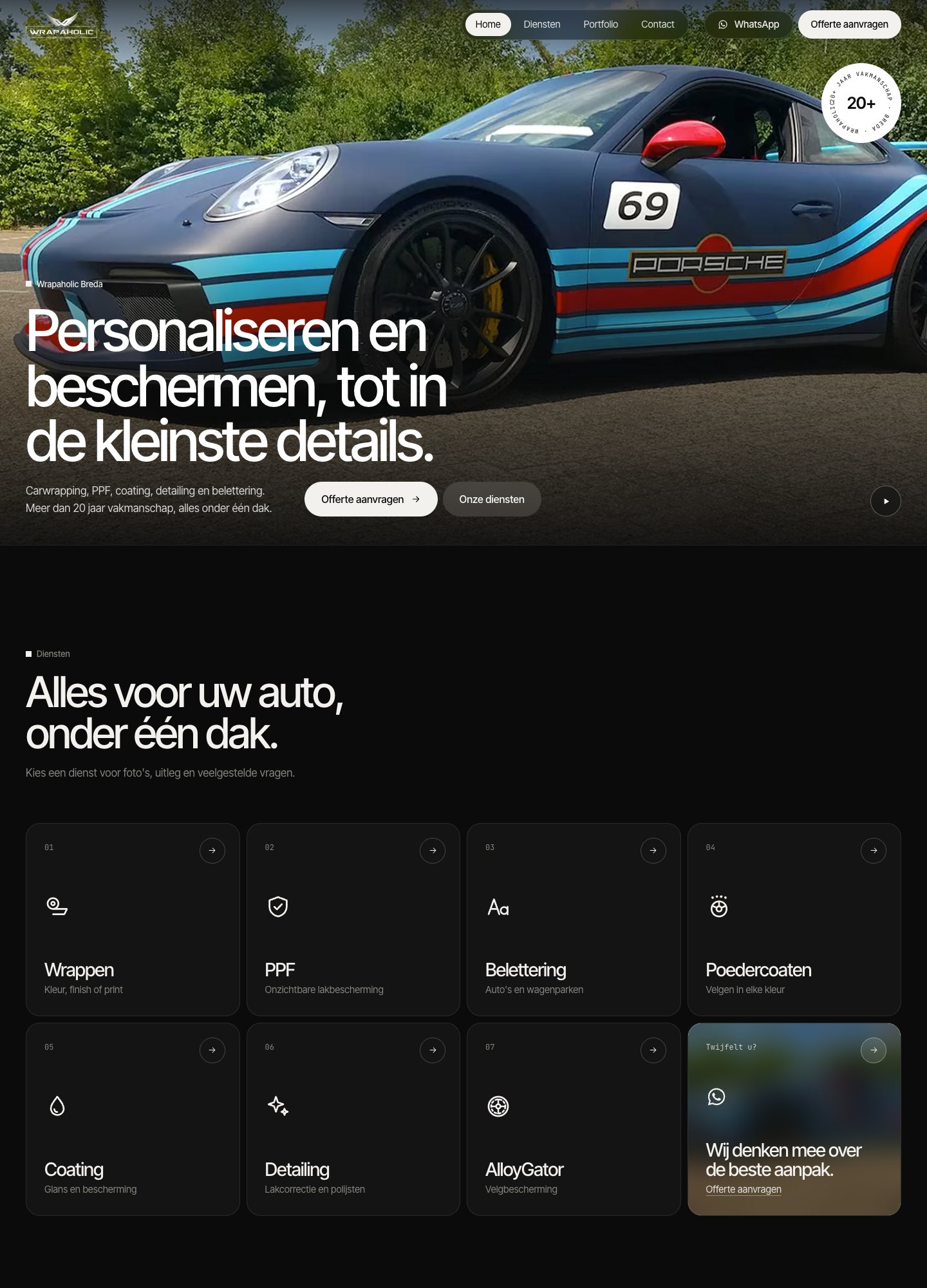
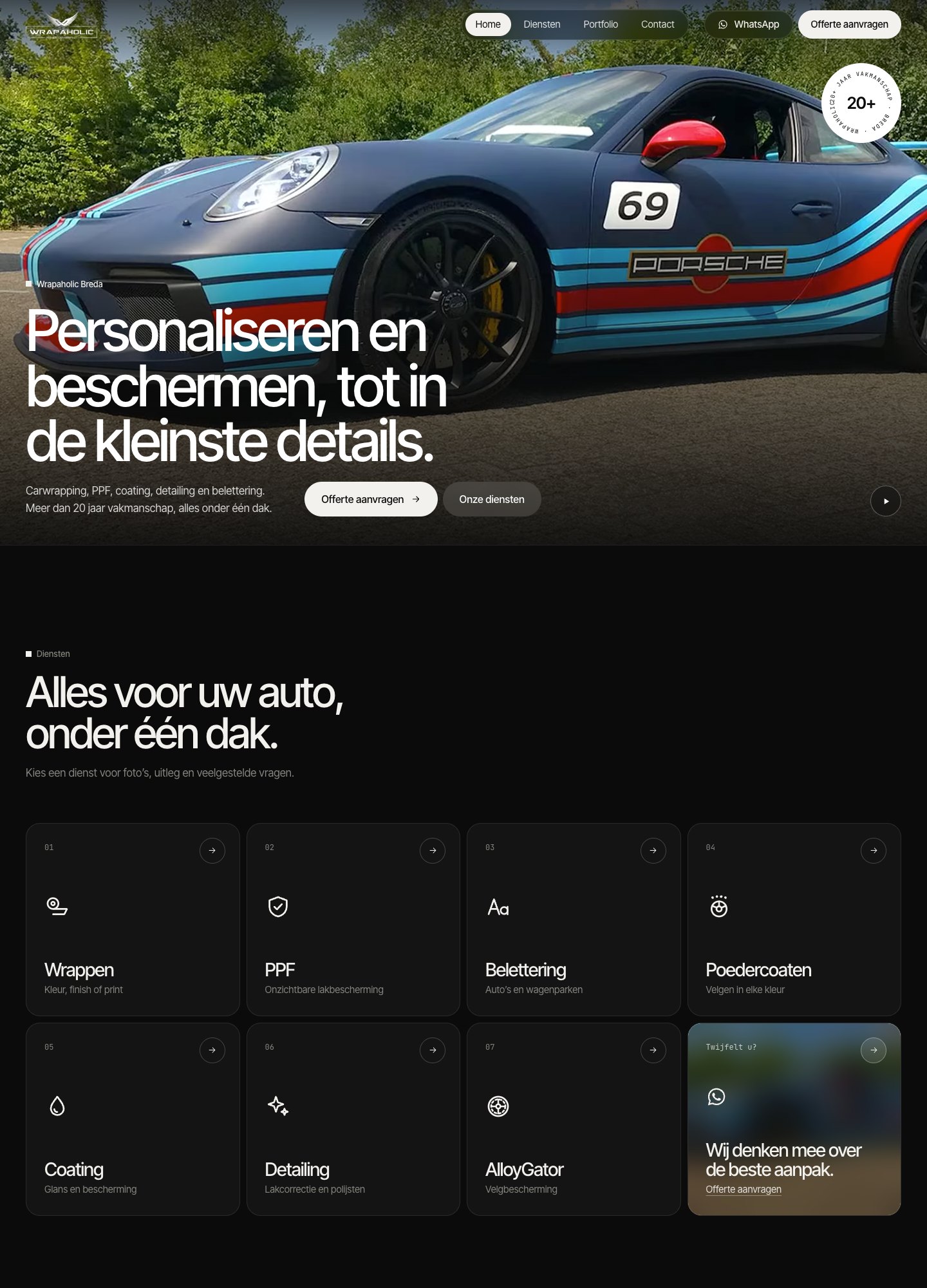
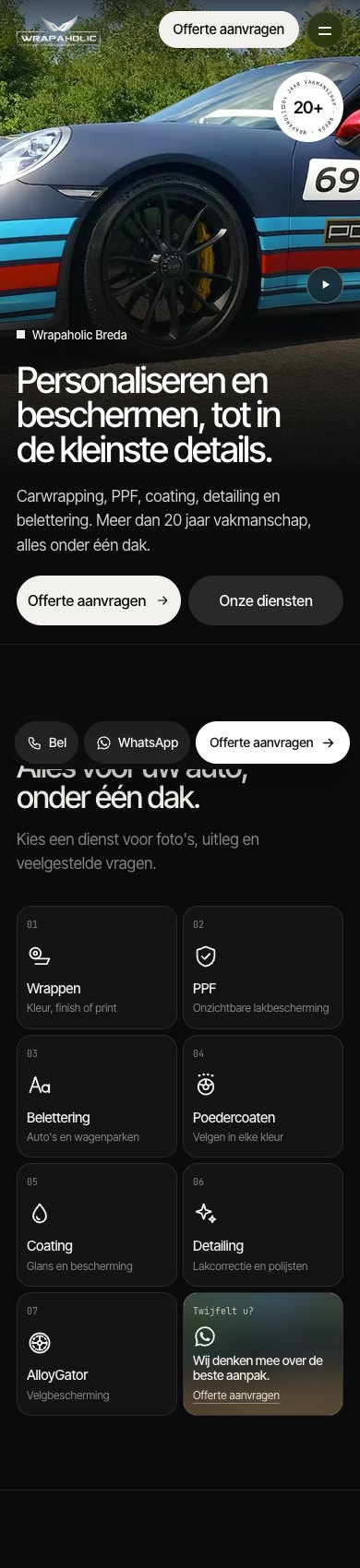
I built the same homepage on both in November 2026: a real Dutch client site for Wrapaholic Breda, a car wrapping studio, rebuilt pixel perfect (under 0.1% pixel difference at 1440, 768 and 390px) on identical local WordPress 7.1.4 installs with PHP 8.5. Unblock 1.0.0 ran on the Unblock Theme 1.0.0. Greenshift 13.2.3 ran with its Animation and Query add ons on the Greenshift block theme 2.6.6, built with Element blocks and classes through Greenshift’s own bundled build guide and HTML converter. These two are the closest pair in my six builder test: both style through classes, both produce markup close to hand written HTML. The differences sit in the styling model, the editor, the output and what happens when you leave.
Quick verdict
- Pick Unblock if you write HTML and CSS yourself or with an AI agent, want one site wide CSS manager with 120 tokens, per block JS/HTML/CSS editors and a List View with real names, and you are fine with a paid plugin your pages cannot live without. On a shop, expect to write the variation picker and cart script yourself.
- Pick Greenshift if you want a free plugin to start with, cheaper licences (including lifetime), the lightest output in my test after the hand coded original, and HTML that stays on the page if the plugin ever goes. It is also my pick for a WooCommerce store: its Woo add on gives you product blocks and swatches on WooCommerce’s own form.
- Either is fine if you want class based styling, semantic tags (real dl, figure, fieldset, nav) and near hand coded DOM size. Both landed within 30 nodes of the original.
Greenshift vs Unblock at a glance
| Unblock | Greenshift | |
|---|---|---|
| Owner | Themeone (Loïc Blascos, maker of WP Grid Builder), France | Wpsoul, distributed team |
| Free version | No, and no trial (live demo only) | Yes, on WordPress.org |
| WordPress.org rating / installs | Not on WordPress.org | 96/100 from 107 ratings, 70,000+ installs |
| Version tested | 1.0.0 (released 10 Nov 2026) | 13.2.3 (4 Nov 2026), on the market since 2022 |
| Minimum WordPress / PHP | 6.7 / 8.1 | 6.9 / 7.3 |
| Cheapest paid plan | $69/yr, 1 site | $39.99/yr Design Pack, 1 site; All in One from $59.99/yr |
| Lifetime option | $499, 1,000 sites | Every pack; All in One $109.99 (1 site) to $399.99 (unlimited) |
| Sites on top yearly plan | 100 (Agency, $199) | Unlimited (All in One, $129.99) |
| Editor | Block editor plus CSS manager modal and docked JS/HTML/CSS panels | Block editor with Element blocks, Style Manager blocks and a settings sidebar |
| Styling model | Global selectors, variables and at rules; visual panels write the same CSS | Local classes per Style Manager block, 7 global classes, raw CSS per class |
| Header / footer method | Block theme template parts (Unblock Theme) | Block theme template parts (Greenshift theme) |
| Form | Native: data-unbk-form posts to its REST endpoint, honeypot and timestamp | Native Contact Form preset: admin-post action and nonce |
| Code shipped (HTML+CSS+JS+fonts) | 390 KB (27 KB without fonts) | 104 KB (28 KB without fonts) |
| JavaScript I wrote | 5.9 KB in 6 block scripts | 6.6 KB in 3 Style Manager blocks |
| DOM nodes | 477 | 465 |
| Lighthouse mobile / desktop | 70 / 96 | 76 / 97 |
| WooCommerce product page code | 467 KB (363 KB fonts), 59 KB JS, 27 requests | 248 KB, 119 KB JS, 45 requests |
| WooCommerce mobile Lighthouse / CLS | 76 / 0 | 80 / 0.08 |
| Builder switched off | Blank page, 0% of text left | 99.6% of text left, unstyled |
| AI build effort (same brief) | 352K tokens, 2 check runs, 19 min | 408K tokens, 3 check runs, 20 min |
| Best for | Developers and AI agent workflows that want one readable CSS system | Builders who want low cost, low weight and low lock in |
How each one thinks
On paper the two look like twins. Both reduce everything to one generic block that can be any HTML tag, and both style it through classes instead of per block settings. In use, they put the styling in very different places, and that decides how each one feels after a few hours.
Unblock is one block, one HTML element. You pick the tag (section, a, dl, video, form) and set any attribute in the Attributes panel. Styling lives in a global CSS manager: selectors grouped in collections (I ended up with 156 selectors in 11 collections, from Base and Buttons to Hero and Footer), 120 variables and 11 at rules. Selecting a block shows its class chips; clicking a chip loads that rule into a CSS editor docked under the canvas, next to an HTML editor and a JavaScript editor for the same block. The inspector also has visual Layout, Sizing, Spacing, Borders, Typography, Background and Effects panels, and they edit the very same rule the CSS editor shows, so you can switch between clicking and typing without creating a second source of truth. Text can also carry Twig expressions.
Greenshift also builds the page from one block type, the Element block, with a tag picker (DIV, NAV, A, IMG, BUTTON and so on). The CSS, though, is stored in Style Manager blocks: one per page and one per template part. In my build the page Style Manager held 47 local classes, the header 16 and the footer 7, plus 7 global classes shared across all three. Each class has visual style groups (a dot marks a group with values) and a raw Custom CSS field for hover, pseudo elements and media queries. Custom JS sits on the same Style Manager block. The vendor workflow is to write clean HTML and CSS and run Greenshift’s bundled converter, which is exactly how I built it.
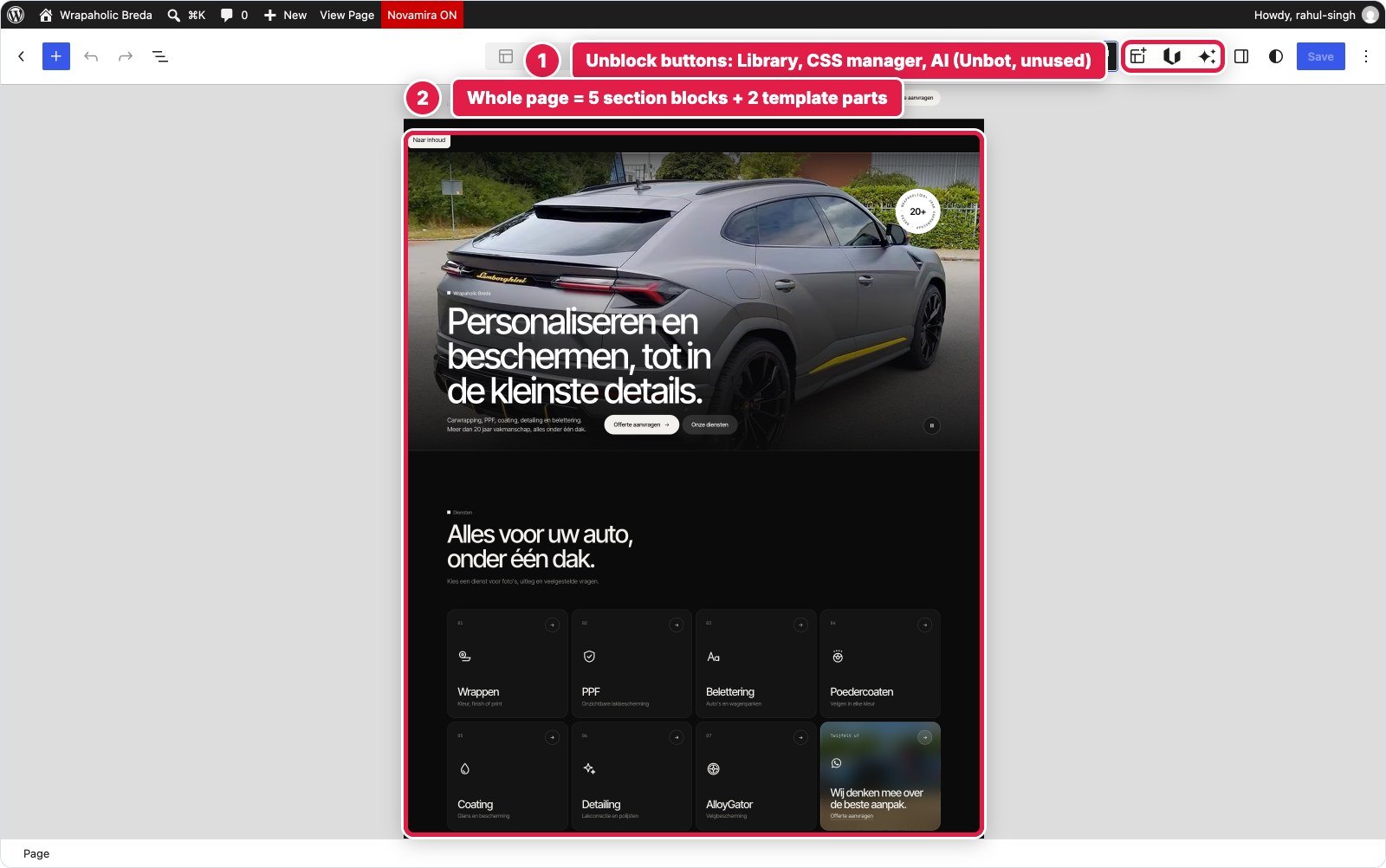
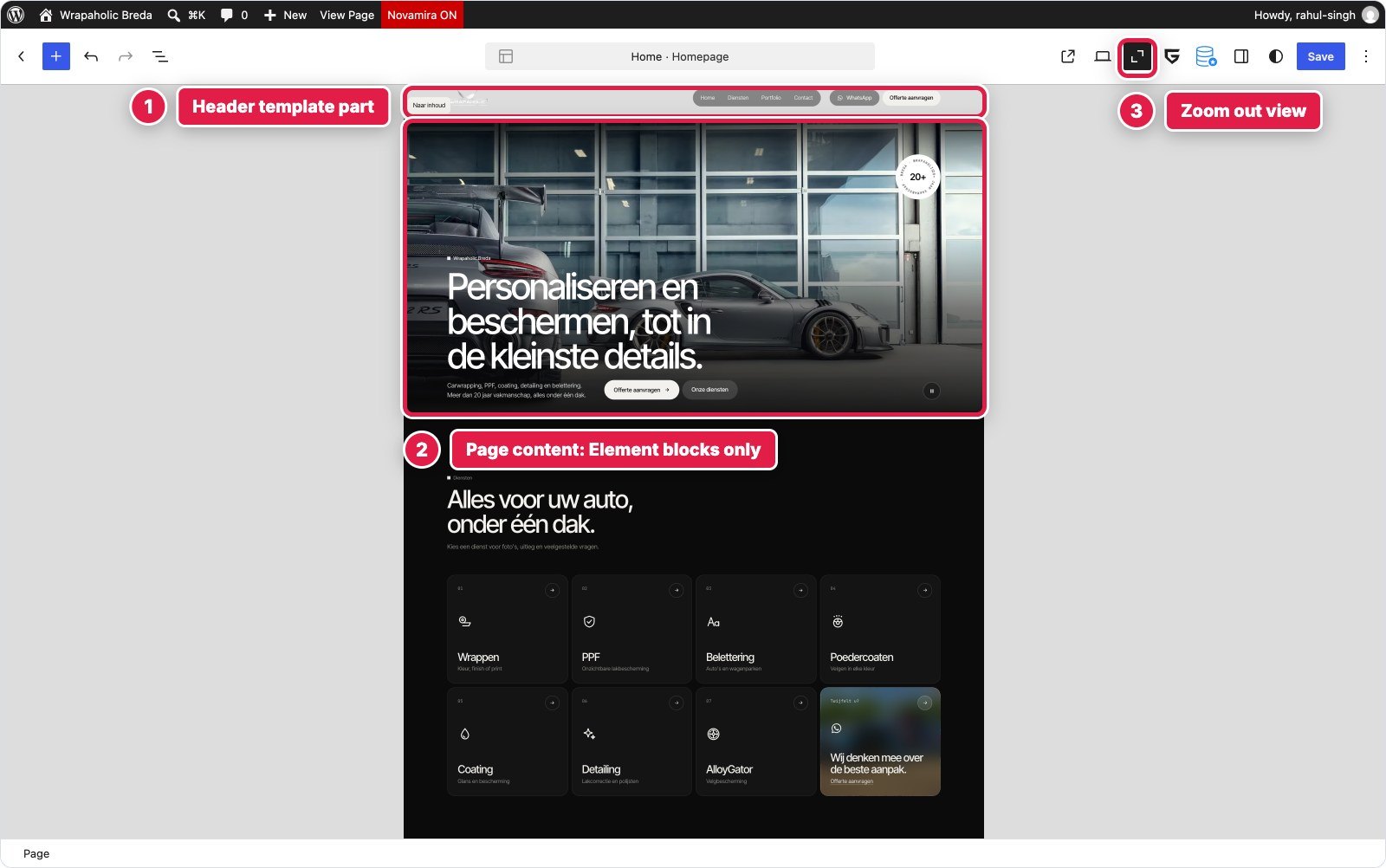
The practical result: in Unblock you edit a component and its CSS in the same spot. In Greenshift you select an element, see its class chips, and then go to the Style Manager block at the top of the List View to change how that class looks. Neither is wrong. Unblock’s model is closer to how a developer thinks about a stylesheet; Greenshift’s keeps the CSS physically inside the content it styles, which is also why its HTML survives without the plugin (more on that in the lock in section).
Header and full screen mobile menu
The header needed a logo, four links, WhatsApp and quote pills, a burger, a bar that turns solid after 12px and hides on scroll down, and a full screen mobile menu with a clip path reveal, Esc to close and scroll lock.
Unblock: the header lives in the Unblock Theme’s header template part, edited in the Site Editor. It is one “Site header” element of 57 blocks, 6 levels deep: an inline SVG sprite with 16 icons, the skip link, the header bar and a “Mobile menu” element that is the overlay. There is no header or menu widget; every node is a generic element whose tag and attributes I set. Styling is 23 selectors in the Header collection (5.2 KB), and the scroll and menu behaviour is a 1,355 byte script attached to the Site header block itself, visible in the JS dock whenever that block is selected.
Greenshift: also a template part, also built only from Element blocks: 55 blocks, 5 levels deep, including the menu element, which alone is 35 blocks. The 16 local classes (5.4 KB) sit in the part’s own Style Manager block, rendered with CSSRender so they print even though a template part is not post content. Greenshift’s mobile_panel component could not reproduce the clip path reveal with the burger built into the header, so the behaviour is 1.7 KB of Custom JS on that Style Manager block, stored in the gspb_block_js option.
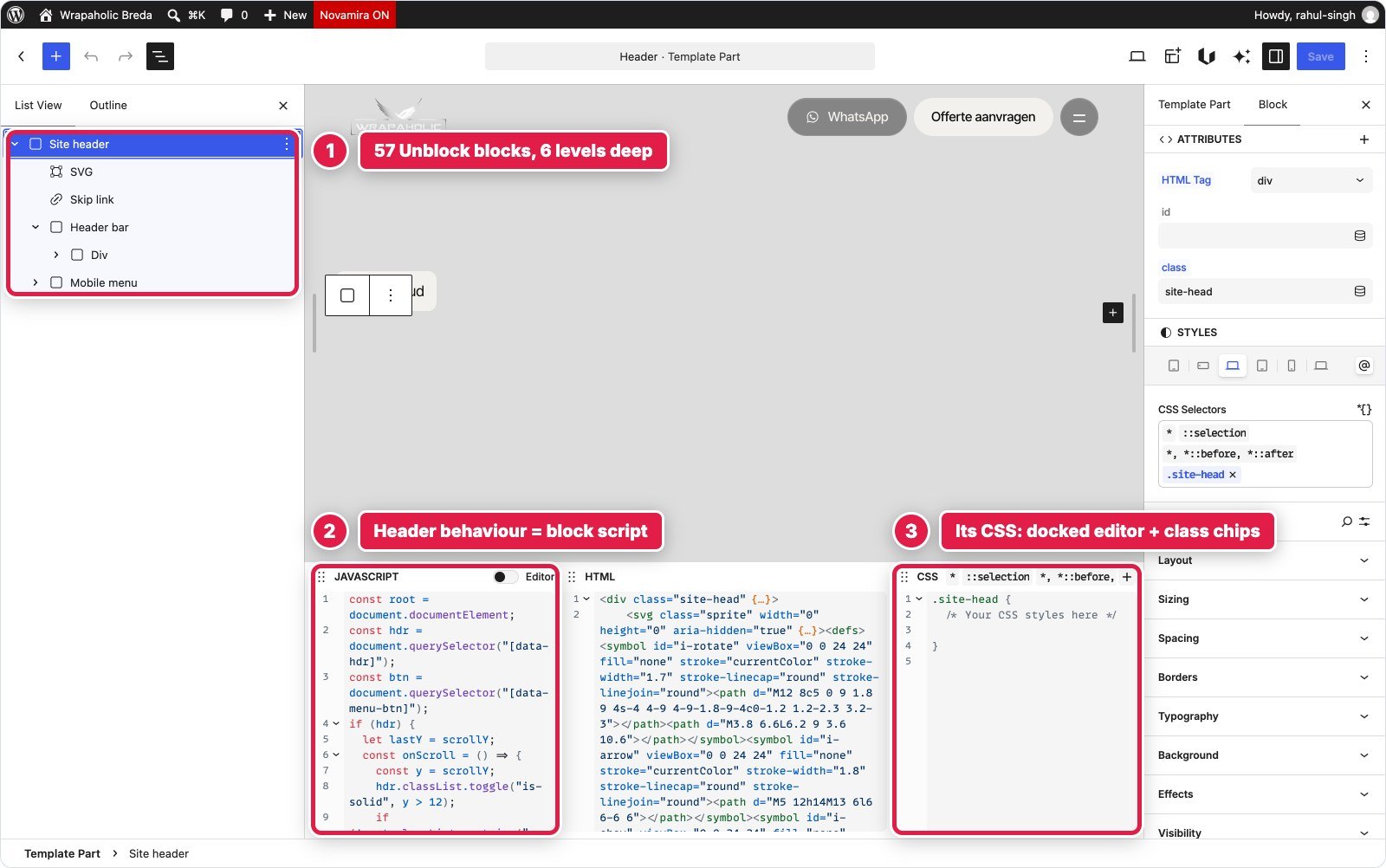

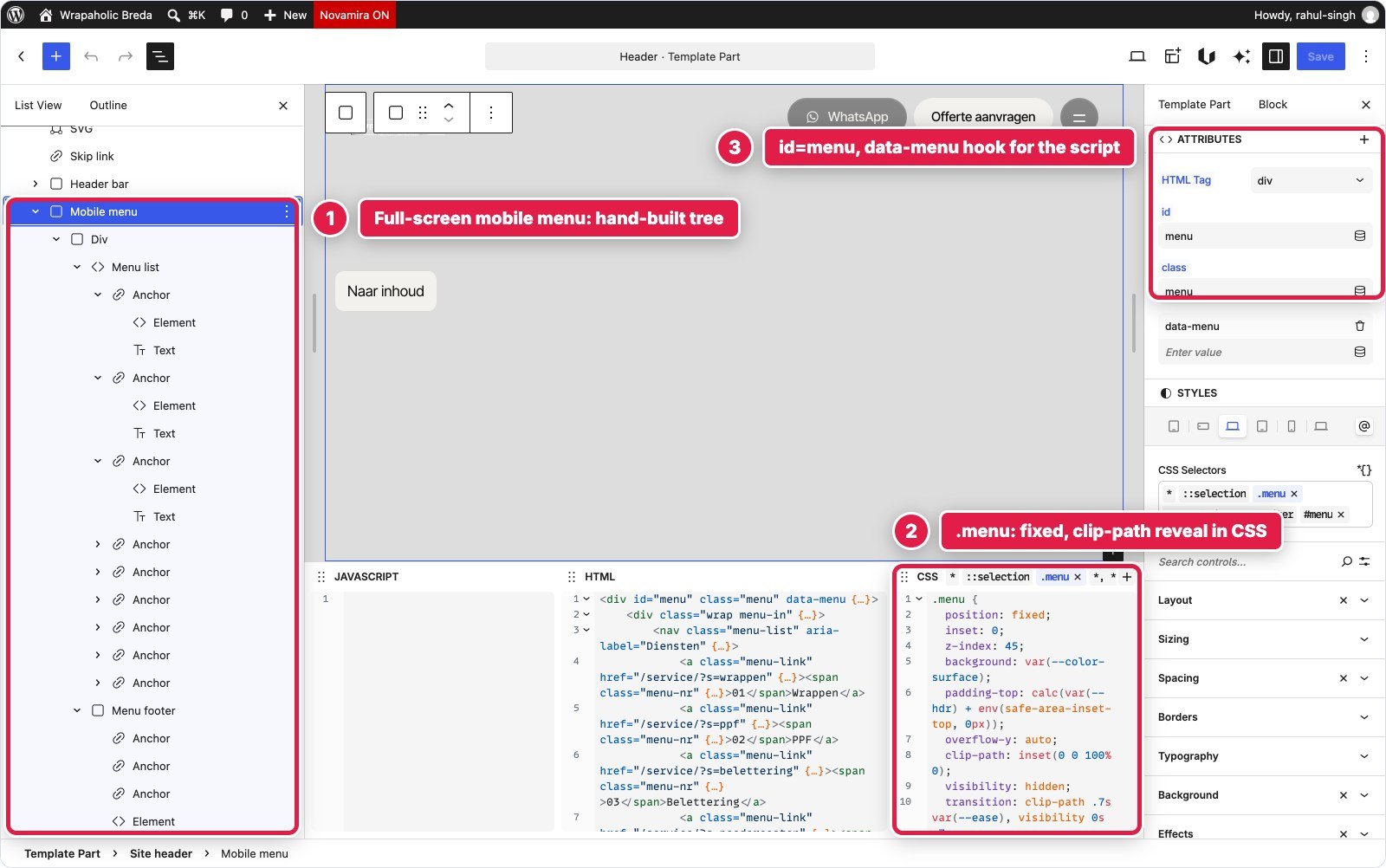

| Unblock | Greenshift | |
|---|---|---|
| Blocks / depth | 57 / 6 | 55 / 5 |
| CSS | 5,205 bytes | 5,358 bytes |
| JS | 1,355 bytes on the header block | 1,664 bytes on the Style Manager block |
| Friction | Template part wraps it in an unclassable <header>; WordPress adds its own skip link | Converter put sub selector @media rules in the wrong order, dropped html.menu-open selectors and lazy loaded the logo; all patched |
Winner for this section: Unblock. Both needed the same amount of JavaScript, but in Unblock the script, the markup and the CSS of the header show up together when you select it. In Greenshift the List View says “DIV element” and “Link element (A tag)” forty times, and the behaviour lives one block away.
Video hero with the rotating badge
The hero is a full height section with a muted looping video (webm and mp4), a poster, a circular rotating text badge, the H1, two pill buttons and a pause/play toggle that also respects reduced motion and pauses off screen.
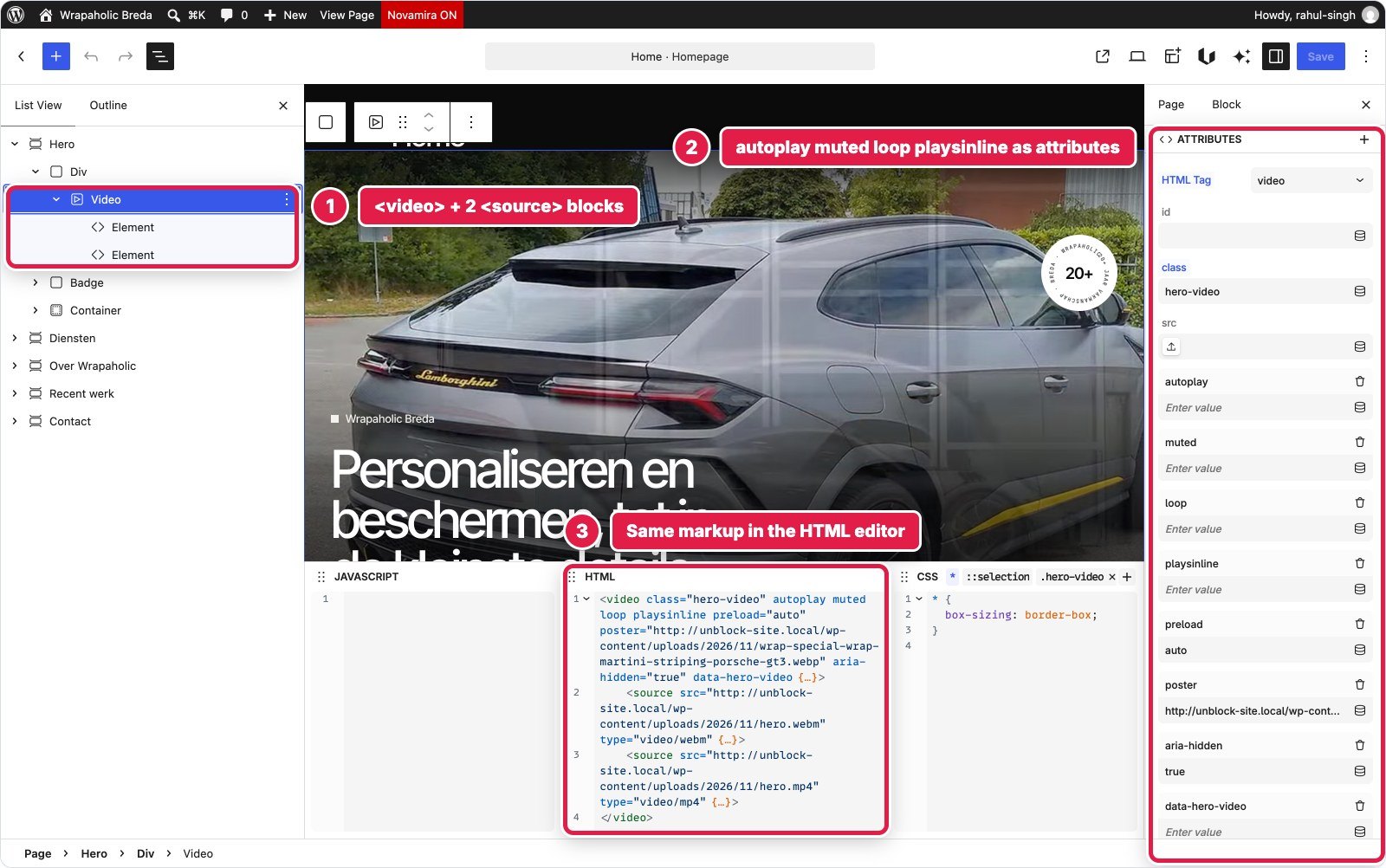
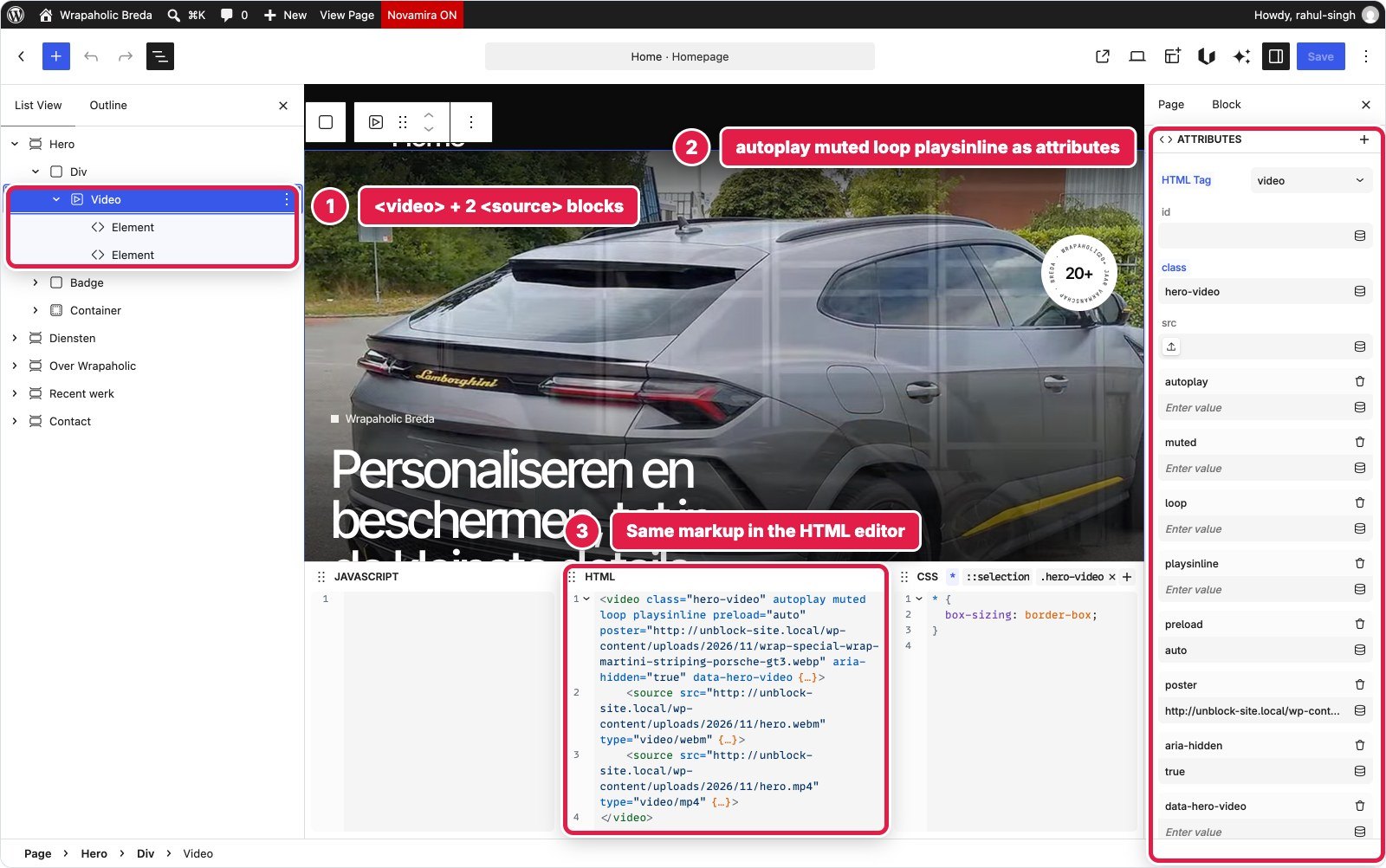
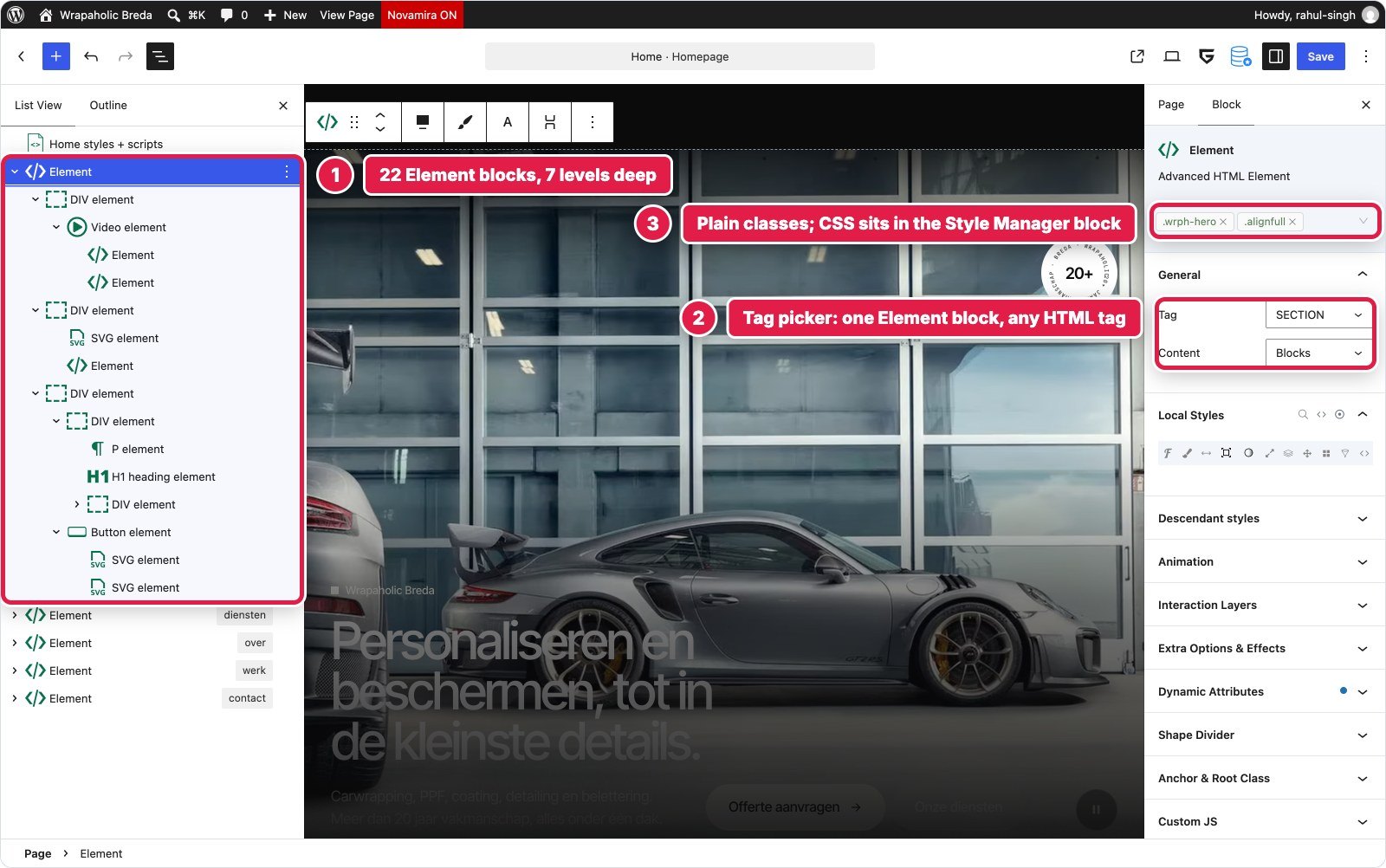
Unblock: one section element, 22 blocks, 7 levels. The video is ordinary HTML: a <video> element with autoplay, muted, loop, playsinline, preload and poster typed as attributes in the Attributes panel, and two <source> child elements. You can read it all at once in the HTML editor. The badge is an inline SVG textPath spun by a CSS keyframe. The toggle is a 756 byte block script on the Hero section.
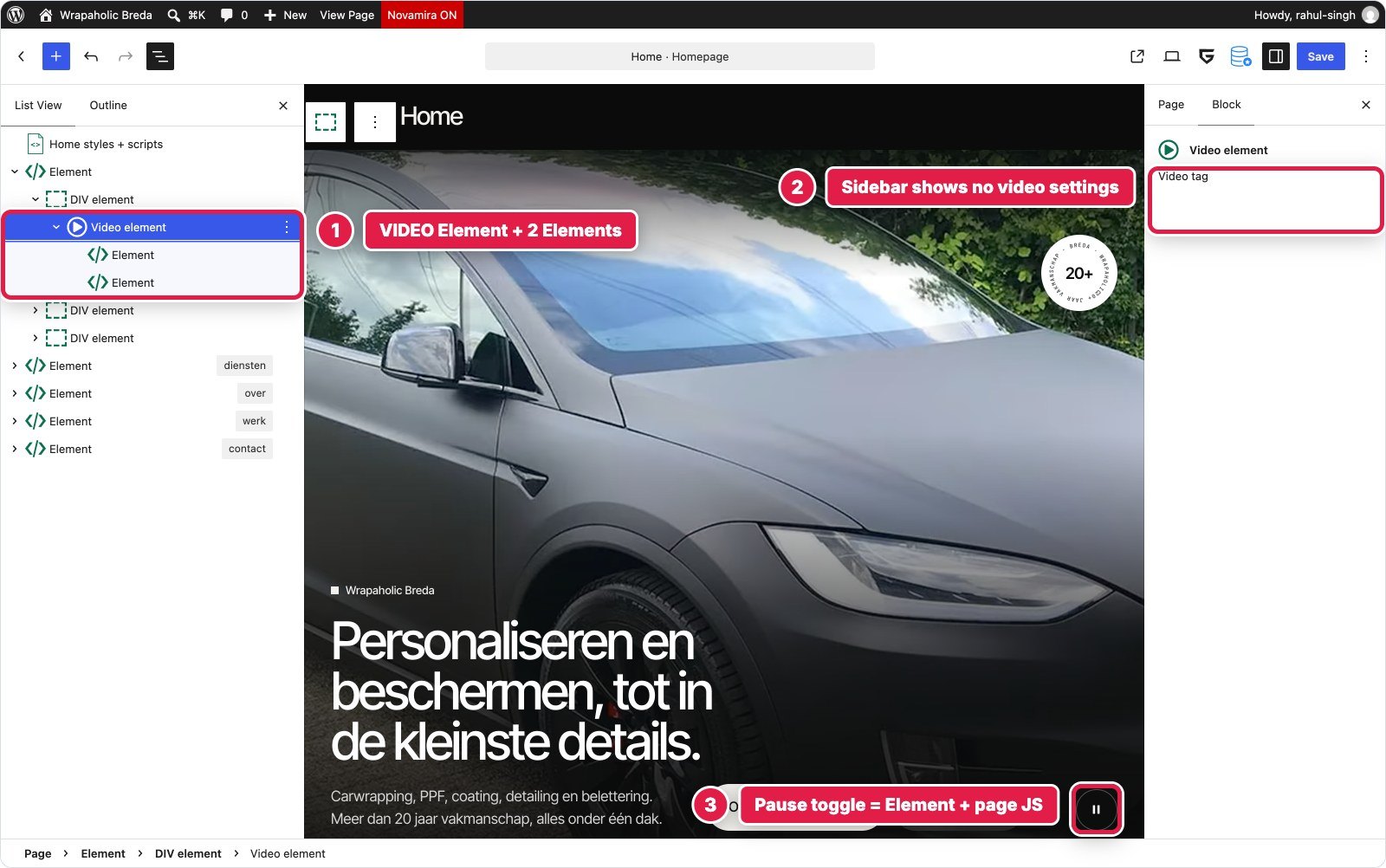
Greenshift: also 22 Element blocks and 7 levels, with a Video Element that takes autoplay, muted, loop, playsinline and poster as block attributes. It accepts a single src, so the two sources are child Elements rendered as <source>, and the vendor converter lost their src and type until I patched it. The real annoyance is in the editor: selecting the Video element shows a sidebar with nothing in it but “Video tag”, so the only way to check those options is code view. The toggle is 778 bytes of page Custom JS.
| Unblock | Greenshift | |
|---|---|---|
| Blocks / depth | 22 / 7 | 22 / 7 |
| CSS | 2,136 bytes | 3,321 bytes |
| JS | 756 bytes | 778 bytes |
| Video settings in the editor | Visible as attributes and HTML | Not shown in the sidebar |
Winner for this section: Unblock. Same structure, same script size, but in Unblock you can see and edit every video attribute where you would expect it.
Service tiles
Eight link tiles in a grid, each with an image, a mono number, an SVG icon, a title, a subtitle and an arrow badge, with a hover zoom and a dark overlay that only applies on devices that can hover.
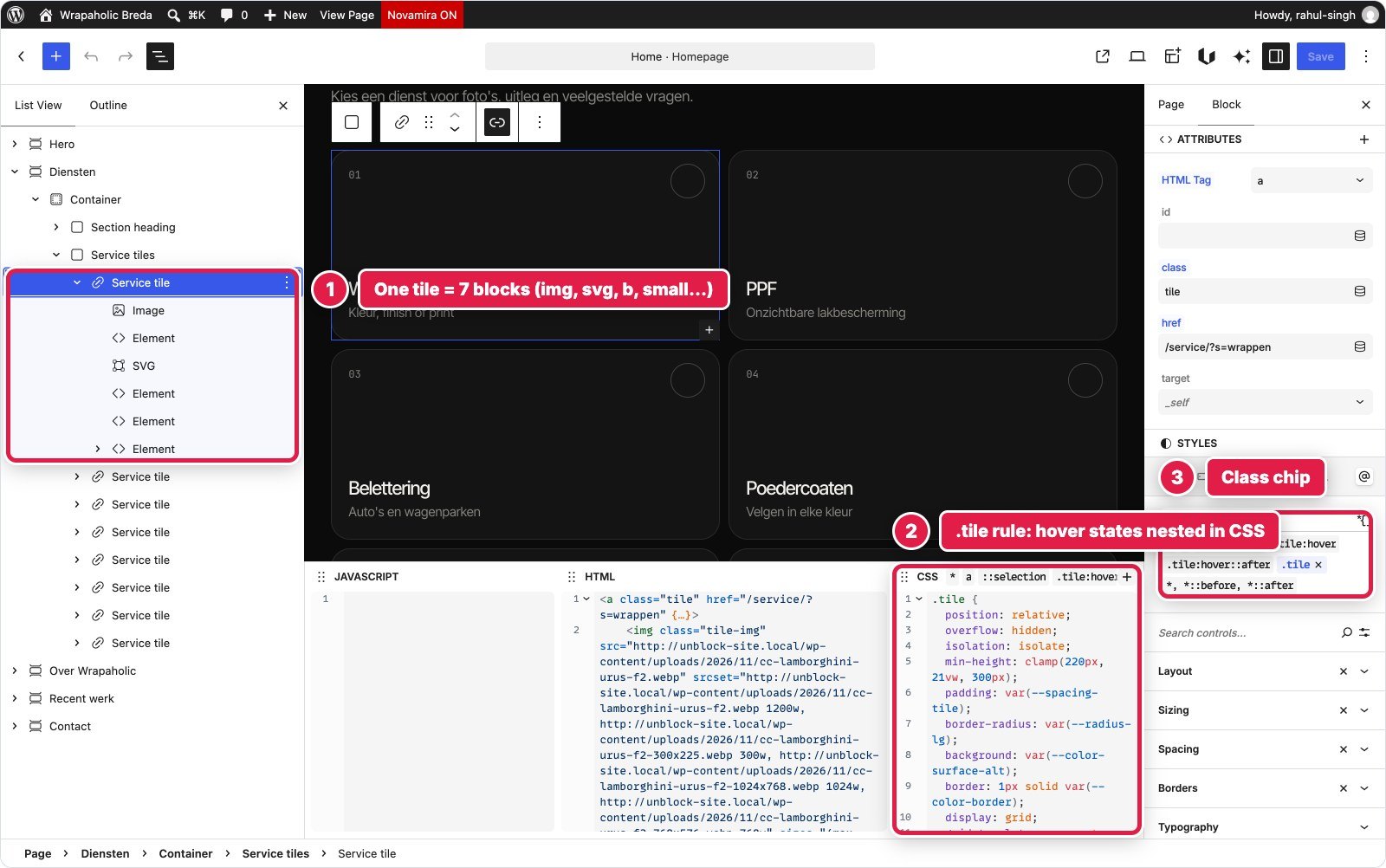
Unblock: a section of 71 blocks, 6 levels. Each tile is an <a> of 7 to 8 blocks. The grid, the hover zoom and the overlays are 13 selectors (3.7 KB) in the Services collection, with the hover states nested inside the .tile rule and every colour and radius reading a token. No JavaScript. Two small catches: WordPress curled the apostrophe in “foto’s” and the only clean fix was a Twig expression, and because Unblock prints each selector’s media variants right after the selector, a few descendant specificity tricks from the original CSS had to become explicit modifier classes.
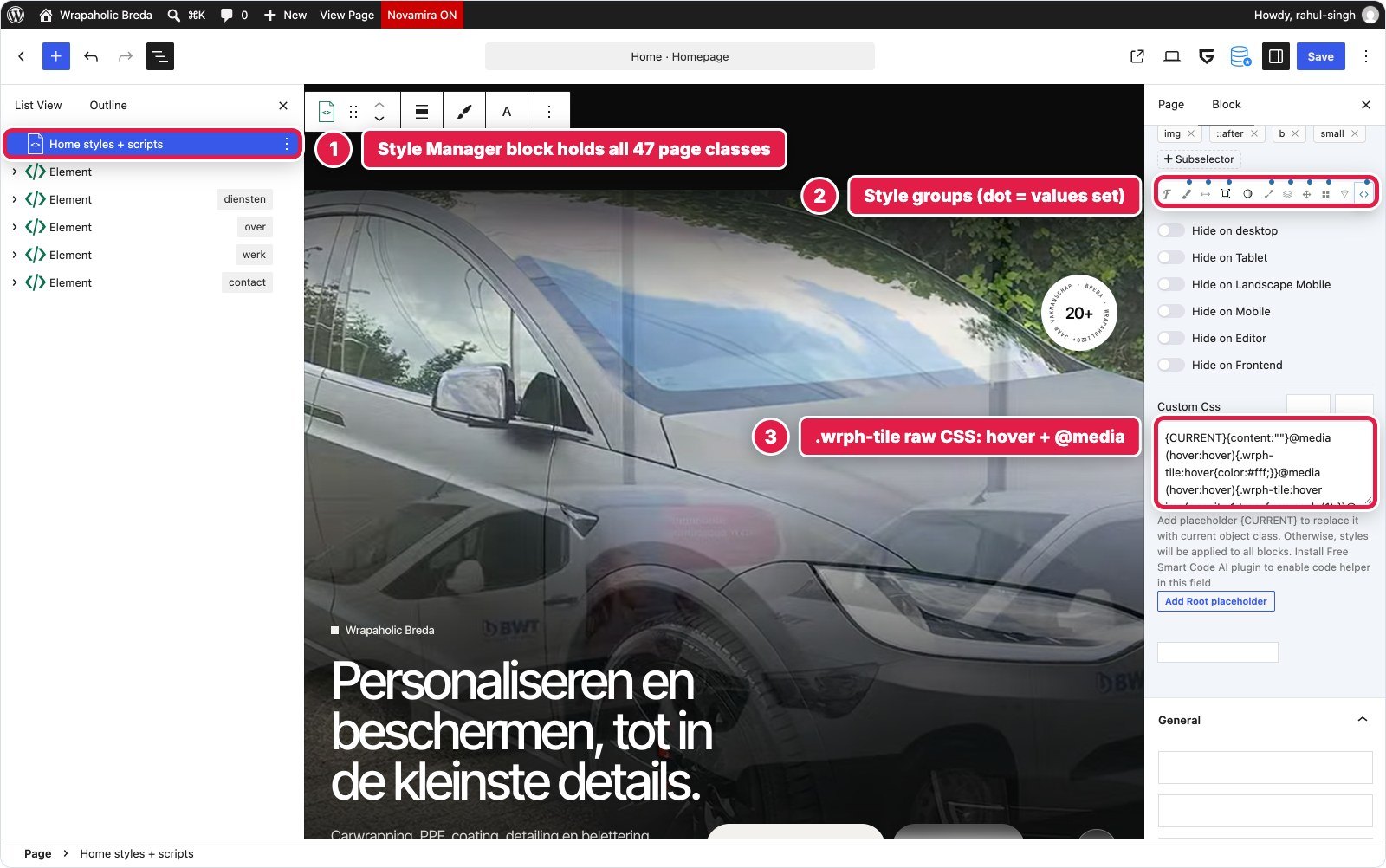
Greenshift: exactly 71 blocks and 6 levels too. The tile styling is local classes (.wrph-tiles, .wrph-tile and its img, ::after, b and small sub selectors) in the page Style Manager, 4.9 KB. Plain properties sit in the visual style groups, while the hover and @media(hover:hover) parts sit in each class’s raw Custom CSS field with a {CURRENT} placeholder. No JavaScript. Every text run and icon being its own Element block is what makes 8 cards cost 71 blocks, and the same is true in Unblock.
| Unblock | Greenshift | |
|---|---|---|
| Blocks / depth | 71 / 6 | 71 / 6 |
| CSS | 3,744 bytes | 4,907 bytes |
| JS | None | None |
| Where hover rules live | Nested in the .tile rule | Raw Custom CSS field of the class |
Winner for this section: Unblock, narrowly. Identical block count, but Unblock’s single rule with nested states is easier to read than visual groups plus a raw field per class.
About, stats and pillars
A two column block with eyebrow, H2, lead and three stats, a photo with a caption overlay, and four numbered pillars.
Unblock: 33 blocks, 6 levels. The stats are a real dl with three dt/dd pairs, the photo is a <figure> with a figcaption, the pillars a ul. 12 selectors (2.0 KB) in the About collection, including the image aspect ratio and the caption; the section itself only uses the shared .sec padding rule.
Greenshift: 33 Element blocks, 6 levels, and the same semantics: DL/DT/DD, FIGURE/IMG/FIGCAPTION, UL/LI. Seven local classes (2.6 KB) with the pillar numbering, caption overlay and stat dividers in raw class CSS through pseudo elements and :nth-child rules. The only friction was the converter dropping alt=”” on decorative images until I patched it.

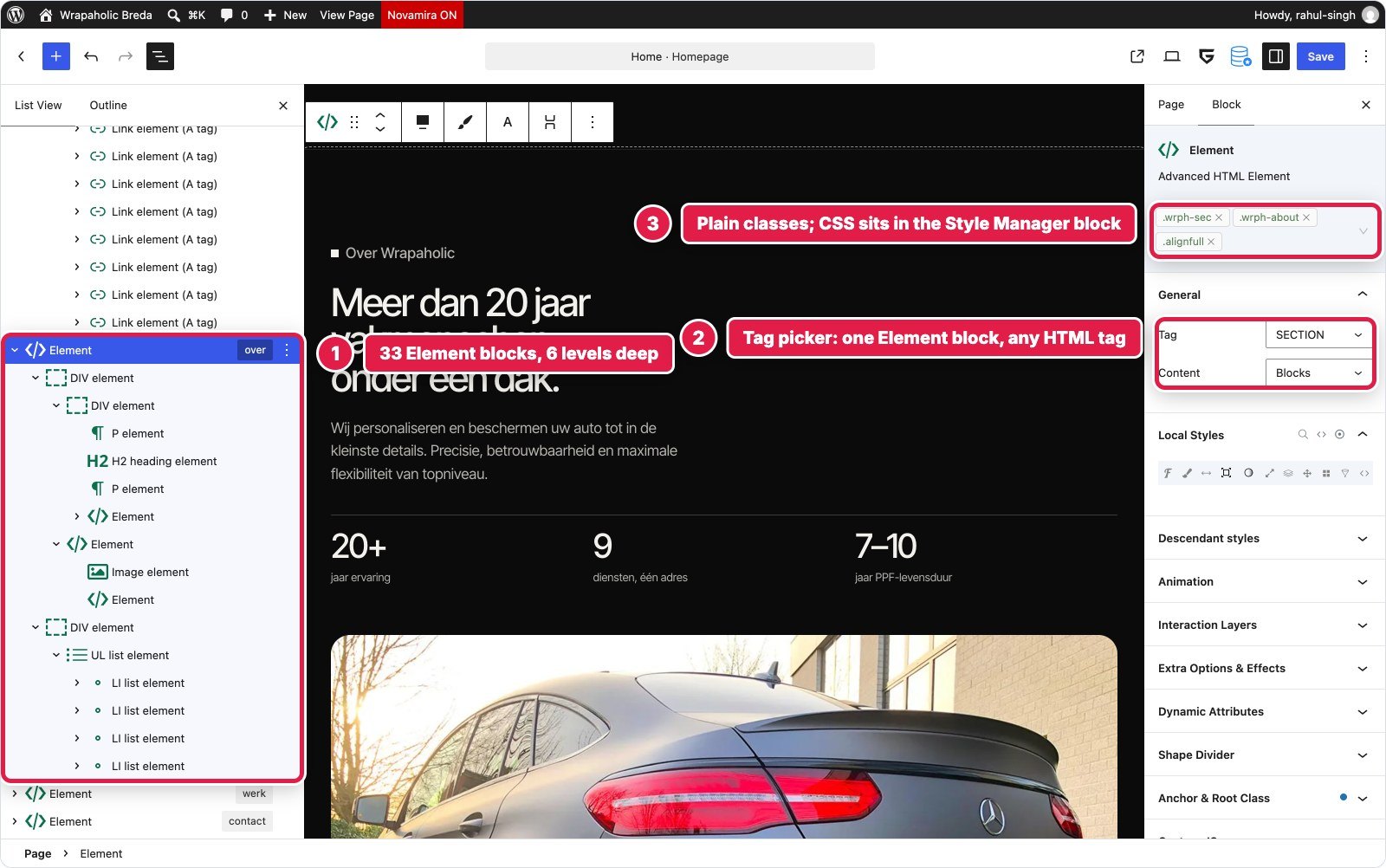
Winner for this section: tie. Same blocks, same depth, same semantic HTML. This is where both builders show what they are good at.
Draggable project strip
A row of six project cards and a portfolio card that scrolls sideways with scroll snap, plus round prev/next buttons that move by exactly one card and mouse drag on desktop.
Unblock: 41 blocks, 6 levels. The strip is a flex row with overflow-x and scroll snap in the .strip rule, and a 1,048 byte block script on the section moves it by one card width and adds drag. Unblock has no slider or carousel block, so there was no other route.
Greenshift: 44 blocks, 6 levels. Greenshift does ship a Swiper based slider, but it cannot do native scroll with snap and a one card step exactly, so I used its own playbook pattern, a plain Element with overflow-x and scroll-snap-type in a local class, plus 1.2 KB of page Custom JS.
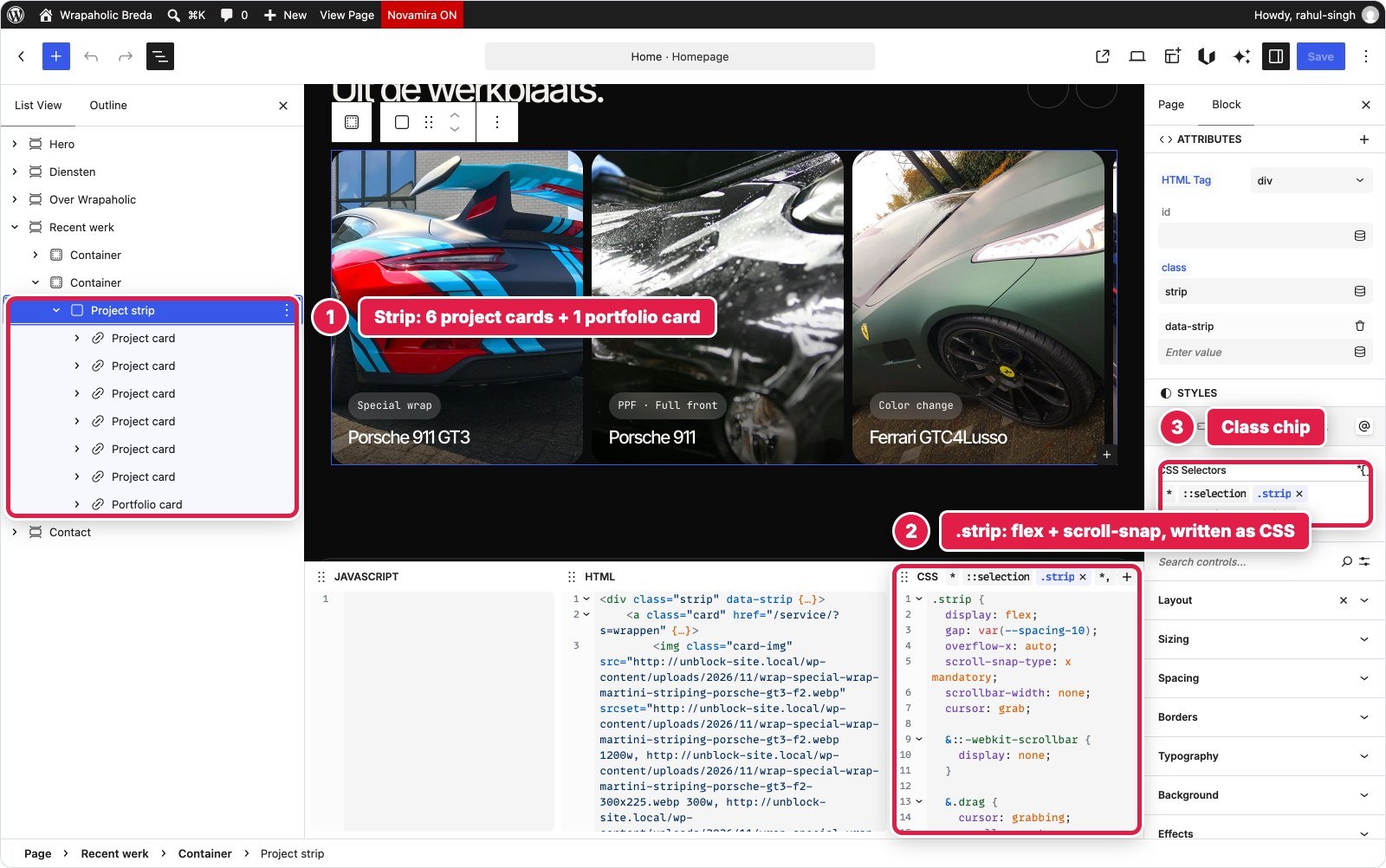
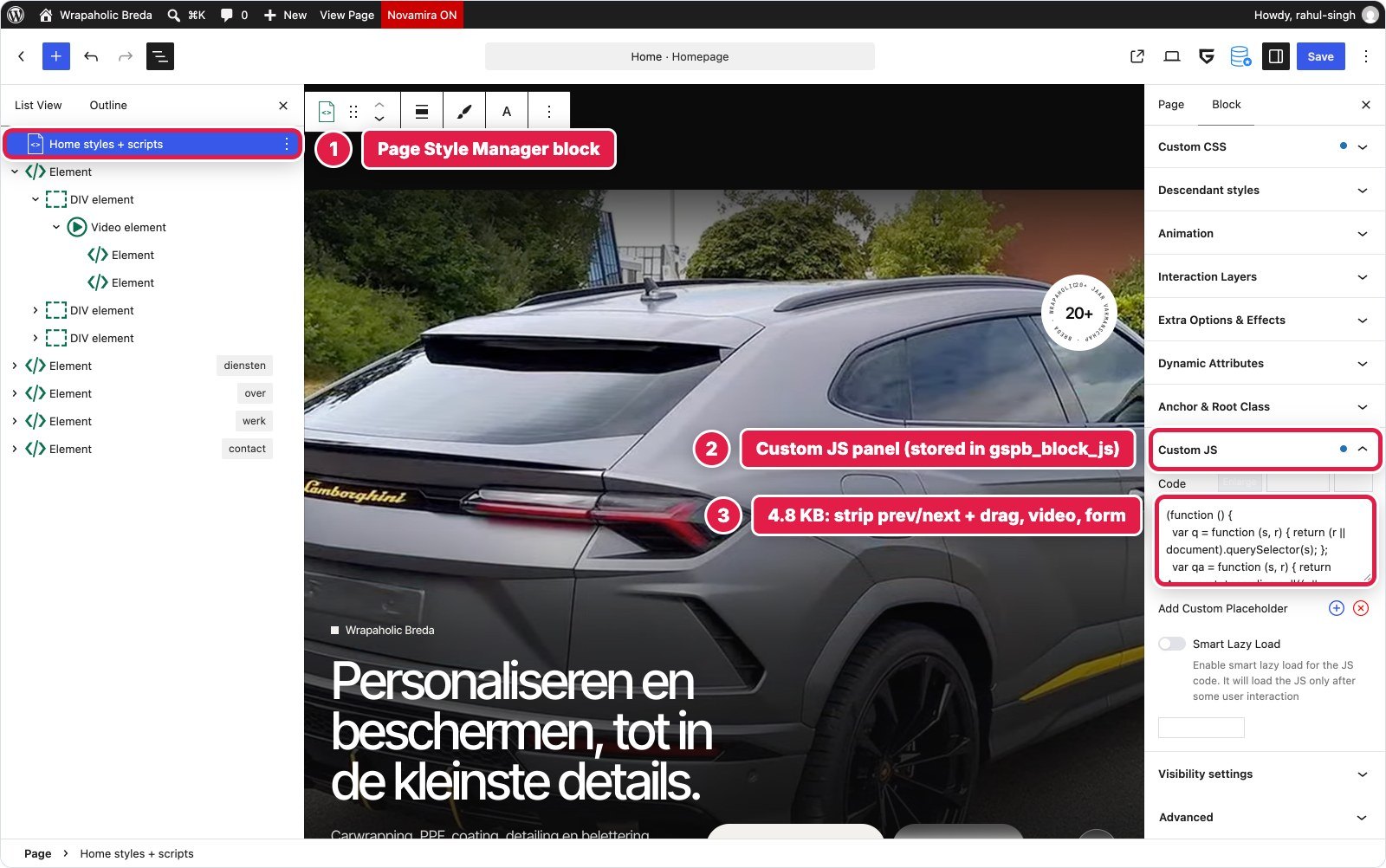
Winner for this section: tie. Same pattern, near identical code. Greenshift at least has a slider block for simpler carousels; Unblock has none.
Contact and quote form
The largest section: address, phone, WhatsApp, e-mail and opening hours with a live open/closed pill on Amsterdam time, and a quote form with service chips, fields, validation and an inline thank you message.
Unblock: 76 blocks, 7 levels. The form is Unblock’s native mechanism: a plain <form data-unbk-form method=”post”>, and Unblock injects the action (its REST endpoint), a honeypot and a timestamp on the server and handles delivery. The native form only posts, so two block scripts (774 and 1,819 bytes) compute the open status and handle validation, the fetch submit and the success message. This section is also where the visual panels earn their place: Borders, Typography and Background on the inspector edit the same .contact rule the CSS dock shows.
Greenshift: 79 blocks, 8 levels. The form is a FORM Element with Greenshift’s built in Contact Form preset, which adds the admin-post action, a nonce and a form type field, and the sidebar offers Cloudflare Turnstile if you add keys. The preset has no client side success state either, so validation and the thank you message are 2.3 KB of page JS. WordPress core’s alignfull margin rule beat the section’s own margin, so the band needed a more specific class.

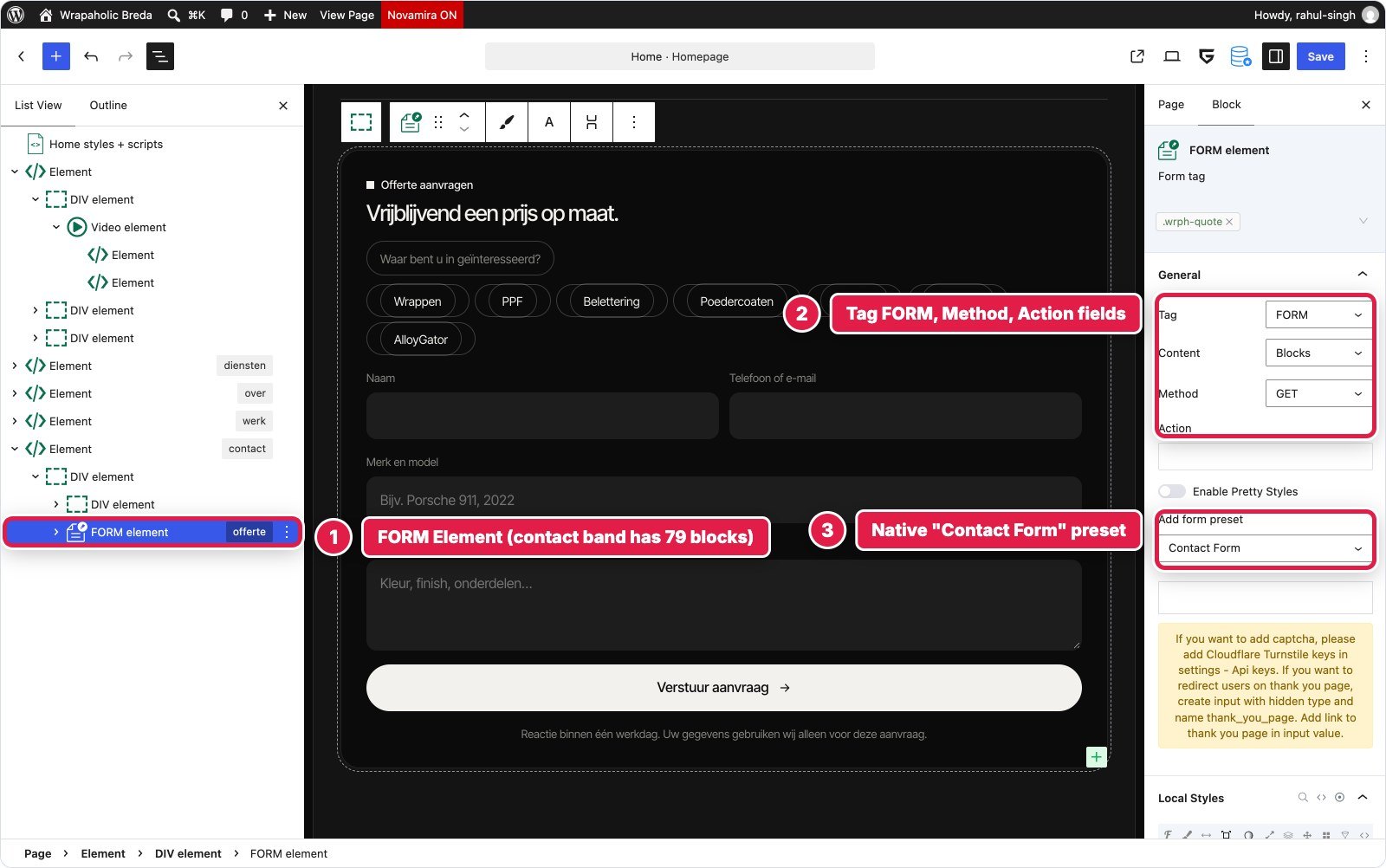

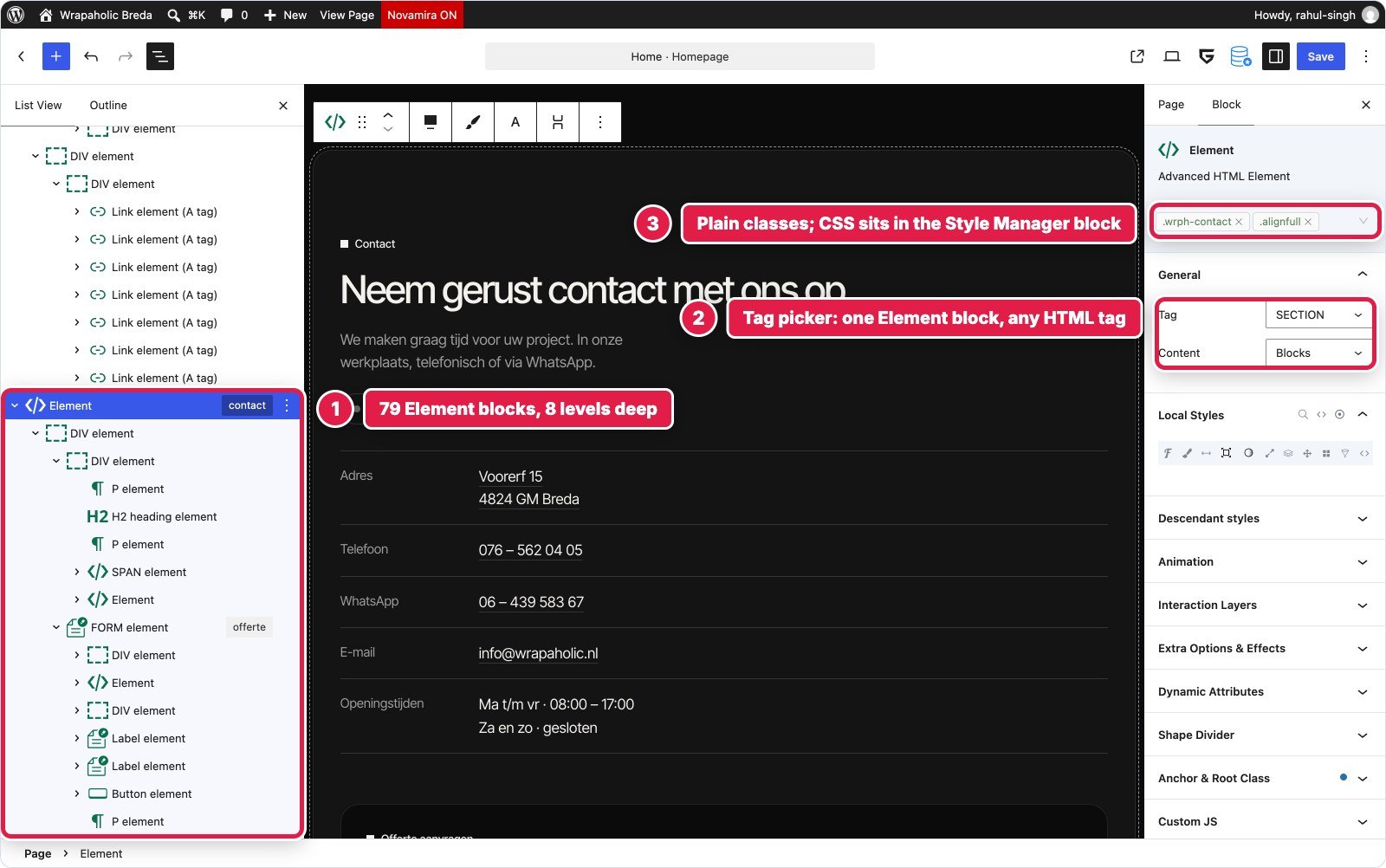
| Unblock | Greenshift | |
|---|---|---|
| Blocks / depth | 76 / 7 | 79 / 8 |
| CSS | 6,607 bytes | 4,441 bytes |
| JS | 2,593 bytes (2 block scripts) | 2,263 bytes (page JS) |
| Spam protection | Honeypot and timestamp, automatic | Nonce; Turnstile optional |
| Client side success state | No, custom JS | No, custom JS |
Winner for this section: tie. Both have a real native form that needed the same custom script for a modern experience. Unblock’s automatic honeypot is a nice default; Greenshift used less CSS here.
Footer with the giant word
Brand column, three link columns, a giant outlined “Wrapaholic” word and a bottom bar with the current year.
Unblock: the theme’s footer template part, 54 blocks, 7 levels, real ul/li/h4 for the columns. The giant word is a single div with CSS text stroke. A 100 byte block script fills in the year. Like the header, the template part wraps everything in a <footer> you cannot add a class to.
Greenshift: a footer template part with its own Style Manager block, 56 blocks, 7 levels. Seven local classes printed with CSSRender, the outline word using -webkit-text-stroke in raw class CSS, and a 109 byte year script. The same @media ordering bug from the header had to be fixed here.

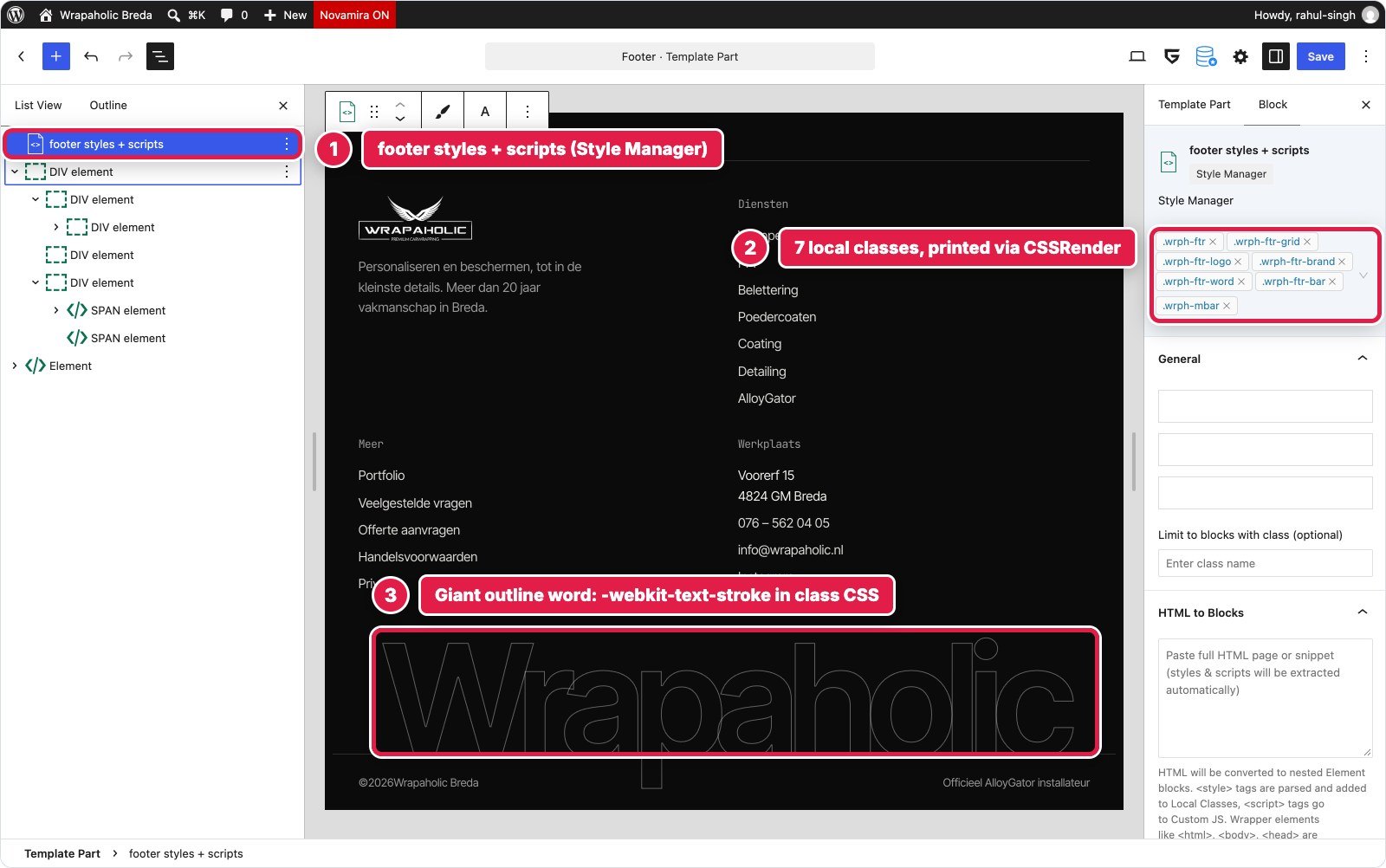
Winner for this section: tie. Same structure and almost the same bytes (2.2 KB CSS against 1.6 KB). Greenshift’s Style Manager here also shows its “HTML to Blocks” field, which converts pasted HTML into Element blocks right in the editor.
Mobile contact bar
A fixed bottom bar with call, WhatsApp and quote links, visible only at 680px and below, hidden while the menu is open or the form has focus.
Unblock: a nav of 10 blocks, 3 levels, in the footer part. It is display:none on desktop and becomes a fixed pill bar inside a 680px at rule on the .mbar selector. Selecting it in the mobile preview shows that media rule in the CSS dock. It hides through classes the header and form scripts set on <html>. The design’s breakpoints (1080, 680, 380) differ from Unblock’s presets (780, 360), so I created site at rules for them.
Greenshift: also a NAV of 10 blocks, 3 levels, with one local class that makes it fixed and mobile only. The matching body padding could not go on a block (vendor rule: no body styles in blocks), so it went into Stylebook custom CSS.
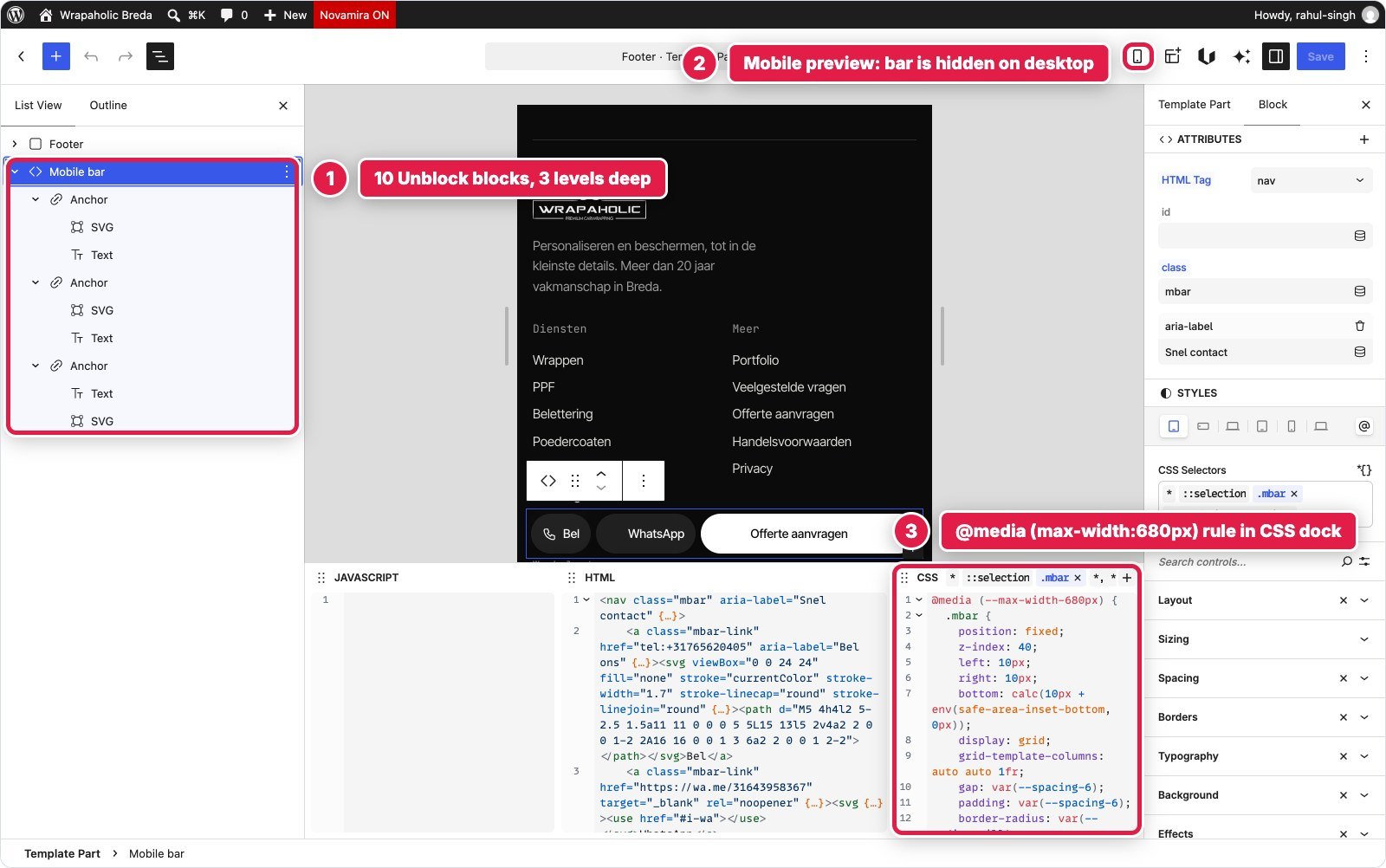

Winner for this section: tie. Identical structure. Unblock shows the responsive rule in context, which is nicer to edit.
Design system, fonts and global styles
This is where the two differ most, and where each one wins something.
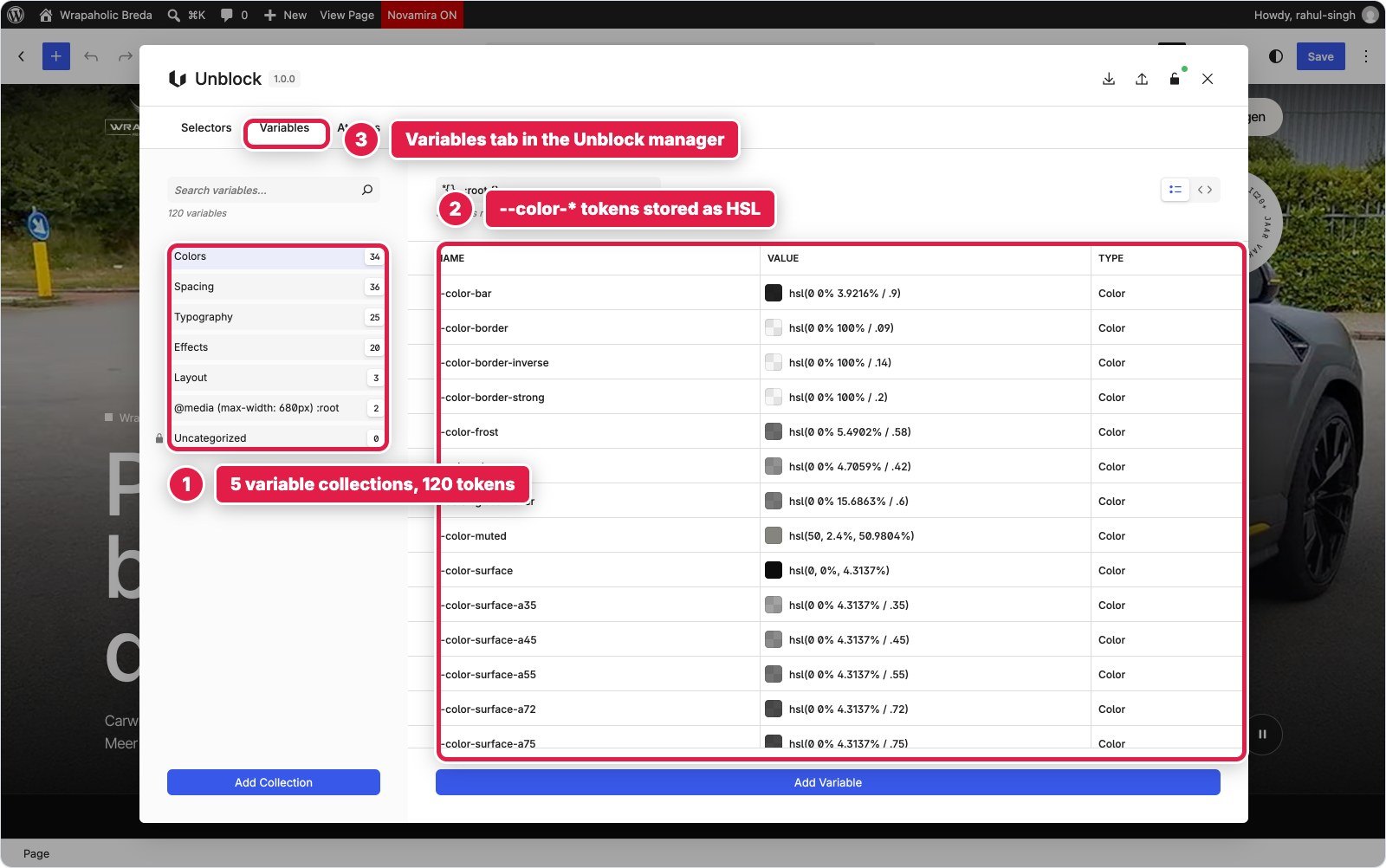
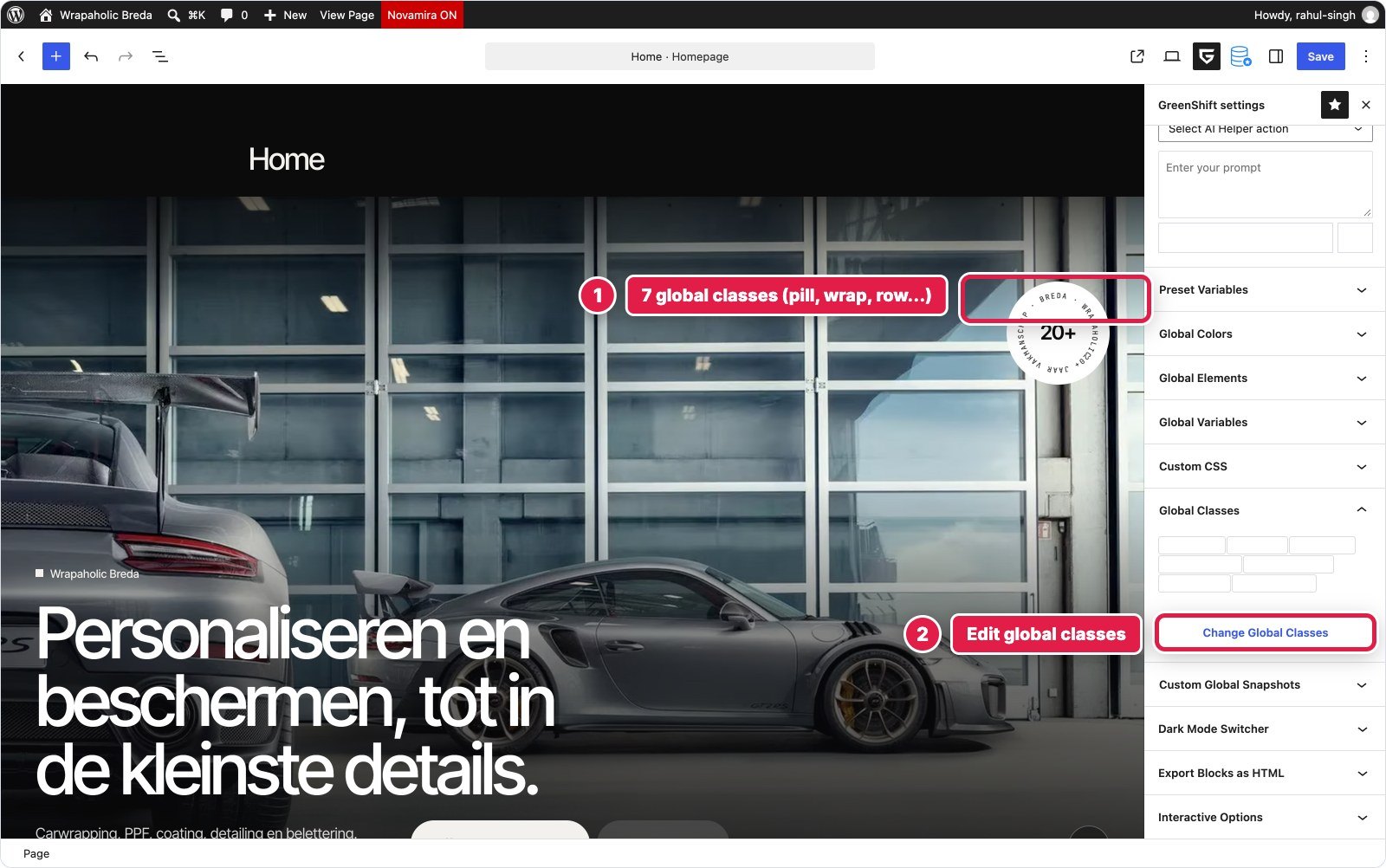
Tokens and classes. Unblock’s CSS manager has a Variables tab with collections. I filed 120 custom properties in Colors (34, stored as HSL), Spacing (36), Typography (25, including families and fluid clamps), Effects (20) and Layout, plus a 680px override. Every colour, size, radius and shadow in the component rules reads a token. The Selectors tab shows each selector as its own small CSS editor with a Local or Global scope switch, and there are tabs for At rules, a CSS Parser and History. Greenshift’s equivalent is the Stylebook in its settings sidebar: I ended up with 24 Global Variables and 7 Global Classes, with everything else as local classes per Style Manager block. It works, but it is a smaller, flatter system, and inside the editor the Global Variables and Global Classes panels inherit the dark theme’s light text colour, so token and class names are near invisible until you open the modal.


Fonts. Greenshift wins this one clearly. Its Settings > Fonts screen stores local woff2 files in uploads/GreenShift and has a preload checkbox; it pulled variable files for Inter Tight and JetBrains Mono, so all three families cost 75 KB. The catch is one file per family without weight or style descriptors, so the italics needed separate family names and @font-face aliases in custom CSS. Unblock’s Fonts tab installs through the WordPress Font Library from Google Fonts and lets you tick faces one by one. I picked only the weights the design uses, but it installed static files per weight, 14 files in total, and they weigh 363 KB. Uploading variable files yourself should fix most of that; I measured what the vendor tool did by default.


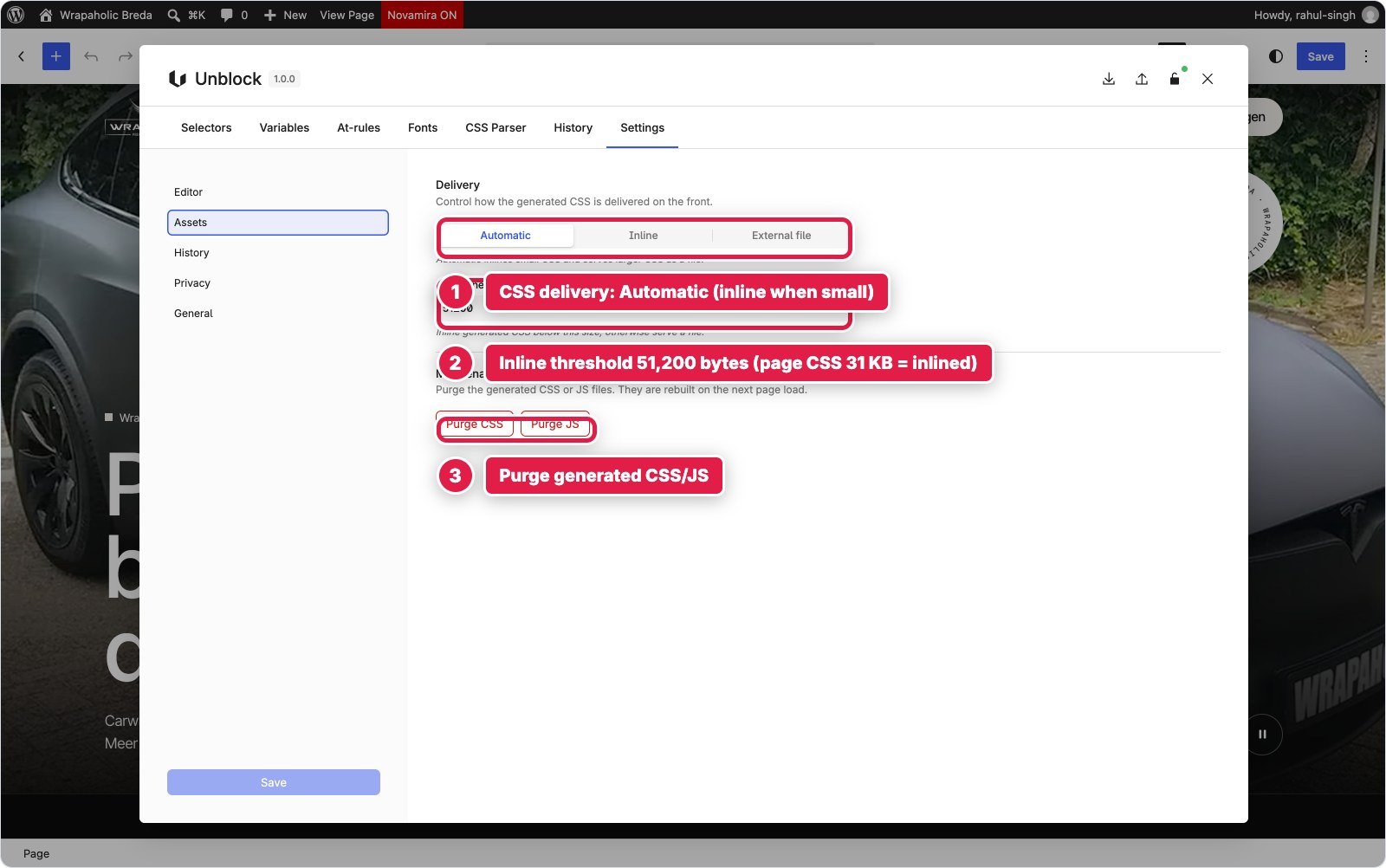
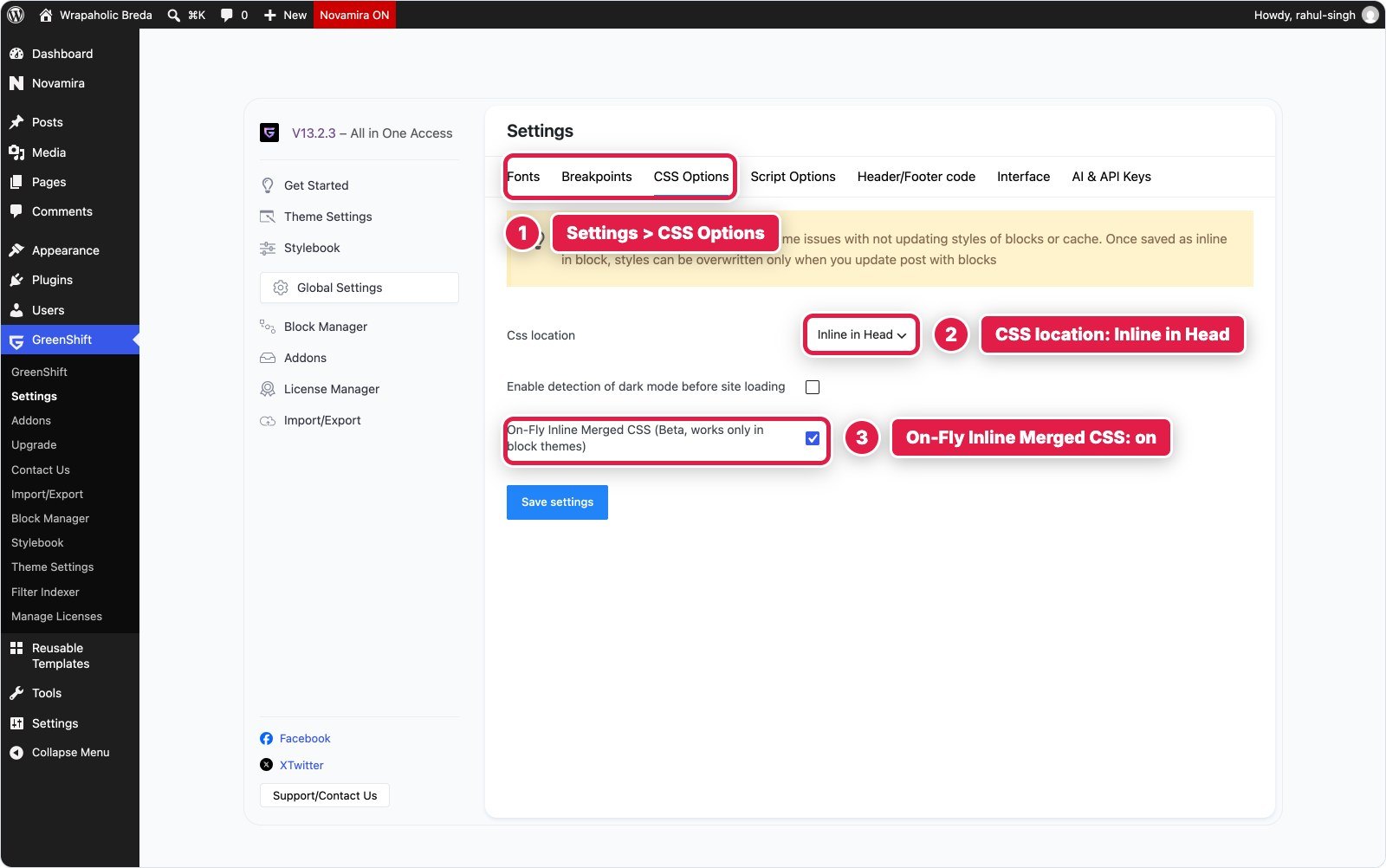
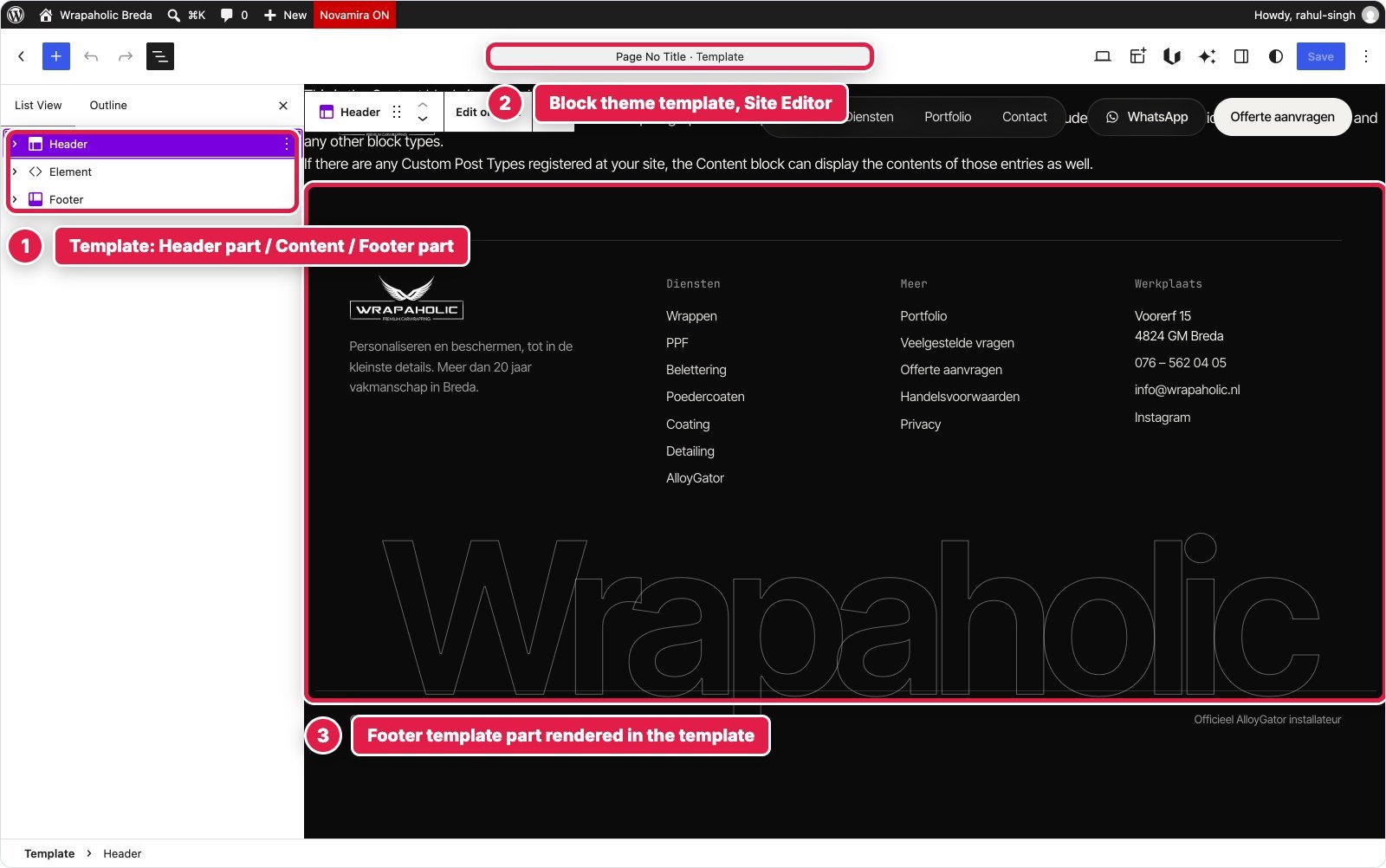
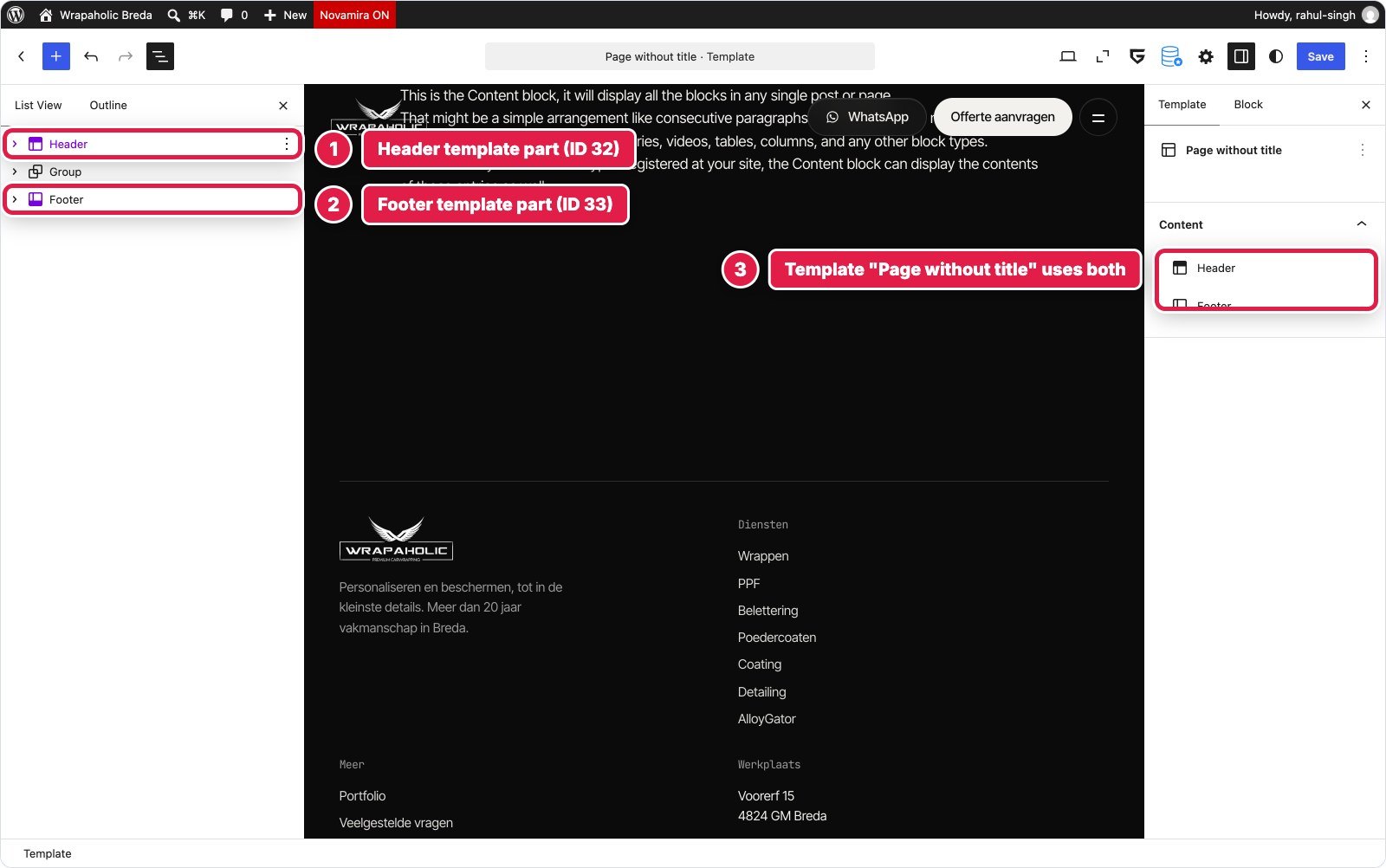
Global settings and templates. Both are block theme sites, so both use template parts for the header and footer and a “page without title” template. Unblock’s Assets settings default to automatic CSS delivery: page CSS under 51,200 bytes is inlined, and generated CSS is page scoped (only selectors used on the page plus globals). Greenshift needed two settings changed: CSS location to Inline in Head and On Fly Inline Merged CSS on, which moves the part CSS and used global classes into one head style.
Winner: Unblock for the design system, Greenshift for fonts. If you maintain a token based system, Unblock’s manager is the better tool by a distance.
Custom CSS and JavaScript: how much each needed and where it lives
With class based builders, “custom CSS” means something different than with Elementor or Kadence. Nearly all styling is CSS by design, so the honest question is how much there was, and where you go to find it later.
| Unblock | Greenshift | |
|---|---|---|
| CSS total | 31,394 bytes as served (33,666 source) | 25,022 bytes |
| Where the CSS lives | One site wide manager: 156 selectors in 11 collections, 120 variables, 11 at rules | Page Style Manager 15.5 KB, header 5.0 KB, footer 2.4 KB, global classes 1.3 KB, Stylebook 0.8 KB |
| JS total | 5,852 bytes | 6,618 bytes |
| Where the JS lives | 6 block scripts on the blocks they control, bundled into one deferred file | 3 Custom JS fields on Style Manager blocks, stored in the gspb_block_js option |
| Visual controls | Layout, Sizing, Spacing, Borders, Typography, Background, Effects, all writing the same rule | Style groups per class, raw Custom CSS for hover, pseudo and @media |
| Blocks (header, page, footer) | 364 | 370 Element blocks plus 3 Style Manager blocks |
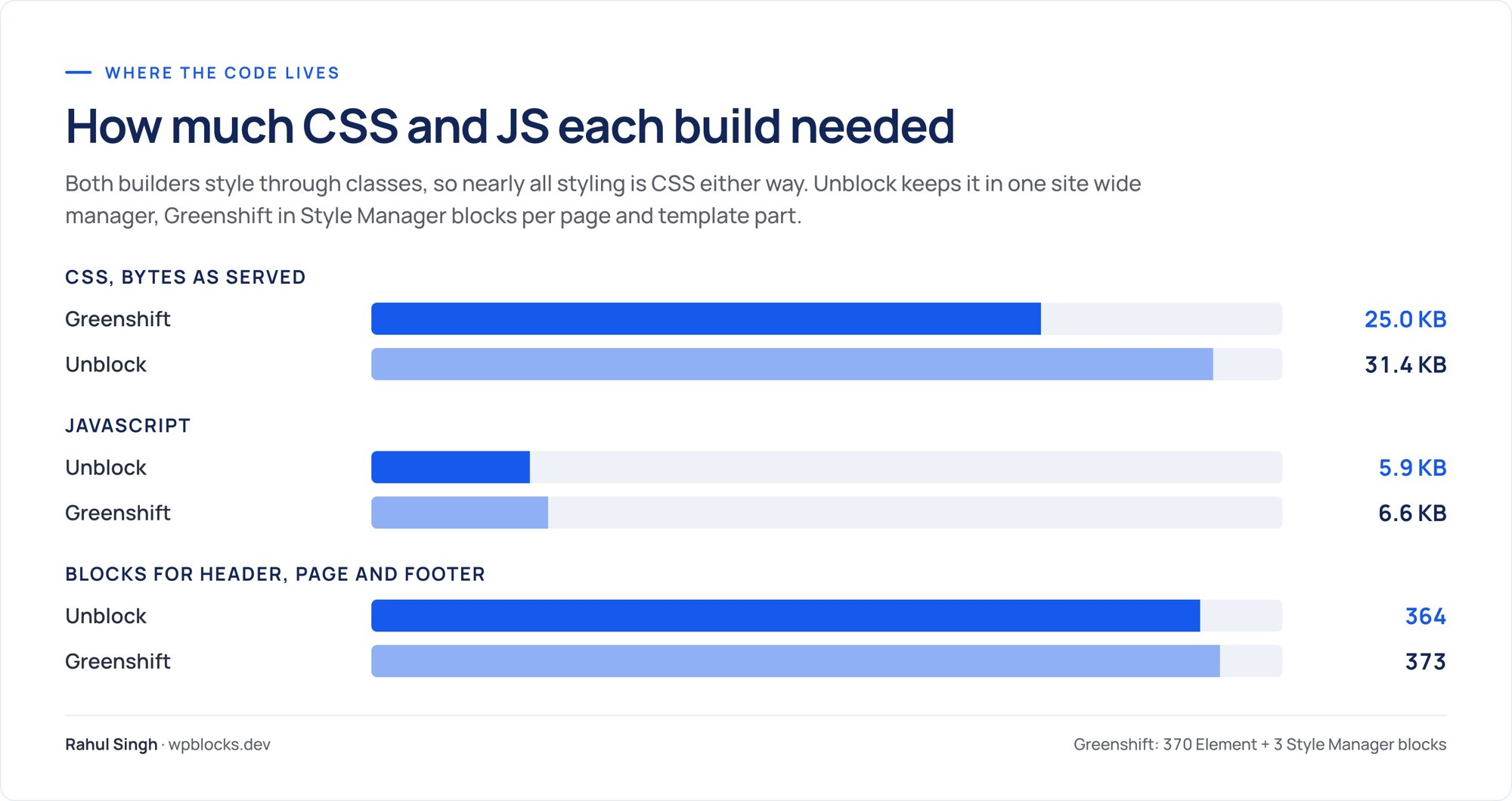
Greenshift needed about 6 KB less CSS, mostly because Unblock’s output includes the full token layer (5 KB of variables) and a base layer of tag rules. Unblock needed slightly less JavaScript and, more importantly, puts each script on the block it belongs to: open the Hero and you see the video script, open the form and you see the form script. In Greenshift the page’s 4.8 KB of JS is one field covering the video, the strip and the form together.


Performance: what each one ships
Same page, same video, same images, same server. I measured transfer size by type, DOM size and unused code with a headless browser, and Lighthouse as the median of three runs.
| Hand coded original | Unblock | Greenshift | |
|---|---|---|---|
| Code shipped, compressed (HTML+CSS+JS+fonts) | 96 KB | 390 KB | 104 KB |
| Code shipped without fonts | 22 KB | 27 KB | 28 KB |
| Fonts | 75 KB | 363 KB | 75 KB |
| HTML document, uncompressed | 22 KB | 89 KB | 95 KB |
| CSS total / unused | 65.5 KB / 71% | 51.8 KB / 44% | 58.6 KB / 52% |
| Script files transferred | 2.9 KB | 8.4 KB | 5.8 KB (plus 10.3 KB inline) |
| DOM nodes / max depth | 449 / 10 | 477 / 12 | 465 / 13 |
| Requests | 17 | 18 | 16 |
| Lighthouse mobile (FCP / LCP) | 76 (1.6 s / 7.0 s) | 70 (3.0 s / 8.0 s) | 76 (0.9 s / 7.2 s) |
| Lighthouse desktop (FCP / LCP) | 97 (0.6 s / 1.2 s) | 96 (0.6 s / 1.4 s) | 97 (0.3 s / 1.3 s) |
| Lighthouse accessibility | 96 | 96 | 96 |

Strip the fonts out and the two are the same: 27 KB for Unblock, 28 KB for Greenshift, both within 6 KB of the hand coded original. Unblock even ships the smaller HTML document. Everything that separates them on paper is the 288 KB font difference from the previous section, and on mobile that shows: first contentful paint was 3.0 s for Unblock against 0.9 s for Greenshift, which preloads its two main fonts. The heavier font payload is the most likely reason Unblock scored 70 on mobile and Greenshift 76.
Be careful reading the mobile scores, though. On every page in this test, including the original, the mobile LCP element is the 2.3 MB hero video, so mobile scores mostly reflect video loading; the hand coded original also scored 76. Desktop is 96 against 97, a tie in practice. Accessibility was 96 on both; axe flagged the same colour contrast rule the original trips, on 1 element in Unblock and 2 in Greenshift.

Winner: Greenshift, as delivered. Fix Unblock’s font files and I would call it a draw.
Building it with AI
Unblock sells itself on AI building, so I also had an AI agent build each version from the same written brief, using each vendor’s recommended method. For Unblock that meant its own abilities (the unblock/* actions its MCP bridge exposes), with no raw database writes; the built in Unbot chat was not used. For Greenshift it meant the workflow in Greenshift’s own bundled build guide: write clean prefixed HTML, CSS and JS, convert it with the vendor converter into Element blocks and Style Manager blocks, and apply it through the plugin’s own REST routes and functions.
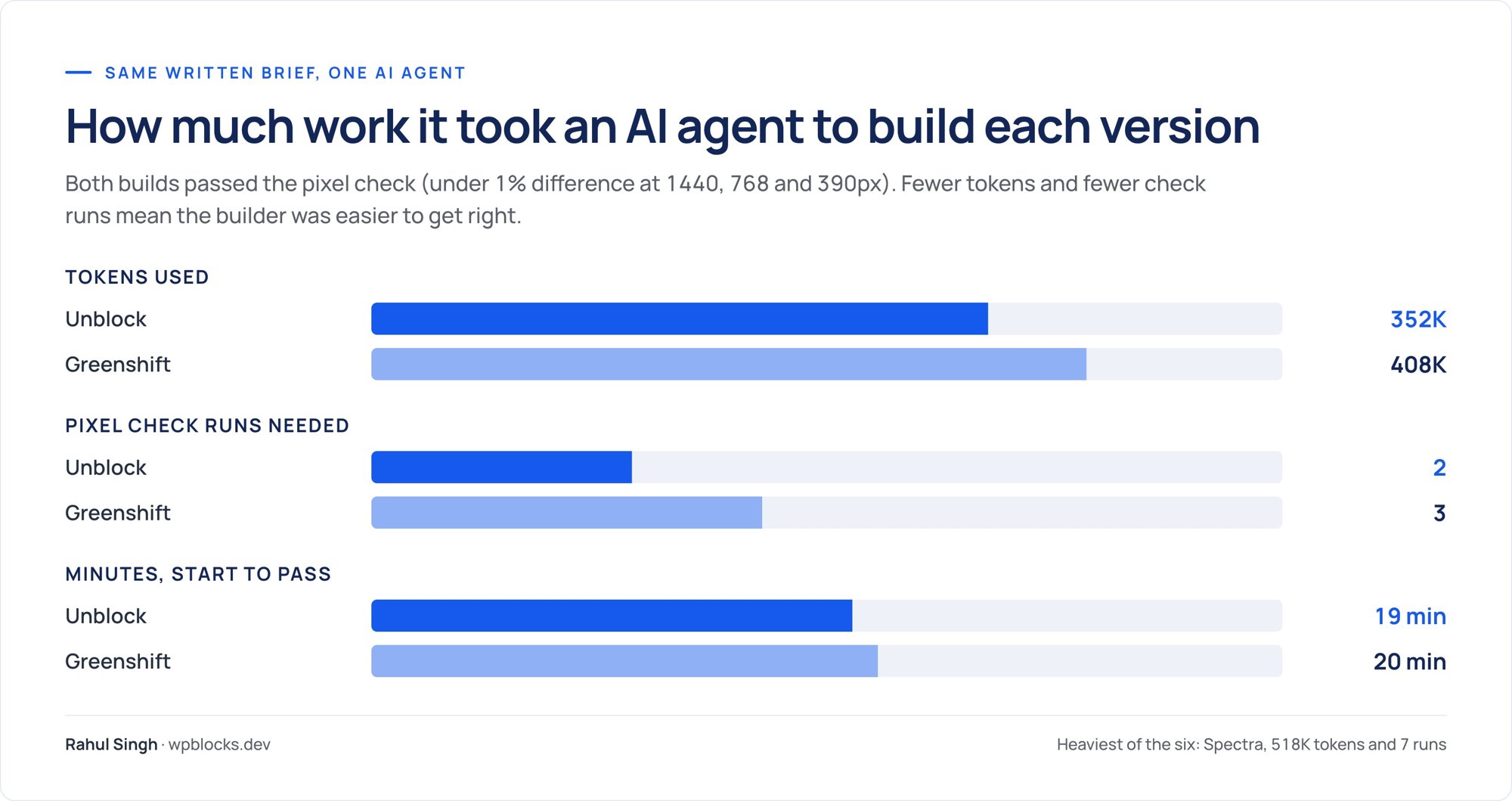
Unblock was the cheapest of all six builders to build with: 352K tokens and 2 check runs. Greenshift was a close second at 408K tokens and 3 runs. That ranking fits their models. Both accept something very close to plain HTML and CSS, which is what language models write best. Unblock edged ahead because its abilities write selectors, variables and blocks directly, while the Greenshift path ran through a converter that dropped attributes (checked, rows, autocomplete, alt=””, source src/type, preload), dropped selectors that do not start with a class, and ordered @media rules wrongly for CSSRender. On top of that, Greenshift’s global settings endpoint needs an application password, and saving custom CSS together with other Stylebook keys silently dropped the others.
Unblock had its own surprises: relative links like ./#contact were rewritten to http://./, WordPress’s decoding=”async” made lazy images paint blank in full page captures, and a test keyframe could not be removed from the at rules store. But the fixes were in my markup, not in the tool chain. Unblock’s AI assistant works with your own API key (OpenAI, Anthropic, Google or a gateway) with no markup, and its MCP bridge needs WordPress 6.9+ and lists 16 tools plus 31 more through the adapter. Greenshift has an AI Helper prompt box in its settings sidebar and sells AI agents in the All in One pack; I did not use either.
Winner: Unblock. If an agent does most of your building, it is the most direct route of the six.
Lock in: switch the builder off
I deactivated each builder plugin, left its theme active, and checked what was left on the homepage.


| Unblock | Greenshift | |
|---|---|---|
| Text still visible | 0% | 99.6% |
| Images / video | 0 of 4 / none | 3 of 4 / video kept |
| Styling | None, nothing renders | None, the classes have no CSS |
| Page height at 1440px (original 5,772px) | 900px (empty viewport) | 39,042px (unstyled SVG icons blow up) |
The difference comes from where each one keeps the HTML. Greenshift saves real HTML inside its block markup in the post content, and only the CSS and scripts are printed by the plugin. Switch it off and WordPress still prints the HTML. Unblock renders its element blocks through the plugin, so in my test nothing of the page came back, not even the header and footer from the Unblock Theme’s template parts.
Unblock’s terms soften this a little: if you stop renewing, built sites keep working, you just lose updates, new features, the AI assistant and support. The risk is the plugin itself going away or a client deactivating it. With Greenshift you would face a restyle; with Unblock you would face a rebuild from your exports.
Winner: Greenshift, by the widest margin in this comparison.
WooCommerce: the Same Product Page on Both
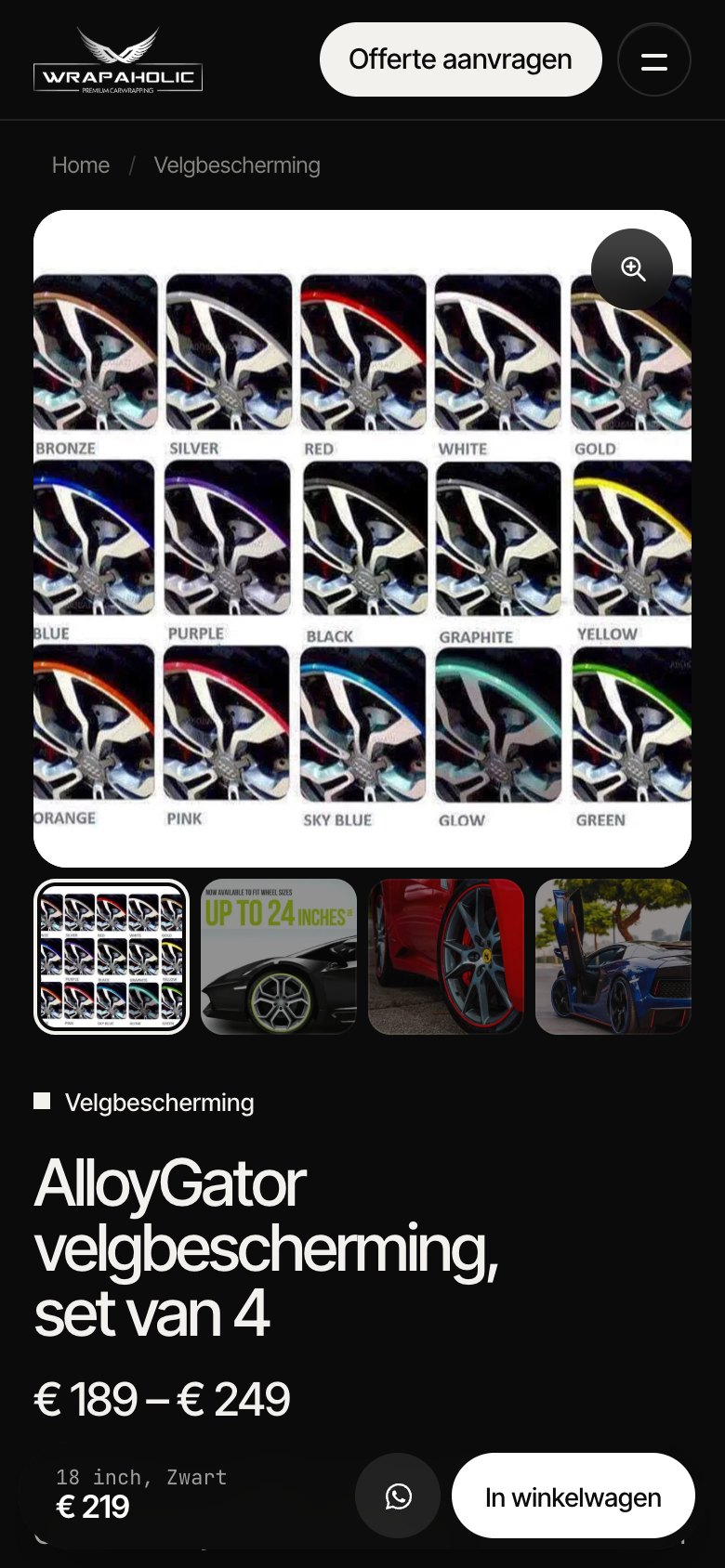
A homepage says little about a shop, so I ran a second round on the same two sites: a WooCommerce product page, built from one design and matched to a hand coded reference. WooCommerce 11.3.0 got two identical products. AlloyGator rim protection is a variable product, 7 rim sizes times 5 colours, which makes 35 variations with their own prices and SKUs. XPEL PPF Compact is a simple product on sale. Each builder had to make one template that serves both: gallery with thumbnails and a lightbox, size buttons and colour swatches, a price box that follows the choice, quantity stepper, add to cart, tabs with a specs table, a related product card and a sticky product bar on phones. As on the homepage, the copy is Dutch because the design belongs to the same Breda client.

Both builds passed the same checks: under 0.5% pixel difference at 1440, 768 and 390 px, identical page heights, and a real cart test in Chrome. Choosing 20 inch and Rood, setting the quantity to 2 and adding to cart put exactly that variation in the WooCommerce cart at € 498,00 on both sites.
How each builder made the template
Both sites run a block theme, so in both cases WordPress’s template hierarchy applies one Single Product template to every product. No display conditions to set. What goes inside that template is where the two split.
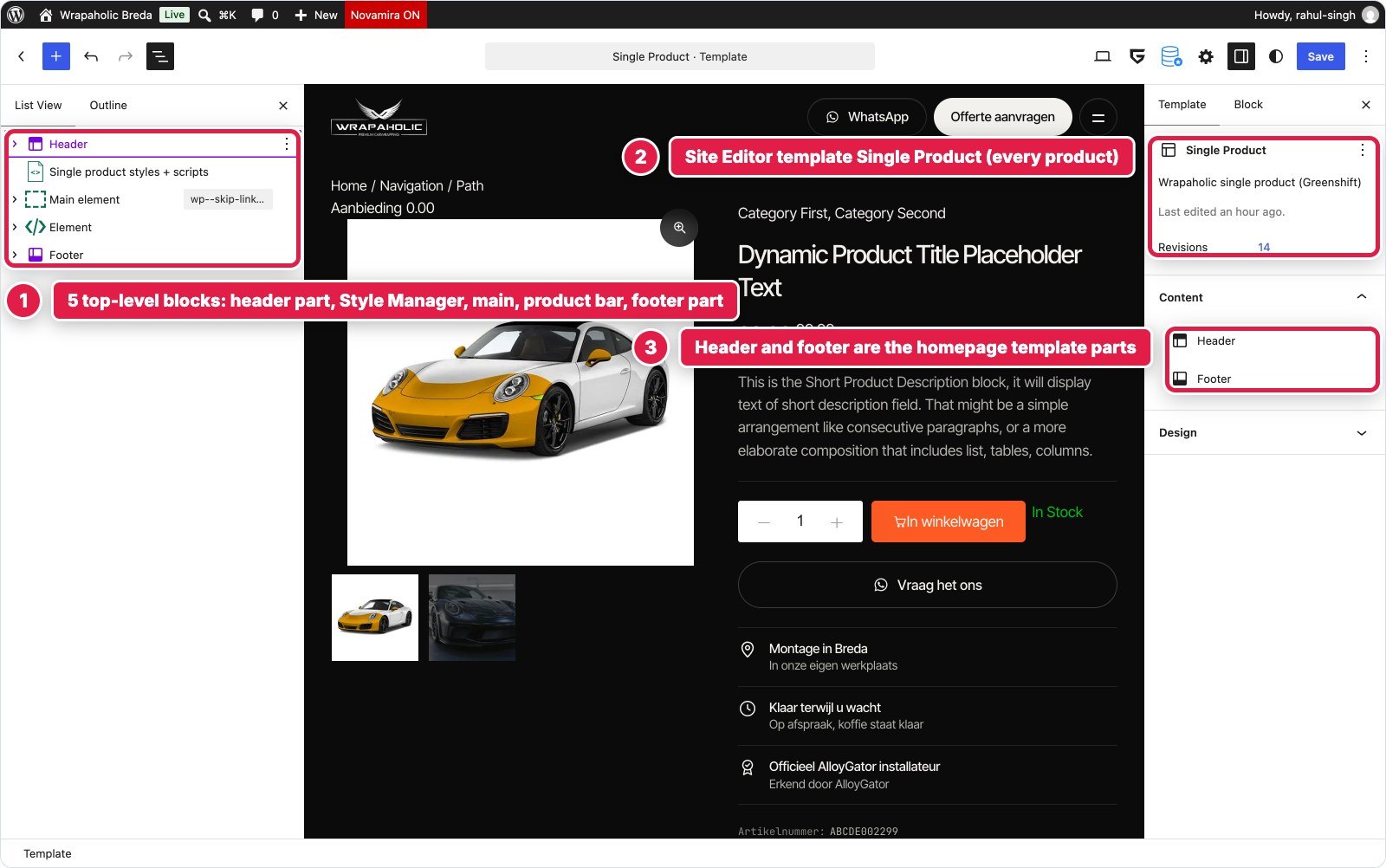
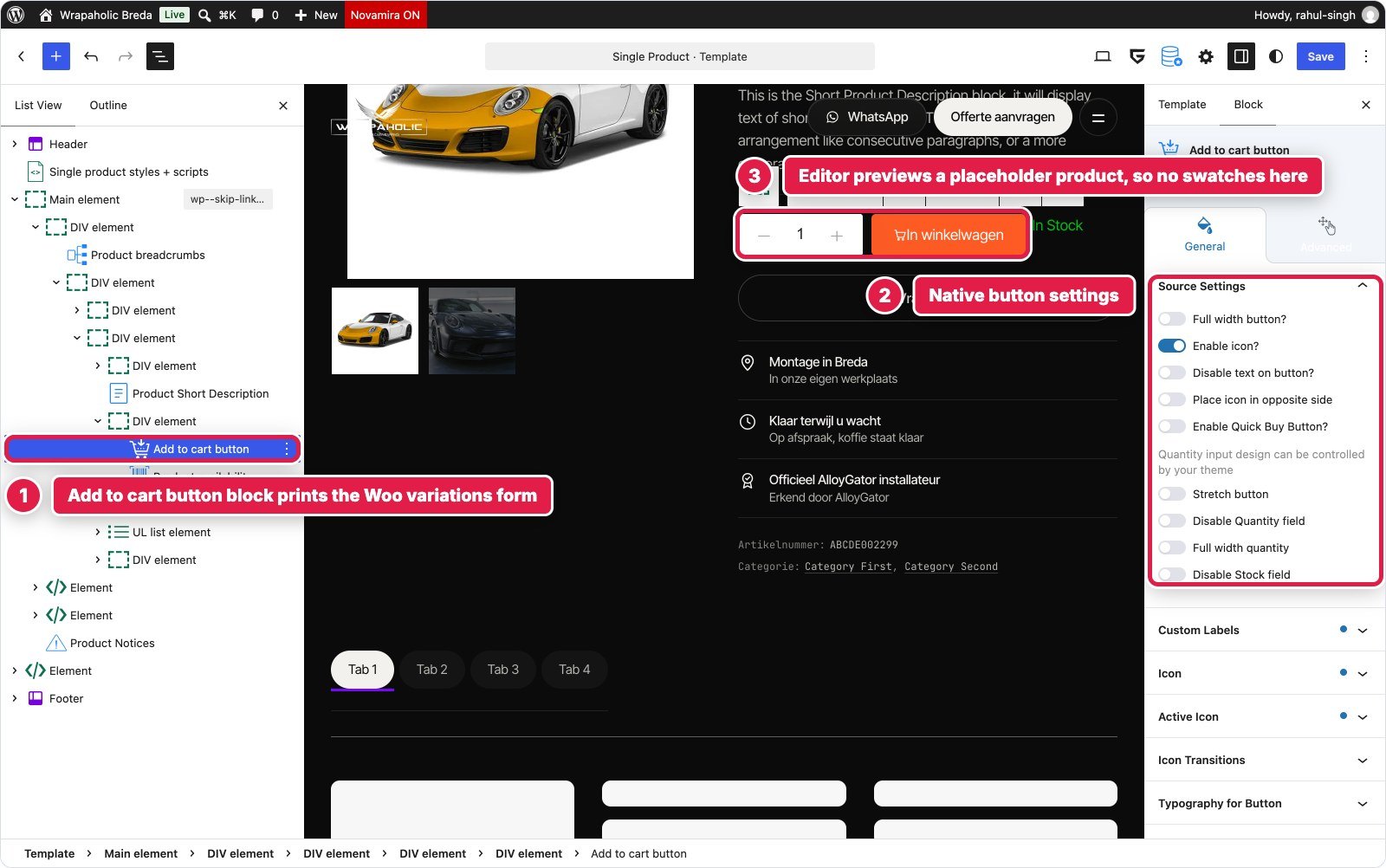
Greenshift has a WooCommerce add on with its own product blocks: gallery, title, price, short description, SKU, availability, tabs, breadcrumbs, sale badge and an Add to cart button block that prints WooCommerce’s own variation form. I edited the theme’s Single Product template in the Site Editor, reused the homepage header and footer parts, and styled everything through one Style Manager block with 50 local classes. The related product card is a Greenshift Query loop, because WooCommerce’s own related products query returned nothing for two products in different categories.
Unblock has no WooCommerce blocks, and it cannot place WooCommerce’s blocks either. It does have a built in WooCommerce data provider, so Twig can read the title, price HTML, gallery, attributes, variations, SKU and stock of the current product. Unblock also refused to write to the single-product template, because WooCommerce registers a template with the same name. The workaround: a three part template (header, product, footer) written once outside Unblock, with the whole product page living in a new Unblock template part of 193 blocks. Every element in it is an Unblock element, loop, condition or text block, plus one core Post Content block for the long description.

The variation picker shows the difference best. Greenshift turns WooCommerce’s attribute dropdowns into swatches: on Products, Attributes you set Velgmaat to Text and Kleur to Color, then give each colour term a hex value. The swatches are radio buttons that drive Woo’s real hidden selects, so WooCommerce’s own variation script still handles price, stock and the variation ID. I still wrote 4.7 KB of JavaScript around it: the chosen value next to each label, the reset text, colour names in the specs table (Greenshift prints only dots there), the tab name “Specificaties”, keyboard support for the tabs and the mobile product bar. The colour swatches render no term name at all, so the labels next to the dots come from CSS.
In Unblock the picker is generated by a loop over the product’s attributes with a nested loop over their values, and a condition sends the colour attribute to swatches and everything else to pill buttons. Each swatch colour is a design token named after the term, so a new colour is one new token. It sits inside a real WooCommerce add to cart form, which works without JavaScript through Woo’s own form handler. With JavaScript, a 6.6 KB block script matches the choice against the 35 variations printed as JSON on the form, updates price, stock note and SKU, and posts to WooCommerce’s AJAX cart endpoint. That script also runs the gallery, lightbox, tabs, quantity stepper and product bar, because Unblock has none of those as components.

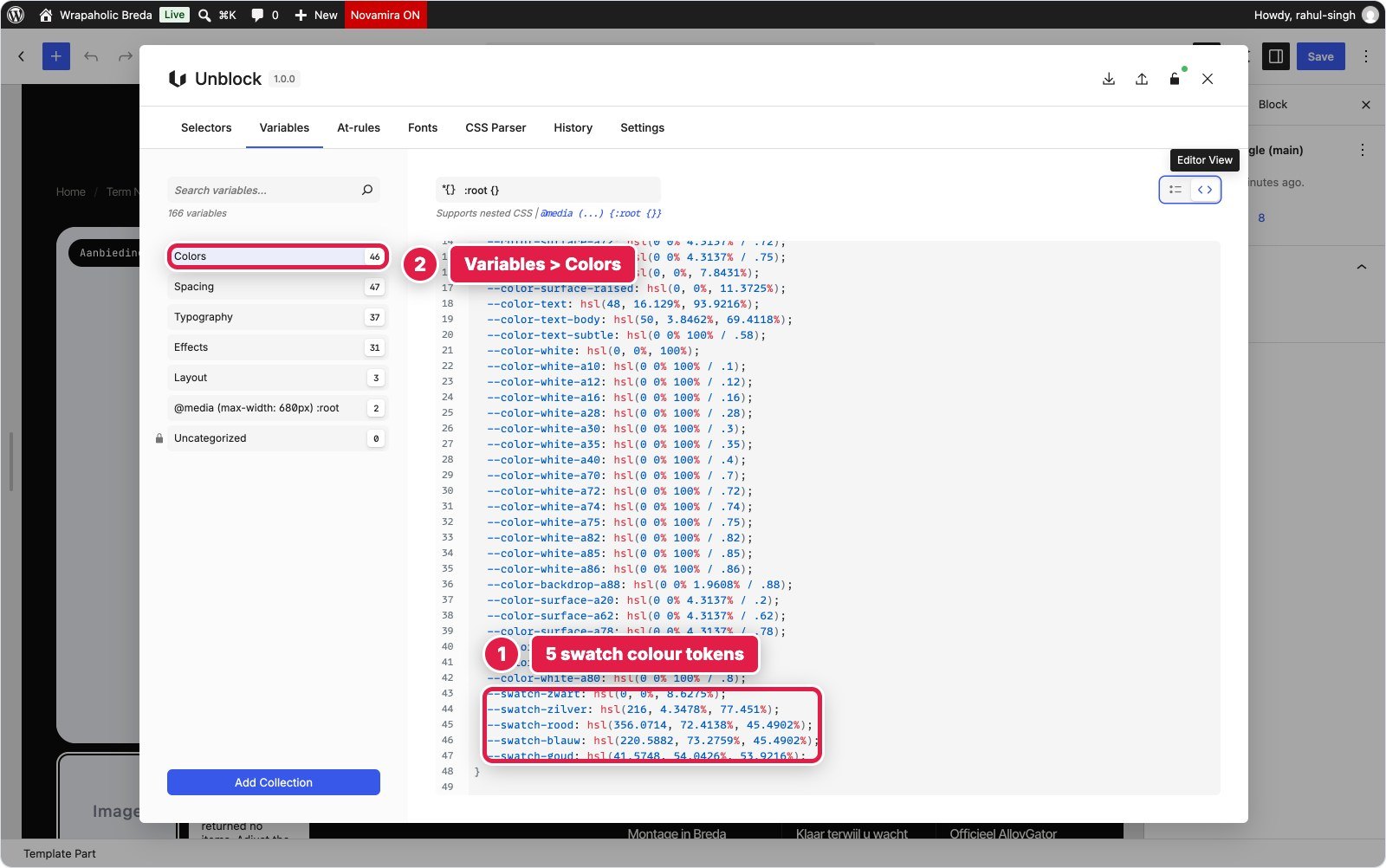

Store settings stayed close. Both kept two decimals so the cart reads € 498,00, and both strip the “,00” on the product page only: Unblock in Twig, Greenshift with JavaScript, since it has no setting or PHP area for it. Unblock changed one store setting, the colour order. Greenshift needed its Woo add on switched on, the attribute types, five swatch colours and the term order. One more Greenshift detail: with 35 variations the product is over WooCommerce’s threshold of 30, so the default 18 inch Zwart choice resolves after one AJAX request. The Woo add on is paid: it is part of the All in One pack ($59.99 a year for 1 site), and Greenshift also sells a Woo Pack from $49.99 a year. Unblock’s WooCommerce data provider comes with the normal licence.
In the editor, neither shows you the real product. Greenshift’s Woo blocks preview a placeholder product, so the title, price and swatches you design against are not AlloyGator. Unblock’s template part has no product context at all: images show “Image” and the loops say they found no items. Both are fine for a developer who checks the front end, and both are poor for anyone who designs by looking.
WooCommerce results
| Hand coded original | Unblock | Greenshift | |
|---|---|---|---|
| Code shipped, compressed (HTML+CSS+JS+fonts) | 104 KB | 467 KB | 248 KB |
| Code shipped without fonts | 29 KB | 105 KB | 173 KB |
| JavaScript | 5 KB | 59 KB | 119 KB |
| Requests | 14 | 27 | 45 |
| DOM nodes | 388 | 453 | 522 |
| Lighthouse mobile / desktop | 95 / 100 | 76 / 99 | 80 / 99 |
| Mobile FCP / LCP | 1.5 s / 2.9 s | 3.5 s / 4.7 s | 1.8 s / 4.7 s |
| Mobile layout shift (CLS) | 0 | 0 | 0.08 |
| Variation picker | Static | Own buttons on a real Woo form, 6.6 KB JS | Woo add on swatches on Woo’s form, plus 4.7 KB JS |
| Custom CSS written | n/a | 25.7 KB | 28.6 KB |
| Pixel difference 1440 / 768 / 390 | n/a | 0.16 / 0.22 / 0.34% | 0.05 / 0.48 / 0.08% |
| Cart test (20 inch, Rood, 2x) | n/a | Pass, € 498,00 | Pass, € 498,00 |
Greenshift ships the lighter page again, 248 KB against 467 KB, and the reason is the same as on the homepage: 363 KB of Unblock’s total is fonts. Take the fonts away and Unblock is lighter, with half the JavaScript (59 KB against 119 KB) and 27 requests against 45. Most of Unblock’s 59 KB is WooCommerce’s own classic scripts, jQuery included, which WooCommerce loads on every product page even though this template uses none of them. Greenshift adds Swiper, its lightbox and the swatch script on top of those. Its swatch stylesheet (3.2 KB) also loads on every page of the site, the homepage included.
The heavy fonts cost Unblock again on mobile: first contentful paint at 3.5 s against 1.8 s, which is most of the gap between 76 and 80. Desktop is 99 on both. The AI agent that built both pages needed 21 minutes and 2 check runs per page on Unblock, and 26 minutes with 7 check runs on the AlloyGator page for Greenshift, most of them to get the mobile layout of WooCommerce’s own form markup into the design.
The layout shift on phones
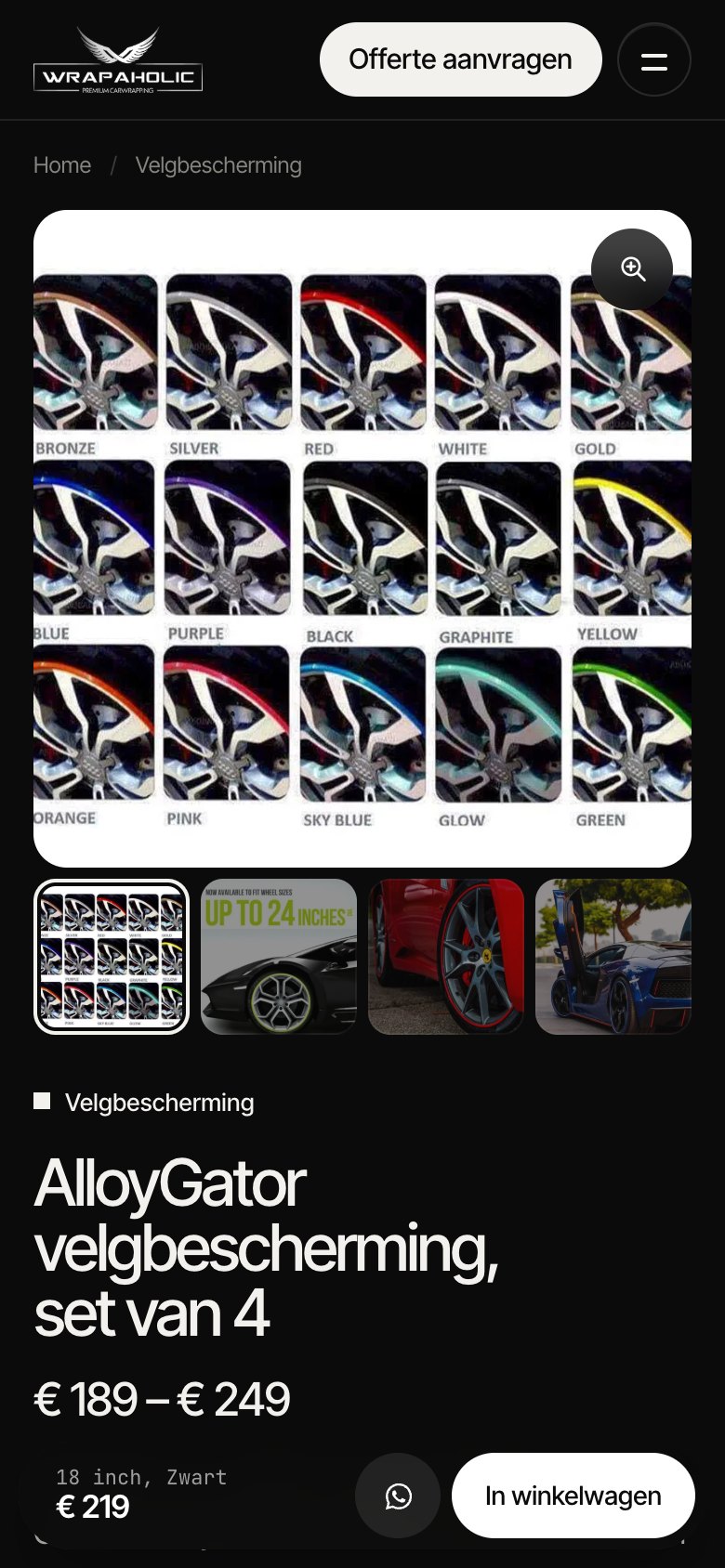
Lighthouse measured a layout shift of 0.08 on Greenshift’s product page on mobile and 0 on Unblock’s. I loaded both pages at 390 px with a throttled CPU and recorded the gallery height while they loaded. On Greenshift the gallery is 714 px tall at first paint and still at DOMContentLoaded; when Swiper starts around page load it drops to 444 px, and the product summary under it moves 270 px up in one shift. On Unblock the gallery is 444 px from the first paint to the end and the summary never moves.
Why the page jumps on phones
Before Greenshift’s Swiper script runs, the thumbnail strip lays every thumbnail out at full column width, so the strip is as tall as the main image (354 px). Swiper then turns it into a row of small thumbnails (84 px) and everything below the gallery jumps up. Unblock’s main image has a fixed 1:1 box with width and height on the image, and no WooCommerce gallery script runs on the page, so there is nothing to resize.
This is fixable with a few lines of CSS that give the gallery, or the thumbnail strip before Swiper starts, its final height, for example with aspect-ratio. The same cause hit three other builders in my test much harder: where WooCommerce’s own flexslider gallery is used, it briefly grows to about 3,600 px on a phone and CLS lands between 0.47 and 0.49.
My WooCommerce verdict
For a WooCommerce store, I would pick Greenshift. Its Woo add on gives you real product blocks with settings, swatches you configure on WooCommerce’s own attribute screens, and WooCommerce’s own variation and cart logic underneath, so Woo updates and plugins that hook into the add to cart form keep working. It ships the lighter page and scores higher on mobile. Budget for the paid add on, fix the gallery height, and accept that swatch CSS loads site wide. Unblock produced the steadier and leaner page apart from its fonts: zero layout shift, 27 requests, half the JavaScript. But the variation picker, gallery, tabs and AJAX cart are your own script, and you maintain them against every WooCommerce update. I would only choose it for a small, fully custom shop built and looked after by a developer.
Winner for WooCommerce: Greenshift, for most stores.
Pricing in 2026
Unblock has four plans, all with every feature, the AI assistant and updates. Starter is $69 a year for 1 site, Professional $129 for 10 sites, Agency $199 for 100 sites, and Lifetime $499 for 1,000 sites, labelled a limited time offer. Local and staging sites do not count. There is no free version and no trial, and a 14 day refund. Until 1 December 2026 a Black Friday deal takes 30% off every plan, so $48.30, $90.30, $139.30 and $349.30.
Greenshift has a free plugin on WordPress.org and four paid packs, every one with a lifetime option. The one I would compare is All in One, which includes all add ons, the AI agents, the Figma converter and the page converter: $59.99 a year for 1 site, $89.99 for 5, $109.99 for 15 and $129.99 for unlimited sites, or $109.99, $219.99, $299.99 and $399.99 lifetime. The Design Pack starts at $39.99 a year. Refunds run 14 days, and renewals from year two are not refundable. No renewal prices are published for either builder.
| What you pay | Unblock | Greenshift All in One |
|---|---|---|
| Free | Not available | Free plugin on WordPress.org |
| 1 site, yearly | $69 | $59.99 (Design Pack $39.99) |
| 10 sites, yearly | $129 | $109.99 (15 sites) |
| 100 sites, yearly | $199 | $129.99 (unlimited) |
| Lifetime | $499, 1,000 sites | $109.99 (1 site) to $399.99 (unlimited) |
| Black Friday 2026 | 30% off every plan until 1 Dec | Regular prices above |
| Refund window | 14 days | 14 days (year two renewals excluded) |
The comparison that should decide it for freelancers
At 1 site the two are close. From 10 sites up Greenshift is cheaper every year, and its unlimited lifetime licence ($399.99) undercuts Unblock’s lifetime ($499) while you can still start on the free plugin. Unblock’s Black Friday price brings its lifetime to $349.30 until 1 December, which is the only window where it wins on price. I ran Greenshift with the All in One licence active, so nothing was held back; I did not test which parts of this build work on the free plugin alone.
When Unblock makes sense, and when it does not
Unblock fits developers who think in HTML, CSS and a little Twig, and who want the builder to stay out of the way: one block per element, one stylesheet you can browse by collection, and scripts attached to the blocks they control. It fits agencies that build with AI agents through MCP, because the agent writes the same selectors and blocks a human would edit afterwards. It also fits anyone who cares about a clean token layer, since the Variables manager is the best design system tool of this pair.
Unblock does not fit clients who will edit alone; neither of these builders is friendly to non technical editors, but Unblock’s three code docks and class chips assume you know CSS. It does not fit people who want a widget library: there is no slider, tabs, menu or header component, so every interactive piece in my build was a hand written script. And it does not fit anyone who cannot accept a blank page if the plugin is ever removed, or who wants to try it free before paying.
Greenshift fits the same technical crowd when budget, page weight and exit risk matter more than editing comfort. It also gives you more built in parts (a Swiper slider, animation and query add ons, Turnstile on forms) when a design is less custom than this one. It fits less well if you dislike hunting for a class’s CSS in a separate Style Manager block or reading a List View full of “Element”.
Pick Unblock if
- You write or generate HTML and CSS and want a builder that maps one to one onto it.
- You want a real token system: 120 variables in collections, site at rules and selectors you can scope global or local.
- You want each block’s JavaScript, HTML and CSS visible side by side when you select it.
- You build with AI agents through MCP and want the shortest path from brief to page.
- You accept a paid plugin with no free tier and a hard dependency on it.
- You want a product page with zero layout shift and the least JavaScript, and you are happy to write its variation and cart logic yourself.
Pick Greenshift if
- You want to start free and keep licence costs low, with a lifetime option on every pack.
- You want the lightest result: 104 KB of code against 96 KB for the hand coded original.
- You want the page HTML to survive if the plugin is ever switched off.
- You like having optional extras such as a slider, animations and query loops in the same ecosystem.
- You can live with CSS that sits in Style Manager blocks and a converter that needed patching.
- You run a WooCommerce store and want product blocks, swatches set on WooCommerce’s own attribute screens and Woo’s own variation logic.
Pros and cons
My verdict on Greenshift
Greenshift
4.5/5
The safer buy for most people who want class based, near hand coded pages: free to start, cheaper, lighter by default and low on lock in. It is also the better fit for a WooCommerce store.
What works
What does not
My verdict on Unblock
Unblock
4.0/5
The best editing model of the pair for developers and AI agent workflows, held back by its font defaults, no free tier and total lock in. On WooCommerce it builds the steadier page, but the shop logic is yours to write.
What works
What does not
The conclusion
Greenshift and Unblock are built on the same idea: give developers one block that can be any HTML tag and style it with classes. I got the same Wrapaholic homepage out of both, with the same 71 block service grid, the same 33 block about section and DOM sizes 12 nodes apart. Neither forced compromises on the design, and both needed similar small scripts for the header, the video, the strip and the form.
Where they part ways is the experience around that idea. Unblock puts the stylesheet first. Its CSS manager, token collections and docked editors are what I would want if I were writing the CSS myself, and they are why the AI build was the cheapest of the six. Greenshift puts the content first. Its CSS travels inside Style Manager blocks, its HTML is saved as real HTML, and the editor is busier and harder to read, but the page survives without the plugin and costs less to buy and to load.
For most readers I recommend Greenshift. It is free to start, cheaper at every tier above one site, lighter as delivered, and the exit is painless. Those are the things that hurt later, when a client site is three years old.
The WooCommerce round points the same way. Greenshift’s Woo add on keeps WooCommerce in charge of variations and the cart and gave me the lighter product page, with a small layout shift on phones that a few lines of CSS fix. Unblock built a product page with no layout shift, fewer requests and half the JavaScript, but only because I wrote the variation picker, gallery and AJAX cart myself. For a shop that has to live through years of WooCommerce updates, I would rather have Greenshift.
Pick Unblock instead if you are a developer or an agency building with AI agents and you value the daily editing experience more than the exit. Upload variable font files rather than relying on the default per weight install, and treat the plugin as permanent infrastructure, because it is. Do that, and Unblock is the more pleasant of the two to work in.
FAQ
Is Unblock better than Greenshift?
For editing it is: one CSS manager, per block code editors and a readable List View. For page weight, price and lock in, Greenshift is better. In my build Greenshift shipped 104 KB of code against 390 KB for Unblock, almost all of the gap being fonts.
Is Greenshift a good Unblock alternative?
Yes. It is the closest alternative I tested: both use one generic element block and class based styling, and both produced near hand coded HTML. Greenshift is free to start and keeps your HTML if you switch it off.
Can I use Unblock and Greenshift together?
I did not test them on the same site and would not. Both want to own the page structure and the styling layer, and each recommends its own block theme.
Does Unblock work without the plugin?
No. In my test the homepage went completely blank with the plugin deactivated: no text, no links, no images. If you stop renewing, built sites keep working, but the plugin must stay active.
Does Greenshift work without the plugin?
Partly. 99.6% of the text, 3 of 4 images and the video stayed on the page, but without any styling, so you would need to restyle it.
Is there a free version of Unblock?
No. There is no free version and no trial, only a live demo. Plans start at $69 a year for 1 site, with a 14 day refund.
Does Greenshift have a lifetime deal?
Yes, every pack has one. All in One lifetime costs $109.99 for 1 site up to $399.99 for unlimited sites. Unblock’s lifetime plan costs $499 for 1,000 sites, or $349.30 during the Black Friday sale until 1 December 2026.
Which is faster, Unblock or Greenshift?
Without fonts they ship the same code: 27 KB against 28 KB. With fonts Greenshift ships 104 KB and Unblock 390 KB, because Unblock’s font installer added static files per weight. Lighthouse mobile was 70 for Unblock and 76 for Greenshift, desktop 96 and 97.
Which is better for building with AI?
Unblock. An AI agent built my homepage in Unblock with 352K tokens and 2 check runs, against 408K tokens and 3 runs for Greenshift. Unblock also has an MCP bridge and a bring your own key AI assistant.
Do Unblock and Greenshift need their own themes?
Not strictly, but both recommend their own block theme, and I used them: the Unblock Theme (free with a licence) and the free Greenshift theme from WordPress.org. Headers and footers were built as template parts in both.
Which is better for WooCommerce, Unblock or Greenshift?
Greenshift for most stores. Its paid Woo add on gives you product blocks and swatches on WooCommerce’s own form, and its product page shipped 248 KB against 467 KB for Unblock. Unblock had no layout shift and half the JavaScript, but its variation picker and cart were my own code.
Does Unblock work with WooCommerce?
Yes, for data: its Twig provider reads product titles, prices, galleries, attributes and variations. It has no WooCommerce blocks, cannot place Woo’s blocks and could not write to the single product template directly, so my product page was an Unblock template part with 6.6 KB of JavaScript for variations and add to cart. It passed the cart test.
Do Greenshift swatches need an add on?
Yes. Colour and text swatches come from the Greenshift WooCommerce add on, set on WooCommerce’s own attribute screens. In my test the colour swatches printed no colour names, so I added the labels with CSS, and the swatch stylesheet loaded on every page of the site.